
1. Introduction
Thank you for choosing the Lefant M330 Pro Robot Vacuum Cleaner. This manual provides essential information for setting up, operating, and maintaining your device to ensure optimal performance and longevity. Please read it thoroughly before use.
The Lefant M330 Pro is a versatile 3-in-1 robot vacuum and mop designed for comprehensive daily cleaning. It features powerful 5000Pa suction, intelligent carpet recognition, and advanced dToF 360° laser mapping for efficient navigation. Its anti-tangle brushless suction port is ideal for homes with pets, and it offers up to 150 minutes of runtime with automatic recharging.

Image: The Lefant M330 Pro robot vacuum cleaner operating on a clean floor, showcasing its sleek design and efficient cleaning capabilities.
2. Setup
2.1 Unboxing and Initial Placement
Carefully remove all components from the packaging. Place the charging dock against a wall in an open area, ensuring there are no obstacles within 1 meter to the sides and 1.5 meters in front. Connect the power adapter to the charging dock and plug it into a power outlet.
2.2 Charging the Robot
Place the robot onto the charging dock. Ensure the charging contacts on the robot align with those on the dock. The indicator light on the robot will show its charging status. Fully charge the robot before its first use.
2.3 Connecting to the Lefant App
- Press and hold the start button for 3 seconds to turn on the robot.
- Download the Lefant APP from your app store. Download Link
- Press and hold the start button for 6 seconds until the light starts flashing.
- Open the Lefant App and add the M330 Pro robot vacuum cleaner.
- Connect to a 2.4 GHz / 5 GHz Wi-Fi network.
- Wait for the connection to complete.

Image: A visual guide illustrating the step-by-step process of connecting the Lefant M330 Pro robot vacuum cleaner to the dedicated mobile application.
2.4 Connecting to Alexa
- Open the Lefant app - Mine - Third-party services to access the service.
- Register your voice account and password.
- Open the Alexa app - More - Skills & Games.
- Search for "Smart Life".
- Click "Enable to Use".
- Select your region - Enter the voice account and password from step 2.
- Wait for the connection to complete successfully.

Image: A series of screenshots demonstrating the process of linking the Lefant M330 Pro robot vacuum cleaner with Amazon Alexa for voice control.
2.5 Controlling with Apple Watch
- Download the Lefant app and the Watch app on your mobile phone.
- Pair the Watch app to your Apple Watch.
- Select the Lefant app on your Apple Watch.
- Remember to click on the Lefant app on your phone and log in to enable access.
- Once access is granted, connect your robot.
- Return to your Apple Watch, from which you can now control your robot.
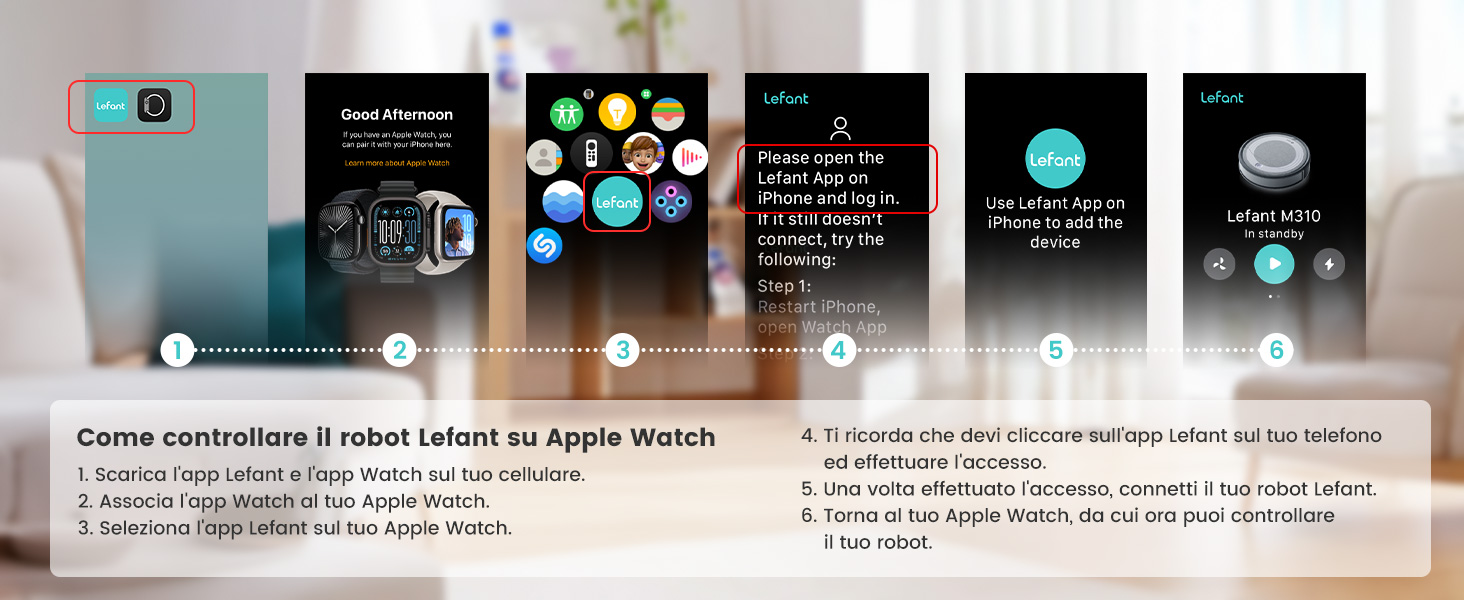
Image: A visual guide detailing the steps required to set up and control the Lefant M330 Pro robot vacuum cleaner using an Apple Watch.
3. Operating Instructions
3.1 Cleaning Modes
The Lefant M330 Pro offers multiple cleaning modes to suit your needs:
- Auto Cleaning: The robot intelligently navigates and cleans your home.
- Zone Cleaning: Define specific areas on the app for the robot to clean.
- Spot Cleaning: Direct the robot to clean a concentrated area of dirt.
- No-Go Zones: Set virtual boundaries to prevent the robot from entering certain areas.

Image: The robot vacuum cleaner intelligently avoiding a designated no-go zone, demonstrating its precise navigation capabilities.
3.2 Intelligent Carpet Recognition and Suction Power
The M330 Pro automatically detects carpets and increases suction power to effectively remove embedded dirt and pet hair. On hard floors, it maintains a quieter, efficient mode. It features three adjustable suction levels to tackle various cleaning challenges.

Image: The robot vacuum cleaner seamlessly transitioning from a hard floor to a carpet, illustrating its adaptive intelligence and increased suction power on soft surfaces.

Image: A visual representation of the three adjustable suction levels, demonstrating the robot's effectiveness in picking up various types of debris, from fine dust to pet hair and larger particles.
3.3 Mopping Function
Attach the mop pad and fill the water tank (200ml capacity) for simultaneous vacuuming and mopping. The robot will clean hard floors, leaving them visibly cleaner.

Image: The Lefant M330 Pro robot vacuum cleaner with its integrated 200ml water tank, highlighting its mopping capability for a complete floor cleaning solution.
3.4 Navigation and Mapping
Equipped with dToF 360° laser mapping, the M330 Pro creates precise maps of your home and plans efficient cleaning paths. It supports multi-level mapping for up to 3 floors and features 190° PSD obstacle avoidance to prevent collisions.

Image: An illustration demonstrating the multi-level mapping capability of the robot vacuum, allowing it to store and navigate maps for up to three different floors.

Image: A comparison highlighting the advantages of LiDAR navigation, showing its precise and efficient path planning compared to less advanced systems.
3.5 Customized Cleaning and Scheduling
Use the app to schedule cleaning times and customize cleaning routines for each room. The robot will automatically return to its charging base when the battery is low and resume cleaning from where it left off.

Image: A diagram illustrating a customized cleaning schedule, showing different rooms being cleaned at specific times, demonstrating the robot's intelligent planning.

Image: The Lefant app interface displaying various control options for the robot, including cleaning modes, scheduling, and no-go zones.
4. Maintenance
Regular maintenance ensures your Lefant M330 Pro operates efficiently. Always turn off the robot before performing any maintenance.
4.1 Cleaning the Dustbin and Filter
Empty the dustbin after each cleaning cycle. The HEPA filter should be cleaned regularly with the provided cleaning tool and replaced every 3-6 months, depending on usage.

Image: A set of replacement HEPA filters, essential for maintaining the air filtration performance of the robot vacuum cleaner.
4.2 Cleaning Side Brushes
Check the side brushes regularly for tangled hair or debris. Remove and clean them as needed. Replace worn brushes to maintain effective edge cleaning.

Image: A set of replacement side brushes, crucial for the robot vacuum's ability to clean edges and corners effectively.
4.3 Cleaning Mop Pads
After each mopping session, remove and wash the mop pad. Allow it to air dry completely before reattaching. Replace pads when they show signs of wear.

Image: A pair of replacement mop pads, designed for the robot vacuum's mopping function to ensure hygienic and effective wet cleaning.
4.4 Cleaning Sensors
Wipe the sensors on the robot with a clean, dry cloth periodically to ensure accurate navigation and obstacle detection.
5. Troubleshooting
If you encounter issues with your Lefant M330 Pro, please refer to the following common solutions:
- Robot not charging: Ensure the charging dock is powered on and the robot's charging contacts are aligned with the dock. Clean the charging contacts if necessary.
- Robot stuck or lost: Clear obstacles from the robot's path. If it frequently gets stuck, consider setting up no-go zones in the app.
- Poor suction: Empty the dustbin, clean or replace the HEPA filter, and check the brushless suction port for blockages.
- App connection issues: Ensure your Wi-Fi network is stable and the robot is within range. Restart the robot and your router, then try reconnecting via the app.
- Unusual noise: Check the side brushes and wheels for tangled hair or debris.
For more detailed troubleshooting or persistent issues, please contact customer support.
6. Specifications
| Feature | Detail |
|---|---|
| Brand | Lefant |
| Model Name | M330 Pro |
| Recommended Surfaces | Hard floors, Wood floors, Tiles, Carpet |
| Special Features | dToF Navigation (15m range), Customized Cleaning, Multiple Cleaning Modes (Zone, Spot, No-Go Zones), Dual WiFi (2.4 & 5 GHz) |
| Color | Cool Grey |
| Control Type | App Control |
| Filter Type | HEPA |
| Battery Life | 150 Minutes |
| Cleaning Path Width | 28 Centimeters |
| Battery Composition | Lithium Ion |
| Voltage | 220 Volts |
| Dustbin Capacity | 450 ml |
| Water Tank Capacity | 200 ml |
| Power Source | Battery Powered |
| Compatible Devices | Google Home, Smartphone, Smartwatch |
| Noise Level | 60 Decibels |
| Maximum Suction | 5000 Pa |
| Item Dimensions (LxWxH) | 28L x 28W x 9.5H cm |
| Item Weight | 2.15 Kilograms |
| UPC | 644161767237 |
7. Warranty
Lefant products are covered by a limited warranty from the date of purchase. Please refer to the warranty card included in your product packaging or visit the official Lefant website for detailed warranty terms and conditions. Keep your proof of purchase for warranty claims.
8. Support
For technical assistance, product inquiries, or customer service, please contact us:
- Email: support.eu@lefant.com
- Website: Visit the official Lefant website for FAQs and additional resources.
When contacting support, please have your model number (M330 Pro) and purchase information ready.