1. Introduction
Thank you for choosing the Hosyond YS-HM3 Bluetooth Stereo Amplifier. This compact and powerful 2.0 channel HiFi audio amplifier is designed to deliver clear and immersive sound for your home entertainment system. Please read this manual carefully before use to ensure proper operation and to maximize your listening experience.
What's in the Box
- 1 x Hosyond YS-HM3 Amplifier
- 1 x Power Adapter (US Plug)
- 1 x 3.5mm Aux Cable
- 1 x 3.5mm to RCA Cable
- 1 x User Manual

Image 1.1: Contents of the Hosyond YS-HM3 Amplifier package.
Video 1.1: An unboxing and overview of the Hosyond YS-HM3 Bluetooth Stereo Amplifier and its included accessories.
2. Product Overview
Front Panel Controls
- Volume Knob: Controls the overall audio output level. Also functions as the power switch (long press).
- Bass Knob: Adjusts the low-frequency audio output.
- Treble Knob: Adjusts the high-frequency audio output.
- LED Indicator: Displays the current input mode (Blue for Bluetooth, Red for AUX, Purple for USB).

Image 2.1: Front panel view of the Hosyond YS-HM3 Amplifier, showing the Volume, Bass, and Treble controls, and the LED indicator.
Rear Panel Connections
- Bluetooth Antenna: For wireless Bluetooth connectivity.
- USB Input: For connecting USB flash drives (U-Disk, TF Card) for audio playback.
- AUX IN (3.5mm): For connecting external audio devices via a 3.5mm cable.
- Power Input (DC 5.5*2.1): Connect the provided DC 12-24V power adapter here.
- Right Channel Output (Banana Speaker Jack): Connects to the right passive speaker.
- Left Channel Output (Banana Speaker Jack): Connects to the left passive speaker.
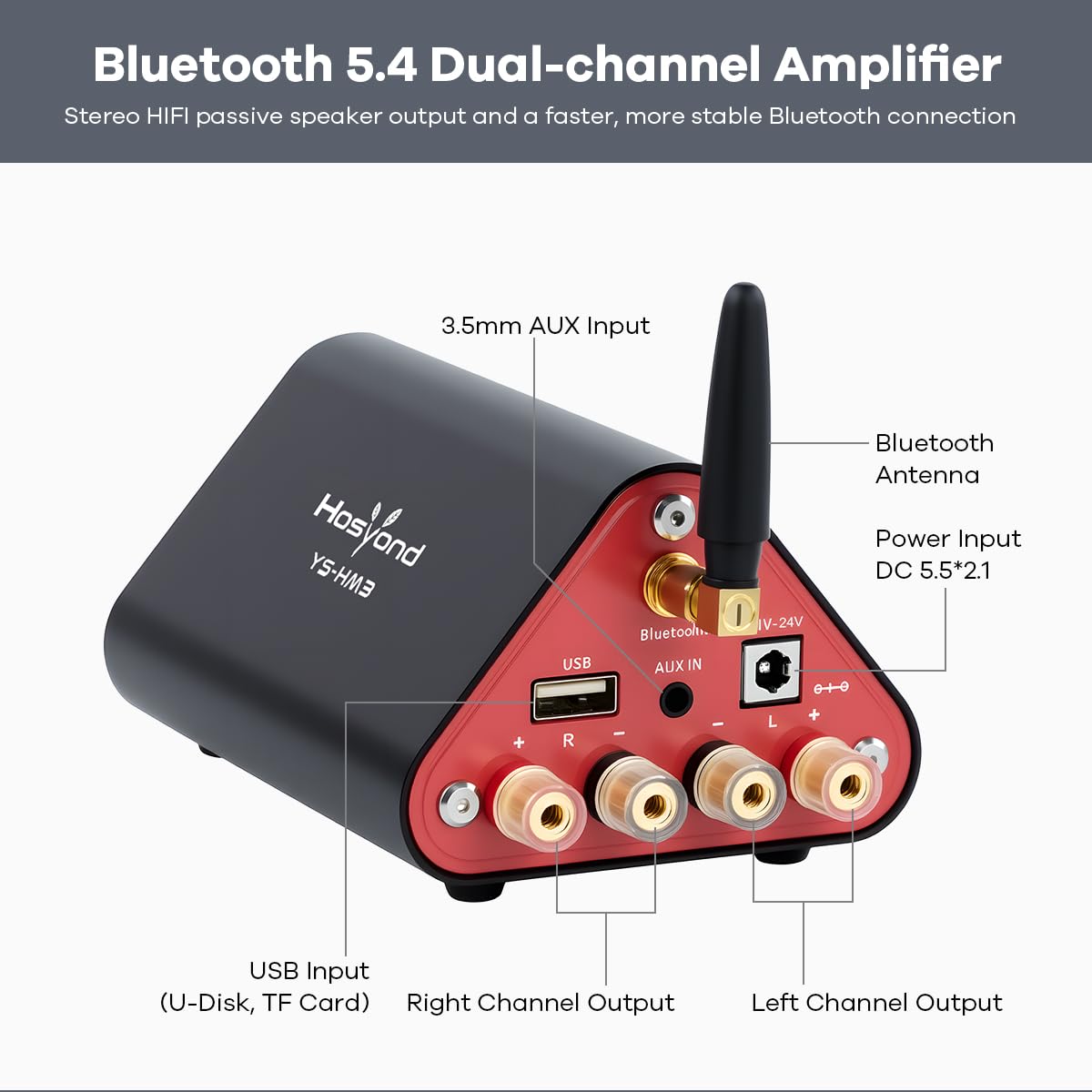
Image 2.2: Rear panel view of the Hosyond YS-HM3 Amplifier, detailing all input and output ports.
3. Setup
Follow these steps to set up your Hosyond YS-HM3 amplifier:
- Connect Speakers: Connect your passive speakers to the Left and Right Channel Output banana speaker jacks on the rear panel. Ensure correct polarity (+ to + and - to -).
- Connect Audio Source: Choose your desired audio input method:
- Bluetooth: No physical connection needed initially.
- USB: Insert a USB flash drive into the USB input port.
- AUX: Connect your audio device (e.g., smartphone, PC, TV) to the AUX IN port using the provided 3.5mm cable or a 3.5mm to RCA cable.
- Connect Power: Plug the provided power adapter into the Power Input (DC 5.5*2.1) on the rear panel, then plug the adapter into a wall outlet.
- Power On: Long press the Volume knob on the front panel to turn on the amplifier. The LED indicator will light up.

Image 3.1: Diagram illustrating various connectivity options for the Hosyond YS-HM3 Amplifier.
4. Operating Instructions
Switching Input Modes
The amplifier supports three audio input modes: Bluetooth, USB, and AUX. The LED indicator on the front panel shows the current mode:
- Bluetooth Mode: Blue light.
- USB Mode: Purple light.
- AUX Mode: Red light.
To switch between modes, long press the Volume knob. Alternatively, inserting a USB drive will automatically switch to USB mode.
Bluetooth Pairing
- Ensure the amplifier is powered on and in Bluetooth mode (blue LED flashing).
- On your device (smartphone, tablet, etc.), enable Bluetooth and search for available devices.
- Select "YS-HM3" from the list of devices to pair.
- Once connected, the blue LED will stop flashing and remain solid. You can now play audio wirelessly.
USB Playback
- Insert a USB flash drive containing audio files (MP3, WAV, WMA, APE, FLAC) into the USB input port.
- The amplifier will automatically switch to USB mode (purple LED) and begin playing audio.
- Note: The amplifier plays songs sequentially. There are no dedicated controls for track skipping or pausing on the unit itself.
AUX Input
- Connect your audio source to the AUX IN port using a 3.5mm audio cable.
- Switch the amplifier to AUX mode (red LED) by long pressing the Volume knob if it's not already in this mode.
- Play audio from your connected device.
Adjusting Audio
- Volume: Rotate the large Volume knob clockwise to increase volume, counter-clockwise to decrease.
- Bass: Rotate the Bass knob to adjust the level of low frequencies.
- Treble: Rotate the Treble knob to adjust the level of high frequencies.
5. Specifications
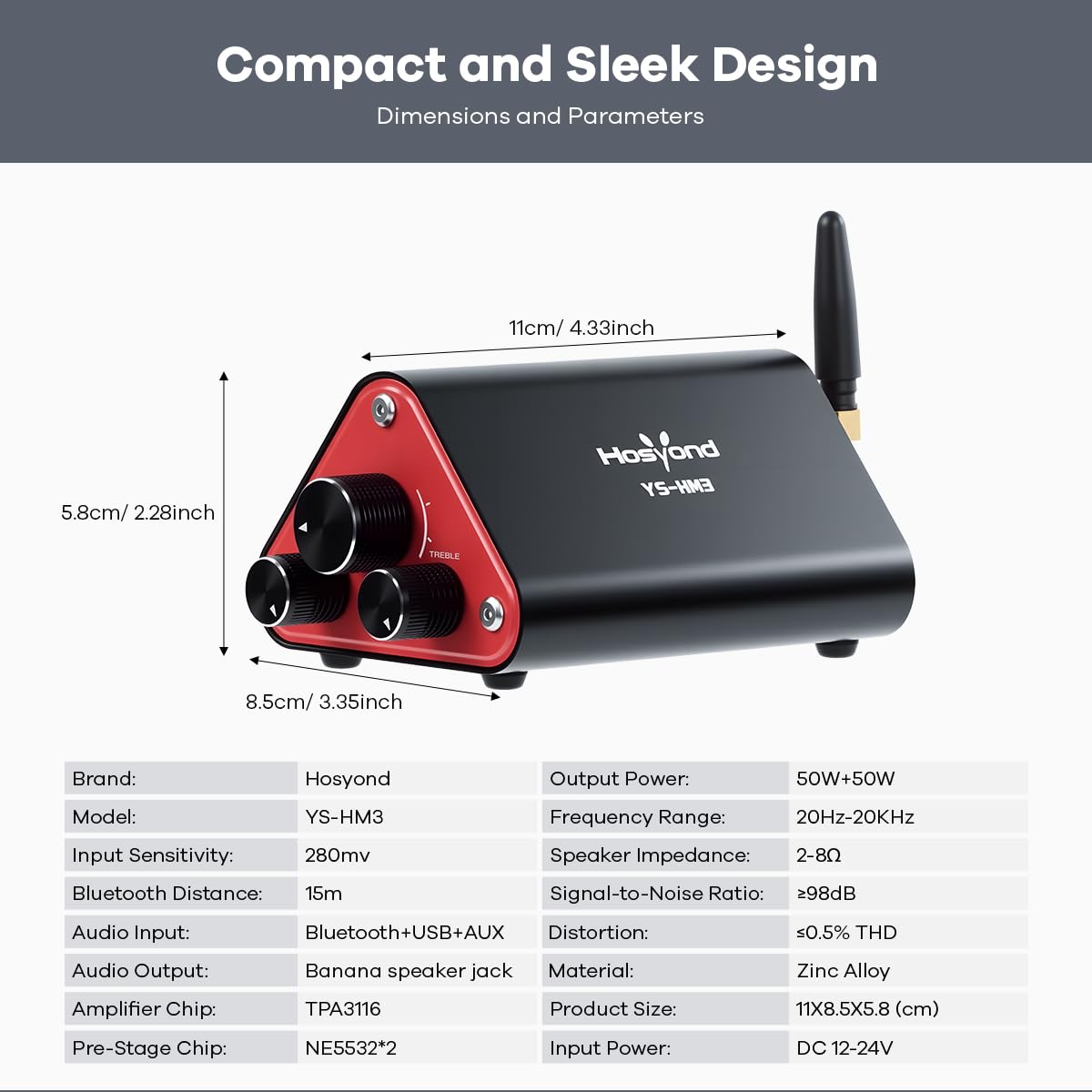
Image 5.1: Dimensions and key parameters of the Hosyond YS-HM3 Amplifier.
| Feature | Specification |
|---|---|
| Brand | Hosyond |
| Model | YS-HM3 |
| Output Power | 50W + 50W |
| Output Channel | 2.0 |
| Input Sensitivity | 280mV |
| Frequency Range | 20Hz – 20KHz |
| Bluetooth Version | 5.4 |
| Bluetooth Distance | Up to 15m |
| Speaker Impedance | 2 – 8Ω |
| Signal-to-Noise Ratio | ≥98dB |
| Audio Input | Bluetooth 5.4 + USB + AUX (3.5mm) |
| Distortion | ≤0.5% THD |
| Audio Output | Banana speaker jack |
| Material | Zinc Alloy |
| Amplifier Chip | TPA3116 |
| Pre-Stage Chip | NE5532*2 |
| Product Size | 16 × 8.5 × 6 cm (approx. 6.3 x 3.35 x 2.36 inches) |
| Input Power | DC 12–24V |
| Protection Mechanism | Overvoltage, Undervoltage, Overheating, DC Detection |

Image 5.2: Internal view highlighting the TPA3116 amplifier chip and NE5532 pre-stage chip.
6. Maintenance
- Cleaning: Use a soft, dry cloth to clean the amplifier's exterior. Do not use liquid cleaners or solvents.
- Ventilation: Ensure the amplifier is placed in a well-ventilated area to prevent overheating. Do not block any ventilation openings.
- Storage: When not in use for extended periods, disconnect the power adapter and store the amplifier in a cool, dry place.
- Handling: Avoid dropping or subjecting the amplifier to strong impacts.
7. Troubleshooting
| Problem | Possible Cause | Solution |
|---|---|---|
| No power | Power adapter not connected or faulty. | Ensure the power adapter is securely connected to the amplifier and a working power outlet. Check if the outlet has power. |
| No sound output | Incorrect input mode selected; Volume too low; Speaker connections loose; Faulty audio cable. | Verify the correct input mode (Bluetooth, USB, AUX) is selected. Increase the volume on both the amplifier and the audio source. Check all speaker wire connections for tightness and correct polarity. Try a different audio cable. |
| Bluetooth connection fails | Amplifier not in pairing mode; Device too far; Interference. | Ensure the amplifier is in Bluetooth mode (blue LED flashing). Move your device closer to the amplifier. Turn off other Bluetooth devices to reduce interference. Try unpairing and re-pairing the device. |
| Sound distortion or poor quality | Volume too high; Poor audio source quality; Loose connections. | Reduce the volume on both the amplifier and the audio source. Ensure your audio source provides a clean signal. Check all cable connections. Adjust Bass and Treble knobs to their center detent position for a balanced sound. |
| USB playback issues | Unsupported audio format; USB drive not recognized. | Ensure audio files are in supported formats (MP3, WAV, WMA, APE, FLAC). Try a different USB flash drive. |


