
GOOLOO DS900
GOOLOO DS900 OBD2 Scanner Diagnostic Tool User Manual
Model: DS900
1. Introduction
The GOOLOO DS900 is an advanced OBD2 diagnostic scanner designed for comprehensive vehicle analysis. Featuring an 8-inch touchscreen, Android 11.0 operating system, and Bluetooth 5.0 connectivity, it offers full system diagnostics, bidirectional control (active tests), and a wide range of maintenance services for both cars and trucks. This manual provides detailed instructions for setting up, operating, and maintaining your DS900 diagnostic tool.
2. What's in the Box
Carefully unpack your GOOLOO DS900 and verify that all items are present:
- 1x DS900 Tablet
- 1x DS900 VCI (Vehicle Communication Interface)
- 1x Power Adapter
- 1x OBD-II Extension Cable
- 1x USB Cable (Type-A to Type-C)
- 1x Quick User Guide
- 1x Carrying Case

Image: All components included in the GOOLOO DS900 package.
3. Setup Guide
3.1 Initial Charging
Before first use, fully charge the DS900 tablet using the provided power adapter. Connect the power adapter to the tablet's charging port and plug it into a power outlet. The charging indicator will show the charging status.
3.2 Connecting the VCI Module
The DS900 VCI (Vehicle Communication Interface) module connects to your vehicle's OBD-II port. It supports both wireless Bluetooth 5.0 and wired USB Type-C connections to the tablet.
- Locate your vehicle's 16-pin OBD-II diagnostic port. This is typically found under the dashboard on the driver's side.
- Plug the DS900 VCI module firmly into the OBD-II port. The VCI's indicator light will illuminate, indicating a successful connection.
- For wireless operation, ensure Bluetooth is enabled on the DS900 tablet and pair it with the VCI module. The VCI offers a robust range of up to 10 meters.
- For a wired connection, use the provided USB Type-A to Type-C cable to connect the VCI module to the DS900 tablet.

Image: Wireless Bluetooth 5.0 connectivity for the DS900 VCI module.

Image: Dual connectivity options: wireless Bluetooth and wired USB Type-C for stable operation.
3.3 Software Updates
The DS900 comes with 2 years of free software updates. It is recommended to update the software regularly to ensure optimal performance and access to the latest vehicle models and diagnostic features.
- Connect the DS900 tablet to a stable Wi-Fi network.
- Navigate to the 'Update' icon on the main interface.
- Follow the on-screen prompts to download and install available updates.

Image: One-Click Software Updates for continuous improvement and new features.
4. Operating the DS900
4.1 User Interface Overview
The DS900 operates on Android 11.0 and features an intuitive 8-inch touchscreen display. The main interface provides quick access to key functions such as Diagnostics, Maintenance, Update, Library, and User Info.

Image: Main user interface of the GOOLOO DS900 diagnostic tablet.
4.2 Full System Diagnostics
The DS900 performs OE-level diagnostics across all available vehicle systems, including Engine, Transmission, ABS, Airbag, EPB (Electronic Parking Brake), TPMS (Tire Pressure Monitoring System), Steering, and more. This allows for a comprehensive health check of the entire vehicle.
- From the main menu, select 'Diagnostics'.
- The tool will automatically identify the vehicle via AutoVIN or prompt for manual selection.
- Initiate a full system scan. The DS900 will read Diagnostic Trouble Codes (DTCs) and display system status.
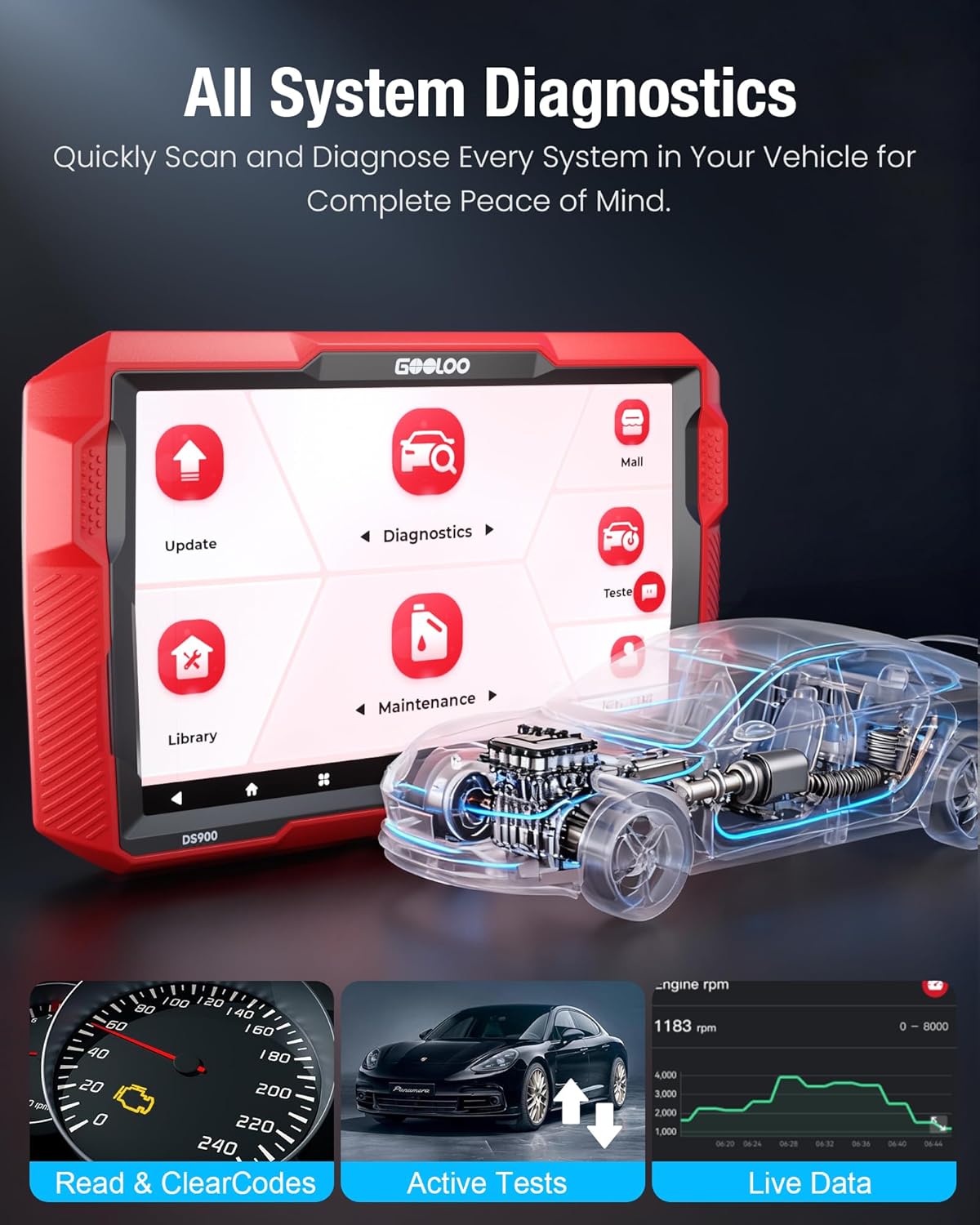
Image: All System Diagnostics interface, showing capabilities like reading codes, active tests, and live data.

Image: Full system diagnosis in action, controlling every detail of the vehicle.
4.3 Reading and Clearing DTCs
The DS900 provides detailed DTC repair guides for various systems, including Chrysler, Dodge, Jeep, and Fiat (2010-2024 models), with more brands added through updates.
- After a system scan, view the detected DTCs. Each code will have a description.
- For supported vehicles, access the DTC repair guide for detailed troubleshooting steps.
- Once repairs are made, select the option to 'Clear Codes' to turn off warning lights and reset the system.

Image: Comparison of a dashboard with a check engine light (Before) and without (After) clearing codes.
4.4 Live Data Stream
Monitor real-time vehicle data in various formats, including graphs, to identify intermittent issues or verify repairs.
- From the 'Diagnostics' menu, select 'Live Data'.
- Choose the parameters you wish to monitor (e.g., engine RPM, coolant temperature, sensor readings).
- The data can be displayed as numerical values, graphs, or combined views for easy analysis.

Image: 4-in-1 Live Data display, including data recording and error logs.
4.5 Bidirectional Control (Active Test)
The bidirectional control feature allows you to send commands to the vehicle's ECU to test specific components, helping to pinpoint faults quickly.
- From the 'Diagnostics' menu, select 'Active Test' or 'Bidirectional Control'.
- Choose the component you wish to test (e.g., fuel injectors, windows, wipers, headlights, horn).
- Follow the on-screen instructions to activate and observe the component's response.
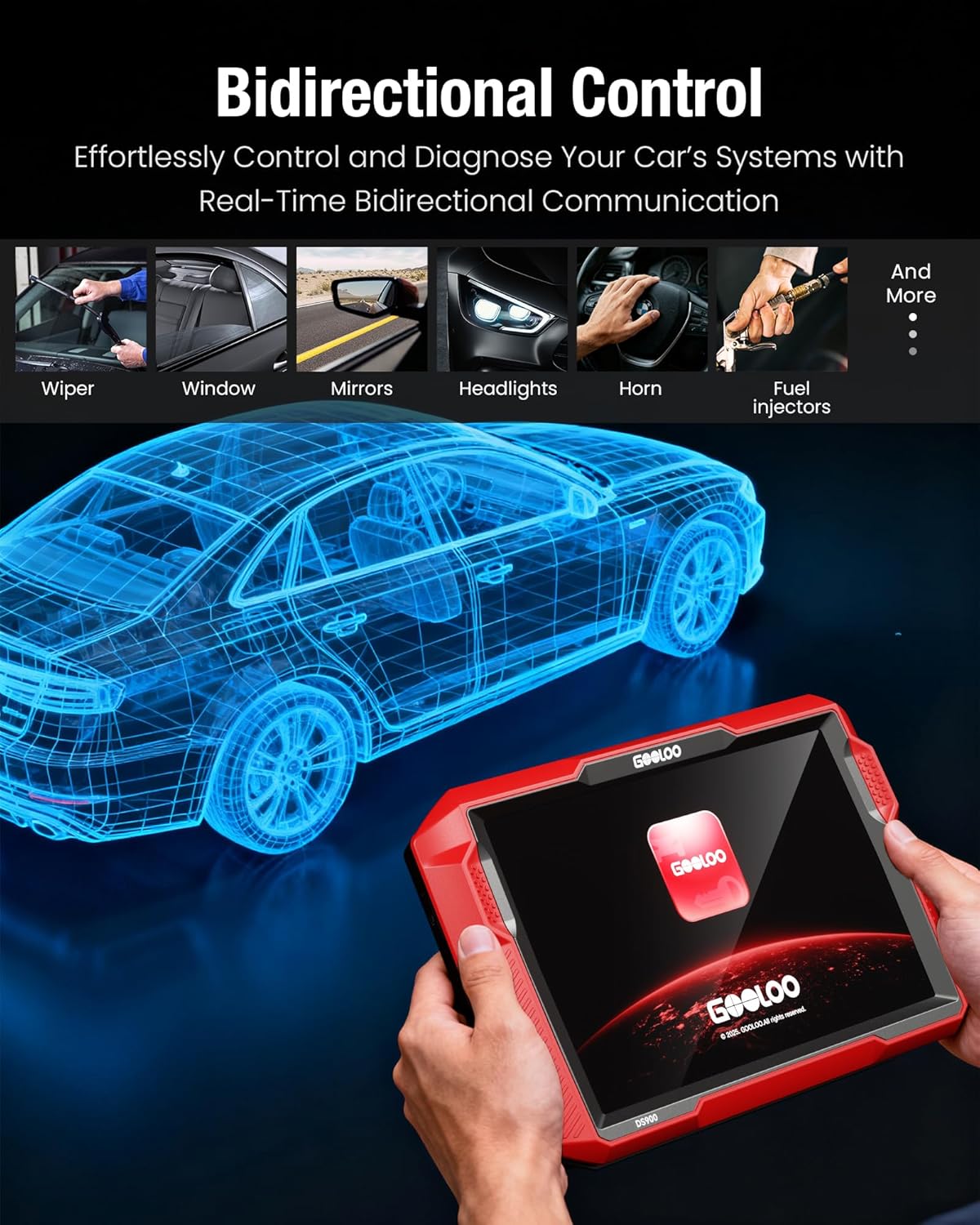
Image: Examples of bidirectional control functions, including testing wipers, windows, and headlights.

Image: Bidirectional control in use, easily performing system testing and troubleshooting.
4.6 Vehicle Compatibility and Protocols
The DS900 offers extensive vehicle compatibility, working with most cars from 1996 to 2025, covering over 60 makes and 10,000+ models. It supports 12 languages.
It also supports advanced protocols like FCA Gateway Access for full diagnostic capabilities on the latest FCA vehicles (Chrysler, Jeep, Dodge, Fiat) and CAN-FD for faster scanning speeds on newer GM and Chrysler vehicles.

Image: Support for FCA and CAN-FD Protocols, enabling diagnostics on newer vehicle models.
5. Maintenance Services
The DS900 provides over 8 popular reset services to assist with routine vehicle maintenance and repair tasks. These services include:
- Oil Reset: Resets the oil life system after an oil change.
- EPB Reset: Resets the electronic parking brake system after brake pad replacement.
- Steering Angle Reset: Resets the steering angle sensor.
- DPF Regeneration: Performs diesel particulate filter regeneration.
- ABS Bleeding: Bleeds the ABS brake system.
- BMS Reset: Resets the battery management system.
- Airbag Reset: Resets the airbag system after a crash or component replacement.
- Throttle Adaptation: Relearns the throttle body position.
To access these functions, navigate to the 'Maintenance' section from the main menu and select the desired service.

Image: Visual representation of the 8+ maintenance services offered by the DS900.

Image: The DS900 simplifies high-frequency maintenance and repair tasks.
6. Troubleshooting
The GOOLOO DS900 is designed to assist in diagnosing vehicle issues. If you encounter problems, follow these general troubleshooting steps:
- No Communication with Vehicle: Ensure the VCI module is securely plugged into the OBD-II port and its indicator light is on. Verify Bluetooth connection or try a wired USB connection. Check the vehicle's battery voltage.
- Incorrect Readings/Data: Ensure the vehicle information (VIN, make, model, year) is correctly identified. Perform a software update to ensure the latest vehicle database is installed.
- DTCs Not Clearing: Some DTCs may be 'permanent' and will only clear after the underlying issue is resolved and the vehicle has completed several drive cycles without the fault recurring. Ensure all necessary repairs have been made.
- Tablet Performance Issues: If the tablet is slow or unresponsive, try restarting it. Ensure sufficient battery charge. Close unnecessary applications running in the background.
- Interpreting Complex Issues: Utilize the 'Live Data Stream' to monitor parameters in real-time and the 'Bidirectional Control' (Active Test) to test components directly. Refer to the DTC repair guides for specific fault code information.
For persistent issues, refer to the 'Support' section of this manual or contact GOOLOO customer service.
7. Specifications
| Feature | Specification |
|---|---|
| Brand | GOOLOO |
| Model | DS900 |
| Operating System | Android 11.0 |
| Display | 8-inch Touchscreen |
| Battery | 10,000 mAh Lithium Polymer (included) |
| Connectivity | Bluetooth 5.0, USB Type-C, Wi-Fi, RJ45 |
| Memory | 2GB RAM + 32GB ROM |
| Item Weight | 5.04 pounds |
| Product Dimensions | 10 x 1.97 x 6.1 inches |
| Automotive Fit Type | Universal Fit |
| Manufacturer | Shenzhen GOOLOO Technology Co.,Ltd. |
| Date First Available | September 25, 2025 |

Image: Advanced hardware features of the GOOLOO DS900.
8. Warranty and Support
Your GOOLOO DS900 is backed by comprehensive support and warranty:
- Warranty: 1-year limited warranty from the date of purchase.
- Software Updates: 2 years of free software updates to keep your tool current with the latest vehicle data and features.
- Money-Back Guarantee: 30-day money-back guarantee.
- Dedicated Support: Access to a dedicated support team for assistance with any operational or technical queries.
For warranty claims, technical assistance, or general inquiries, please refer to the contact information provided in your Quick User Guide or visit the official GOOLOO website.

Image: Lifetime free updates and technical support for the DS900.
9. Product Video
Watch this official product video for a visual overview of the GOOLOO DS900's features and capabilities.
Video: DS900 OBD2 Scanner: Full System Diagnostic Tool. This video demonstrates the key functionalities and user experience of the GOOLOO DS900 diagnostic scanner.
Related documentsDS900


Ask a question about this manual
Ask about setup, troubleshooting, compatibility, parts, safety, or missing instructions. Manuals+ will review the question and use this page’s manual context to help answer it.