
1. Introduction and Overview
The FEDOUR 18.9-inch Submersible Aquarium LED Light (Model RD10-RGBW) is designed to provide optimal lighting for your aquatic environment. This light features full spectrum RGBW LEDs, IP68 waterproofing, and multiple adjustable settings to create a natural and vibrant habitat for your fish and plants. This manual provides detailed instructions for installation, operation, and maintenance to ensure safe and effective use of your aquarium light.
2. Product Features
- Optimal Illumination: Equipped with high color rendering 5050 RGB LEDs and high brightness 2835 White LEDs, restoring true colors and presenting a vivid underwater landscape.
- 24/7 Natural Mode: Simulates natural light changes throughout the day, including sunrise, daylight, sunset, and moonlight, providing a healthy routine for aquatic creatures. The light automatically turns on at 6 AM and off at 11 PM in this mode.
- Adjustable Settings: Offers 10 levels of brightness adjustment, 6H/9H/12H/24H timing functions, and 8 distinct color options to customize your aquarium's lighting.
- IP68 Waterproof Rating: The light body is fully submersible, allowing for versatile placement and easy cleaning without concerns about water ingress.
- Easy Installation: Comes with two powerful suction cups for secure attachment to any position underwater or under the fish tank lid.
3. Package Contents
Please check the package to ensure all items are present and in good condition:
- FEDOUR 18.9-inch Submersible Aquarium LED Light x 1
- Suction Cup x 2
- Power Adapter x 1

Image: Components of the FEDOUR 18.9-inch Submersible Aquarium LED Light, showing the light bar, controller, power adapter, and two suction cups.
4. Safety Instructions
To prevent injury or product damage, please read and follow these safety guidelines:
- Always unplug the light from the power outlet before performing any maintenance, cleaning, or installation.
- Ensure your hands are dry when handling the power adapter and plug.
- Do not operate the light if it has a damaged cord or plug, or if it is malfunctioning or has been dropped or damaged in any manner.
- This product is designed for indoor aquarium use only. Do not use it for purposes other than its intended use.
- Keep out of reach of children.
- Ensure the power supply voltage matches the specifications of the light.
- Do not attempt to repair or modify the light yourself. Refer all servicing to qualified personnel.
5. Setup and Installation
- Attach Suction Cups: Securely attach the two provided suction cups to the light bar.
- Position the Light: Place the light bar inside your aquarium. Thanks to its IP68 waterproof rating, it can be fully submerged. Alternatively, it can be installed under the aquarium lid. Ensure the light is positioned to provide optimal illumination for your tank.
- Connect Power: Connect the light bar's cable to the controller, and then connect the controller to the power adapter. Finally, plug the power adapter into a standard electrical outlet.

Image: The light bar with strong suction cups, illustrating how they attach to the aquarium wall for secure positioning.

Image: Demonstrates the IP68 waterproof rating and various installation methods, including fully submersible, under the aquarium lid, and as a background light.
Video: This video demonstrates the installation process of the FEDOUR Submersible Aquarium LED Light, including attaching suction cups and connecting the power cord.
6. Operating Instructions
The light is controlled via an inline controller with several buttons:
6.1. Power On/Off
Press the Power button (circular button with a line) to turn the light on or off.
6.2. Brightness Adjustment
Press the Brightness button (sun icon) to cycle through 10 levels of brightness, from 10% to 100%.
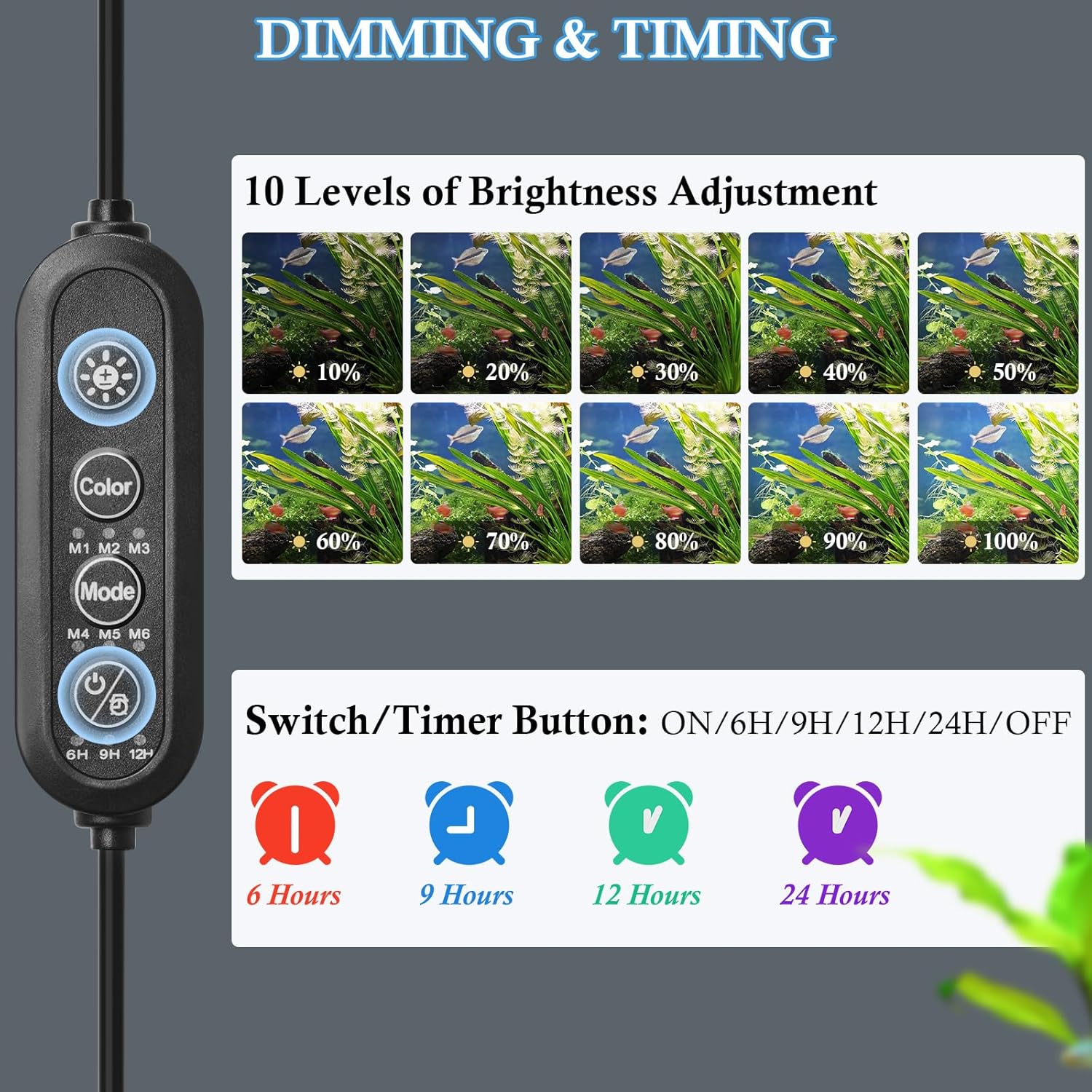
Image: The controller interface demonstrating the 10 levels of brightness adjustment, from 10% to 100% illumination.
6.3. Color Adjustment
Press the Color button (circular button with a color wheel icon) to cycle through 8 different color options: Red, Blue, Green, Cyan, Purple, RGB Mixed White, White, and Full Spectrum.

Image: The controller interface displaying the 8 adjustable color options, including Red, Blue, Green, Cyan, Purple, RGB Mixed White, White, and Full Spectrum.
6.4. Timer Function
Press the Timer button (clock icon) to set the light to turn off automatically after 6 hours, 9 hours, 12 hours, or 24 hours. Press again to turn the timer off.
Image: The controller interface illustrating the timer function with options for 6, 9, 12, and 24 hours, or OFF.
6.5. Lighting Modes (M1-M6)
Press the Mode button to cycle through the following preset lighting modes:
- M1: Daytime Mode - Full Spectrum light at 100% brightness.
- M2: Night Mode - Blue light at 30% brightness.
- M3/M4/M5: Automatic Color Changing Mode - The light automatically changes colors every 2 hours (M3), 2 minutes (M4), or 2 seconds (M5).
- M6: 24/7 Natural Mode - Simulates the daily changes of natural light (sunrise, daylight, sunset, moonlight). The light automatically turns on at 6 AM and turns off at 11 PM.

Image: The controller interface illustrating M1 (Daytime Mode), M2 (Night Mode), and M3/M4/M5 (Automatic Color Changing Modes).

Image: The controller interface for M6 (24/7 Natural Mode), accompanied by a graph depicting the simulated natural light cycle from 6 AM to 11 PM.
Video: This video demonstrates the various operating functions of the FEDOUR Submersible Aquarium LED Light, including brightness, color, timer, and different lighting modes.
7. Maintenance
Regular maintenance ensures the longevity and optimal performance of your aquarium light:
- Cleaning: Always unplug the light before cleaning. Gently wipe the light bar with a soft, damp cloth to remove algae or mineral deposits. Do not use abrasive cleaners or harsh chemicals.
- Suction Cups: Periodically check the suction cups to ensure they are securely attached to the aquarium glass. Re-attach if they appear loose.
- Cable Inspection: Regularly inspect the power cord and adapter for any signs of damage. If damage is found, discontinue use and contact customer support.
8. Troubleshooting
If you encounter issues with your FEDOUR aquarium light, refer to the following common problems and solutions:
| Problem | Possible Cause | Solution |
|---|---|---|
| Light does not turn on. | No power, loose connection, faulty adapter. | Check if the power adapter is securely plugged into the outlet and the light controller. Ensure the outlet is functional. |
| Light flickers or dims unexpectedly. | Unstable power supply, loose connection, internal fault. | Ensure a stable power supply. Check all connections. If the issue persists, contact customer support. |
| Colors are not changing or incorrect. | Incorrect mode selected, controller malfunction. | Press the Color button to cycle through desired colors. If using an automatic mode (M3/M4/M5), ensure it's selected correctly. |
| Timer function is not working. | Timer not set correctly, power interruption. | Ensure the Timer button has been pressed to select a duration (6H, 9H, 12H, or 24H). Power interruptions can reset the timer. |
If troubleshooting steps do not resolve the issue, please contact FEDOUR customer support for assistance.
9. Specifications
| Model Number | RD10-RGBW |
| Power | 8W |
| Size (Light Bar) | 18.9"L x 0.8"W x 0.8"H (48cm L) |
| Suitable for Aquariums | 19-30 inches (48-80cm) |
| LEDs | 27 pcs (5050 RGB LEDs, 2835 White LEDs) |
| Lumen Output | 560 Lumens |
| Output Voltage | DC 12V |
| Input Voltage | AC 100-240V, 50/60Hz |
| Material | Plastic |
| Waterproof Rating | IP68 |
| Cable Length | 10.8 FT / 3.3 M |
| Light Source Type | Light Emitting Diode |
| Color Temperature | 8800 Kelvin |
10. Warranty and Support
The FEDOUR 18.9-inch Submersible Aquarium LED Light comes with a 12-month warranty from the date of purchase. This warranty covers manufacturing defects and malfunctions under normal use.
If you have any questions, concerns, or require technical assistance, please do not hesitate to contact our dedicated after-sales service team. We are committed to resolving your issues within 24 hours.
For support, please visit the FEDOUR Store on Amazon or refer to your purchase documentation for direct contact information.