1. Introduction
Thank you for choosing the Itaar 71-inch Pantry Cabinet. This versatile storage solution is designed to enhance your kitchen or dining area with ample storage, a convenient charging station, and integrated LED lighting. This manual provides essential information for safe assembly, operation, and maintenance of your new cabinet.
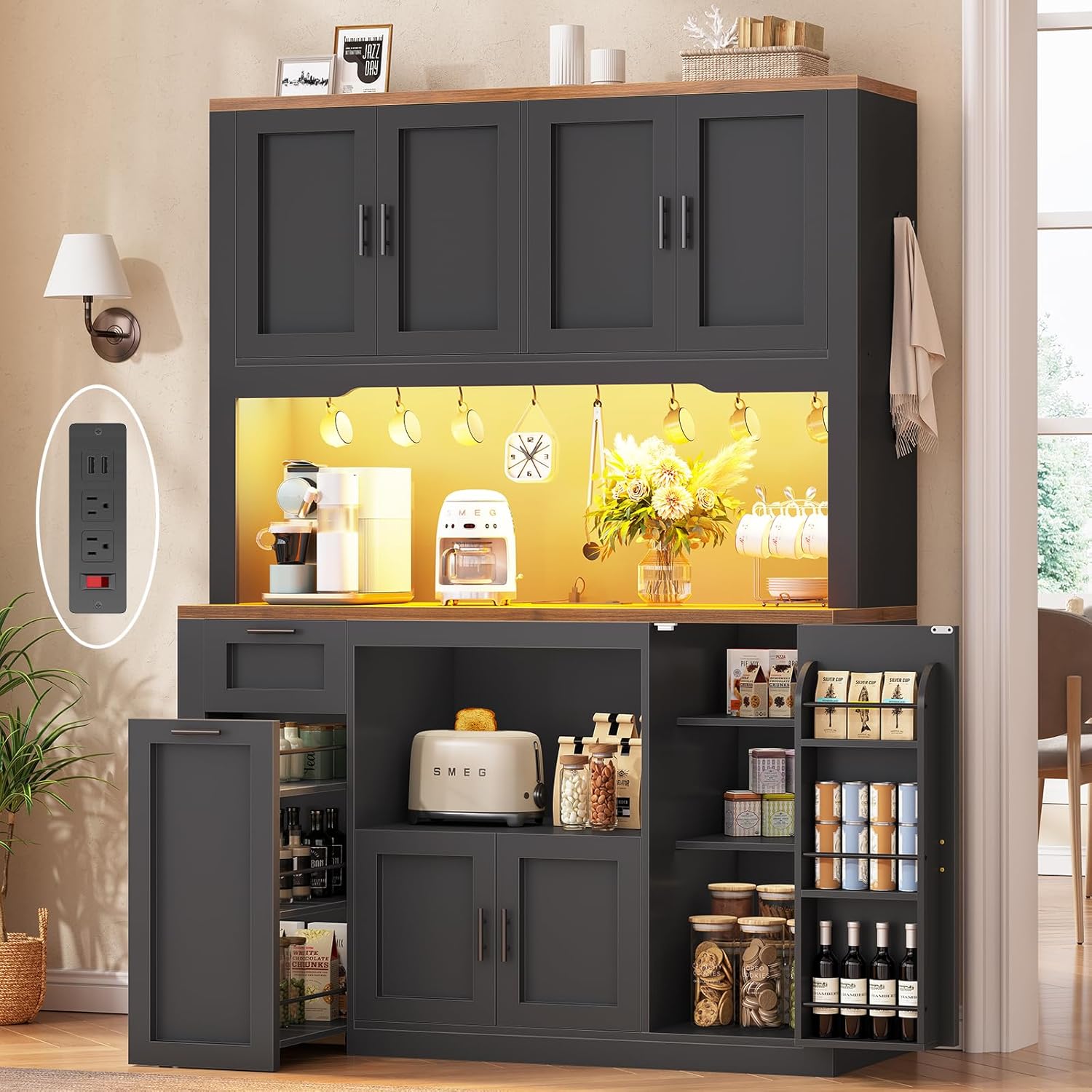
Image 1.1: The Itaar 71-inch Pantry Cabinet, showcasing its overall design and functionality in a modern kitchen environment.
2. Product Features
- Ample Storage: Features a 3-tier storage cart, one drawer, three door shelves, and three double-door compartments for diverse storage needs.
- Storage Cart with Wheels: Includes a removable 3-tier cart with sturdy wooden shelves and safety railings, designed for easy access and mobility. Each shelf supports up to 30 lbs.
- Multi-functional Desktop: A large 47.3"L x 15"W desktop provides generous workspace, ideal for appliances like coffee makers or microwaves.
- Integrated LED Light: Provides illumination for the desktop area, enhancing visibility for daily tasks.
- Built-in Charging Station: Equipped with outlets for convenient power access for household appliances, featuring an on/off switch, two 120V/12A AC outlets, and two 5V/2A USB ports.
- Durable Construction: Made from engineered wood with a high-gloss finish.
- Anti-Tipping Feature: Designed with an anti-tipping mechanism for enhanced safety.

Image 2.1: A visual breakdown of the cabinet's storage components, including the upper hutch with adjustable shelves, S-hooks, LED light, built-in charging, sliding drawer, 3-tier storage cart, and door shelves.
3. Safety Information
WARNING: Always secure the cabinet to the wall using the provided anti-tipping hardware to prevent accidental tipping. Failure to do so can result in serious injury or death. Exercise caution when handling the storage cart and its contents to avoid injury from moving parts or falling items.
4. Package Contents
Before assembly, verify that all components are present and undamaged. Refer to the separate assembly instructions for a detailed list of parts and hardware. Typically, the package includes:
- Cabinet panels and doors
- Hardware kit (screws, dowels, hinges, handles)
- 3-tier storage cart components
- Charging station unit
- LED light strip and control unit
- Anti-tipping hardware
- Assembly instructions manual
5. Assembly Instructions
Detailed assembly instructions, including numbered parts and diagrams, are provided in a separate manual included with your purchase. Please follow these instructions carefully to ensure correct and safe assembly. It is recommended to have at least two people for assembly.
Key Assembly Steps:
- Unpack all components and verify against the parts list.
- Assemble the main cabinet frame.
- Install shelves, drawers, and door hinges.
- Attach the charging station and LED light strip according to the electrical safety guidelines.
- Assemble the 3-tier storage cart.
- Secure the cabinet to the wall using the anti-tipping hardware.

Image 5.1: A diagram showing the various dimensions of the cabinet, including the drawer, upper hutch, and overall height and width, crucial for assembly and placement.
6. Operating Instructions
6.1. Charging Station
The built-in charging station provides convenient power access for small appliances and mobile devices. It includes two standard AC outlets and two USB ports.
- Power On/Off: Use the red switch located on the charging station to turn the power on or off. This allows you to disconnect power to connected devices without unplugging them.
- AC Outlets: Plug in appliances requiring 120V/12A power.
- USB Ports: Connect devices for charging via the 5V/2A USB ports.

Image 6.1: A detailed view of the charging station, highlighting the on/off switch, AC outlets, and USB ports, with a smartphone connected for charging.
6.2. LED Light
The integrated LED light strip illuminates the desktop area. It can be controlled via a key control unit or a smartphone application.
- Key Control: Use the physical key control unit to turn the lights on/off, adjust brightness, and change colors.
- App Control: Download the specified smartphone application (refer to the LED light kit instructions for app details) to access advanced features such as:
- Over 60,000 color options
- Music Sync function (lights react to sound)
- Timing function (schedule on/off times)
- Built-in microphone for sound reactivity

Image 6.2: This image displays the LED lighting system, showing the key control unit and a smartphone interface for app control, along with icons representing various features like color options, music sync, and timing.
6.3. Storage Cart
The 3-tier storage cart is designed for easy access and mobility. It can be pulled out for use and pushed back into its designated compartment when not needed.
- Mobility: The smooth-rolling dual-wheel base allows the cart to be easily moved.
- Capacity: Each tier is designed to hold items such as vegetables, fruits, snacks, beverages, or tools, with a weight capacity of 30 lbs per shelf.
- Safety: Safety railings on each tier help prevent items from falling off during movement.

Image 6.3: A detailed view of the pull-out 3-tier storage cart, filled with various kitchen items, demonstrating its functionality and mobility with wheels.
7. Maintenance and Care
To maintain the appearance and longevity of your Itaar Pantry Cabinet, follow these care guidelines:
- Cleaning: Wipe surfaces with a soft, damp cloth. Avoid abrasive cleaners or harsh chemicals that may damage the high-gloss finish.
- Spills: Clean up spills immediately to prevent staining or water damage, especially on the textured desktop.
- Protection: Use coasters or placemats under hot items or items that may scratch the surface.
- Hardware: Periodically check and tighten all screws and hardware to ensure stability.
- Electrical Components: Ensure the charging station and LED lights are kept dry. Do not attempt to repair electrical components yourself.
8. Troubleshooting
If you encounter issues with your pantry cabinet, refer to the following common troubleshooting tips:
- Cabinet Instability: Ensure all assembly screws are tightened. Verify that the anti-tipping hardware is correctly installed and secured to the wall.
- Drawer/Door Malfunction: Check hinges and drawer slides for proper alignment and ensure no obstructions are present. Adjust screws if necessary.
- Charging Station Not Working: Ensure the main power switch on the charging station is in the 'ON' position. Check if the cabinet is properly plugged into a functional wall outlet. Test with different devices.
- LED Light Not Working: Verify the LED light strip is correctly connected to its power source and control unit. Check the power supply to the cabinet. If using app control, ensure Bluetooth or Wi-Fi connection is active and the app is updated.
- Missing or Damaged Parts: If your item arrives damaged, scratched, or with missing parts, please contact customer support immediately for assistance.
9. Specifications
| Feature | Detail |
|---|---|
| Brand | Itaar |
| Model Name | 111 |
| Color | Black |
| Product Dimensions | 15"D x 47.3"W x 70.1"H |
| Material | Engineered Wood |
| Finish Type | High-gloss |
| Weight Limit (per shelf) | 30 Pounds |
| Item Weight | 127.85 Pounds |
| Special Feature | Anti-Tipping, Charging Station, LED Light |
| Assembly Required | Yes |
10. Product Overview Video
Watch this video for a visual overview of the Itaar Pantry Cabinet's features and functionality.
Video 10.1: An official product video from Itaar showcasing the 71-inch Pantry Cabinet, its various storage compartments, the charging station, and the LED lighting system in action.
11. Warranty and Support
Itaar is committed to providing quality products. If you experience any issues, such as damaged, scratched, or missing parts upon arrival, please contact the seller directly for assistance. Keep your purchase receipt as proof of purchase.