1. Introduction
This manual provides detailed instructions for the assembly, operation, and maintenance of your Itaar 71-inch Pantry Cabinet. Designed to enhance kitchen organization, this cabinet features a charging station, LED lighting, and various storage solutions including a microwave stand and a mobile storage cart. Please read this manual thoroughly before assembly and use to ensure proper function and safety.

Figure 1: Overview of the Itaar 71-inch Pantry Cabinet.
2. Important Safety Information
- Anti-Tipping: Always secure the cabinet to the wall using the provided anti-tipping hardware to prevent accidental tipping, especially in households with children or pets.
- Weight Capacity: Do not overload shelves. Each shelf has a maximum weight capacity of 30 lbs. Distribute weight evenly to maintain stability.
- Electrical Safety: The integrated charging station is designed for standard household appliances. Do not exceed the rated electrical load. Always use the on/off switch to power down the charging station when not in use or during cleaning.
- Assembly: Follow all assembly instructions carefully. Ensure all fasteners are tightened securely. If any parts are damaged or missing, do not proceed with assembly; contact customer support immediately.
- Placement: Place the cabinet on a level, stable surface. Avoid placing it in areas with excessive moisture or direct sunlight, which can damage the materials.
3. Product Overview and Components
The Itaar Pantry Cabinet is a versatile storage solution for your kitchen or dining area. It includes the following key features:
- Upper Hutch: Two cabinets with adjustable shelves for flexible storage.
- Central Open Shelf: Features LED lighting and S-hooks for hanging utensils or mugs.
- Microwave Stand: A dedicated space for a microwave or other small appliances.
- Charging Station: Integrated power strip with AC outlets and USB ports.
- Sliding Drawer: For cutlery or small items.
- Bottom Cabinets: Two double-door compartments for larger items.
- Storage Cart: A 3-tier mobile cart with wheels and safety railings.
- Door Shelves: Three shelves integrated into the side door for spices or small bottles.

Figure 2: Key storage features of the pantry cabinet.
4. Assembly and Setup
Assembly of the Itaar Pantry Cabinet is required. Detailed instructions and numbered assembly tools are included in the packaging. We recommend two adults for assembly due to the size and weight of the components.
4.1 Pre-Assembly Checklist
- Verify all parts are present and undamaged against the parts list in the included manual.
- Ensure you have a clear, spacious area for assembly.
- Gather necessary tools (e.g., screwdriver, hammer) if not provided.
4.2 Assembly Steps
Refer to the separate assembly manual provided with your product for step-by-step instructions. Key steps include:
- Assemble the base frame.
- Attach side panels and internal shelving.
- Install the microwave stand and central countertop.
- Assemble and attach the upper hutch cabinets.
- Install the sliding drawer, storage cart, and door shelves.
- Mount the charging station and LED light strip.
- Secure the entire unit to the wall using the anti-tipping hardware.

Figure 3: Product dimensions for planning placement.
5. Operating Instructions
5.1 Using the Charging Station
The pantry cabinet includes a built-in charging station for convenient power access. It features two 120V/12A AC outlets and two 5V/2A USB ports.
- Power On/Off: Use the red switch on the charging station to turn the power on or off. This allows you to easily disconnect power to connected devices without unplugging them.
- Connecting Devices: Plug your appliances or USB charging cables into the appropriate ports.
- Cable Management: A wire hole is provided on the back panel for neat cable routing.

Figure 4: Integrated charging station with power outlets and USB ports.
5.2 Controlling the LED Light
The central open shelf is equipped with an LED light strip, offering various lighting options to enhance your kitchen ambiance or provide task lighting.
- Key Control: Use the inline controller to cycle through colors and modes.
- App Control: Download the compatible smartphone application to access over 60,000 colors, music sync, and timing functions. Refer to the LED light strip's specific instructions for app pairing.
- Music Sync: The built-in microphone allows the lights to react to music.
- Timing Function: Schedule the lights to turn on or off at specific times.

Figure 5: LED lighting features and control options.
5.3 Utilizing Storage Features
- Adjustable Shelves: The upper hutch cabinets feature adjustable shelves. To reposition, remove the shelf, adjust the shelf pins to the desired height, and reinsert the shelf.
- Storage Cart: The 3-tier storage cart is on wheels for easy access. It can be pulled out for use and pushed back into its compartment when not needed. Safety railings prevent items from falling.
- Door Shelves: The three door shelves are ideal for organizing spices, small bottles, or condiments.
- Sliding Drawer: Use the smooth-gliding drawer for storing cutlery, utensils, or other small kitchen essentials.

Figure 6: The mobile 3-tier storage cart.
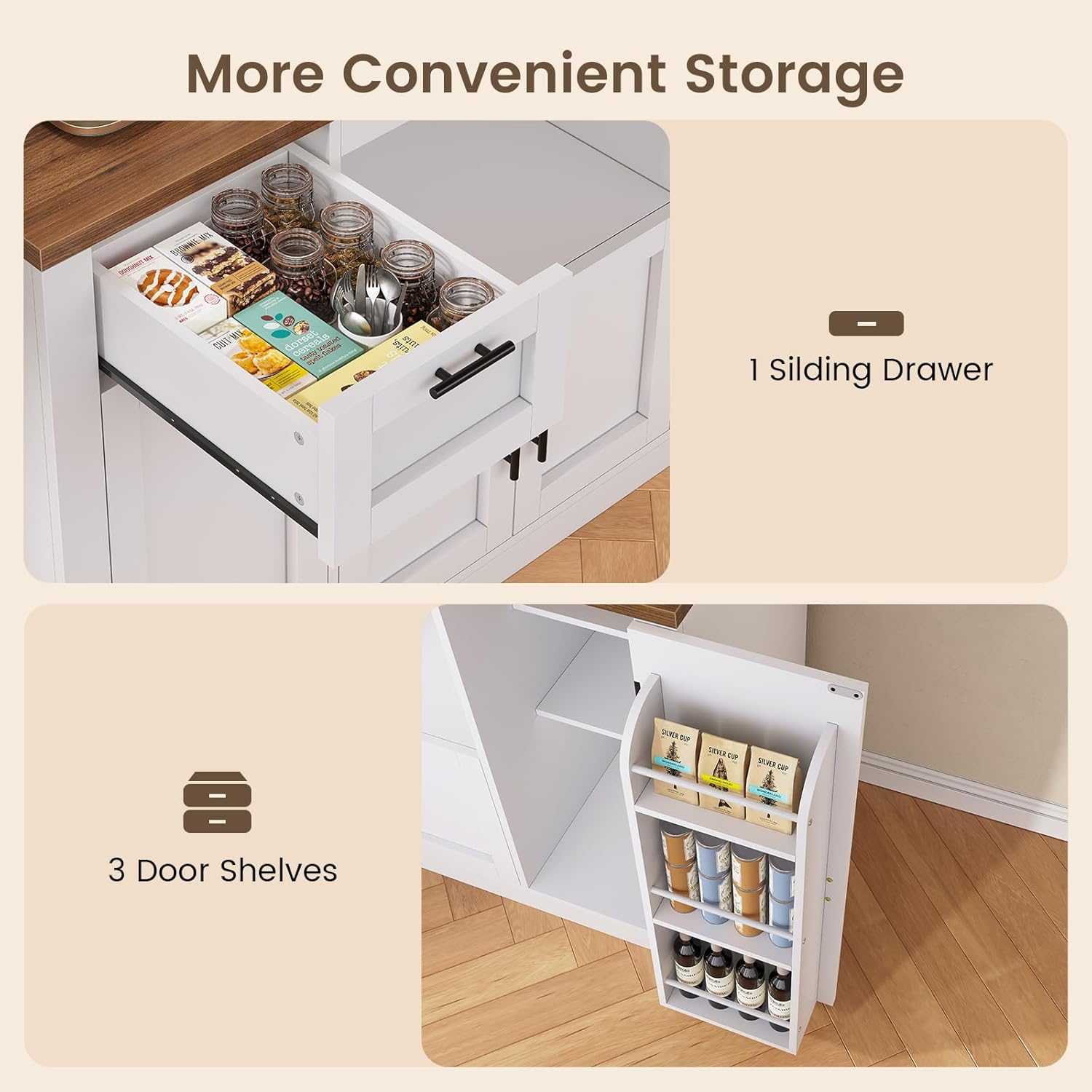
Figure 7: Sliding drawer and door shelves for convenient storage.
6. Care and Maintenance
- Cleaning: Wipe surfaces with a soft, damp cloth. Avoid abrasive cleaners or harsh chemicals that may damage the finish. The textured desktop is waterproof and wear-resistant, making it easy to clean spills.
- Hardware: Periodically check all screws and fasteners to ensure they remain tight. Tighten if necessary.
- LED Lights: If the LED lights malfunction, check the power connection. If issues persist, contact customer support.
7. Troubleshooting
| Problem | Possible Cause | Solution |
|---|---|---|
| Cabinet is wobbly or unstable. | Uneven floor; loose fasteners; anti-tipping kit not installed. | Ensure cabinet is on a level surface. Tighten all assembly screws. Install or re-secure the anti-tipping hardware to the wall. |
| LED lights not working. | Power switch off; loose connection; faulty LED strip. | Check the power switch on the charging station. Ensure all LED strip connections are secure. If still not working, contact customer support. |
| Charging station not providing power. | Power switch off; not plugged into wall outlet; circuit breaker tripped. | Ensure the red switch on the charging station is ON. Verify the cabinet's main power cord is securely plugged into a functional wall outlet. Check your household circuit breaker. |
| Parts arrived damaged or missing. | Shipping damage; packaging error. | Do not proceed with assembly. Contact Itaar customer service immediately with your order details and photos of the damage. |
8. Product Specifications
- Brand: Itaar
- Model Name: 111
- Item Model Number: 11
- Color: White
- Product Dimensions: 15"D x 47.3"W x 70.1"H
- Item Weight: 127.9 Pounds
- Material: Engineered Wood, Metal Frame
- Mounting Type: Freestanding (with anti-tipping feature)
- Number of Shelves: 11 (including internal and cart shelves)
- Number of Compartments: 3 (double-door compartments)
- Special Feature: Anti-Tipping, Charging Station, LED Light
- Assembly Required: Yes
9. Warranty and Customer Support
Itaar is committed to providing high-quality products. If your item arrives damaged, scratched, or with missing parts, please contact our customer support team immediately. Provide your order number and a description of the issue, along with any relevant photos, to facilitate a quick resolution.
For further assistance or inquiries, please visit the Itaar Store on Amazon or refer to your purchase documentation for specific contact information.
10. Product Video Overview
Watch this official product video for a visual overview of the Itaar Pantry Cabinet's features and functionality.
Video: Itaar 71" Pantry Cabinet with Charging Station. This video demonstrates the various storage compartments, the adjustable shelves, the mobile cart, and the integrated charging station.


