
1. Introduction
Thank you for choosing the FJAU Warming Mat. This electric silicone food warmer is designed to keep your dishes warm and ready for serving, perfect for parties, family meals, or everyday use. Please read this manual carefully before operation to ensure safe and optimal performance.
2. Important Safety Instructions
- Read All Instructions: Familiarize yourself with the operation and safety features before first use.
- Electrical Safety: Use only with a 110V power supply. Do not immerse the mat or power cord in water or other liquids. Ensure hands are dry when plugging or unplugging.
- Hot Surface: The mat surface can reach up to 212°F (100°C). Exercise caution and avoid direct skin contact with the heating area during operation. Use heat-resistant gloves if necessary.
- Surface Compatibility: Place the mat on surfaces that can withstand temperatures above 140°F (60°C) to prevent damage to countertops.
- Child Lock: Utilize the child lock feature to prevent accidental changes to settings or activation by children.
- Overheat Protection: The mat is equipped with built-in overheat protection. If overheating occurs, the device will automatically shut off.
- Auto Shut-off: The mat will automatically shut off after 24 hours of inactivity for safety.
- Cleaning: Always unplug and allow the mat to cool completely before cleaning. Wipe with a damp cloth; do not rinse under running water.
- Storage: Ensure the mat is completely cool and dry before rolling up for storage.
- Ventilation: Do not cover the mat with flammable materials during operation. Ensure adequate airflow around the mat.
3. Product Overview
The FJAU Warming Mat is an extra-large (32"x15") electric silicone mat designed for versatile food warming. It features an intuitive control panel for temperature and timer settings.
Key Components:
- Silicone Warming Surface: Food-grade, nano-coated, stain-resistant, and waterproof.
- Control Panel: Digital display for temperature, power button, temperature adjustment buttons (+/-), timer button, child lock button, and "Warm Dishes" quick-set button.
- Power Cord: Standard two-prong 110V AC cord.
- Elevated Feet: Designed for better heat dissipation and burn prevention for countertops.

This image displays the large blue silicone warming mat laid out on a surface, holding several dishes including a roasted chicken, pizza, and various side dishes, all emitting steam, indicating warmth. The control panel is visible on the right side.
4. Setup
- Unpack: Carefully remove the warming mat and all accessories from the packaging.
- Placement: Unroll the mat and place it on a flat, stable, and heat-resistant surface. Ensure there is adequate space around the mat for ventilation.
- Connect Power: Insert the power cord into the designated port on the control panel. Plug the two-prong power cord into a standard 110V AC electrical outlet.
- Initial Cleaning: Before first use, wipe the silicone surface with a damp cloth and dry thoroughly.

This image shows a hand wiping a spill from the blue silicone mat, highlighting its easy-to-clean, stain-resistant, waterproof, and odorless properties. Another part of the image shows the mat rolled up and stored in a cabinet, demonstrating its space-saving design.
5. Operating Instructions
5.1 Power On/Off
- Press the POWER button (
 ) on the control panel to turn the mat on or off. The digital display will show the current temperature.
5.2 Temperature Control
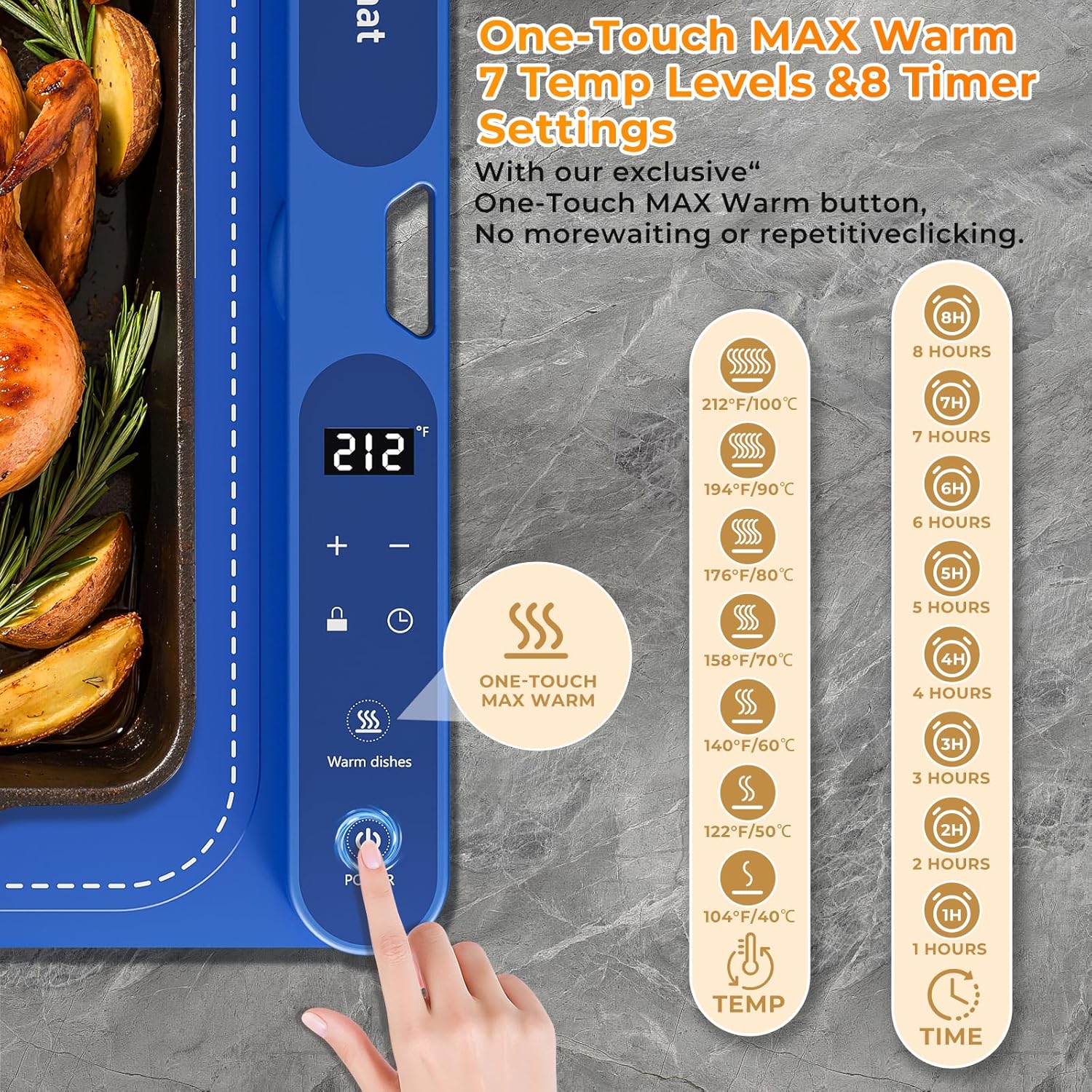
- Use the + and - buttons to adjust the temperature. The mat offers 7 temperature levels, ranging from 104°F (40°C) to 212°F (100°C).
- The smart sensor technology automatically maintains the set temperature.
This image focuses on the control panel of the warming mat, displaying the digital temperature readout (212°F), plus and minus buttons for adjustment, a lock icon, a timer icon, a "Warm dishes" button, and the power button. It also shows a visual guide for 7 temperature levels (104°F to 212°F) and 8 timer settings (1 to 8 hours).
5.3 One-Touch MAX Warm
- Press the Warm Dishes button () for instant maximum heating. The mat will reach its MAX heating temperature (212°F) in approximately 7 minutes.
5.4 Timer Settings
- Press the Timer button () to set the operating duration from 1 to 8 hours. The mat will automatically shut off once the timer expires.
5.5 Child Lock
- Press and hold the Lock button () to activate or deactivate the child lock. This prevents accidental changes to settings.
5.6 Versatile Applications
The warming mat is compatible with various heat-resistant containers including glass, ceramic, and stainless steel. It can be used for:
- Keeping cooked meals and drinks warm.
- Dough fermentation.
- Thawing frozen foods (at lower temperatures).
- Melting chocolate.
- Warming masks or other beauty products.

This image shows the blue warming mat on a dining table, holding various containers such as a stainless steel pot, an iron pot, a casserole dish, a baby bottle, and a tin foil box, demonstrating its compatibility with different tableware materials.
6. Cleaning and Maintenance
- Unplug and Cool: Always unplug the mat from the power outlet and allow it to cool completely before cleaning.
- Wipe Clean: Use a soft, damp cloth to wipe the silicone surface. The nano-coated surface resists stains, oil, and spills, making cleaning easy.
- Do Not Rinse: Do not immerse the mat in water or rinse it under running water. This can damage the electrical components.
- Avoid Abrasives: Do not use abrasive cleaners, scouring pads, or harsh chemicals, as these can damage the silicone surface.
- Dry Thoroughly: Ensure the mat is completely dry before storing or reusing.
7. Storage
- Once completely cool and dry, the mat can be rolled up compactly for neat storage.
- Use the included storage bag or strap to keep it securely rolled.
- Store in a dry place away from direct sunlight and extreme temperatures.
8. Troubleshooting
| Problem | Possible Cause | Solution |
|---|---|---|
| Mat does not turn on. | Not plugged in correctly; power outlet issue. | Ensure power cord is securely plugged into both the mat and a working outlet. |
| Mat not heating. | Power is off; temperature set too low; child lock active. | Turn on power, increase temperature, or deactivate child lock. |
| Temperature fluctuates. | Normal operation of smart sensor to maintain set temperature. | No action required. This is part of the mat's design for stable heating. |
| Mat automatically shuts off. | Timer expired; 24-hour auto shut-off; overheat protection activated. | Check timer settings. If due to overheat, allow to cool before restarting. |
9. Specifications
- Model: WARMING-G008Pro Max
- Brand: FJAU
- Dimensions: 32" x 15" (Extra Large)
- Material: Food-grade Silicone with Nano-coated surface
- Color: Blue
- Power Source: Electric
- Voltage: 110 Volts
- Wattage: 450 watts
- Temperature Range: 104°F – 212°F (40°C – 100°C)
- Timer Settings: 1-8 hours
- Safety Features: Child Lock, Overheat Protection, 24-Hour Auto Shut-off
- UPC: 762744310875
- Manufacturer: Dongguan Aoxun Plastic Products Co., LTD
10. Warranty and Support
For warranty information or technical support, please refer to the product packaging or contact FJAU customer service directly. Keep your purchase receipt for warranty claims.