1. Introduction
Thank you for choosing BIBIED JH-DW2ET OTC Rechargeable Hearing Aids. These devices are designed to provide clear sound for individuals with mild to moderate hearing loss. Featuring smart noise reduction, a comfortable design, and multiple listening modes, your hearing aids are engineered for daily use. Please read this manual carefully to ensure proper use and maintenance.

Image 1.1: Overview of BIBIED JH-DW2ET Smart OTC Hearing Aids highlighting key features.
2. What's in the Box
Your BIBIED JH-DW2ET package includes the following items:
- Hearing aid *1 pair (Left and Right)
- Ear dome *6 pairs (various sizes: S/M/L)
- Charging case *1
- Charging cable *1
- Cleaning tool *1
- Use manual *1 (this document)

Image 2.1: All components included in the BIBIED JH-DW2ET product package.
3. Setup
3.1 Charging the Hearing Aids and Case
Before first use, fully charge both the hearing aids and the charging case.
- Connect the charging cable to the charging case and a power source.
- Place the hearing aids into their respective slots in the charging case (Left for L, Right for R).
- The indicator lights on the case will show charging status. A full charge for the hearing aids takes approximately 2 hours, providing up to 20 hours of continuous use. The charging case holds 4 full replenishments, extending total usage to 100 hours.
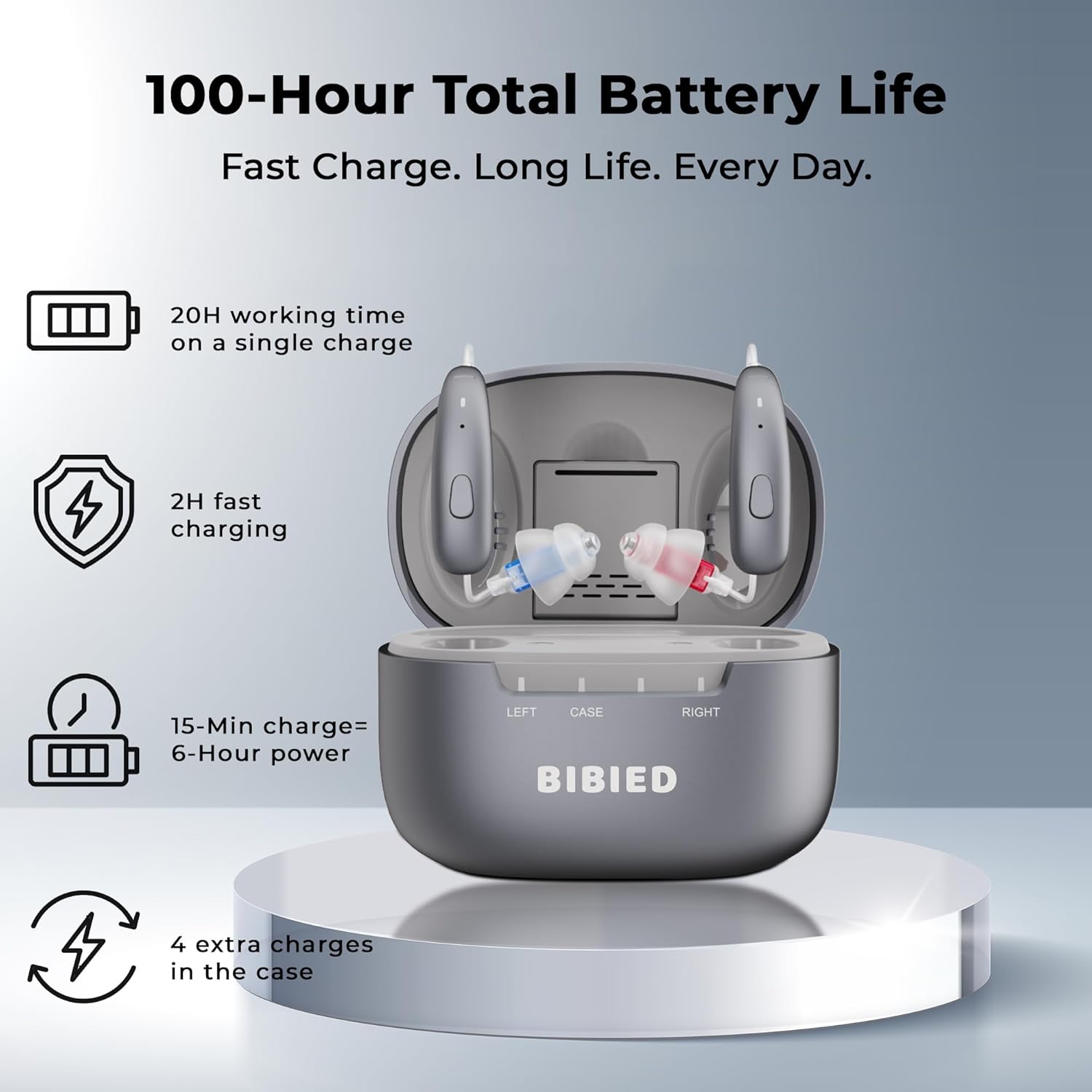
Image 3.1: Battery life and charging specifications for the hearing aids and charging case.
3.2 Selecting and Fitting Ear Domes
Proper ear dome selection is crucial for comfort and sound quality. Your kit includes multiple sizes (S/M/L) of soft silicone ear domes.
- Choose an ear dome size that feels comfortable and creates a good seal in your ear canal.
- Gently attach the selected ear dome to the receiver of the hearing aid.
- Place the hearing aid behind your ear, then carefully insert the ear dome into your ear canal. The device should sit securely and comfortably, with the thin tube following the contour of your ear.

Image 3.2: Proper placement of the hearing aid and ear dome in the ear.

Image 3.3: Side profile demonstrating the discreet design of the hearing aid when worn.
4. Operating Instructions
4.1 Power On/Off
The hearing aids automatically power on when removed from the charging case and power off when placed back into the case.
4.2 Adjusting Volume
Your hearing aids feature 11-level volume adjustment. Use the designated button on the hearing aid to cycle through volume levels. A short press typically adjusts the volume up or down, while a long press might switch modes.
4.3 Switching Listening Modes
The BIBIED JH-DW2ET offers four specialized listening programs to optimize sound for various environments. Each mode automatically adjusts settings within 0.5 seconds. The device saves your last used mode and volume level.
- Normal Mode: Suitable for quiet environments and one-on-one conversations.
- Restaurant Mode: Designed to reduce background noise in busy settings, focusing on speech.
- Music Mode: Optimized for enjoying music with enhanced clarity.
- Outdoor Mode: Reduces wind noise and other outdoor ambient sounds.
To switch between modes, press and hold the mode button on the hearing aid until you hear an audible indication of the new mode.

Image 4.1: Visual representation of the four smart listening modes.
5. Maintenance
5.1 Daily Cleaning
Regular cleaning helps maintain optimal performance and hygiene.
- After each use, gently wipe the hearing aids and ear domes with a soft, dry cloth.
- Use the provided cleaning tool to remove any wax or debris from the ear domes and sound outlets.
- Ensure no moisture enters the hearing aid components.
5.2 Storage
When not in use, store your hearing aids in the charging case. This protects them from dust, moisture, and physical damage, while also keeping them charged.
5.3 General Care
- Avoid exposing the hearing aids to extreme temperatures or direct sunlight.
- Keep them away from water and high humidity. The devices are IP64 dustproof and water-resistant, but not waterproof.
- Do not use alcohol, solvents, or abrasive cleaners.
- Keep out of reach of children and pets.
6. Troubleshooting
If you experience issues with your hearing aids, please refer to the following common solutions:
| Problem | Possible Cause | Solution |
|---|---|---|
| No sound or weak sound | Low battery, clogged ear dome, incorrect volume setting | Charge the hearing aids, clean the ear dome, increase volume |
| Whistling or feedback sound | Improper fit, ear dome too small, earwax buildup | Re-insert the hearing aid, try a larger ear dome, clean ear canal |
| Sound is distorted or unclear | Clogged ear dome, moisture, low battery | Clean the ear dome, ensure devices are dry, charge the hearing aids |
| Hearing aids not charging | Charging cable not connected, dirty charging contacts, faulty case | Check cable connection, clean charging contacts on aids and case, contact support if issue persists |
If the problem persists after trying these solutions, please contact customer support.
7. Specifications
- Model Name: JH-DW2ET
- Brand: BIBIED
- Product Dimensions: 1.18 x 0.3 x 0.1 inches
- Item Weight: 0.11 ounces (per hearing aid)
- Material: Plastic
- Style: Receive-In-Canal (RIC)
- Gain: Up to 35 dB
- Noise Reduction: Intelligent noise cancellation
- Distortion (THD): <0.8%
- Circuit Noise (EQ): <12dB
- Battery Life: 20 hours (single charge), 100 hours (with charging case)
- Charging Time: 2 hours for full charge
- Water Resistance: IP64 Dustproof and Water-Resistant

Image 7.1: Internal technology and sound amplification capabilities.
8. Warranty and Support
BIBIED provides a 12-month support period for your JH-DW2ET hearing aids. This covers manufacturing defects and ensures you receive assistance for any operational issues.
For technical support, warranty claims, or any questions regarding your BIBIED hearing aids, please contact our customer service team. Refer to the contact information provided on the product packaging or the official BIBIED website.

Image 8.1: BIBIED customer support team ready to assist.


