
1. Introduction
This manual provides comprehensive instructions for the setup, operation, and maintenance of your Nobsound VFD Audio Spectrum Analyzer AK2515 PRO V3. This device is designed to visually represent audio signals with a high-resolution Vacuum Fluorescent Display (VFD), offering various input options and display modes for audiophiles and studio professionals.

Image 1.1: The Nobsound VFD Audio Spectrum Analyzer AK2515 PRO V3, showcasing its vibrant display.
2. Package Contents
Please verify that all items listed below are included in your package:
- 1 × AK2515 PRO V3 Audio Spectrum Analyzer Board
- 1 × USB Cable (Type-C)
- 1 × 3.5mm Audio Cable
- 1 × 1:2 3.5mm Cable
- 2 × Acrylic Board
- 1 Set × Installation Screws

Image 2.1: All components included in the AK2515 PRO V3 package, laid out for inspection.
3. Product Overview and Features
The Nobsound AK2515 PRO V3 is a versatile audio spectrum analyzer with advanced functionalities:
- High-Resolution VFD Display: Features a 25 × 15 resolution vacuum fluorescent display for clear frequency band visualization. Functions as a precise clock when no audio is present.
- Wide Frequency Range: Supports 32Hz-20KHz, capturing a broad spectrum of audio details. Includes an integrated noise filter for clean display.
- Multiple Connectivity Options: Offers 3.5mm AUX, MIC, and Bluetooth 5.0 inputs. The 3.5mm jack can also serve as an audio output in Bluetooth mode, enabling the device to act as a Bluetooth receiver.
- Advanced AGC Algorithm: Built-in Automatic Gain Control dynamically adjusts the display to audio volume, maintaining vivid and balanced spectrum bars.
- Customizable Display Modes: Provides various gain settings, three spectrum display modes (real-time, smooth I, smooth II), and multiple music spectrum and clock display styles.
- User-Friendly Design: Features 7-level brightness adjustment, adjustable peak-hold and fall speeds, power-off memory, auto-switch, and deep-sleep modes.

Image 3.1: The AK2515 PRO V3 demonstrating its wide frequency range and multiple input options (AUX, MIC, Bluetooth).

Image 3.2: The AK2515 PRO V3 highlighting its integrated Bluetooth 5.0 for wireless audio input.
4. Setup
Follow these steps to set up your Nobsound VFD Audio Spectrum Analyzer:
- Assembly: Attach the two acrylic boards to the main spectrum analyzer board using the provided installation screws. Ensure they are securely fastened to protect the display and components.
- Power Connection: Connect the USB Type-C cable to the DC 5V input port on the analyzer board and plug the other end into a compatible 5V USB power source (e.g., a USB wall adapter, computer USB port).
- Audio Input:
- 3.5mm AUX Input: Use the provided 3.5mm audio cable to connect your audio source (e.g., smartphone, PC, audio player) to the 'AUDIO IN' 3.5mm jack on the analyzer.
- Microphone Input: The device has a built-in microphone for ambient sound pickup. No external connection is needed for this mode.
- Bluetooth Input: Power on the device. On your audio source (e.g., smartphone), search for Bluetooth devices and connect to the AK2515 PRO V3. The 3.5mm jack will function as an audio output in this mode.

Image 4.1: Detailed view of the AK2515 PRO V3 board, showing input/output ports and control buttons.
5. Operating Instructions
The AK2515 PRO V3 offers various modes and adjustable settings. Use the 'Up' and 'OK' buttons on the device to navigate and select options.
5.1 Work Modes
- Auto Mode: Displays music spectrum when audio is detected; switches to clock mode when no audio input.
- Auto Mode (No Clock): Displays music spectrum with audio; enters deep sleep mode when no audio.
- Music Spectrum Mode: Always displays the music spectrum.
- Clock Display Mode: Always displays the clock.
5.2 Sound Level Display Modes
- Normal mode
- Mirror mode 1
- Mirror mode 2
5.3 Amplification Curve Settings
These settings adjust how the spectrum responds to different frequencies:
- Compressed low-frequency
- Compressed low-frequency to enhance high frequency
- No enlarging (default setting)
- Slightly compression low frequency to enhances high frequency
- Enhance high frequency
5.4 Music Spectrum Modes
- Normal mode
- Invert color mode
- Reverse mode
- Frequency division mode
- Amplified curve mode
- Real output
- Smooth output I
- Smooth output II
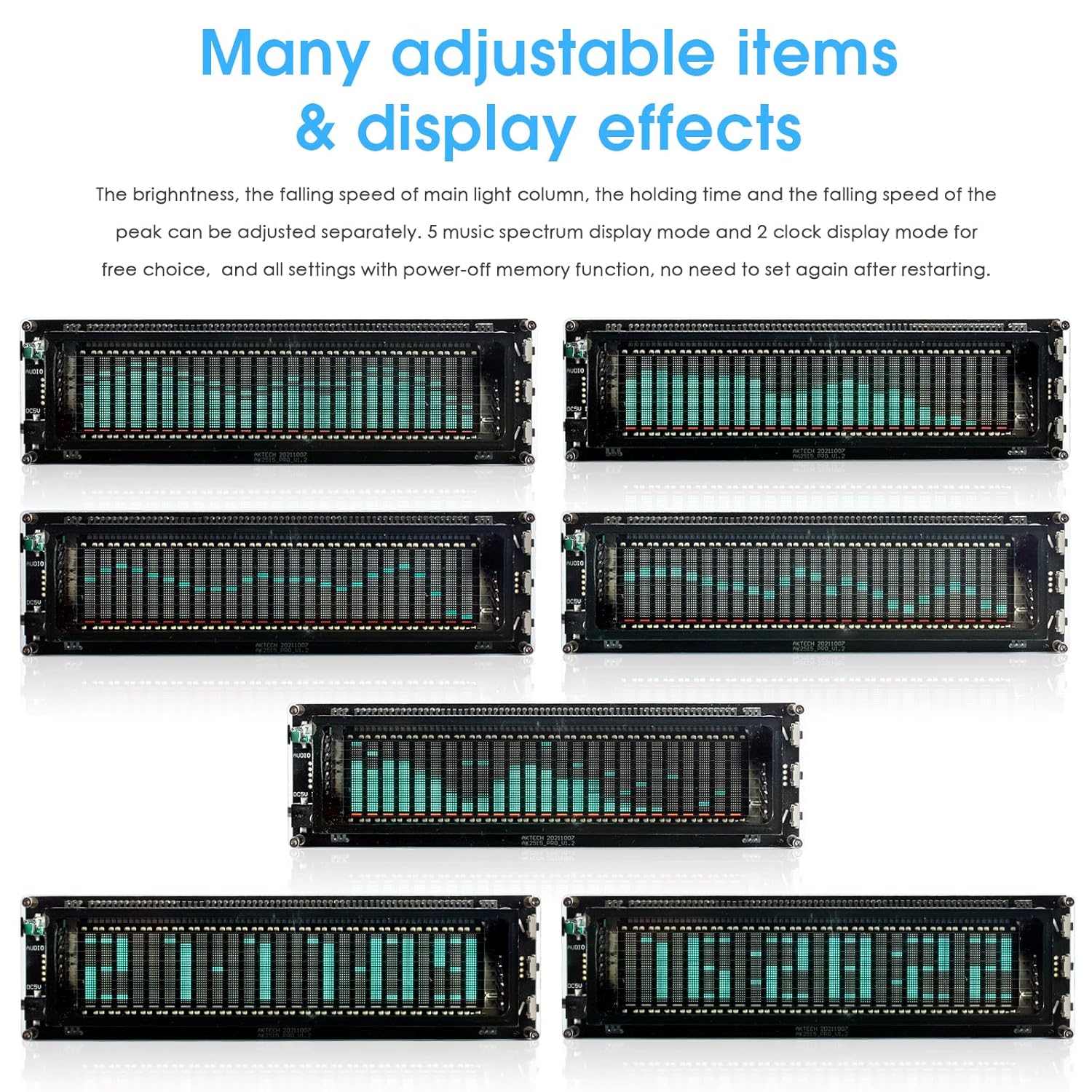
Image 5.1: Examples of various adjustable display effects and spectrum modes.

Image 5.2: Illustration of the AGC algorithm and different output curve display modes (Real, Smooth I, Smooth II).
5.5 Adjustable Items
- Main light column falling speed
- Peak holding time
- Peak falling speed
- Brightness adjustment (7 levels)
- Font type (4 kinds for clock display)
5.6 Clock Display
The clock displays year, month, day, hour, minute, and second, along with the date. The clock accuracy is ±5ppm, with a year error within 2.5 minutes, thanks to the SD2405AL built-in crystal oscillator.

Image 5.3: The AK2515 PRO V3 displaying both music spectrum and clock functions.
6. Maintenance
To ensure the longevity and optimal performance of your Nobsound VFD Audio Spectrum Analyzer, follow these maintenance guidelines:
- Cleaning: Use a soft, dry cloth to clean the display and exterior. Avoid abrasive cleaners or solvents that could damage the acrylic or VFD screen.
- Environment: Operate the device in a clean, dry environment. Avoid exposure to extreme temperatures, humidity, or direct sunlight.
- Power: Always use the specified DC 5V power supply. Disconnect power when the device is not in use for extended periods.
- Handling: Handle the device with care to prevent physical damage to the VFD screen or internal components.
7. Troubleshooting
If you encounter issues with your AK2515 PRO V3, consider the following common solutions:
- No Display/Power: Ensure the USB Type-C power cable is securely connected to a functional 5V power source. Try a different USB cable or power adapter.
- No Audio Spectrum Display:
- AUX Input: Verify the 3.5mm audio cable is correctly connected to both the audio source and the analyzer. Check the audio source's volume level.
- Bluetooth Input: Confirm the device is successfully paired and connected via Bluetooth to your audio source. Ensure audio is playing on the source.
- Microphone Input: Ensure there is ambient sound for the microphone to pick up.
- Check the selected work mode; ensure it is set to a music spectrum display mode.
- Incorrect Display Behavior: Review the operating instructions for different display modes and adjustable items. Reset settings to default if necessary.
- Clock Inaccuracy: While the clock is highly accurate, significant discrepancies might indicate a power interruption or a need for manual adjustment if available.
If problems persist, please refer to the support information in Section 9.
8. Specifications
| Display Screen | VFD (Vacuum Fluorescent Display) |
| Resolution | 25 × 15 |
| Frequency Range Supported | 32Hz-20KHz |
| Display Items | Music spectrum / Sound level / Clock |
| Audio Signal Input | 3.5mm AUX / MIC / Bluetooth 5.0 |
| Working Voltage | DC 5V |
| Dimensions (W×D×H) | 175 × 28 × 50mm / 6.89 × 1.10 × 1.97in |
| Net Weight | 189g / 0.42lb |
| Model Number | PJ454-BT |
| Date First Available | March 29, 2018 |
9. Warranty and Support
For warranty information and technical support, please contact Douk Audio directly through their official website or the retailer from whom you purchased the product. Keep your purchase receipt as proof of purchase.

