1. Introduction
The TESMEN TOE-100DMAX is an intelligent digital socket tester designed for comprehensive electrical safety inspections. This device integrates essential functions such as wiring verification, voltage measurement, and Residual Current Device (RCD) testing. It is a reliable tool for both professional electricians and home users performing daily safety checks, home renovations, or maintenance tasks.
Key features include a clear backlit LCD for easy reading in various lighting conditions, a compact and lightweight design for portability, and a data hold function to retain measurement results.
2. Safety Information
Please read and understand all safety warnings and operating instructions before using this device. Failure to follow these instructions may result in electric shock, fire, or serious injury.
- Always ensure the socket tester is in good working condition before use.
- Do not use the device if it appears damaged or if the casing is open.
- Do not use the device in wet conditions or with wet hands.
- This device is designed for testing standard AC sockets. Do not attempt to test other types of electrical connections.
- The RCD test function intentionally trips the RCD/GFCI. Ensure all connected equipment is safely shut down or disconnected before performing this test to prevent data loss or damage.
- If the device indicates a wiring fault, consult a qualified electrician immediately. Do not attempt to repair faulty wiring yourself unless you are qualified.
- Keep out of reach of children.
3. Package Contents
Verify that all items are present and undamaged upon opening the package:
- 1 x TESMEN TOE-100DMAX Socket Tester
- 2 x AAA 1.5V Batteries
- 1 x User Manual (Multilingual)
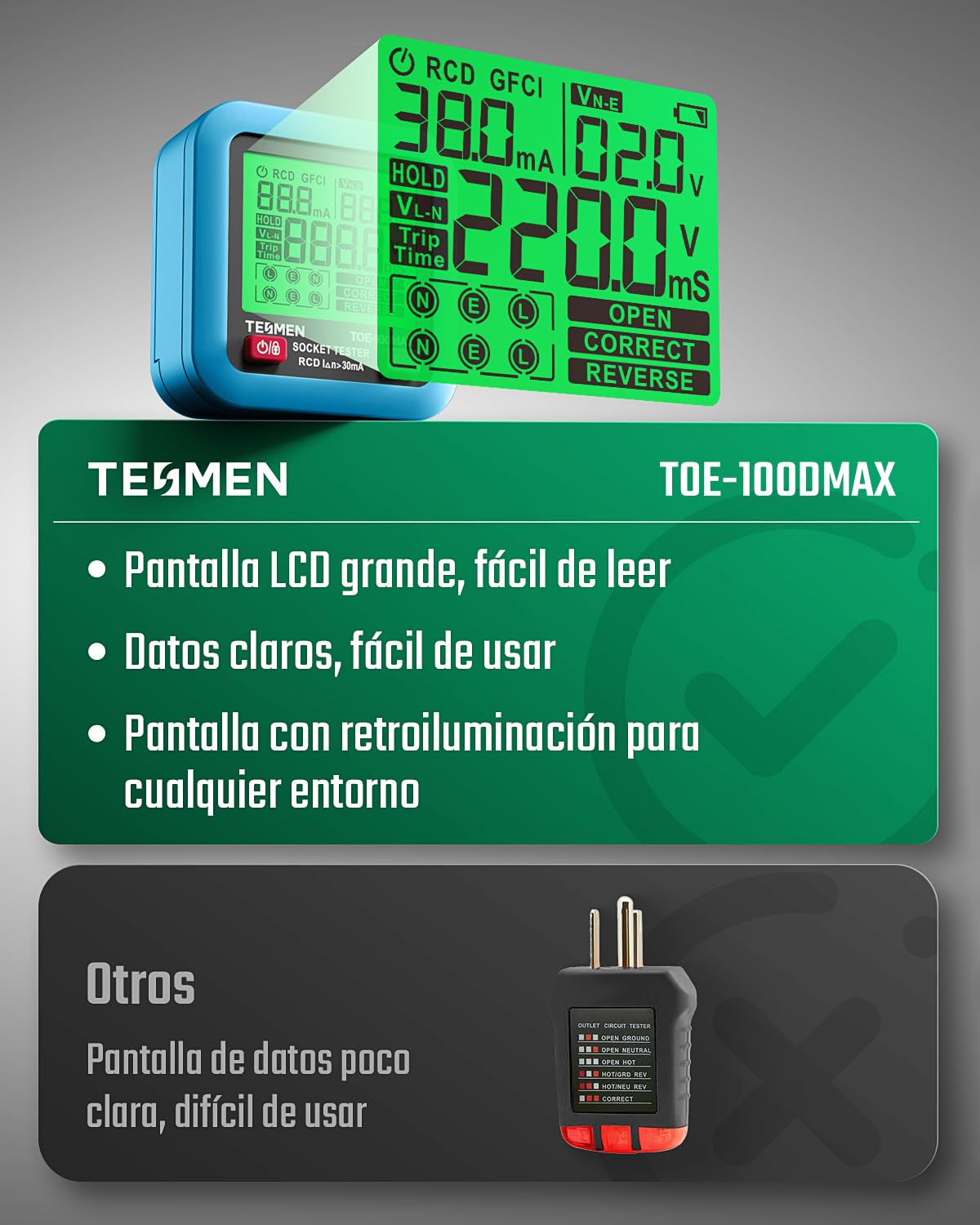
Image 3.1: The TESMEN TOE-100DMAX Socket Tester, two AAA batteries, and the user manual included in the package.
4. Product Overview
The TESMEN TOE-100DMAX features a compact design with a clear LCD display and intuitive controls.

Image 4.1: Front view of the TESMEN TOE-100DMAX Socket Tester, showing the LCD display, power button, RCD test button, and the included AAA batteries.
4.1. Components
- LCD Display: Shows wiring status, voltage, RCD trip time, and other measurements.
- Power Button (ON/OFF): Press to turn the device on or off.
- RCD Test Button (RCD): Initiates the RCD trip test.
- EU Plug: For connecting to standard European wall sockets.
- Battery Compartment: Located on the back for AAA batteries.
5. Setup
5.1. Battery Installation
- Locate the battery compartment cover on the back of the device.
- Use a small screwdriver to loosen the screw securing the battery cover.
- Carefully remove the cover.
- Insert two AAA 1.5V batteries, ensuring correct polarity (+ and -).
- Replace the battery cover and tighten the screw.
Note: The device comes with batteries included. If the display does not light up or is dim, replace the batteries.
6. Operating Instructions
6.1. Basic Wiring and Voltage Test
- Press the ON/OFF button to power on the device. The backlit LCD will illuminate.
- Plug the TESMEN TOE-100DMAX directly into the wall socket you wish to test.
- The device will automatically perform a wiring check and display the results on the LCD.
- The LCD will show the phase voltage (VL-N) and leakage voltage (VN-E).
- Observe the wiring status indicators (N, E, L) and the "CORRECT", "OPEN", or "REVERSE" messages on the display. A green indicator typically signifies correct wiring, while orange indicates an error.

Image 6.1: Detailed view of the TESMEN TOE-100DMAX display, illustrating indicators for phase detection, voltage detection, current detection, leakage voltage, earth voltage, wiring status, and phase voltage.
6.2. RCD/GFCI Trip Test
The RCD test simulates a leakage current to verify the functionality of your Residual Current Device (RCD) or Ground Fault Circuit Interrupter (GFCI).
- Ensure the device is plugged into the socket and the basic wiring test shows a correct configuration.
- Important: Disconnect any sensitive electronic equipment from the circuit before performing this test, as it will intentionally trip the RCD/GFCI, cutting power to the circuit.
- Press the RCD button. The device will simulate a leakage current.
- Observe if the RCD/GFCI in your electrical panel trips (switches off).
- The display will show the trip time in milliseconds (ms) and the test current (mA) if the RCD trips successfully. The expected trip time is between 10-1000ms.
- If the RCD/GFCI does not trip, or trips outside the expected time range, it indicates a potential fault with the RCD/GFCI or the electrical installation. Consult a qualified electrician.
- After the test, reset your RCD/GFCI in the electrical panel to restore power.

Image 6.2: The TESMEN TOE-100DMAX performing an RCD trip test, showing the device plugged into a socket and a finger pressing the RCD button, with a circuit breaker panel in the foreground.
6.3. Data Hold Function
The TOE-100DMAX features a data hold function. After unplugging the device from a socket, the last measurement results will remain on the display. This allows you to record or compare readings conveniently without needing to keep the device plugged in.
7. Understanding Display Indicators
The backlit LCD provides clear visual feedback on the electrical status of the socket.
- Green Indicator: Typically signifies correct wiring and safe conditions.
- Orange Indicator/Warning: Indicates a wiring error or an unsafe condition.
- VL-N: Phase-Neutral Voltage measurement.
- VN-E: Neutral-Earth Voltage (Leakage Voltage) measurement.
- Trip Time (ms): Time taken for the RCD to trip during the test.
- Wiring Status (N, E, L): Indicates the status of Neutral, Earth, and Live wires.
- CORRECT: All wiring is properly connected.
- OPEN: Indicates a missing connection (e.g., Open Earth, Open Neutral, Open Live).
- REVERSE: Indicates reversed connections (e.g., Live/Neutral Reverse).

Image 7.1: The TESMEN TOE-100DMAX's large, backlit LCD display, highlighting its readability and clear data presentation compared to other basic testers.
8. Specifications
| Parameter | Value |
|---|---|
| Model | TOE-100DMAX |
| Phase Voltage (VL-N) | 30–260V / 45–65Hz |
| Leakage Voltage (VN-E) | 0–99V / 45–65Hz |
| RCD Trip Time | 10–1000ms |
| Power Source | 2 x AAA 1.5V Batteries |
| Minimum Operating Voltage | 30 Volts |
| Dimensions (Product) | 6.57 x 6.57 x 5.99 cm |
| Weight | 180 g |
| Compliance | CE Marked, RoHS Compliant |
| Manufacturer | TESMEN |
9. Maintenance
- Cleaning: Wipe the device with a dry, soft cloth. Do not use abrasive cleaners or solvents.
- Battery Replacement: When the battery indicator on the display shows low power, replace the two AAA batteries as described in the "Battery Installation" section. Remove batteries if the device will not be used for an extended period.
- Storage: Store the device in a cool, dry place, away from direct sunlight and extreme temperatures.
10. Troubleshooting
| Problem | Possible Cause | Solution |
|---|---|---|
| Device does not turn on. | Batteries are dead or incorrectly installed. | Check battery polarity or replace with new AAA batteries. |
| Display is dim or flickering. | Low battery power. | Replace batteries. |
| Wiring error indicated (e.g., OPEN, REVERSE). | Faulty wiring in the socket or circuit. | Consult a qualified electrician to inspect and repair the wiring. Do not use the socket until repaired. |
| RCD test does not trip the RCD/GFCI. | Faulty RCD/GFCI or wiring issue. | Ensure the socket is correctly wired. If the issue persists, the RCD/GFCI may be faulty and requires inspection by a qualified electrician. |
| Inaccurate voltage readings. | Device malfunction or external interference. | Ensure the device is fully inserted into the socket. If readings remain inconsistent, the device may require service or replacement. |
11. Warranty and Support
TESMEN products are manufactured to high-quality standards. For warranty information, technical support, or service inquiries, please refer to the warranty card included with your product or visit the official TESMEN website. Keep your purchase receipt as proof of purchase.
Manufacturer: TESMEN
Website: www.tesmen.com (Note: This is a placeholder link, please verify the actual support website.)


