
1. Introduction
The TESMEN TOE-100DMAX is an intelligent electrical socket tester designed for comprehensive safety inspections, home renovations, and electrical maintenance tasks. This device integrates essential functions such as wire sequence detection, voltage measurement, and Residual Current Device (RCD) leakage protection testing. It serves as a reliable tool for both professional electricians and DIY enthusiasts, ensuring electrical safety and proper wiring configurations.
2. Key Features
- All-in-One Smart Socket Tester: Combines wiring verification, voltage measurement, and RCD testing into a single, convenient device.
- One-Click RCD Test: Easily simulate a leakage situation on protected sockets to measure trip time and test current, identifying abnormal or slow responses.
- Large Backlit LCD Display: Features a high-brightness backlit screen for clear readings in various lighting conditions. Green indicates correct wiring; orange signals errors.
- Data Hold Function: Battery-powered operation allows results to remain visible on the screen after removal, useful for quick comparisons and record-keeping.
- Compact and Portable: Lightweight design for easy transport and mobile diagnostics.
3. Package Contents
Upon opening the package, verify that all items are present and in good condition:
- 1x TESMEN TOE-100DMAX Socket Tester
- 2x AAA Batteries
- 1x Multi-language User Manual

Image 3.1: Contents of the TESMEN TOE-100DMAX package, including the tester, two AAA batteries, and the user manual.
4. Setup and Battery Installation
The TESMEN TOE-100DMAX is powered by two AAA batteries. Follow these steps to install them:
- Locate the battery compartment cover on the back of the device. It is typically secured by a small screw on the bottom edge, near the plug.
- Using a small screwdriver, carefully loosen the screw. Note that the screw may not fully detach; it is designed to remain captive.
- Once the screw is loose, gently slide the battery compartment cover off. Do not attempt to lift it directly, as it slides horizontally.
- Insert two AAA batteries into the compartment, ensuring the polarity (+ and -) matches the indicators inside the compartment.
- Slide the battery compartment cover back into place and tighten the screw to secure it.
The device is now ready for use. The display will activate once connected to a live socket.

Image 4.1: The TESMEN TOE-100DMAX Socket Tester with its included AAA batteries, ready for installation.
5. Operating Instructions
5.1 Basic Socket Testing
- Ensure the batteries are correctly installed.
- Plug the TESMEN TOE-100DMAX directly into the electrical socket you wish to test.
- The device will automatically power on and display the current wiring status and voltage readings on its LCD screen.
- Observe the display for wiring indications:
- A green display indicates correct wiring.
- An orange display indicates a wiring error, such as an open ground, open neutral, open live, live/neutral reverse, or live/ground reverse. Specific error codes will be shown on the screen.
- The display will show:
- VL-N: Phase-Neutral Voltage
- VN-E: Neutral-Ground Voltage (Leakage Voltage)
- Wiring Status: Indicated by symbols (N, E, L) and text (OPEN, CORRECT, REVERSE).

Image 5.1: Detailed view of the TESMEN TOE-100DMAX display, showing various measurements like phase voltage, leakage voltage, and wiring status indicators.
5.2 RCD (Residual Current Device) Testing
The RCD test function simulates a leakage current to verify the proper operation and trip time of RCDs (also known as GFCI in some regions). This is a critical safety feature.
- Plug the tester into the socket protected by an RCD.
- Ensure the basic wiring test shows a correct status before proceeding with the RCD test.
- Press the "RCD" button on the tester.
- The RCD should trip, cutting power to the circuit. The tester's display will show the trip time in milliseconds (ms) and the test current (mA).
- If the RCD does not trip, or if the trip time is outside acceptable limits (typically 10-1000ms for standard RCDs), this indicates a potential fault with the RCD or the electrical installation.
- To reset the circuit, manually reset the RCD/circuit breaker in your electrical panel.
Important Safety Note: Performing an RCD test will temporarily cut power to the circuit. Ensure all sensitive equipment is safely shut down or disconnected before initiating the test.
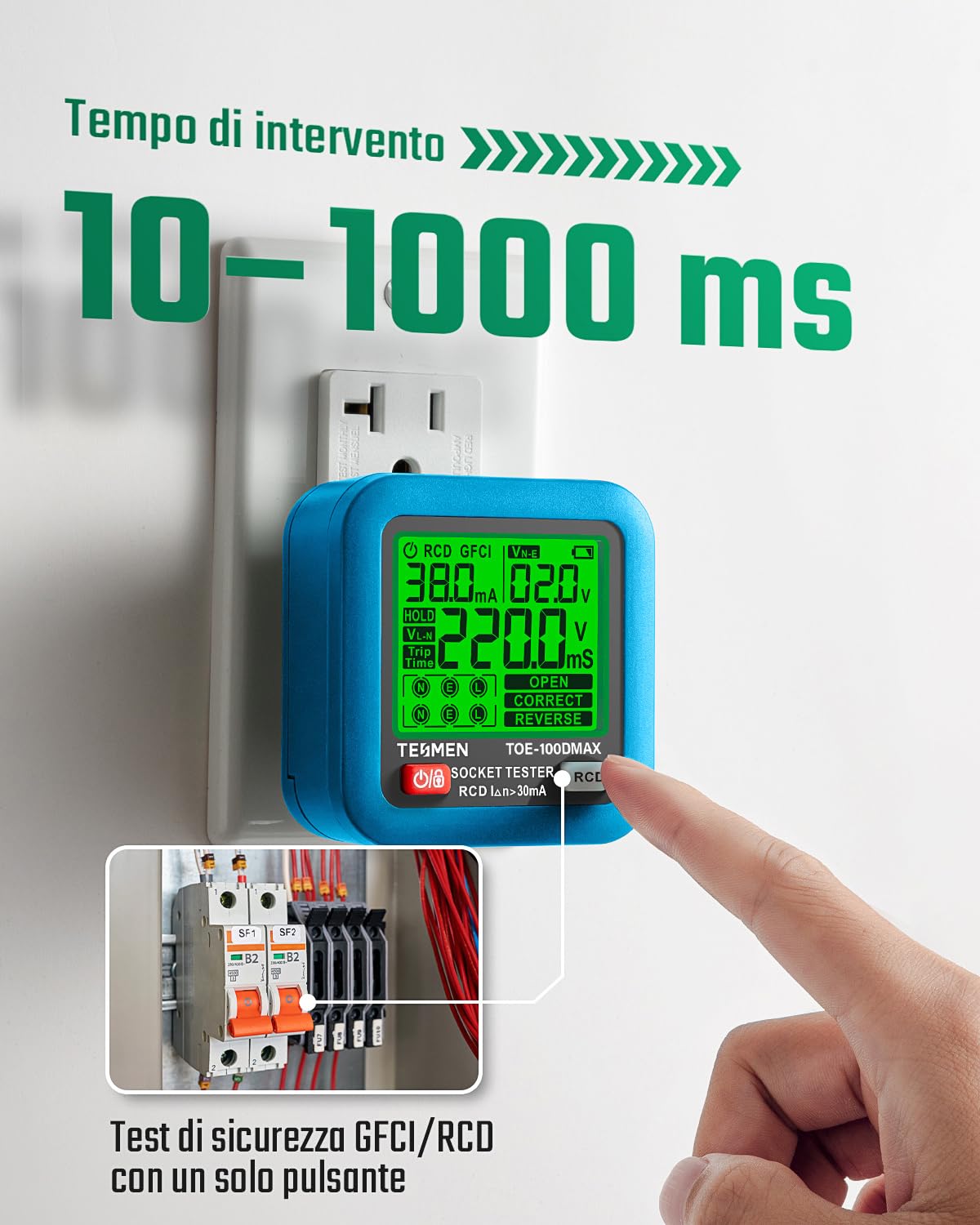
Image 5.2: The TESMEN TOE-100DMAX performing an RCD test, showing the device plugged into a socket and a circuit breaker panel in the background. The display indicates a trip time.
5.3 Data Hold Function
The TESMEN TOE-100DMAX features a data hold function. After unplugging the device from a socket, the last measured values will remain displayed on the screen for a short period. This allows for convenient recording or comparison of readings across multiple sockets without needing to re-test immediately.
6. Maintenance
- Cleaning: Wipe the device with a soft, dry cloth. Do not use abrasive cleaners or solvents.
- Storage: Store the tester in a cool, dry place away from direct sunlight and extreme temperatures.
- Battery Replacement: If the display becomes dim or the device does not power on, replace the AAA batteries as described in the "Setup and Battery Installation" section. Remove batteries if the device will not be used for an extended period to prevent leakage.
- Inspection: Periodically inspect the device for any signs of damage, such as cracks in the casing or bent pins on the plug. Do not use a damaged device.
7. Troubleshooting
| Problem | Possible Cause | Solution |
|---|---|---|
| Device does not power on or display is dim. | Low or dead batteries; incorrect battery installation. | Replace AAA batteries, ensuring correct polarity. |
| Display shows an orange light or error code. | Indicates a wiring fault (e.g., open ground, live/neutral reverse). | Consult the specific error code on the display and refer to a qualified electrician for wiring correction. Do not use the socket until repaired. |
| RCD test does not trip the circuit breaker. | Faulty RCD; RCD not present; incorrect wiring preventing test. | Ensure the socket is protected by an RCD. If it is, and the RCD does not trip, contact a qualified electrician to inspect the RCD and wiring. |
| Inaccurate voltage readings. | Poor connection; device malfunction. | Ensure the tester is fully inserted into the socket. Test another known good socket. If issues persist, the device may require service. |
8. Specifications
- Model Number: TOE-100EMAX-BL
- Brand: TESMEN
- Power Source: 2 x AAA Batteries (included)
- Phase Voltage Range: 30–260V / 45–65Hz
- Leakage Voltage Range: 0–99V / 45–65Hz
- RCD Trip Time Measurement: 10–1000ms
- Product Dimensions (LxWxH): 6.6 x 6.6 x 6 cm (approximately 2.6 x 2.6 x 2.4 inches)
- Product Weight: 180 grams (approximately 6.35 ounces)
- Operating Voltage (Min): 30 Volts
- Display: Backlit LCD
- Origin: China
9. Warranty and Support
For warranty information and technical support, please refer to the official TESMEN website or contact your retailer. Keep your purchase receipt as proof of purchase for any warranty claims.
Manufacturer: TESMEN
Website: support.tesmen.com (Note: This link is an example based on common support URLs; please verify the actual support URL from the product packaging or official documentation.)