
1. Introduction
Welcome to the user manual for your Pikabike S7 Folding Electric Bicycle. This manual provides essential information for the safe assembly, operation, maintenance, and troubleshooting of your new electric bicycle. Please read this manual thoroughly before your first ride and retain it for future reference.
1.1 Safety Guidelines
Your safety is paramount. Always adhere to the following guidelines:
- Always wear a helmet and appropriate safety gear when riding.
- Familiarize yourself with local traffic laws and regulations for electric bicycles.
- Perform a pre-ride inspection before each use, checking brakes, tires, and battery level.
- Do not operate the bicycle under the influence of alcohol or drugs.
- Avoid riding in adverse weather conditions or on excessively rough terrain if you are not experienced.
- Ensure all components are securely fastened before riding.
2. Package Contents
Upon unpacking, please verify that all items listed below are present and undamaged:
- Pikabike S7 Folding Electric Bicycle (Main Frame, Wheels, Handlebars, Seat)
- Lithium-ion Battery Pack
- Battery Charger
- Tool Kit for Assembly
- User Manual (this document)
- Pedals
- Front and Rear Fenders (may be pre-installed)
- Headlight and Taillight (may be pre-installed)

Figure 2.1: The Pikabike S7 Folding Electric Bicycle in its assembled state, showcasing its compact design.
3. Setup and Initial Assembly
The Pikabike S7 requires some assembly. Please follow these general steps. Refer to the included assembly guide for detailed, step-by-step instructions specific to your model.
3.1 Unfolding the Bicycle
- Carefully remove the bicycle from its packaging.
- Locate the main frame hinge and release the safety latch.
- Unfold the frame until it locks into place. Secure the latch.
- Raise the handlebar stem and secure its locking mechanism.
- Adjust the seat post to your desired height and tighten the quick-release lever.

Figure 3.1: The Pikabike S7 in both its folded and unfolded configurations, demonstrating its portability.
3.2 Attaching Components
- Pedals: Identify the left (L) and right (R) pedals. Thread them into the crank arms by hand, then tighten securely with a wrench from the tool kit. Note that the left pedal is reverse-threaded.
- Front Wheel: If not pre-installed, attach the front wheel, ensuring the disc brake rotor is correctly aligned with the caliper.
- Handlebars: Adjust the angle of the handlebars and tighten the stem bolts.
3.3 Initial Battery Charge
Before your first ride, fully charge the battery. This typically takes 4-6 hours.
- Ensure the bicycle is turned off.
- Locate the charging port on the battery.
- Connect the charger to the battery port, then plug the charger into a standard wall outlet.
- The charger indicator light will typically show red during charging and turn green when fully charged.
- Disconnect the charger once charging is complete.

Figure 3.2: Illustration of the 48V 20AH battery, indicating a charging time of 4-6 hours and a maximum range of 100 miles on a single charge.
4. Components Overview
Familiarize yourself with the main components of your Pikabike S7:
- Motor: The S7 features an 1800W peak electric motor, providing power for pedal assist and throttle modes.
- Battery: A 48V 20AH (960 Watt Hours) lithium-ion battery powers the motor and electrical system.
- Digital Display: Located on the handlebars, this display shows speed, mileage, battery level, current gear, and turn signals.
- Brakes: Equipped with dual disc brakes for reliable stopping power.
- Suspension: Dual suspension system (front shock absorber and medium damping) for a smoother ride.
- Tires: 14-inch fat tires designed for various terrains.
- Lighting: Integrated bright headlights and reflective taillights for visibility.

Figure 4.1: Diagram illustrating the internal structure of the 1800W peak motor, highlighting its power and efficiency.
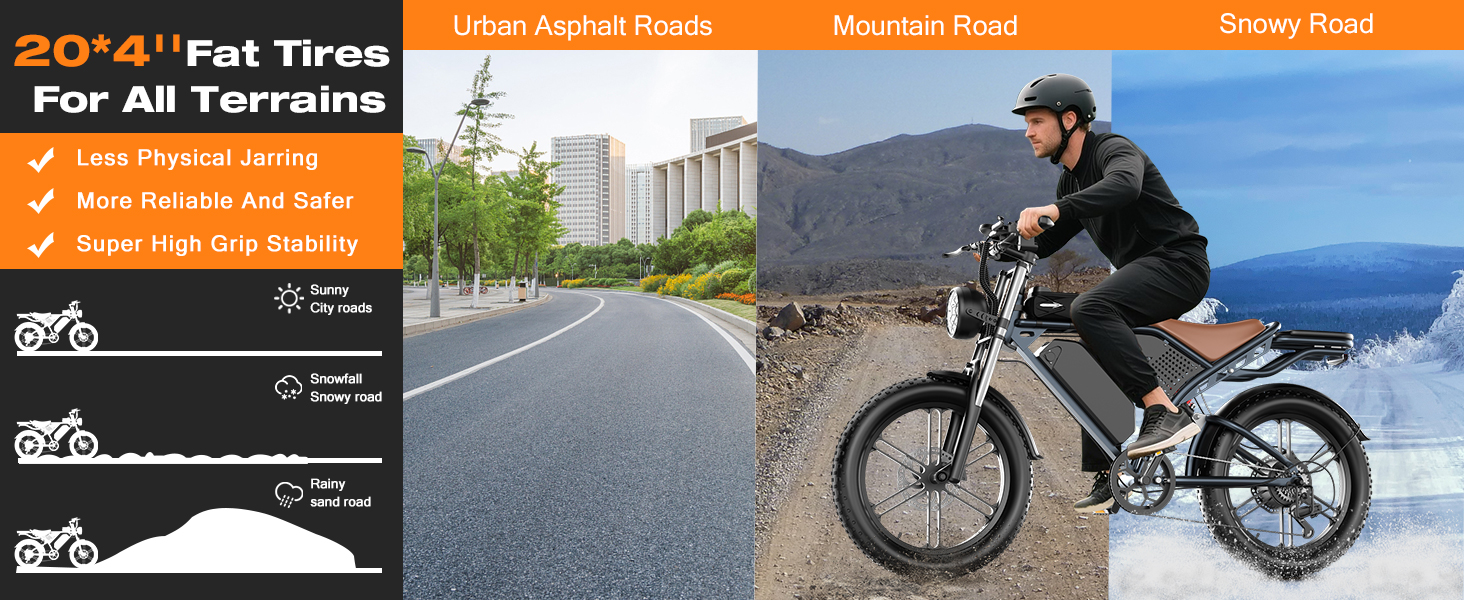
Figure 4.2: Close-up of the digital display, showing indicators for driving speed, mileage, battery level, current gear, and turn signals.

Figure 4.3: Visual representation of the dual shock absorption system, including front shock absorber and medium damping for enhanced ride comfort.

Figure 4.4: Image highlighting the bright integrated headlights and reflective taillights for improved visibility.
5. Operating Instructions
5.1 Power On/Off
- To power on the bicycle, press and hold the power button on the digital display for a few seconds. The display will illuminate.
- To power off, press and hold the power button again until the display turns off.
5.2 Riding Modes
The Pikabike S7 offers multiple riding modes:
- Pedal-Assist Mode: The electric motor provides assistance as you pedal. You can typically adjust the level of assistance using buttons on the handlebars.
- Full Electric (Throttle) Mode: Engage the throttle (if equipped) to propel the bicycle without pedaling.
- Manual Pedal Mode: Ride the bicycle like a traditional bike without any motor assistance.
5.3 Digital Display Functions
The digital display provides crucial information during your ride:
- Driving Speed: Shows your current speed.
- Mileage: Displays trip distance or total odometer reading.
- Battery Level: Indicates the remaining battery charge.
- Current Gear: Shows the selected pedal-assist level.
- Turn Signals: Indicators for left and right turns (if equipped and functional).
- Fault Alarm: Alerts you to potential system errors.
Note: Some users have reported difficulty changing the display unit from KPH to MPH. Consult the manufacturer's specific display manual or contact support for detailed instructions on display settings.
5.4 Folding the Bicycle
To fold the Pikabike S7 for storage or transport:
- Ensure the bicycle is powered off.
- Lower the seat post to its lowest position.
- Release the handlebar stem latch and fold the handlebars down.
- Release the main frame hinge latch and carefully fold the frame in half until it locks into its compact position.
6. Maintenance
Regular maintenance ensures the longevity and safe operation of your electric bicycle.
6.1 Battery Care
- Charge the battery fully after each use, or at least once every two months if not in use.
- Avoid completely draining the battery.
- Store the battery in a cool, dry place, away from direct sunlight and extreme temperatures.
- Use only the original charger provided with your bicycle.
6.2 Tire Pressure
- Check tire pressure before each ride. Refer to the tire sidewall for recommended PSI.
- Proper tire pressure improves ride quality, efficiency, and reduces the risk of punctures.

Figure 6.1: The 14-inch fat tires are designed for stability and grip across urban asphalt, mountain roads, and snowy conditions.
6.3 Brake Inspection
- Regularly inspect brake levers, cables, and pads for wear.
- Ensure brake levers engage smoothly and return to their original position.
- If brakes feel spongy or ineffective, have them inspected and adjusted by a qualified technician.
6.4 General Cleaning
- Clean the bicycle with a damp cloth and mild soap. Avoid high-pressure washing, especially near electrical components.
- Lubricate the chain regularly to ensure smooth operation.
7. Troubleshooting
This section addresses common issues you might encounter with your Pikabike S7. For problems not listed here, please contact customer support.
| Problem | Possible Cause | Solution |
|---|---|---|
| Bicycle does not power on. | Battery is not charged or not properly connected. | Ensure battery is fully charged and securely seated. Check power button connection. |
| Motor not providing assistance. | Low battery, pedal-assist level set to zero, or sensor issue. | Charge battery. Increase pedal-assist level on the display. Check for error codes on the display. |
| Brakes feel weak or spongy. | Worn brake pads, loose cables, or air in hydraulic lines (if applicable). | Inspect brake pads for wear and replace if necessary. Adjust brake cable tension. For hydraulic brakes, professional service may be required. |
| Display shows incorrect speed/mileage or is stuck in KPH. | Incorrect display settings or sensor malfunction. | Consult the specific display manual for setting adjustments. If unable to change units, contact customer support. |
| Horn button is always on or not working. | Mechanical defect in the button or wiring issue. | Inspect the horn button mechanism. If defective, contact customer support for replacement parts or service. |
| Battery holder screws are loose or too short. | Improperly sized screws from manufacturing. | Replace with appropriate length and gauge screws to secure the battery holder firmly. |
8. Specifications
Key technical specifications for the Pikabike S7 Folding Electric Bicycle:
| Feature | Detail |
|---|---|
| Model Name | S7 |
| Bike Type | Folding Bike |
| Brand | Pikabike |
| Color | Dark Black |
| Frame Material | Alloy Steel |
| Frame Size | 20 inches |
| Wheel Size | 14 Inches |
| Motor Power (Peak) | 1800W |
| Battery Type | Lithium-ion |
| Battery Capacity | 48V 20AH (960 Watt Hours) |
| Charging Time | 4-6 Hours |
| Max Mileage (Pure Electric) | Up to 60 miles (from A+ content) |
| Max Mileage (Pedal Assist) | Up to 100 miles (from A+ content) |
| Max Speed | Up to 35 MPH (manufacturer claim) |
| Number of Speeds | 3 |
| Suspension Type | Dual (Front Shock Absorber, Medium Damping) |
| Brake Style | Disc (Dual Disc Brake) |
| Electric Assist Type | Pedal-Assist |
| Ebike Weight | 99 lbs |
| Maximum Capacity | 365 lbs |
| Recommended Rider Height | 5'3" - 6'2" |
| Included Components | Charger, Tool Kit, User Manual |

Figure 8.1: Diagram illustrating the dimensions of the Pikabike S7 and recommended rider height and weight capacities.
9. Warranty and Support
9.1 Warranty Information
The Pikabike S7 Folding Electric Bicycle comes with a 1-year limited warranty from the date of purchase. This warranty covers manufacturing defects in materials and workmanship. It does not cover damage due to misuse, accidents, normal wear and tear, or unauthorized modifications.
9.2 Customer Support
For technical assistance, warranty claims, or to order replacement parts, please contact Pikabike customer support:
- Email: support@pikabike.com
- Phone: 1-800-XXX-XXXX (Please check Pikabike's official website for the most current contact information)
- Website: www.pikabike.com
When contacting support, please have your purchase receipt and the bicycle's serial number ready.