
1. Introduction
This manual provides essential information for the installation, operation, and maintenance of your BACODLUL ZX530S-8S 8-Port 10G Layer 3 Managed Network Switch. Please read this manual thoroughly before using the device to ensure proper and safe operation.
The BACODLUL ZX530S-8S is an industrial-grade, high-performance Layer 3 managed network switch designed for demanding network environments. It features 8x 10G SFP+ ports and 1x Console port, offering robust connectivity and advanced management capabilities including LACP, DHCP, and VLAN support.
2. Safety Information
Always observe the following safety precautions to prevent injury and damage to the device:
- Ensure the power supply voltage matches the device's requirements (AC 100-240V, 50/60Hz; DC 12V 2A).
- Do not expose the switch to water or excessive humidity.
- Avoid placing the switch in areas with extreme temperatures or direct sunlight.
- Ensure proper ventilation to prevent overheating.
- Do not open the device casing; refer servicing to qualified personnel.
- Protect against electrostatic discharge (ESD) when handling the device, especially ports. The device offers ESD protection of 8kV (Air) and 6kV (Contact, Class B).
3. Package Contents
Verify that all items are present in the package:
- BACODLUL ZX530S-8S 10G L3 Managed Network Switch (x1)
- Power Adapter (x1)
- User Manual (x1)
- Certificate of Compliance (x1)
- Rubber Feet (x1 set)
- Console Cable (x1)
4. Product Features
- 8x 10G SFP+ Ports for high-speed fiber connectivity.
- 1x Console Port for command-line interface (CLI) management.
- Layer 3 Management capabilities.
- Supports LACP (Link Aggregation Control Protocol) for increased bandwidth and redundancy.
- DHCP (Dynamic Host Configuration Protocol) support.
- VLAN (Virtual Local Area Network) support with a range of 1-4094, up to 4K VLANs.
- High backplane bandwidth of 160Gbps.
- Packet forwarding rate of 119.04Mpps.
- 12Mbit packet cache and 16K MAC address table.
- Jumbo Frame support up to 10K.
- Store-and-Forward forwarding mode.
- Compliance with multiple network protocols including IEEE 802.3, 802.3z, 802.3az, 802.1w, 802.3ae, and 802.3bz.
- Robust ESD protection for enhanced durability.
5. Hardware Description
The BACODLUL ZX530S-8S switch features a compact design with all ports located on the front panel for easy access.
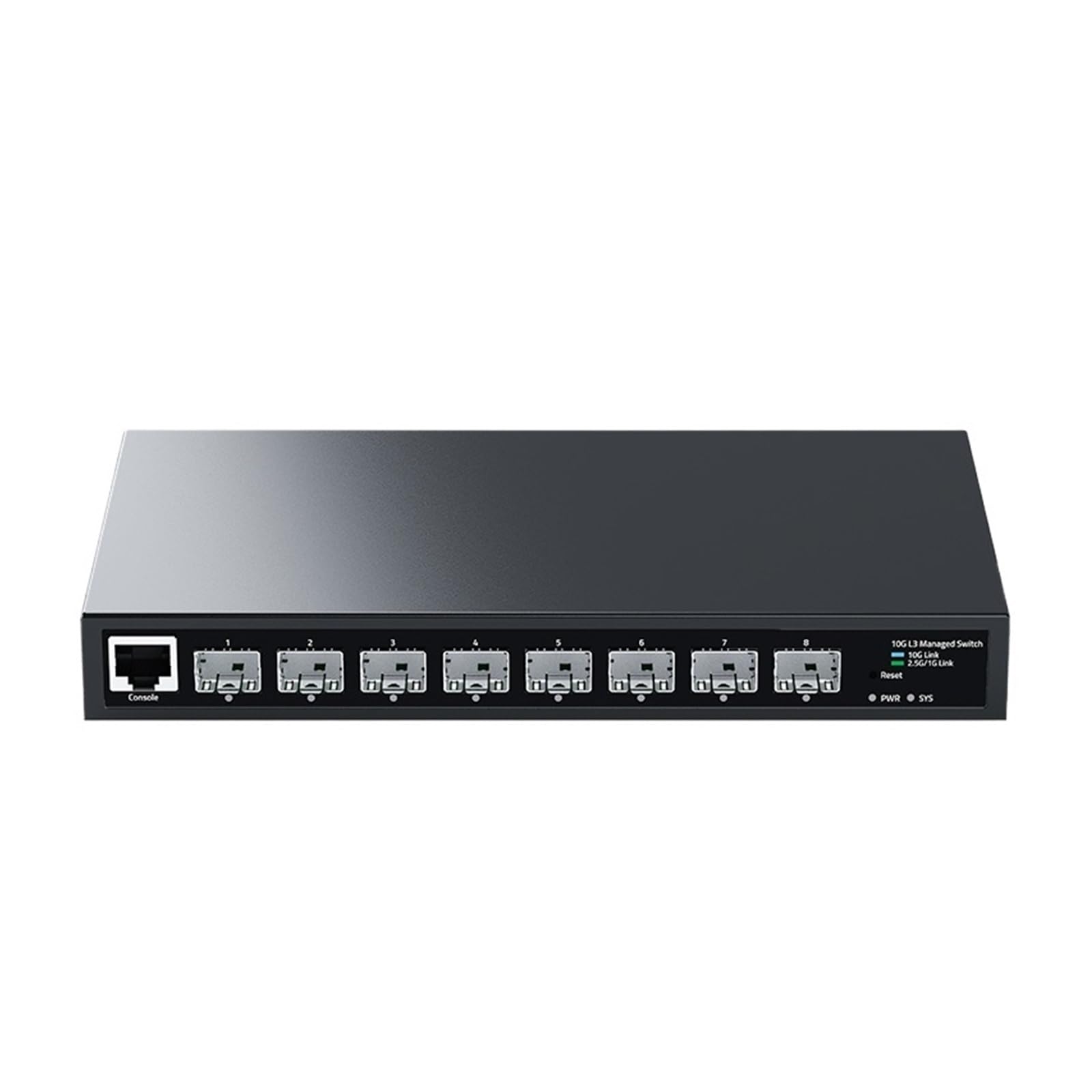
Figure 5.1: Front view of the BACODLUL ZX530S-8S 10G L3 Managed Network Switch, showing 8 SFP+ ports and a console port.
5.1 Front Panel
- 8x 10G SFP+ Ports: For high-speed fiber optic connections.
- 1x Console Port: RJ45 port for local management via CLI.
- LED Indicators: (Specific LED functions are not detailed in provided images, but typically include Power, Link/Activity for each port).
5.2 Rear Panel
- Power Input: DC 12V 2A power connector.
6. Setup
6.1 Physical Installation
- Unpack the Switch: Carefully remove the switch and all accessories from the packaging.
- Attach Rubber Feet: Apply the included rubber feet to the bottom of the switch to prevent slipping and provide stability.
- Placement: Place the switch on a stable, flat surface in a well-ventilated area. Ensure adequate space around the switch for airflow. Avoid placing it near heat sources or in direct sunlight.
6.2 Power Connection
- Connect the power adapter to the DC 12V 2A power input port on the rear panel of the switch.
- Plug the power adapter into a suitable AC power outlet (100-240V, 50/60Hz).
- The power LED indicator on the switch should illuminate, indicating that the device is receiving power.
6.3 Network Connection
- Insert compatible 10G SFP+ transceivers (not included) into the SFP+ ports as needed.
- Connect fiber optic cables from your network devices (servers, other switches, etc.) to the SFP+ transceivers.
- The Link/Activity LEDs for the connected ports should illuminate, indicating a successful connection and data activity.
6.4 Initial Configuration (Console Access)
- Connect the included console cable from the switch's console port to a serial port on your computer.
- Open a terminal emulation program (e.g., PuTTY, Tera Term) on your computer.
- Configure the serial port settings (typically 115200 baud rate, 8 data bits, no parity, 1 stop bit, no flow control).
- You should now be able to access the switch's command-line interface (CLI) for initial configuration, including IP address assignment, VLAN setup, and other management functions.
7. Operating the Switch
Once the switch is physically installed and powered on, and initial configuration is complete, it will begin forwarding network traffic according to its configuration.
7.1 Web Management Interface
The BACODLUL ZX530S-8S supports a web-based management interface. After assigning an IP address to the switch via the console or DHCP, you can access the web interface by entering the switch's IP address into a web browser.
- Login: Enter the default username and password (refer to the device's specific documentation or initial setup guide for default credentials).
- Configuration: Use the web interface to configure advanced features such as VLANs, LACP, QoS, security settings, and monitoring.
7.2 Key Features Overview
- VLANs: Create and manage Virtual Local Area Networks to segment your network and improve security and performance.
- LACP: Aggregate multiple physical links into a single logical link to increase bandwidth and provide link redundancy.
- DHCP: Configure the switch to act as a DHCP server or client, or to relay DHCP requests.
- Spanning Tree Protocol (STP/RSTP): Prevent network loops and ensure network stability.
- Jumbo Frames: Support for larger Ethernet frames (up to 10K) to improve network efficiency for high-bandwidth applications.
8. Maintenance
Regular maintenance ensures the longevity and optimal performance of your switch.
- Cleaning: Use a soft, dry cloth to clean the exterior of the switch. Do not use liquid or aerosol cleaners.
- Ventilation: Ensure that the ventilation openings are clear of dust and obstructions. Periodically clean dust from the vents using compressed air.
- Firmware Updates: Check the manufacturer's website periodically for firmware updates. Keeping the firmware updated can improve performance, add new features, and fix bugs.
- Environmental Conditions: Operate the switch within the specified environmental requirements (Working Temperature: 0~40°C, Operating Humidity: 10%~90% non-condensing).
9. Troubleshooting
This section addresses common issues you might encounter with your switch.
- No Power:
- Ensure the power adapter is securely connected to both the switch and a working power outlet.
- Verify the power outlet is functional by plugging in another device.
- Check the power adapter for any visible damage.
- No Link/Activity on Port:
- Check the fiber optic cable connection at both ends.
- Ensure the SFP+ transceiver is correctly seated in the port.
- Verify the connected device is powered on and functioning correctly.
- Check the port configuration (e.g., speed, duplex) on both the switch and the connected device.
- Cannot Access Web Management Interface:
- Ensure your computer is on the same network segment as the switch or has a route to the switch's IP address.
- Verify the switch's IP address is correctly configured.
- Try accessing the switch via the console port to check its network configuration.
- Clear your browser's cache or try a different browser.
- Network Performance Issues:
- Check for excessive network traffic or broadcast storms.
- Verify cable integrity and ensure no damaged cables are in use.
- Review switch logs for error messages or port flapping.
- Ensure proper VLAN configuration and avoid misconfigurations that could lead to performance degradation.
10. Specifications
Detailed technical specifications for the BACODLUL ZX530S-8S 10G L3 Managed Network Switch.

Figure 10.1: Detailed product parameters including port configuration, performance metrics, and supported network protocols.

Figure 10.2: Additional specifications covering lightning protection, environmental conditions, power, physical dimensions, and package contents.
10.1 General Specifications
| Parameter | Value |
|---|---|
| Product Name | 8-Port 10G Layer 3 Managed Switch |
| Model Number | ZX530S-8S |
| Port Definition | 8x 10G SFP+ Ports, 1x Console Port |
| Backplane Bandwidth | 160Gbps |
| Packet Forwarding Rate | 119.04Mpps |
| Packet Cache | 12Mbit |
| MAC Address Table | 16K |
| VLAN Range | 1-4094 (Max 4K VLANs) |
| Jumbo Frame | 10K |
| Forwarding Mode | Store-and-Forward |
10.2 Network Protocols
- IEEE 802.3: Ethernet Media Access Control (MAC) Protocol
- IEEE 802.3z: 1000BASE-X Gigabit Ethernet (Fiber Optic)
- IEEE 802.3az: Energy Efficient Ethernet
- IEEE 802.1w: Rapid Spanning Tree Protocol
- IEEE 802.3ae: 10 Gigabit Ethernet
- IEEE 802.3bz: 2.5GBASE-T Ethernet
10.3 Environmental & Power
| Parameter | Value |
|---|---|
| Lightning Protection | ESD Protection: 8kV (Air), 6kV (Contact, Class B) |
| Working Temperature | 0~40°C |
| Storage Temperature | -40~70°C |
| Operating Humidity | 10% ~ 90% (non-condensing) |
| Storage Humidity | 5% ~ 95% (non-condensing) |
| Voltage Supply | AC 100-240V 50/60Hz, DC 12V 2A |
| Power Consumption (idle) | 3.9W |
10.4 Physical Characteristics
| Parameter | Value |
|---|---|
| Product Size (L×W×H) | 222 x 126 x 28 mm |
| Package Size (L×W×H) | 259 x 228 x 60 mm |
| Bare Machine Weight | 0.62 KG |
| Finished Weight (with packaging) | 0.91 KG |
11. Warranty and Support
For warranty information and technical support, please refer to the Certificate of Compliance included in your package or visit the official BACODLUL website. Keep your purchase receipt for warranty claims.
For further assistance, please contact BACODLUL customer support through their official channels.