
Kisonli LED-918
Kisonli LED-918 RGB Soundbar Speaker User Manual
Model: LED-918
Introduction
Thank you for purchasing the Kisonli LED-918 RGB Soundbar Speaker. This manual provides detailed instructions for the proper setup, operation, and maintenance of your device. Please read this manual thoroughly before use to ensure optimal performance and to prevent damage.
Important Safety Information
- Do not expose the device to water or excessive moisture.
- Avoid placing the device near heat sources or in direct sunlight.
- Do not attempt to disassemble or repair the device yourself. Refer all servicing to qualified personnel.
- Use only the power cable provided with the device.
- Keep the device away from children and pets.
Package Contents
Please check the package for the following items:
- Kisonli LED-918 RGB Soundbar Speaker
- Power Cable
- AUX Audio Cable (3.5mm)
- User Manual (this document)

Image: Kisonli LED-918 RGB Soundbar Speaker packaging box, showing the speaker and its model number.
Product Overview
The Kisonli LED-918 is a versatile soundbar designed for desktop use, featuring RGB lighting, multiple playback options, and an integrated phone holder.
Front View
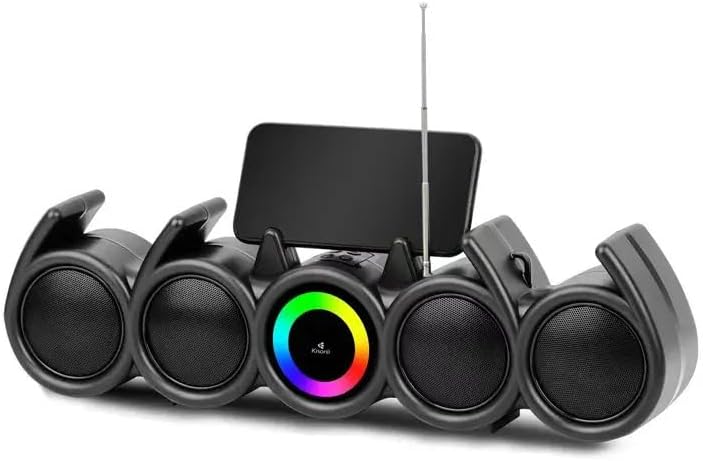
Image: Front view of the Kisonli LED-918 soundbar, showcasing the central RGB light ring, dual speakers, and the integrated phone holder with a smartphone placed in it.
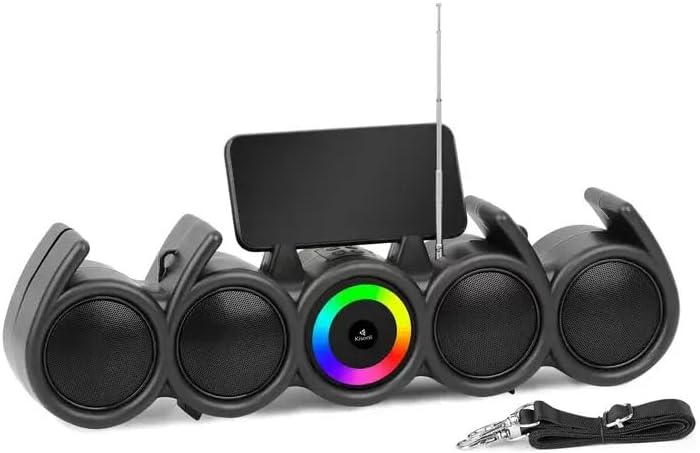
Image: Front view of the Kisonli LED-918 soundbar, similar to the previous image, but also showing an optional carrying strap attached to the side.
Rear View and Ports
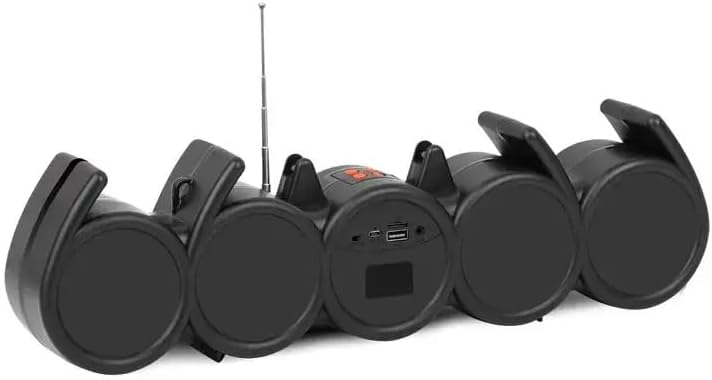
Image: Rear view of the Kisonli LED-918 soundbar, highlighting the various input ports including USB, TF card slot, and AUX input.
Controls
- Power Button: Located on the front/top, used to turn the speaker on or off.
- Mode Button: Cycles through input modes (AUX, TF, USB).
- Light Button: Short press to change RGB lighting effects.
- Volume Control: Typically integrated with other buttons or a dedicated knob.
Setup Guide
- Placement: Place the Kisonli LED-918 soundbar on a stable, flat surface, preferably under your computer monitor or TV for optimal audio projection.
- Power Connection: Connect the provided power cable to the DC 5V input port on the back of the soundbar and then plug it into a standard USB power source (e.g., computer USB port, USB wall adapter).
- Initial Power On: Press and hold the Power button (usually located on the front or top of the speaker) for a few seconds until the RGB lights illuminate, indicating the speaker is on.
Operating Instructions
Power On/Off
- To turn on: Press and hold the Power button until the RGB lights activate.
- To turn off: Press and hold the Power button again until the lights turn off and the speaker powers down.
Adjusting Volume
Volume control is typically managed via the connected device (computer, smartphone) or dedicated volume buttons on the soundbar, if present. Refer to the specific button layout on your unit.
RGB Lighting Control
The soundbar features a central RGB light ring. Short press the Light Button to cycle through four distinct dynamic lighting effects. Pressing it again will switch to the next effect.
Playback Modes
The Kisonli LED-918 supports multiple audio input sources. Press the Mode Button to switch between available modes.
- AUX Input:
Connect your audio source (e.g., computer, smartphone) to the soundbar's AUX input port using a 3.5mm audio cable. Select AUX mode using the Mode button. Audio will play from the connected device.
- TF Card Playback:
Insert a TF (MicroSD) card containing MP3 audio files into the TF card slot on the back of the soundbar. The speaker will automatically detect the card and begin playback. Use the Mode button to select TF card mode if it doesn't switch automatically.
- USB Flash Drive Playback:
Insert a USB flash drive (U-disk) containing MP3 audio files into the USB port on the back of the soundbar. The speaker will automatically detect the drive and begin playback. Use the Mode button to select USB mode if it doesn't switch automatically.
Integrated Phone Holder Usage
The soundbar includes a built-in stand designed to securely hold your smartphone. Simply place your device into the designated slot for hands-free viewing during video calls, media consumption, or as a convenient display.
Maintenance
- Cleaning: Use a soft, dry cloth to wipe the surface of the soundbar. Do not use liquid cleaners or abrasive materials.
- Storage: When not in use for extended periods, store the soundbar in a cool, dry place away from direct sunlight and extreme temperatures.
- Cable Care: Avoid bending or crimping the power and audio cables excessively to prevent damage.
Troubleshooting
| Problem | Possible Cause | Solution |
|---|---|---|
| No power | Power cable not connected properly; Power source not active. | Ensure the power cable is securely connected to both the soundbar and a working USB power source. Try a different USB port or adapter. |
| No sound | Incorrect input mode selected; Volume too low; Audio cable not connected. | Press the Mode button to select the correct input (AUX, TF, USB). Increase the volume on both the soundbar and the connected device. Ensure the AUX cable is fully inserted. |
| RGB lights not working | Light function turned off; Device malfunction. | Short press the Light button to activate or cycle through lighting effects. If the issue persists, contact customer support. |
| TF/USB playback not working | Incorrect file format; Corrupted media; Card/drive not inserted correctly. | Ensure audio files are in MP3 format. Reinsert the TF card or USB drive. Try a different TF card or USB drive. |
Specifications
- Model Name: LED-918
- Speaker Type: Soundbar
- Output Power: Dual 8W drivers (16W total)
- Connectivity: AUX, TF Card, USB (U-disk)
- Lighting: RGB Light Ring with dynamic effects
- Special Features: Integrated Phone Holder
- Product Dimensions: 38 x 7 x 7 cm
- Item Weight: 650 Grams
- Included Components: Power Cable
- Manufacturer: Kisonli
- Country of Origin: China
Warranty and Support
The Kisonli LED-918 RGB Soundbar Speaker comes with a standard manufacturer's warranty. For detailed warranty information, technical support, or service inquiries, please refer to the warranty card included in your package or contact your retailer or the official Kisonli customer support channels.
Please retain your proof of purchase for warranty claims.