
1. Introduction
This manual provides essential information for the safe and efficient use of your XIAOMI Redmi 15C smartphone. Please read this guide thoroughly before operating your device to ensure proper functionality and to prevent damage.
The Redmi 15C is designed to offer a reliable mobile experience with its large display, powerful battery, and capable camera system.
2. Safety Information
- Battery Safety: Do not attempt to replace the battery yourself. Use only authorized service centers. Avoid exposing the device to extreme temperatures or direct sunlight.
- Charging: Use only the original USB cable provided. A power adapter is not included; use a compatible 33W fast charger from a reputable manufacturer.
- Water and Dust Resistance: The device features IP64 dust and water resistance. This rating indicates protection against dust ingress and splashing water from any direction. It is not designed for submersion in water.
- Disposal: Dispose of the device and its battery responsibly according to local regulations. Do not dispose of in household waste.
- Driving Safety: Always prioritize driving safety. Do not use your phone while driving unless absolutely necessary and in compliance with local laws.
3. Package Contents
Verify that your package contains the following items:
- XIAOMI Redmi 15C Smartphone
- USB Cable (Type-C)
- SIM Eject Tool
- Quick Start Guide
- Warranty Card
Note: A power adapter is not included in the box and must be purchased separately. For optimal charging, use a 33W fast charger.
4. Device Overview
Familiarize yourself with the physical components of your Redmi 15C.
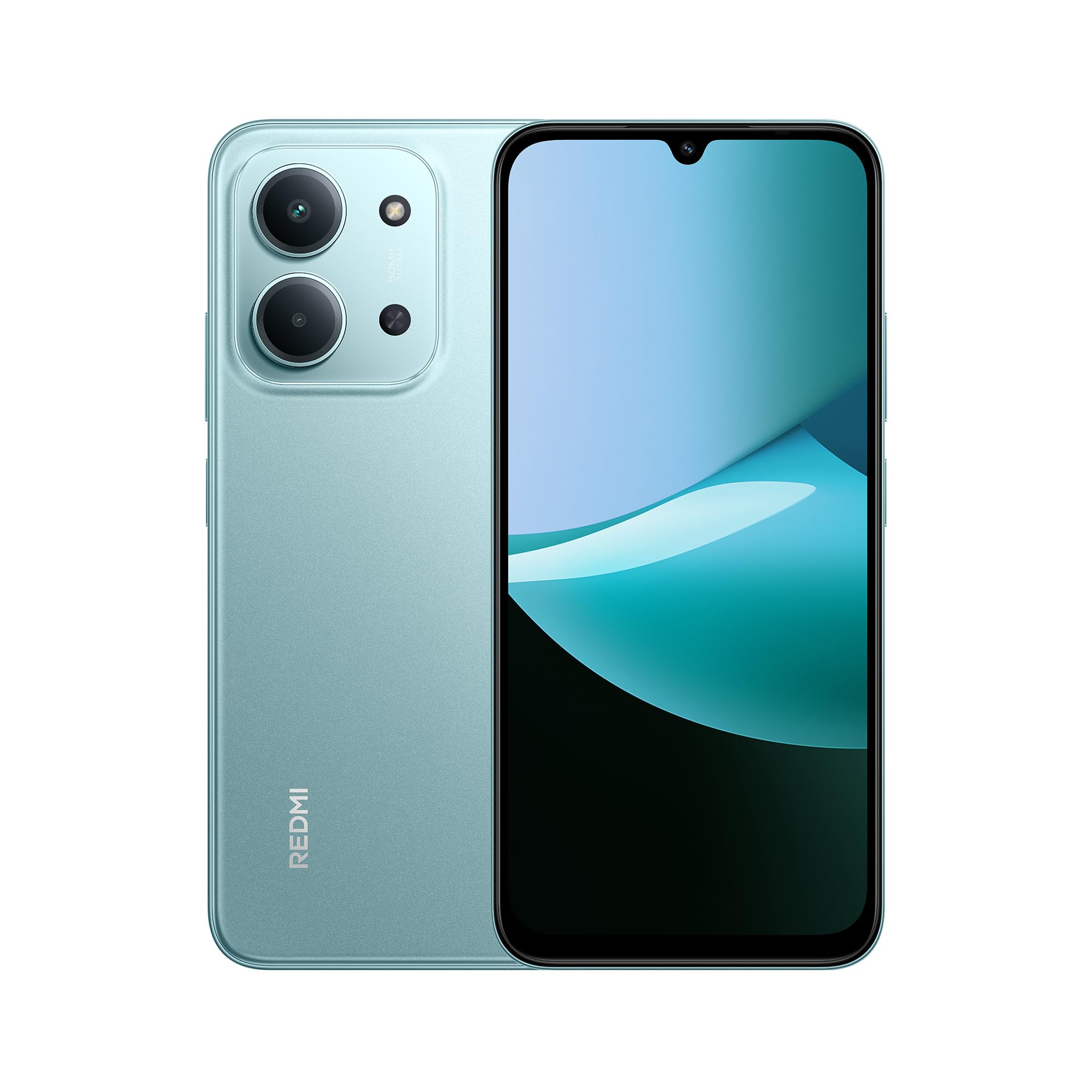
Front and rear view of the XIAOMI Redmi 15C smartphone in Mint Green.

The slim 7.99mm body of the Redmi 15C, designed for comfortable handling.
Physical Components:
- Power Button: Located on the side, used to turn the device on/off or wake/sleep the screen.
- Volume Buttons: Located near the power button, used to adjust media and call volume.
- USB Type-C Port: Located at the bottom, used for charging and data transfer.
- SIM/SD Card Tray: Located on the side, for inserting SIM cards and a microSD card.
- Front Camera: Located at the top of the display.
- Rear Camera System: Located on the back, featuring a 50MP AI dual camera.
- Speaker: For audio output.
- Microphone: For voice input during calls and recordings.
5. Getting Started (Setup)
5.1. Inserting SIM/SD Card
- Locate the SIM card tray on the side of your device.
- Insert the SIM eject tool into the small hole next to the tray and press firmly until the tray pops out.
- Place your Nano-SIM card(s) and/or microSD card into the designated slots on the tray. Ensure the gold contacts face downwards. The device supports Dual SIM functionality.
- Carefully reinsert the tray into the device.
5.2. Powering On/Off
- To Power On: Press and hold the Power button until the XIAOMI logo appears.
- To Power Off: Press and hold the Power button until the power menu appears, then select "Power off".
- To Restart: Press and hold the Power button until the power menu appears, then select "Restart".
5.3. Initial Setup Wizard
Upon first power-on, the device will guide you through the initial setup process. Follow the on-screen instructions to:
- Select your language and region.
- Connect to a Wi-Fi network.
- Accept terms and conditions.
- Sign in to your Google account or create a new one.
- Set up screen lock (PIN, pattern, password, fingerprint, face unlock).
- Restore data from a previous device (optional).
6. Basic Operation
6.1. Navigation
The Redmi 15C features a responsive touchscreen. Use gestures such as tapping, swiping, pinching, and spreading to navigate the interface.
6.2. Making Calls and Sending Messages
- Calls: Open the "Phone" app, enter the number, and tap the call icon.
- Messages: Open the "Messages" app, tap the new message icon, enter the recipient and your message.
6.3. Connecting to Wi-Fi and Bluetooth
- Go to Settings > Wi-Fi or Settings > Bluetooth.
- Toggle the respective switch to turn it on.
- Select the desired network or device from the list and enter the password if prompted.
6.4. Using the Camera
The Redmi 15C is equipped with a 50MP AI dual camera system for capturing photos and videos.

Detail of the 50MP AI dual camera system on the Redmi 15C, designed to capture clear and vibrant images.
- Open the "Camera" app.
- Select your desired mode (Photo, Portrait, Video, etc.).
- Tap the shutter button to take a picture or start/stop recording a video.
6.5. Battery Management
The device features a massive 6000mAh battery for extended usage.

Illustration of the 6000mAh battery inside the Redmi 15C, providing up to 82 hours of music playback.
To charge your device:

The Redmi 15C supports 33W fast charging, allowing the battery to reach 50% in approximately 31 minutes.
- Connect the USB Type-C cable to the device and a compatible 33W fast charger.
- Avoid overcharging; disconnect the charger once the battery is full.
- To optimize battery life, adjust screen brightness, disable unnecessary features, and close background apps.
7. Advanced Features
7.1. Processor Performance
The Redmi 15C is powered by a MediaTek Helio G81-Ultra octa-core processor, ensuring smooth performance for daily tasks and applications.

Visual representation of the powerful MediaTek Helio G81-Ultra octa-core processor, designed for consistent smooth performance.
7.2. Immersive Display
Experience content on the immersive 6.9-inch display with a 120Hz AdaptiveSync refresh rate, providing a smoother visual experience.

The 6.9-inch display of the Redmi 15C, featuring up to 120Hz AdaptiveSync for a fluid user interface.
7.3. AI Features with Google Gemini
The Redmi 15C integrates with Google Gemini, an AI assistant designed to help with various tasks such as writing, brainstorming, and learning.

The Redmi 15C demonstrating interaction with Google Gemini, an AI assistant for various tasks. Setup is required for this feature.
8. Maintenance
8.1. Cleaning the Device
- Use a soft, lint-free cloth to clean the screen and body of the device.
- Avoid using harsh chemicals or abrasive materials.
- Do not spray cleaners directly onto the device.
8.2. Software Updates
Regularly check for and install software updates to ensure your device has the latest features, security patches, and performance improvements.
- Go to Settings > About phone > MIUI version (or similar for Hyper OS).
- Tap "Check for updates" and follow the on-screen instructions.
8.3. Storage Management
To maintain optimal performance, regularly manage your device's storage.
- Delete unnecessary files, photos, and videos.
- Uninstall unused applications.
- Move large files to a microSD card (if installed) or cloud storage.
9. Troubleshooting
If you encounter issues with your device, try the following solutions:
| Issue | Solution |
|---|---|
| Device does not turn on | Ensure the battery is charged. Connect to a charger for at least 10 minutes, then try powering on. |
| Apps are crashing or freezing | Restart the device. Clear the cache of the problematic app (Settings > Apps > [App Name] > Storage > Clear cache). |
| Poor network signal | Check if your SIM card is properly inserted. Try restarting the device. Ensure you are in an area with network coverage. |
| Battery drains quickly | Reduce screen brightness. Close background apps. Disable unnecessary features like GPS or Bluetooth when not in use. |
| Device is slow or unresponsive | Clear storage space. Restart the device. Check for system updates. |
If problems persist, contact customer support or visit an authorized service center.
10. Specifications
Detailed technical specifications for the XIAOMI Redmi 15C.
| Feature | Specification |
|---|---|
| Model Name | 15C |
| Operating System | Hyper OS 2 |
| Processor | MediaTek Helio G81-Ultra Octa-core |
| RAM | 4 GB |
| Storage Capacity | 128 GB |
| Display Size | 6.9 Inches |
| Display Resolution | 720 x 1600 |
| Refresh Rate | 120 Hz |
| Rear Camera | 50 MP AI Dual Camera |
| Front Camera | Yes |
| Battery Capacity | 6000 mAh |
| Talk Time | Up to 30 Hours |
| Charging | 33W Fast Charging Compatible |
| Connectivity | 4G, Wi-Fi, Bluetooth, GPS |
| SIM Support | Dual SIM |
| Dimensions (L x W x H) | 17.3 x 8.1 x 0.82 cm |
| Weight | 400 g |
| Special Features | Wi-Fi Hotspot, Integrated GPS, IP64 Dust and Water Resistance |
11. Warranty and Support
Your XIAOMI Redmi 15C smartphone comes with a standard manufacturer's warranty. Please refer to the warranty card included in your package for specific terms and conditions, including warranty period and coverage details.
For technical support, service, or further inquiries, please visit the official XIAOMI support website or contact their customer service. Keep your proof of purchase for warranty claims.


