
1. Introduction
This manual provides detailed instructions for the proper installation, operation, and maintenance of the Nova Star VX1000 LED Screen Video Processor. The VX1000 is an all-in-one controller designed to integrate video processing and video control functionalities for LED display systems. It is suitable for various applications, including medium to high-end rental setups, stage control systems, and fine-pitch LED displays. Please read this manual thoroughly before using the device to ensure optimal performance and safety.
2. Product Overview
The Nova Star VX1000 is a powerful video processor capable of driving up to 6.5 million pixels. It features a comprehensive set of input and output connectors to accommodate diverse video sources and display configurations.
2.1 Front Panel
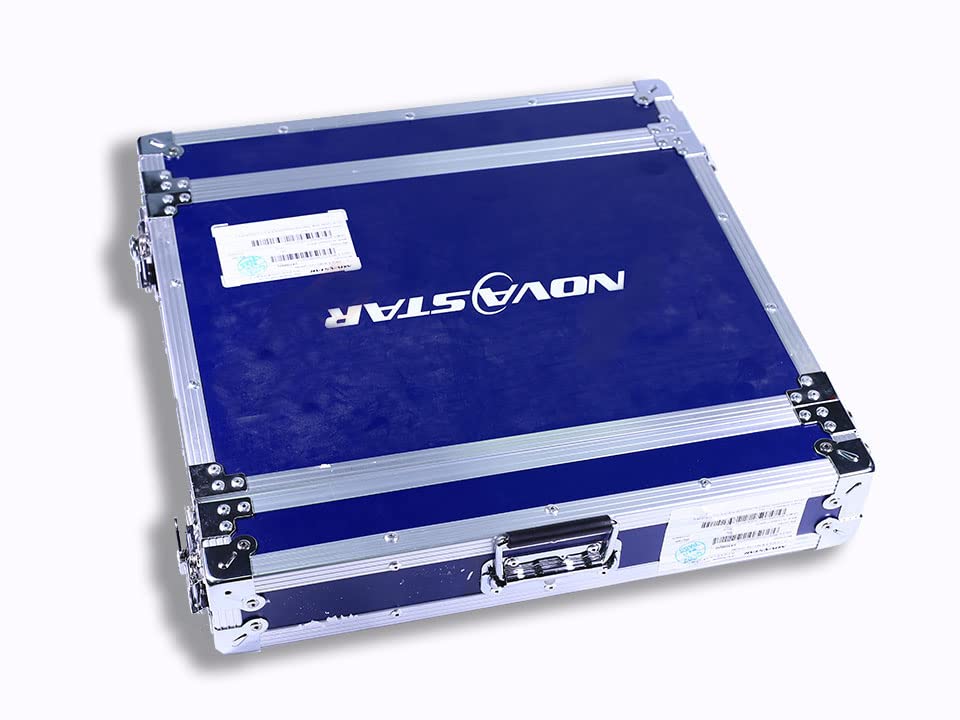
Figure 2.1: Front view of the Nova Star VX1000 LED Screen Video Processor. This image shows the front panel with the display screen, control knob, and various function buttons for operation.
The front panel provides access to the device's display screen, control knob, and various buttons for menu navigation, input selection, and output configuration.
2.2 Rear Panel and Connectors

Figure 2.2: Rear view of the Nova Star VX1000 LED Screen Video Processor. This image highlights the extensive array of input and output ports, including HDMI, DVI, SDI, Ethernet, and optical fiber connections.
The rear panel houses all the input and output connectors.
- Input Connectors:
- 1x HDMI 1.4 (IN & LOOP)
- 1x HDMI 1.4
- 1x DVI (IN & LOOP)
- 1x DVI
- 1x 3G-SDI (IN & LOOP)
- 1x 10G optical fiber port (OPT1)
- Output Connectors:
- 10x Gigabit Ethernet ports (drives up to 6.5 million pixels, max width 10,240 pixels, max height 8192 pixels)
- 2x Fiber outputs (OPT 1 copies output on 10 Ethernet ports; OPT 2 copies or backs up output on 10 Ethernet ports)
- 1x HDMI 1.3 (for monitoring or video output)
- Self-adaptive OPT 1: Can function as either a video input or a sending card output depending on the connected device.
- Audio: Audio input accompanied with HDMI input source, audio output via a multifunction card, and output volume adjustment supported.

Figure 2.3: Detailed close-up of the rear panel connectors on the Nova Star VX1000, illustrating the labels for each input and output port for easy identification during setup.
3. Setup
Follow these steps to set up your Nova Star VX1000 video processor.
- Unpacking: Carefully unpack the VX1000 unit and all accessories from its packaging. Ensure all components are present, including the power cable, USB cable, and any included video cables.

Figure 3.1: The Nova Star VX1000 unit displayed with its various accessories, including cables and documentation, as typically found upon unpacking.
- Mounting: The VX1000 is designed for rack mounting. Secure the unit into a standard 19-inch equipment rack using appropriate rack screws. Ensure adequate ventilation around the unit.
- Power Connection: Connect the provided power cable to the AC power inlet on the rear panel of the VX1000 and then to a suitable power outlet.
- Input Source Connection: Connect your video input sources (e.g., computer, media player, camera) to the desired input ports on the VX1000 rear panel (HDMI, DVI, SDI, or OPT1).
- LED Display Connection: Connect the Gigabit Ethernet output ports (up to 10 ports) to your LED display receiving cards. For larger or redundant setups, utilize the Fiber outputs (OPT1/OPT2).
- Monitoring Output (Optional): If desired, connect a monitor to the HDMI 1.3 output port for real-time monitoring of the processed video signal.
- Control Connection: Connect a computer to the VX1000 via the USB port for configuration and control using NovaLCT software (not included, typically downloaded from Nova Star website).
4. Operating Instructions
This section outlines the basic steps for operating the Nova Star VX1000.
- Power On: Ensure all connections are secure, then press the power button on the front panel to turn on the VX1000. The front display will illuminate.
- Initial Configuration: Upon first power-on or after a factory reset, you may need to configure basic display parameters. Use the control knob and buttons on the front panel to navigate the on-screen menu.
- Input Selection: Select the desired video input source using the input selection buttons or through the menu. The active input will be displayed on the front panel.
- Output Configuration: Configure the output resolution and mapping to match your LED display's specifications. This is typically done via the NovaLCT software connected to the USB port. Refer to the NovaLCT software manual for detailed instructions on screen configuration and mapping.
- Brightness and Color Adjustment: Adjust brightness, contrast, and color settings as needed through the front panel menu or NovaLCT software to optimize the visual quality of your LED display.
- Saving Settings: After making configurations, ensure you save your settings to prevent loss upon power cycle.
- Power Off: To power off the unit, press and hold the power button until the unit shuts down, or use the power off option in the system menu.
5. Maintenance
Regular maintenance ensures the longevity and reliable operation of your VX1000.
- Cleaning:
- Periodically clean the exterior of the unit with a soft, dry cloth.
- Do not use liquid cleaners or aerosols directly on the unit.
- Ensure ventilation openings are free from dust and debris to prevent overheating.
- Firmware Updates: Check the official Nova Star website regularly for firmware updates. Keeping the firmware updated can improve performance, add new features, and resolve potential issues. Follow the provided instructions carefully when performing firmware updates.
- Environmental Conditions: Operate the VX1000 within its specified environmental conditions (temperature, humidity) to prevent damage. Avoid exposing the unit to extreme temperatures, direct sunlight, or high humidity.
- Storage: When not in use for extended periods, store the VX1000 in a dry, dust-free environment, preferably in its original packaging or a protective flight case.

Figure 5.1: Two Nova Star branded flight cases, designed for secure transport and storage of the VX1000 video processor and its accessories.
6. Troubleshooting
This section provides solutions to common issues you might encounter with the VX1000.
| Problem | Possible Cause | Solution |
|---|---|---|
| No power | Power cable disconnected; power outlet faulty; unit fault. | Check power cable connection; try a different power outlet; contact support if issue persists. |
| No video output on LED display | Incorrect input selected; output cables disconnected; LED display not configured correctly; resolution mismatch. | Verify input selection; check Ethernet/Fiber cable connections; ensure LED display mapping and resolution are correct in NovaLCT; adjust output resolution on VX1000. |
| Input signal not detected | Source device off; cable faulty; input port faulty. | Ensure source device is powered on and outputting signal; try a different video cable; try a different input port on the VX1000. |
| Image flickering or distortion | Poor cable connection; signal interference; incorrect refresh rate. | Secure all cable connections; ensure cables are not too long or near interference sources; verify refresh rate settings. |
| Unit overheating | Blocked ventilation; operating in high ambient temperature. | Ensure ventilation openings are clear; operate in a well-ventilated area within specified temperature range. |
7. Specifications
Key technical specifications for the Nova Star VX1000 LED Screen Video Processor.
- Model: Nova Star VX1000
- Manufacturer: NOVA STAR
- Pixel Capacity: Up to 6.5 million pixels
- Maximum Width: 10,240 pixels
- Maximum Height: 8,192 pixels
- Input Connectors: 2x HDMI 1.4 (one with loop), 2x DVI (one with loop), 1x 3G-SDI (with loop), 1x 10G optical fiber (OPT1, self-adaptive)
- Output Connectors: 10x Gigabit Ethernet ports, 2x Fiber outputs (OPT1, OPT2), 1x HDMI 1.3 (monitoring)
- Audio: HDMI audio input, multifunction card audio output, volume adjustment
- Dimensions (D x W x H): 11.81"D x 17.72"W x 1.57"H (483 x 351 x 50mm)
- Weight: 6300g (6.3 kg)
- Color: Black
- UPC: 731140911986
- ASIN: B0FJM5CV4N
8. Warranty and Support
For warranty information and technical support, please refer to the official Nova Star documentation included with your product or visit the official Nova Star website.
If you encounter issues that cannot be resolved using the troubleshooting guide, please contact your authorized dealer or Nova Star customer support for assistance.