
Important Safety Instructions
Please read this manual thoroughly before using the appliance and save it for future reference. Failure to follow these instructions may result in fire, electric shock, or injury.
- Always plug heaters directly into a wall outlet/receptacle. Never use with an extension cord or relocatable power tap (outlet/power strip).
- This heater is hot when in use. To avoid burns, do not let bare skin touch hot surfaces. Use handles when moving this heater.
- Extreme caution is necessary when any heater is used by or near children or invalids and whenever the heater is left operating and unattended.
- Do not operate any heater with a damaged cord or plug or after the heater malfunctions, has been dropped or damaged in any manner.
- Do not use outdoors.
- To disconnect heater, turn controls to OFF, then remove plug from outlet.
- Do not insert or allow foreign objects to enter any ventilation or exhaust opening as this may cause an electric shock or fire, or damage the heater.
- To prevent a possible fire, do not block air intakes or exhaust in any manner. Do not use on soft surfaces, like a bed, where openings may become blocked.
- A heater has hot and arcing or sparking parts inside. Do not use it in areas where gasoline, paint, or flammable vapors or liquids are used or stored.
- Use this heater only as described in this manual. Any other use not recommended by the manufacturer may cause fire, electric shock, or injury to persons.
- Always plug heaters directly into a wall outlet/receptacle. Never use with an extension cord or relocatable power tap (outlet/power strip).
Product Overview
The Dreo Space Heater DR-HSH020 is a compact and powerful heating solution designed for indoor use. It features advanced heating technology and multiple safety features.

Figure 1: Front view of the Dreo Space Heater DR-HSH020 and its remote control.
Key Features:
- Fast Warm Air Delivery: Powered by 1500W Hyperamics tech, delivers warmth in just 2 seconds and produces 53.9% more heated air than traditional heaters.
- Vertical Tilt for Full-Body Warmth: Manually tilt the portable heater from 0°-20°-40°-60°, allowing you to direct heat precisely.
- Unbreakable Safety: Features advanced tip-over protection, V0 flame retardant materials, overheat protection, and a safety plug, all certified by ETL.
- Precise Temperature Control: Advanced NTC chipset allows setting temperature from 41-95℉ in precise 1℉ increments for energy-saving comfort.
- Quiet Operation: Uses a brushless DC motor and winglet fan design to reduce turbulence, operating as quietly as 34dB.
- Multiple Modes: Offers 3 heat levels and 3 fan levels.
- Convenient Controls: Features a touch panel, 12-hour timer, and remote control for ease of use.
- Easy Portability: Designed with an easy-carry handle.
Setup
Follow these steps to set up your Dreo Space Heater:
- Unpack: Carefully remove the heater and all accessories from the packaging.
- Placement: Place the heater on a firm, level surface. Ensure there is at least 3 feet (0.9 meters) of clear space around the heater to allow for proper airflow.
- Power Connection: Plug the heater directly into a 120V AC, 60Hz wall outlet. Do not use extension cords or power strips. The power cord is approximately 6 feet long.
- Initial Check: Ensure the power cord is not damaged and the plug is fully inserted into the outlet.
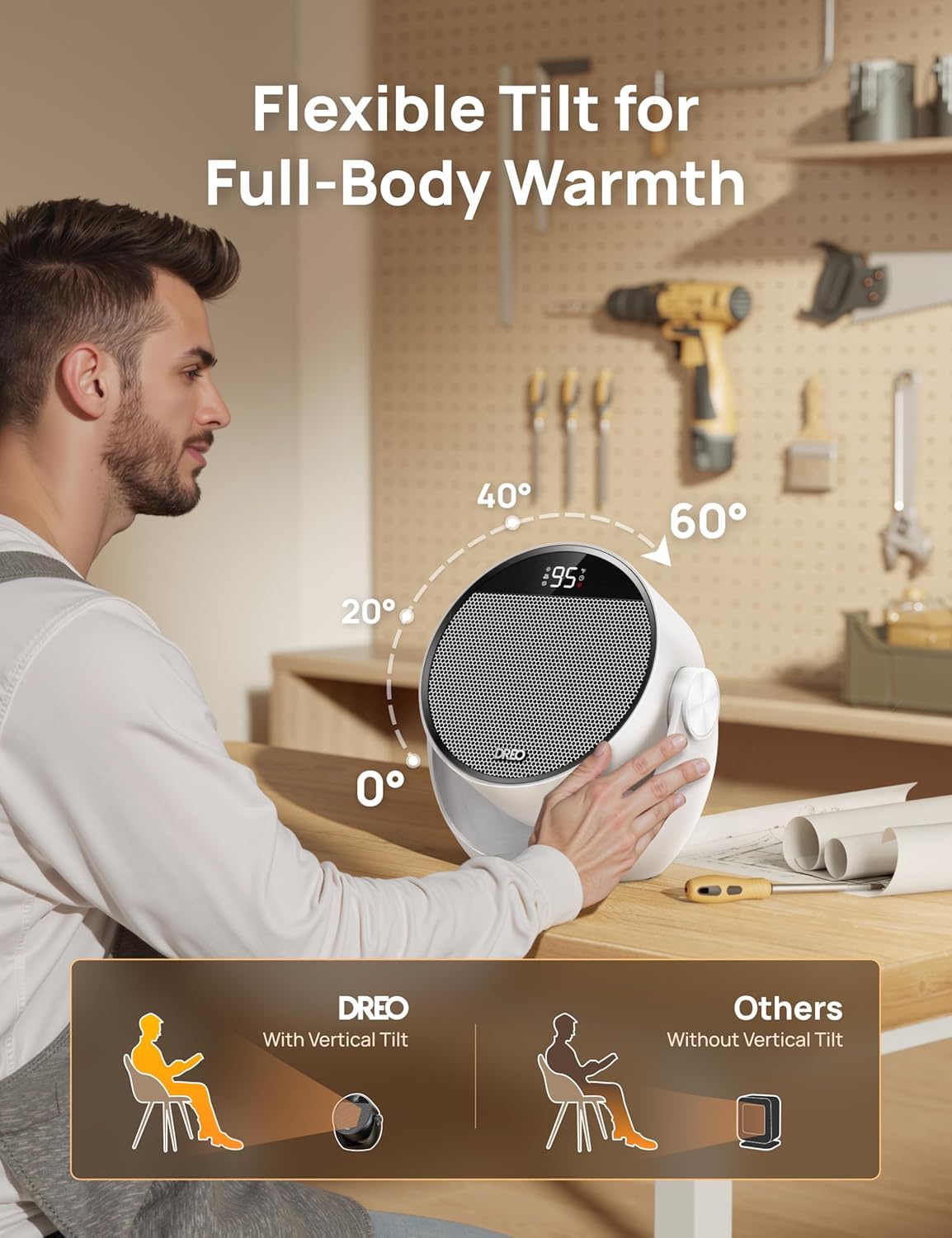
Figure 2: The compact design allows for versatile placement on surfaces like desks or floors.
Operating Instructions
The Dreo Space Heater offers various modes and settings for optimal comfort.
Control Panel and Remote:
The heater can be controlled via the touch panel on top of the unit or the included remote control. The remote control offers all the same functions as the touch panel, with an additional light button to dim the display.
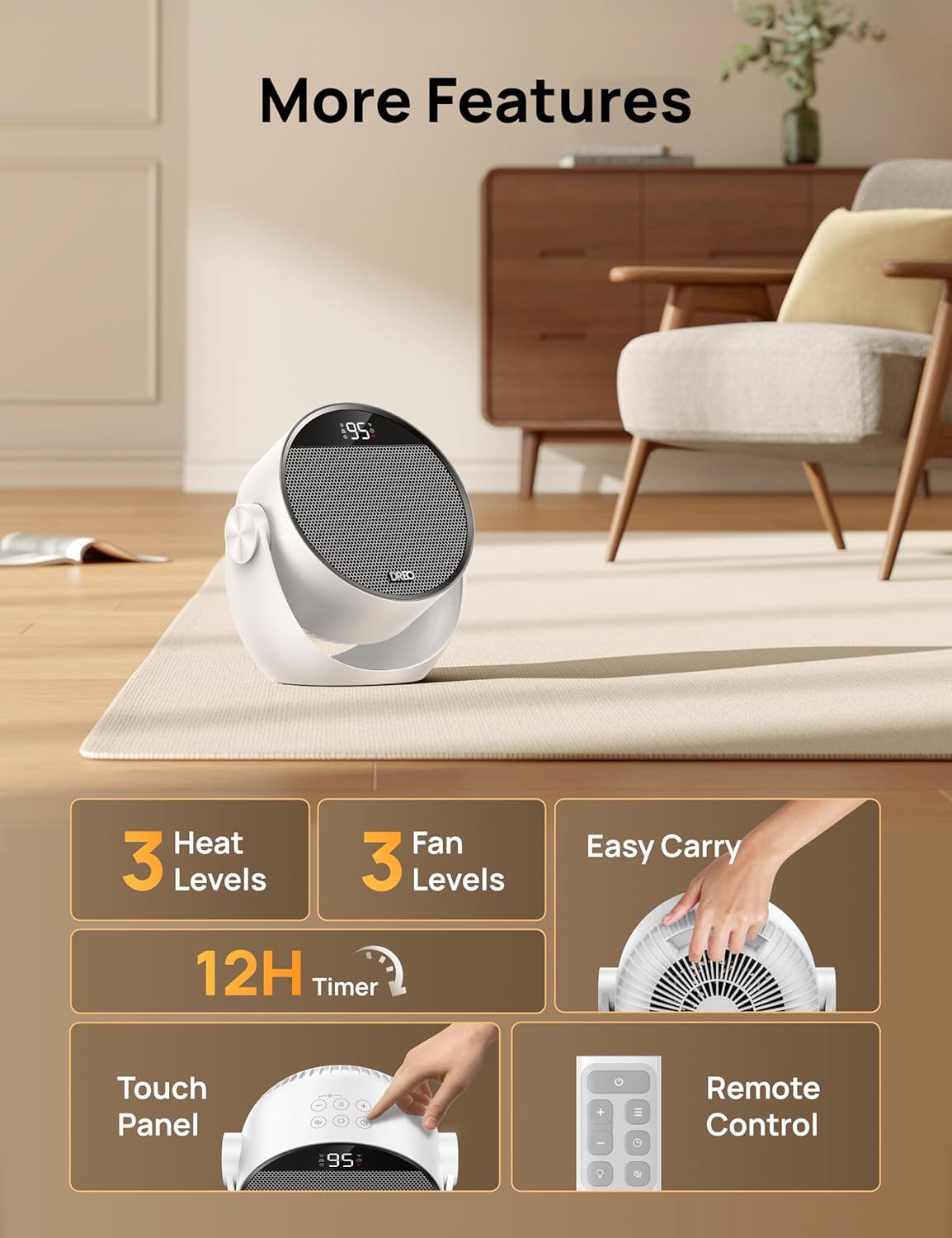
Figure 3: The intuitive touch panel and remote control for easy operation.
Power On/Off:
- Press the Power Button on the control panel or remote to turn the heater on or off.
- A small red icon will illuminate when the unit has power, indicating it is ready for use.
Operating Modes:
Press the Mode Button to cycle through the available modes:
- Heat Mode (H1, H2, H3): Provides heating at three different power levels. H3 is the highest heat output.
- Fan Mode (F1, F2, F3): Operates as a fan without heat, with three fan speed settings.
- ECO Mode: In ECO mode, you set a desired temperature. The heater will automatically adjust its heating power (H1, H2, or H3) to maintain the set temperature, optimizing energy consumption.
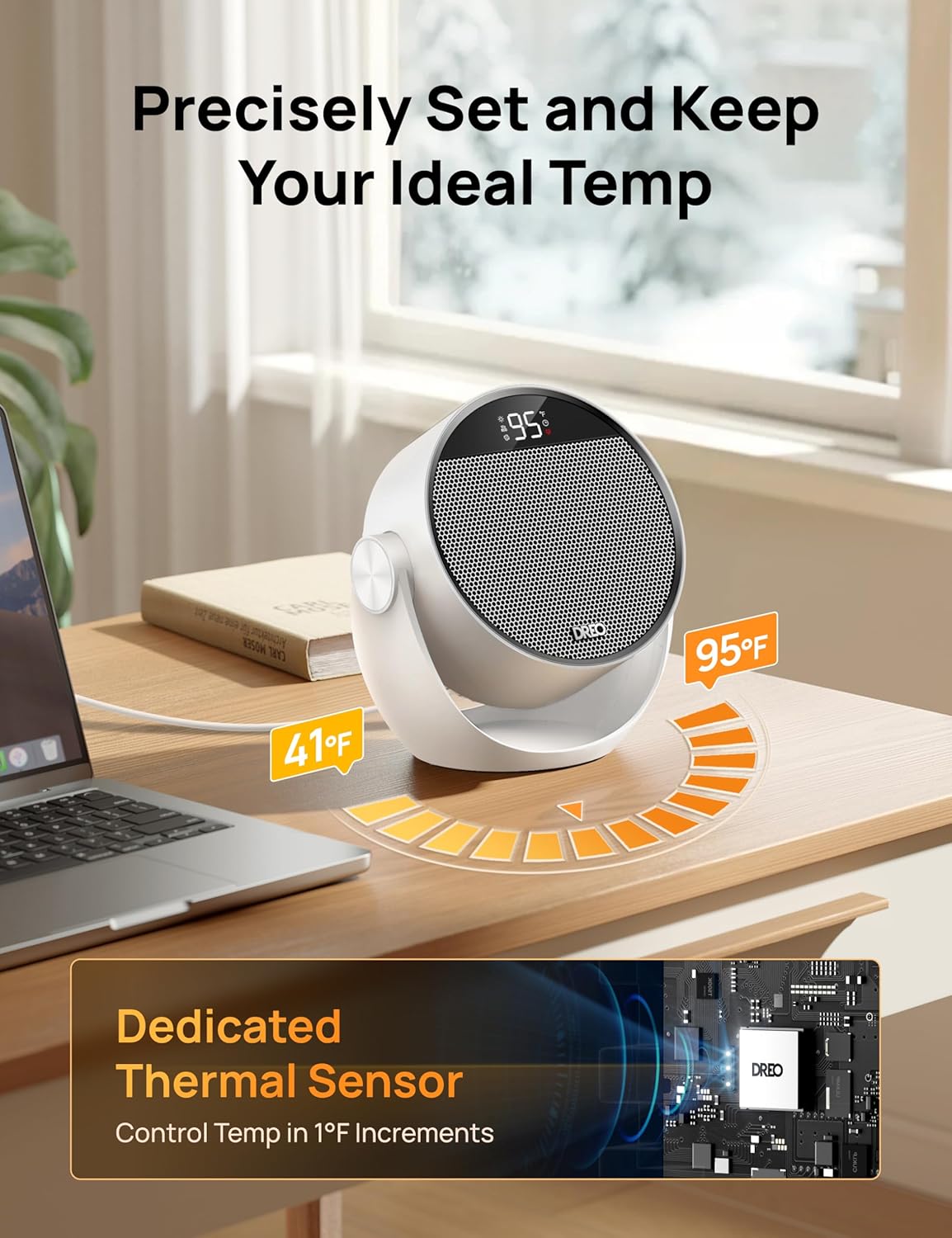
Figure 4: Precise temperature control from 41°F to 95°F in 1°F increments.
Temperature Adjustment:
- In Heat or ECO mode, use the + and - buttons to adjust the desired temperature between 41°F and 95°F.
Timer Function:
- Press the Timer Button to set the heater to automatically turn off after a set period (up to 12 hours). Each press increases the timer by 1 hour.
Child Lock:
- To activate Child Lock, press and hold the "+" and "Mode" buttons simultaneously for 3 seconds. The display will show 'LC'.
- When Child Lock is active, all buttons on the control panel are disabled.
- To deactivate, press and hold the "+" and "Mode" buttons simultaneously again for 3 seconds.
Mute Function:
- Press the Mute Button on the control panel or remote to turn off the button press sounds.
Adjustable Tilt:
- Manually adjust the heater's tilt angle to direct airflow. The heater can be tilted to 0°, 20°, 40°, or 60° for optimal personal comfort.
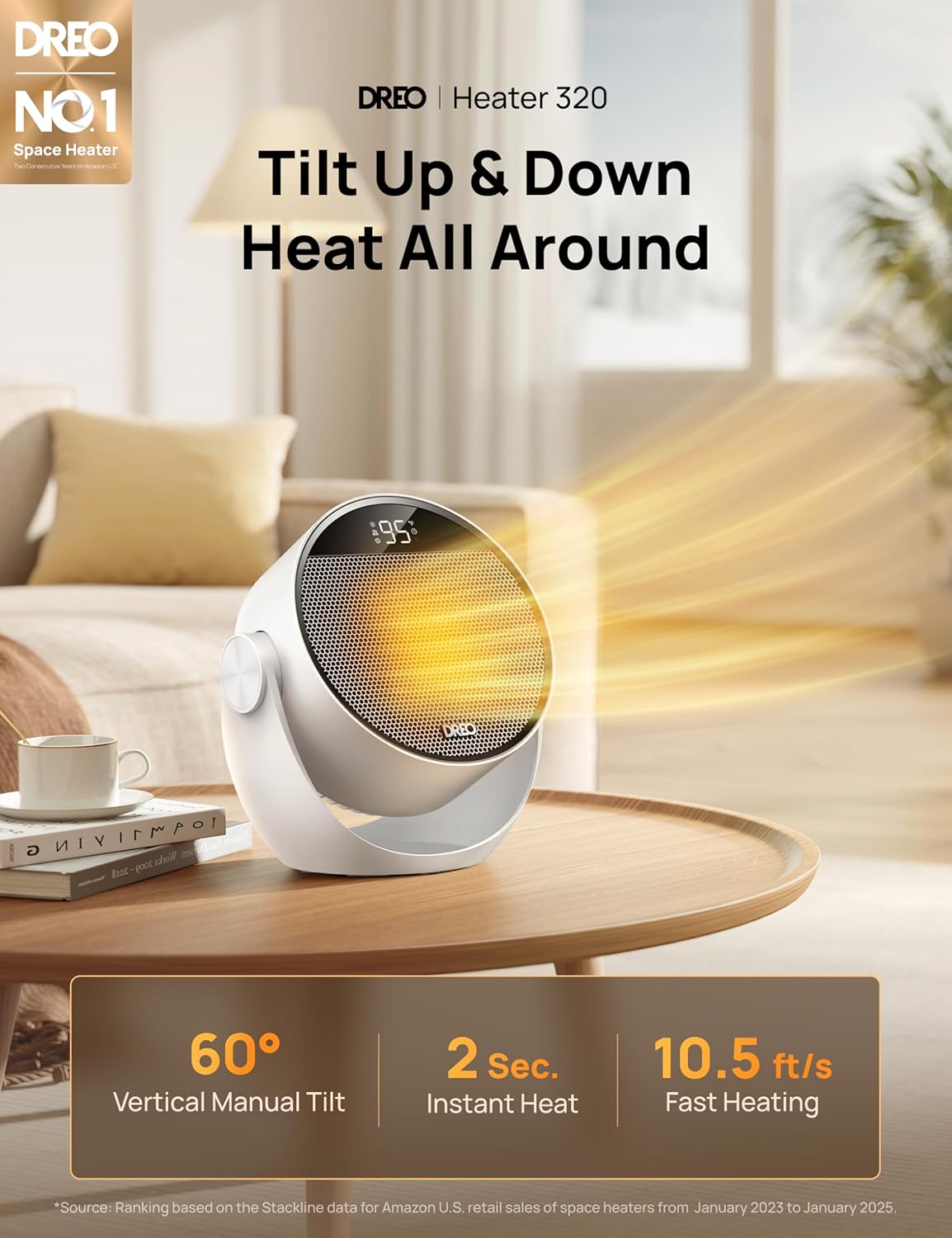
Figure 5: The 60° vertical manual tilt allows for precise heat direction.
Maintenance
Proper maintenance ensures the longevity and efficient operation of your Dreo Space Heater.
Cleaning:
- Always unplug the heater before cleaning.
- Use a soft, damp cloth to wipe the exterior surfaces of the heater.
- Do not use cleaning agents or solvents that may damage the heater's finish.
- Regularly vacuum the air intake and exhaust grilles to remove dust and lint.
Storage:
- If storing the heater for an extended period, clean it thoroughly.
- Store the heater in its original packaging or a suitable container in a cool, dry place.
- Avoid placing heavy objects on top of the heater during storage.
Troubleshooting
If you encounter issues with your Dreo Space Heater, refer to the following common problems and solutions:
| Problem | Possible Cause | Solution |
|---|---|---|
| Heater does not turn on. | No power, power switch off, tip-over switch activated. | Check power outlet, ensure power switch is on, place heater on a flat, stable surface. |
| No heat output. | Heater is in Fan Mode, temperature setting is too low. | Switch to Heat Mode, increase desired temperature. |
| Heater turns off unexpectedly. | Overheat protection activated, tip-over switch activated. | Unplug and let cool for 30 minutes, ensure proper ventilation, place on stable surface. |
| Display shows 'LC'. | Child Lock is active. | Press and hold '+' and 'Mode' buttons for 3 seconds to deactivate. |
Specifications
- Brand: Dreo
- Model Number: DR-HSH020
- Power: 1500W
- Voltage: 120V AC, 60Hz
- Dimensions (D x W x H): 9.65" x 5.71" x 10.12"
- Item Weight: 3.54 Pounds
- Temperature Range: 41°F - 95°F
- Noise Level: As low as 34dB
- Safety Features: Tip-Over Protection, Overheat Protection, V0 Flame Retardant Materials, Child Lock, ETL Listed
- UPC: 810142858670
Warranty and Support
Dreo provides a limited warranty for this product. For detailed warranty information, product support, or to purchase replacement parts, please visit the official Dreo website or contact their customer service.
- Official Website: Dreo Official Store
- Customer Service: Refer to the contact information provided on the official website or in your product packaging.


