
1. Introduction
Thank you for choosing the OUKITEL P2001 Plus Solar Generator. This portable power station is designed to provide reliable power for various applications, from home backup to outdoor adventures. Featuring a robust 2048Wh capacity and 2400W AC output, it is equipped with a durable LiFePO4 battery and supports multiple charging methods, including solar and AC. Please read this manual thoroughly before operating the device to ensure safe and optimal performance.
What's in the Box:
- OUKITEL P2001 Plus Portable Power Station
- 100W Solar Panel
- AC Charging Cable
- Car Charging Cable
- Solar Charging Cable
- User Manual
Note: Due to the product's weight, the power station and solar panels may be delivered in separate packages.
2. Safety Instructions
To ensure safe operation and prolong the lifespan of your OUKITEL P2001 Plus, please adhere to the following safety guidelines:
- Read all instructions before use.
- Do not disassemble, repair, or modify the unit. Incorrect reassembly may cause fire or electric shock.
- Keep the unit away from water, moisture, and high temperatures.
- Use and store the unit in a well-ventilated area. Do not block the ventilation openings.
- Avoid dropping, impacting, or subjecting the unit to strong vibrations.
- Keep out of reach of children and pets.
- Do not insert foreign objects into the ports or openings.
- Ensure proper grounding when connecting to external devices.
- Do not overload the power station beyond its rated output.
3. Product Overview
The OUKITEL P2001 Plus is a high-capacity portable power station designed for versatility and durability. It features a 2048Wh LiFePO4 battery and delivers a continuous 2400W AC output (5000W peak).
Key Features:
- Large Capacity: 2048Wh battery for extended power supply.
- High Output: 2400W AC output (5000W peak) to power most appliances.
- Durable Battery: LiFePO4 battery with over 3500 charge/discharge cycles, lasting up to 15 years.
- Fast Charging: 0-100% in 1.5 hours via 1800W AC input.
- Versatile Outlets: 13 output ports including 4 AC, 2 USB-A QC 3.0, 4 USB-C PD (20W, 45W, 100W), 2 DC, and 1 cigar lighter.
- APP Control: Monitor and control the power station via Bluetooth or Wi-Fi.
- EPS Function: Emergency Power Supply (less than 0.01s) for uninterrupted power during outages.
Ports and Display:
The front panel of the P2001 Plus features a clear LCD display showing battery status, input/output wattage, and remaining runtime. Various output ports are conveniently located for easy access.
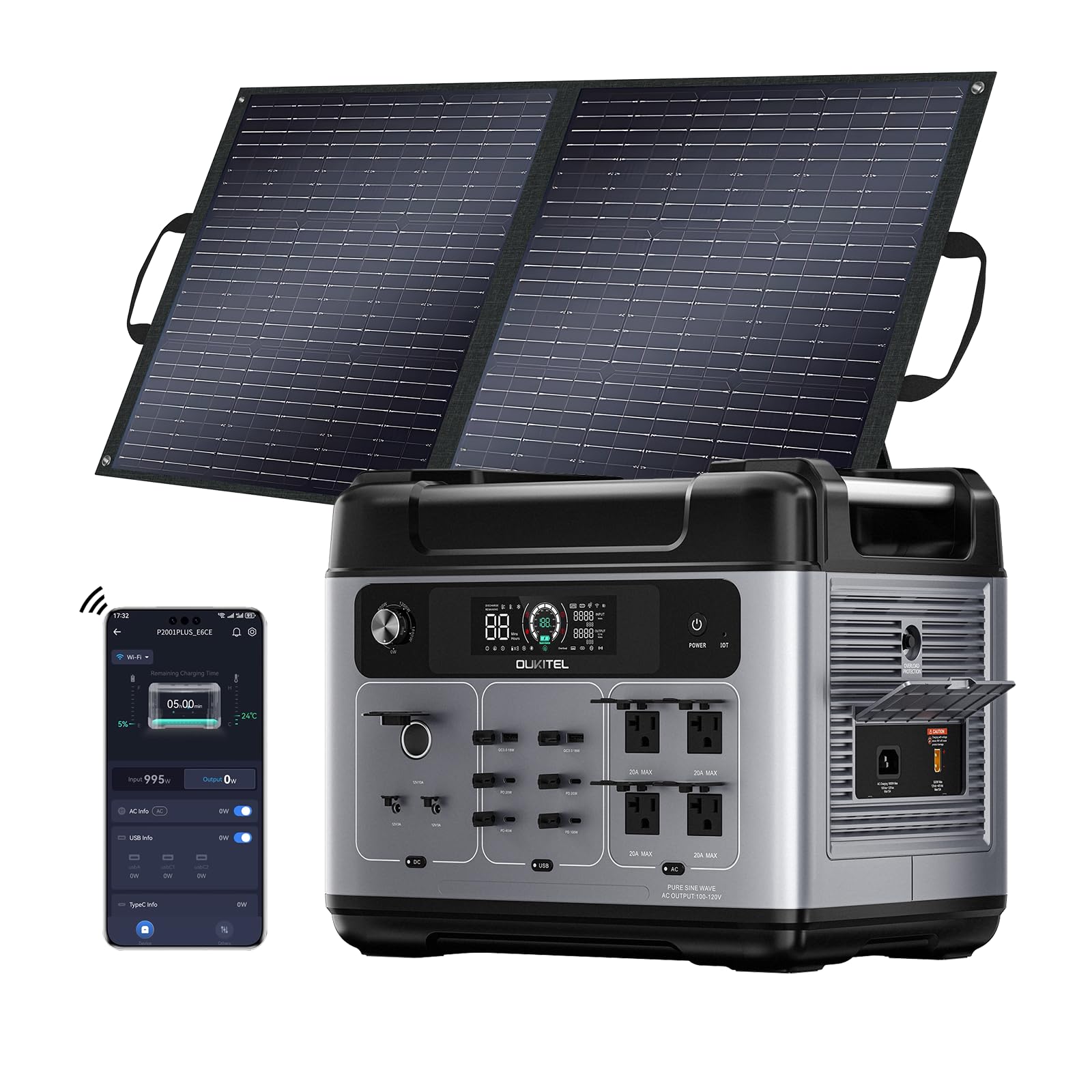


4. Setup
4.1 Unpacking and Initial Charge
- Carefully unpack all components and verify against the 'What's in the Box' list.
- Inspect the unit for any visible damage.
- Before first use, fully charge the power station using the AC charging cable until the display shows 100%.
4.2 APP Installation and Connection
The OUKITEL P2001 Plus can be controlled and monitored via a mobile application. Follow these steps to set up the app:
- Download the APP:
- For users in the US/Canada, search for "Landbook" on the App Store (iOS) or Google Play Store (Android).
- For users in other countries/regions, search for "Wonderfree" on the App Store (iOS) or Google Play Store (Android).
- Registration: Open the app, click "Register" in the upper right corner. Choose your country/region, enter your email, fill in the verification code sent to your email, set a password, and complete registration.
- Login: After successful registration, log in using your email and password. Ensure the selected country during login matches your registration country.
- Enable Bluetooth: Ensure your phone's Bluetooth is enabled and the app has location access permissions.
- Enter Network Configuration Mode: Turn on the power station. Use a pin to press and hold the "IOT" hole on the power panel until you hear a "beep" sound. The network configuration icon on the LCD screen will start blinking.
- Connect Device: In the app, click the "+" button in the top right corner and select "Detect Nearby Devices." The app will display a list of configurable devices. Click the "+" button next to your device (e.g., P2001 Plus).
- Wi-Fi Setup: Enter the Wi-Fi account and password your portable station is connected to, then click "Next." Wait for the progress bar to complete loading.
- Finish: Once configured, the interface will display the product device. Select "Finish." You can also edit the device name and click "Save."

Video 4.1: OUKITEL Solar Generator APP Setup Guide. This video demonstrates the step-by-step process of installing, registering, and connecting the OUKITEL solar generator to its mobile application for remote control and monitoring.
5. Operating Instructions
5.1 Powering On/Off
- To power on the unit, press and hold the main power button until the LCD screen illuminates.
- To power off, press and hold the main power button until the LCD screen turns off.
5.2 Using Output Ports
The P2001 Plus offers a variety of output ports to power different devices:
- AC Outlets: Press the AC power button to activate the 4 AC outlets. Connect your AC-powered devices.
- USB Ports: The unit features 2 USB-A Quick Charge 3.0 ports and 4 USB-C PD ports (20W, 45W, 100W). These are typically active when the unit is on.
- DC Outlets: Press the DC power button to activate the 2 DC outlets and the 1 cigar lighter port.

5.3 Emergency Power Supply (EPS)
The P2001 Plus includes an EPS function, providing uninterrupted power to connected devices in the event of a power outage. When connected to an AC power source, the unit will pass through power to connected devices. If the grid power fails, the unit automatically switches to battery power within 0.01 seconds, ensuring continuity for critical devices.

6. Charging Methods
The OUKITEL P2001 Plus supports multiple charging methods to ensure you always have power when you need it.
6.1 AC Wall Outlet Charging
- Connect the AC charging cable to the AC input port on the power station and then to a standard wall outlet.
- The unit supports up to 1800W AC input, allowing for a full charge in approximately 1.5 hours.
- Intelligent input current adjustment (400W-1800W) prevents damage from unstable voltage.
6.2 Solar Panel Charging
- Connect the included 100W solar panel (or other compatible solar panels) to the solar charging input port using the solar charging cable.
- Position the solar panels in direct sunlight for optimal charging efficiency.
- Combine solar and AC input for ultra-fast charging, achieving 80% battery capacity in just 50 minutes and a full charge in 80 minutes (up to 2300W combined input).
6.3 Car Charging
- Connect the car charging cable to the car charging input port on the power station and then to your vehicle's 12V cigarette lighter socket.
- This method is ideal for charging while on the go.


7. Maintenance
Proper maintenance ensures the longevity and optimal performance of your OUKITEL P2001 Plus.
7.1 Battery Care
- The built-in LiFePO4 battery is designed for over 3500 charge/discharge cycles, offering a lifespan of up to 15 years.
- For long-term storage, charge the unit to approximately 50-80% every 3-6 months.
- Avoid fully discharging the battery frequently to maximize its lifespan.
- The Battery Management System (BMS) and Control Unit (MCU) manage cell voltage and temperature for safety and efficiency.

7.2 Storage and Cleaning
- Store the unit in a cool, dry place, away from direct sunlight and corrosive materials.
- Ensure the unit is turned off during storage.
- Clean the exterior with a dry, soft cloth. Do not use harsh chemicals or abrasive materials.
- Keep the ventilation openings clear of dust and debris.
8. Troubleshooting
If you encounter issues with your OUKITEL P2001 Plus, refer to the following common troubleshooting steps:
| Problem | Possible Cause | Solution |
|---|---|---|
| Unit does not power on | Battery is completely discharged; Power button not pressed long enough. | Connect to AC power for charging; Press and hold the power button for 3-5 seconds. |
| No AC output | AC output not activated; Overload protection triggered; Device power exceeds unit's capacity. | Press the AC power button; Reduce connected load; Check device power requirements. |
| Slow charging via solar | Insufficient sunlight; Solar panel not properly angled; Dirty solar panels. | Adjust panel angle towards direct sun; Clean solar panel surface; Check cable connections. |
| APP connection issues | Bluetooth/Wi-Fi off; Incorrect app/region selected; Device not in configuration mode. | Ensure Bluetooth/Wi-Fi is on; Verify app version and region; Re-enter network configuration mode. |
If the problem persists after trying these solutions, please contact customer support.
9. Specifications
| Feature | Detail |
|---|---|
| Brand | YOYOSCX (OUKITEL) |
| Model Name | P2001 Plus |
| Battery Type | LiFePO4 |
| Capacity | 2048Wh |
| AC Output (Rated) | 2400W |
| AC Output (Peak) | 5000W |
| Total AC Outlets | 4 |
| USB-A Ports | 2 (Quick Charge 3.0) |
| USB-C PD Ports | 4 (20W, 45W, 100W) |
| DC Outlets | 2 |
| Cigar Lighter Port | 1 |
| AC Input | 1800W Max (1.5H full charge) |
| Solar Input | Up to 500W (with 100W panel included) |
| Combined AC+Solar Input | Up to 2300W (80% in 50min) |
| EPS Switching Time | < 0.01s |
| Item Weight | 102 Pounds (approx. 46.27 kg) |
| Item Dimensions (L x W x H) | 15.7" x 12.6" x 11.3" (approx. 39.9cm x 32cm x 28.7cm) |
10. Warranty & Support
10.1 Warranty Information
The OUKITEL P2001 Plus Solar Generator comes with a 5-year manufacturer warranty. This warranty covers defects in materials and workmanship under normal use. Please retain your proof of purchase for warranty claims.
10.2 Customer Support
For any questions, technical assistance, or warranty inquiries, please contact our customer support team:
- Email: support@oukitel.com
- Website: www.oukitel.com
Please provide your model number and purchase date when contacting support.