Introduction
The NEEWER EB01 Wireless Monitoring Earphones provide a real-time, zero-latency audio monitoring solution. Designed for versatility, these Open Wear Stereo (OWS) earphones eliminate the need for wired connections, offering freedom of movement for various applications such as live streams, vlogs, interviews, and stage performances. The system includes a 2.4G wireless dongle that connects to any 3.5mm TRS audio output, ensuring broad compatibility with professional audio equipment, computers, and mobile devices.
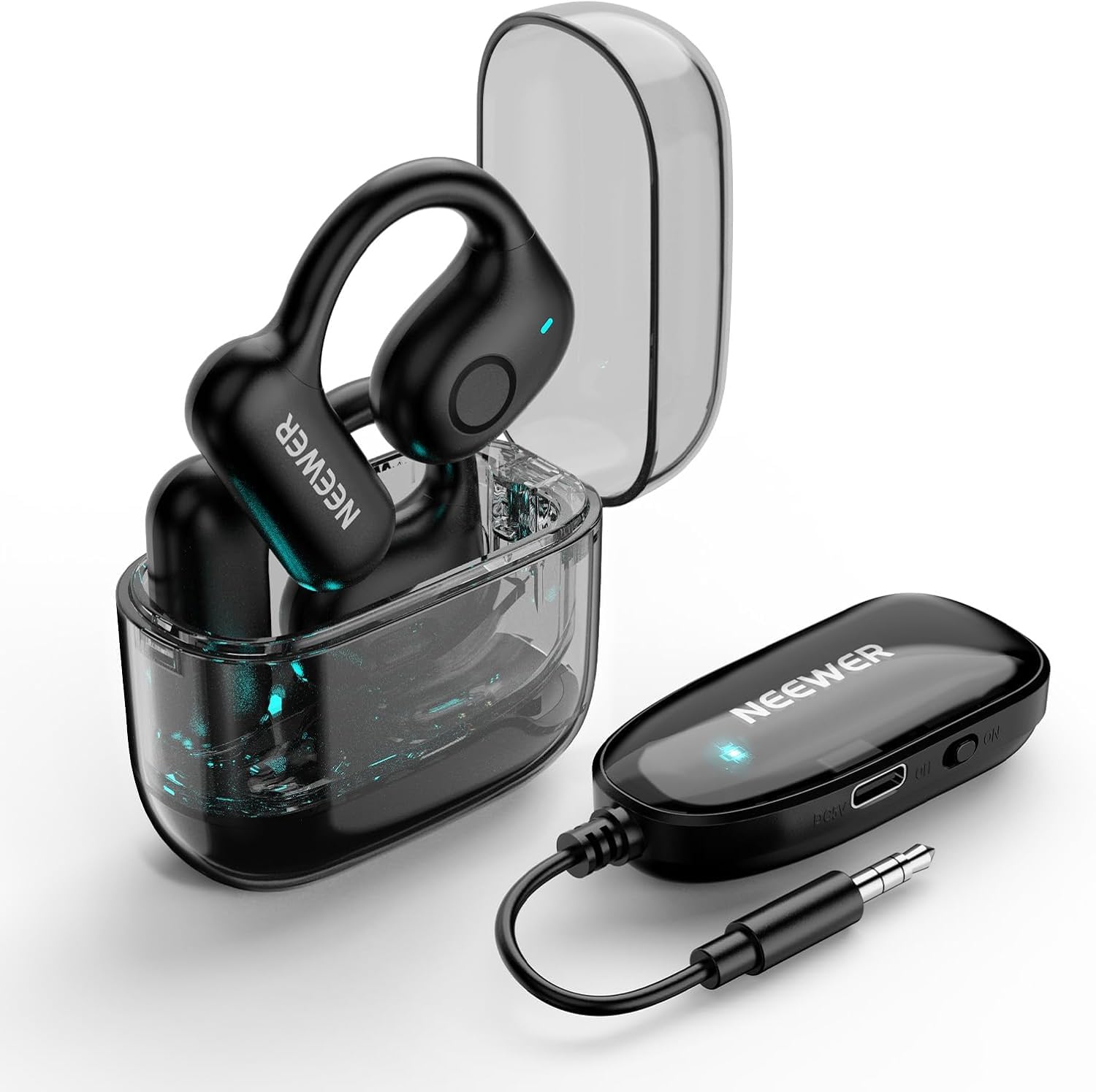
Image: The NEEWER EB01 OWS Wireless Monitoring Earphones and the accompanying 2.4G wireless dongle, showcasing their compact design and open-ear fit.
Package Contents
Verify that all items listed below are included in your package. If any items are missing or damaged, please contact NEEWER customer support.
- 1 x 3.5mm TRS Dongle
- 1 x Earphones (Pair)
- 1 x Charging Case
- 1 x Charging Cable
- 1 x User Manual

Image: A visual representation of the NEEWER EB01 package contents, including the earphones, charging case, 3.5mm TRS dongle, charging cable, and user manual.
Product Overview
The NEEWER EB01 system consists of open-ear wireless monitoring earphones and a compact 2.4G wireless dongle. The earphones are designed for comfortable, long-duration wear, allowing ambient sound awareness while providing clear audio monitoring. The dongle features a standard 3.5mm TRS plug for broad compatibility and includes volume adjustment buttons for precise control.
Key Features:
- OWS (Open Wear Stereo) Design: Allows real-time audio monitoring without isolating you from your surroundings.
- 2.4G Wireless Technology: Ensures zero-latency audio transmission for critical monitoring applications.
- Universal 3.5mm TRS Dongle: Compatible with a wide range of devices including audio interfaces, wireless lavalier microphone systems, computers, laptops, sound mixers, and DMX consoles.
- Automatic Pairing: Simplifies connection between the dongle and earphones.
- Long Battery Life: Up to 24 hours of total continuous runtime with the charging case.

Image: A musician using the NEEWER EB01 dongle connected to an audio interface, demonstrating its compatibility with sound cards for monitoring during recording or practice.
Image: A close-up of a circuit board highlighting the 2.4G wireless technology chip, which enables the zero-latency monitoring feature of the EB01 earphones.

Image: The NEEWER EB01 dongle connected to a laptop's 3.5mm TRS jack, illustrating its universal compatibility with various devices for audio output.
Setup Instructions
Follow these steps to set up your NEEWER EB01 Wireless Monitoring Earphones for first use.
- Initial Charging: Before first use, ensure both the earphones and the dongle are fully charged. Place the earphones in the charging case and connect the charging cable to the case. Connect the dongle to a power source using its charging cable. A full charge ensures optimal battery longevity.
- Connect the Dongle: Plug the 3.5mm TRS dongle into the audio output jack of your monitoring device (e.g., camera, audio interface, laptop). Ensure the dongle is powered on.
- Power On Earphones: Remove the earphones from their charging case. They will automatically power on and attempt to pair with the dongle.
- Automatic Pairing: The earphones and dongle are designed to pair automatically within an unobstructed range of 98ft/30m. No manual pairing steps are typically required. A successful connection is usually indicated by a stable light on both devices.
- Adjust Volume: Use the volume adjustment buttons on the dongle to set your desired monitoring level.
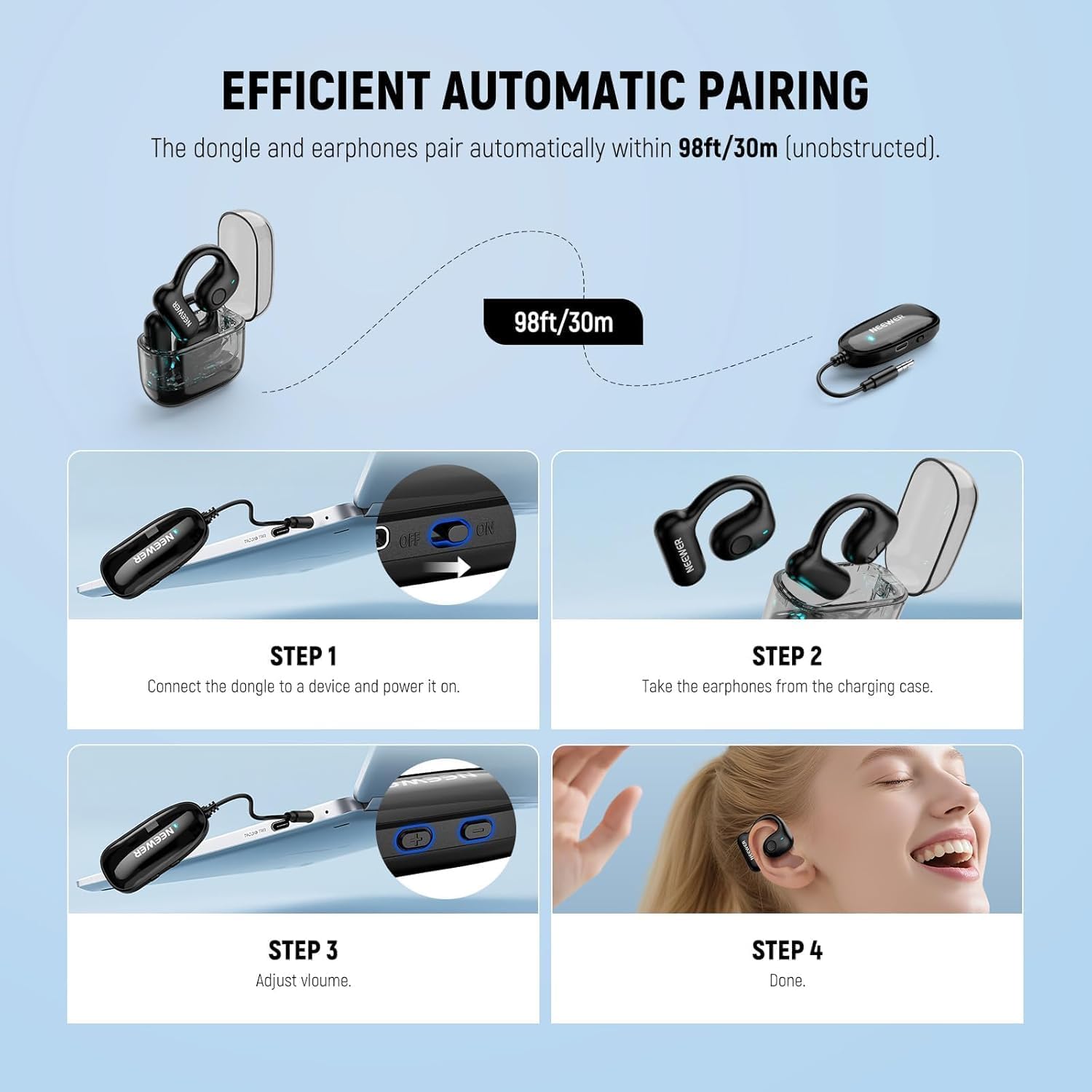
Image: A four-step visual guide demonstrating the setup process: 1. Connecting the dongle to a device and powering it on. 2. Taking the earphones from the charging case. 3. Adjusting volume on the dongle. 4. Earphones in use.
Operating Instructions
Once set up, the NEEWER EB01 earphones are ready for use. Here are guidelines for optimal operation.
Real-Time Monitoring:
The 2.4G wireless technology provides real-time, zero-latency audio monitoring. This is crucial for applications where timing is critical, such as live performances, recording, or broadcasting. The OWS design allows you to hear both the monitored audio and your environment, which can be beneficial for situational awareness.
Volume Control:
Adjust the monitoring volume directly on the dongle using the dedicated volume buttons. This allows for quick and convenient audio level adjustments without needing to interact with the source device.
Power Management:
The earphones provide approximately 12 hours of use on a full charge, while the dongle offers about 7 hours. The charging case can provide 1.5 additional full charges for the earphones, extending the total continuous runtime to up to 24 hours. To conserve battery, return the earphones to the charging case when not in use, and power off the dongle if it will not be used for an extended period.

Image: A diagram illustrating the battery life of the NEEWER EB01 components: Dongle (7 hours), Earphones (12 hours), and the charging case providing 1.5 full charges for a total of 24 hours runtime.
Video: Official NEEWER video demonstrating the real-time monitoring capabilities and use cases of the EB01 earphones in various professional settings.
Maintenance
Proper maintenance ensures the longevity and optimal performance of your NEEWER EB01 earphones.
- Cleaning: Use a soft, dry cloth to clean the earphones, dongle, and charging case. Avoid using harsh chemicals or abrasive materials.
- Storage: Store the earphones in their charging case when not in use to protect them from dust and damage. Store the dongle in a safe place.
- Battery Care: For optimal battery life, fully charge the device before its first use. Avoid completely draining the battery frequently. If storing for an extended period, charge the battery to approximately 50% every few months.
- Avoid Moisture: Keep the device away from water and excessive humidity.
Troubleshooting
If you encounter issues with your NEEWER EB01 earphones, refer to the following common solutions.
| Problem | Possible Cause | Solution |
|---|---|---|
| No sound or intermittent connection | Low battery on earphones or dongle; Dongle not properly connected; Out of range; Pairing issue; Protective film on earphone contacts. | Charge both earphones and dongle. Ensure dongle is firmly plugged into the audio jack. Move closer to the dongle (within 30m/98ft unobstructed). Place earphones back in the case and remove them again to re-initiate pairing. Check for and remove any protective plastic film on the earphone charging contacts. |
| Earphones not charging | Charging cable not connected; Dirty charging contacts; Protective film on contacts. | Ensure the charging cable is securely connected to the case and a power source. Clean the charging contacts on both the earphones and the case with a dry cotton swab. Remove any protective plastic film from the earphone charging contacts. |
| Poor audio quality or low volume | Volume too low; Earphones not positioned correctly; Environmental noise. | Adjust volume using the dongle's buttons. Ensure earphones are securely and correctly placed over your ears. The OWS design allows ambient sound, which may affect perceived audio quality in noisy environments. |
| Earphones feel loose or fall off | Improper fit for ear shape; Vigorous activity. | Ensure earphones are correctly positioned over the ear. The design is open-ear and may not be suitable for all ear shapes or high-impact activities. |
Specifications
Detailed technical specifications for the NEEWER EB01 Wireless Monitoring Earphones.
- Brand: NEEWER
- Model Name: EB01
- Model Number: 21000192
- Color: Black
- Ear Placement: Open Ear (OWS)
- Connectivity Technology: 2.4G Wireless
- Headphones Jack: 3.5 mm TRS
- Wireless Range: Up to 30 meters (unobstructed)
- Frequency Range: 20 Hz - 20,000 Hz
- Audio Driver Type: Balanced Armature Driver
- Earphone Battery Life: Approximately 12 Hours
- Dongle Battery Life: Approximately 7 Hours
- Total Runtime with Charging Case: Up to 24 Hours
- Control Method: Push Button (on dongle)
- Material: Plastic
- Item Weight: 2.82 Ounces
- UPC: 191073114807
Warranty and Support
NEEWER products are designed for reliability and performance. For warranty information and customer support, please refer to the details below.
Return Policy:
This product is eligible for a refund or replacement within 30 days of purchase, subject to the retailer's return policy.
Customer Support:
For technical assistance, troubleshooting not covered in this manual, or warranty claims, please contact NEEWER customer support through their official website or the retailer where the product was purchased. Please have your model number (EB01) and proof of purchase ready.


