
1. Introduction
This user manual provides detailed instructions for the UGREEN NASync DXP4800 Plus 4-Bay Desktop Network Attached Storage (NAS) device. It covers hardware installation, software configuration, operational procedures, maintenance guidelines, troubleshooting steps, and product specifications. Please read this manual thoroughly before using your device to ensure proper setup and optimal performance.
2. Product Overview
2.1 Key Features
- User-Friendly Application: Simple setup and file-sharing across Windows, macOS, Android, iOS, web browsers, and smart TVs for secure access from various devices.
- Centralized Storage: Offers centralized data storage, automatic backups, remote access, and various RAID options for data recovery.
- High Storage Capacity: Supports up to 136TB capacity for extensive data storage.
- Fast Data Transfers: Achieves transfer speeds of up to 1250MB/s via 10GbE network ports or 10Gbps USB ports.
- Secure Private Cloud: Ensures 100% data ownership with advanced encryption and flexible permission management.
- Powerful Processor: Equipped with a 12th Gen 5-core Intel Pentium Gold Processor.
- Expandable Memory: Features 8GB DDR5 4800MHz RAM, expandable up to 64GB.
- Robust Construction: Durable aluminum alloy construction.
- Integrated Smart Assistant: Includes smart search and classification for photos and files.
2.2 Package Contents
Verify that all items listed below are included in your package. If any items are missing or damaged, please contact UGREEN support.

Image: Contents of the UGREEN NASync DXP4800 Plus package, including the NAS unit, user manual, after-sales card, hard drive tray keys, power adapter, Ethernet cables, SSD silicone pads, screws, and screwdriver.
- NASync DXP4800 Plus x 1
- User Manual x 1
- After-sales Card x 1
- Hard Drive Tray Keys x 2
- Power Adapter (DC 12V/10A) x 1
- Ethernet Cables (CAT 7) x 2
- SSD Silicone Pads x 2
- Screws & Screwdriver x 1
- HDMI Cable Right Angle 4K 90 Degree HDMI Cord 6.6 FT x 1 (Bundled item)
2.3 Device Components
The UGREEN NASync DXP4800 Plus features a robust design with accessible ports for connectivity and expansion.

Image: Front view of the UGREEN NASync DXP4800 Plus, showing four drive bays labeled 01-04, status indicator lights, an SD card slot, a USB-C port, and a USB 3.2 port.

Image: Detailed view of the front and rear expansion ports on the UGREEN NASync DXP4800 Plus. Front ports include SD Card Slot, Type-C Gen 2, and USB 3.2 Gen 2. Rear ports include HDMI (4K), USB 3.2 Gen 1, 2x USB 2.0, Ethernet (2.5GbE), Ethernet (10GbE), Reset button, and DC 12V power input.
3. Setup Guide
3.1 Hardware Installation
- Install Hard Drives/SSDs: Open the drive bays using the provided keys. Insert your 3.5-inch HDDs, 2.5-inch HDDs, or 2.5-inch SSDs into the trays. Secure them with the included screws. For NVMe M.2 SSDs, locate the dedicated slots inside the device and follow the installation instructions in the full user manual.
- Connect Power: Connect the power adapter to the DC 12V input port on the rear of the NAS, then plug it into a power outlet.
- Connect to Network: Use the provided Ethernet cables to connect the NAS to your router or network switch. You can utilize either the 2.5GbE or 10GbE port for network connectivity.
- Optional HDMI Connection: If you plan to connect the NAS directly to a display, use the bundled right-angle HDMI cable to connect the HDMI port on the NAS to your TV or monitor.
- Power On: Press the power button on the front panel to turn on the NAS.
3.2 Initial Software Setup (UGOS Pro)
The UGREEN NASync DXP4800 Plus runs on the UGOS Pro operating system. Follow these steps for initial setup:
- Access UGOS Pro: From a computer connected to the same network, open a web browser and enter the IP address of your NAS or use the UGREEN NASync discovery tool.
- Follow On-Screen Instructions: The UGOS Pro wizard will guide you through creating an administrator account, configuring storage pools (RAID setup), and setting up basic network services.
- Install Mobile/Desktop Applications: Download the UGREEN NASync application for Windows, macOS, Android, or iOS from the official UGREEN website or respective app stores for easy management and access.

Image: UGOS Pro operating system compatibility across Windows, macOS, iOS, Android, Smart TV, and Web browsers.
4. Operating Instructions
4.1 File Management and Sharing
UGOS Pro provides a comprehensive file manager for organizing and sharing your data.
- Create Shared Folders: Set up shared folders and assign user permissions for collaborative access.
- Remote Access: Utilize UGREENlink for secure remote access to your files from anywhere.
- Protocol Support: Supports various file protocols including SMB, WebDAV, FTP, NFS, and Rsync.

Image: Illustration of UGREENlink Remote Access, showing a login screen for secure file access.

Image: Diagram showing support for various internal and external storage file formats (ext4, Btrfs, FAT32, NTFS, XFS) and multiple file protocols (SMB, WebDAV, FTP, NFS, Rsync).
4.2 Data Backup and Synchronization
Protect your data with robust backup and synchronization features.
- Automatic Backups: Configure scheduled backups from your devices to the NAS.
- Host Backup: Backup data from your NAS to other hosts or cloud services.
- Synchronization: Keep files synchronized across multiple devices.

Image: Devices (laptop, tablet, phone) syncing and backing up data to the UGREEN NASync DXP4800 Plus.
4.3 Media Streaming and Multimedia Hub
Transform your NAS into a central media hub.
- Stream Content: Seamlessly stream movies, music, and photos to phones, tablets, laptops, and smart TVs.
- 4K HDMI Output: Connect directly to a 4K display for local media playback.

Image: A person watching a movie streamed from the UGREEN NASync DXP4800 Plus to a large screen TV.
4.4 Advanced Features
The NASync DXP4800 Plus supports advanced functionalities for diverse use cases.
- Virtual Machine: Run virtual machines directly on your NAS.
- Docker Support: Deploy and manage Docker containers for various applications.
- Smart Assistant: Utilize smart search for photos (pets, objects, text) and smart recognition for classifying faces, places, and animals.

Image: Graphics illustrating the Virtual Machine and Docker capabilities of the NASync DXP4800 Plus.

Image: Depiction of the Integrated Smart Assistant features, including Smart Search for images and Smart Recognition & Classification for organizing content.
5. Maintenance
5.1 Cooling System
The NASync DXP4800 Plus features a smart cooling fan system to maintain optimal operating temperatures and ensure device longevity.
- Operating Modes: The fan can operate in Default Mode, Quiet Mode, or Full Speed Mode, adjustable via the UGOS Pro interface.
- Airflow: Ensure proper airflow around the device by keeping vents clear and avoiding enclosed spaces.

Image: Diagram illustrating the internal airflow and smart cooling fan of the NASync DXP4800 Plus, showing Default, Quiet, and Full Speed modes.
5.2 Data Protection and Integrity
Regular maintenance of your storage configuration is crucial for data integrity.
- RAID Configuration: Utilize RAID technology to protect against single or multiple drive failures. Refer to the UGOS Pro documentation for detailed RAID setup and management.
- Data Encryption: Enable advanced encryption features within UGOS Pro to secure your stored files.
- Drive Health Monitoring: Regularly check the health status of your installed drives through the UGOS Pro interface.
6. Troubleshooting
This section addresses common issues and provides solutions. For more detailed troubleshooting, consult the UGREEN Knowledge Center or the support section within the NAS App.

Image: Frequently Asked Questions (FAQ) for the UGREEN NASync DXP4800 Plus, addressing storage pool monitoring, failure prediction, USB copy functionality, and robust system controls.
6.1 Common Questions and Solutions
- Q1: Does the device have comprehensive storage pool monitoring?
- Yes, the device features RAID technology for storage pool management, providing data protection and centralized storage resource management. A storage pool requires at least one unused and healthy hard drive. Detailed guides are available in the UGREEN Knowledge Center or the 'Support' section of the NAS App.
- Q2: Does the device have failure prediction?
- Yes, the device supports fault prediction through NAS indicator lights and hard disk monitoring. Detailed information is provided in the user manual and the 'Support' center in the NAS App.
- Q3: Does the device have USB copy functionality?
- No, there is no direct USB copy functionality for data security reasons. This feature is not currently planned for addition.
- Q4: Does the device have robust system controls?
- Yes, the device offers a series of control switches and settings. The 'Control Panel' function in the NAS App provides a comprehensive and user-friendly management tool for administrators to efficiently manage and configure the system. It can be found in the UGREEN Knowledge Center or 'Support' center in the NAS App: App guide > System > Control Panel.
7. Specifications
Below are the technical specifications for the UGREEN NASync DXP4800 Plus.
| Feature | Specification |
|---|---|
| Brand | UGREEN |
| Model | DXP4800 Plus |
| ASIN | B0FJG1GX4S |
| Drive Bays | 4 |
| Max Storage Capacity | 136TB (HDDs & SSDs sold separately) |
| CPU Model | Intel Gold 8505 (12th Gen 5-core) |
| Max Turbo Frequency | 4.40 GHz |
| RAM | 8GB DDR5 (Expandable up to 64GB) |
| LAN Ports (RJ45) | 1x 10GbE, 1x 2.5GbE |
| NVMe Slots | 2 (for fast caching or SSD storage up to 16TB) |
| HDMI Port | 1x 4K HDMI |
| USB Ports | 1x USB 3.2 Gen 2 (Type-C), 1x USB 3.2 Gen 2 (Type-A), 1x USB 3.2 Gen 1 (Type-A), 2x USB 2.0 (Type-A) |
| SD Card Slot | Yes |
| Material | Metal |
| Color | Black |
| Mounting Type | Tabletop |
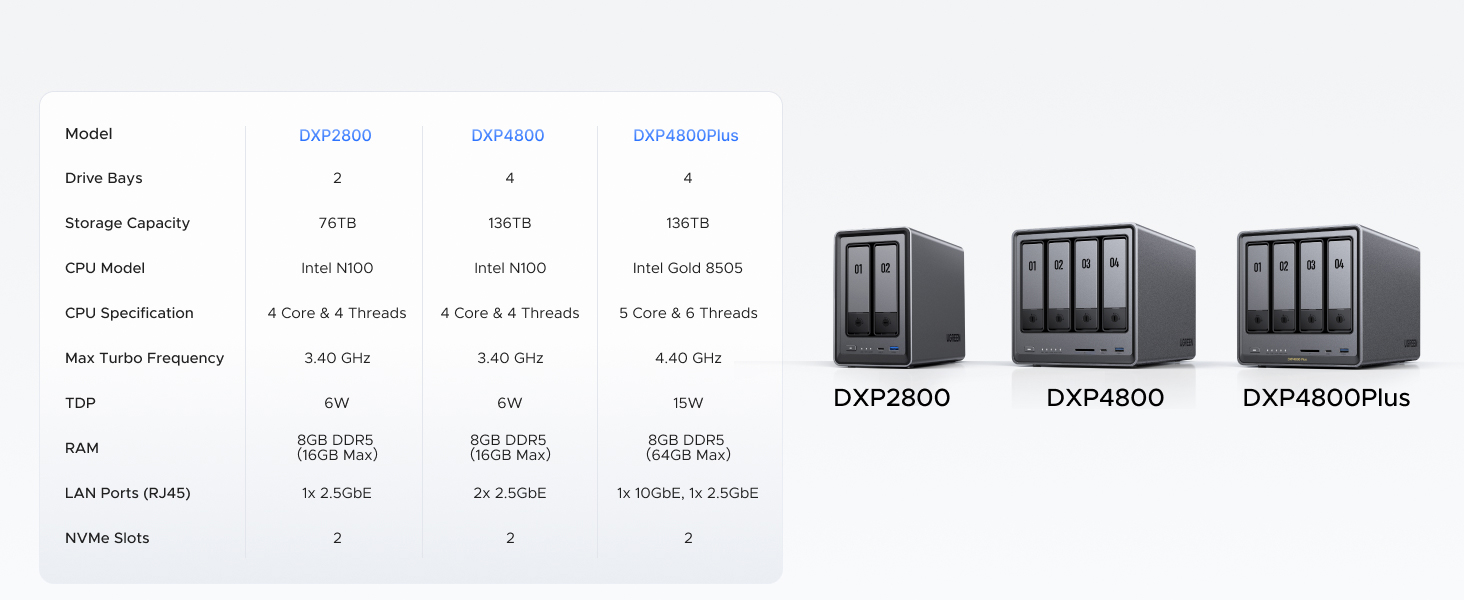
Image: Comparison table of UGREEN NASync models DXP2800, DXP4800, and DXP4800 Plus, highlighting differences in drive bays, storage capacity, CPU, RAM, and LAN ports.
8. Warranty and Support
UGREEN is committed to providing reliable products and customer support.
- Warranty Coverage: Enjoy 2 years of protection with UGREEN.
- Specialist Support: Access 24-hour specialist support for any technical inquiries or issues.
- Returns Policy: Benefit from a 30-day free returns policy.
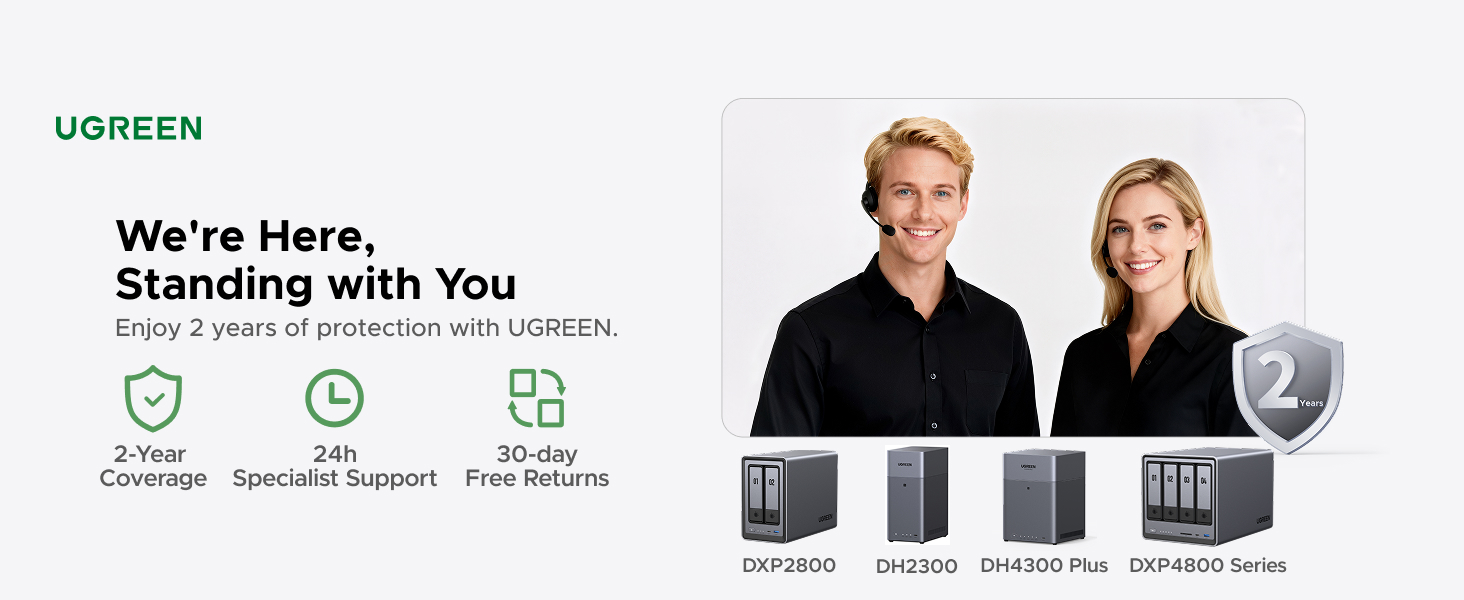
Image: Graphic detailing UGREEN's customer support, including 2-year coverage, 24h specialist support, and 30-day free returns, alongside images of various NASync models.
For further assistance, please visit the official UGREEN website or contact their customer service directly. The seller for this product is UGREEN GROUP LIMITED.
9. Safety Information
Please observe the following safety guidelines to prevent damage to the device or injury to yourself:
- Do not expose the device to water or excessive moisture.
- Avoid placing the device near heat sources or in direct sunlight.
- Ensure the device is placed on a stable, level surface.
- Use only the power adapter provided with the device.
- Do not attempt to open or repair the device yourself. Refer all servicing to qualified personnel.
- Keep the device away from children and pets.