
Introduction
Thank you for choosing the Claiks Corner Desk with Drawers. This L-shaped computer desk is designed to optimize your workspace with integrated USB charging ports, power outlets, a monitor stand, and ample storage. This manual provides detailed instructions for assembly, operation, maintenance, and troubleshooting to ensure safe and efficient use of your new desk.
Important Safety Information
- Always assemble the desk with at least two people to prevent injury and ensure proper alignment.
- Keep all small parts and packaging materials away from children and pets to avoid choking hazards.
- Ensure all screws and fasteners are securely tightened before use. Periodically check and re-tighten as necessary.
- Do not overload the desk. The maximum weight recommendation is 70 kg (154 lbs).
- For electrical components (USB ports, power outlets), ensure the desk is connected to a properly grounded power source. Do not exceed the rated electrical capacity.
- Avoid placing hot items directly on the desk surface without protection.
- Do not stand or sit on the desk.
Package Contents
Before beginning assembly, please verify that all components listed below are present and undamaged. If any parts are missing or damaged, please contact customer support.
- Desk Panels (L-shaped sections)
- Metal Frame Components
- Fabric Drawers (4 units)
- USB Charging Port & Power Outlet Unit
- Monitor Stand
- PC Stand
- Storage Bag
- Assembly Hardware (screws, bolts, Allen wrench)
- Instruction Manual
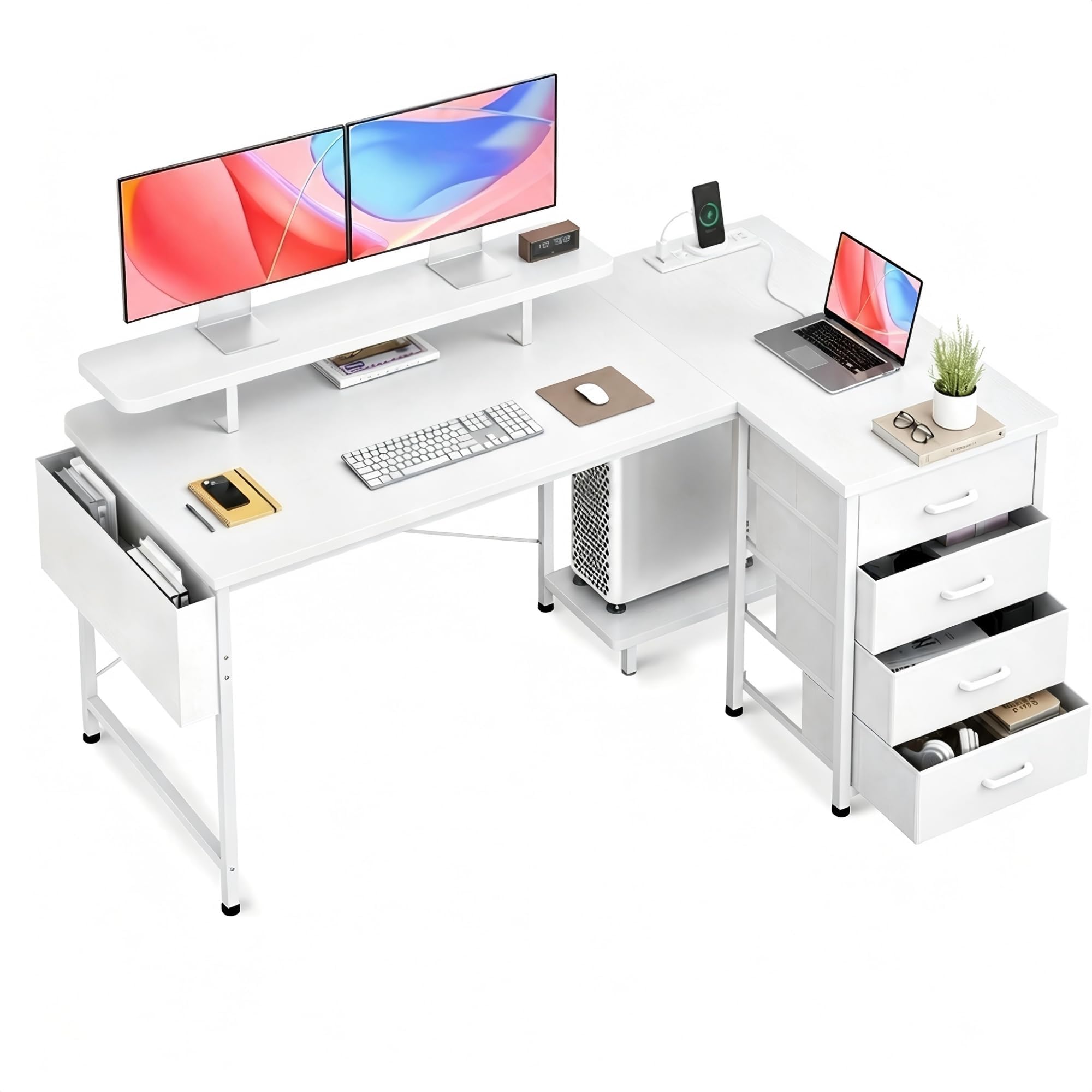
Image: The Claiks L-shaped corner desk, fully assembled, showcasing its white finish, integrated monitor stand, four fabric drawers, and side storage bag. A laptop, monitors, and other office accessories are displayed on the desk surface.
Assembly Instructions
Tools Required
- Phillips Head Screwdriver (not included)
- Allen Wrench (included)
Step-by-Step Assembly
Follow the numbered steps carefully. Refer to the included diagrams for visual guidance. Do not fully tighten all screws until the entire desk frame is assembled.
- Unpack and Identify Parts: Lay out all components on a clean, soft surface to prevent scratches. Identify each part using the labels or diagrams provided in the separate assembly guide.
- Assemble the Main Frame: Connect the metal frame components using the provided screws and Allen wrench. Ensure the L-shape orientation is correct for your desired setup. Hand-tighten screws initially.
- Attach Desk Panels: Secure the main L-shaped desk panels to the assembled metal frame using the designated screws. Ensure panels are flush and aligned.
- Install Drawer Supports: Attach the necessary supports and runners for the fabric drawers to the designated sections of the desk frame.
- Insert Fabric Drawers: Fold and assemble the four fabric drawers according to their individual instructions, then slide them into their respective compartments.
- Install USB Charging Port & Power Outlet Unit: Mount the power strip unit into its designated slot on the desk. Connect the power cable securely.
- Attach Monitor Stand: Secure the monitor stand to the top surface of the desk using the provided hardware. Ensure it is stable and level.
- Attach PC Stand and Storage Bag: Position and secure the PC stand to the bottom frame. Attach the storage bag to the side of the desk using the hooks or fasteners provided.
- Final Tightening: Once all components are in place and aligned, fully tighten all screws and fasteners. Do not overtighten.
- Cable Management: Utilize any integrated cable management features to organize power cords and device cables.
Operating Instructions
USB Charging Ports & Power Outlets
The desk is equipped with 2 USB charging ports and 2 standard power outlets. To use them, plug the desk's main power cord into a wall outlet. You can then connect your electronic devices (smartphones, tablets, gaming gear, Bluetooth devices) to the USB ports for charging or plug in other electronics into the power outlets. Ensure devices are compatible with the power specifications.
Monitor Stand
The integrated monitor stand is designed to elevate your monitor(s) to an ergonomic viewing height, reducing strain on your neck and back. It also provides additional storage space underneath for small office items, keyboards, or mice when not in use.
Storage Drawers and Bag
The four fabric drawers and side storage bag offer convenient storage for books, paperwork, stationery, and other office essentials, helping to keep your workspace tidy and organized.
Maintenance
- Cleaning: Wipe the desk surfaces with a soft, damp cloth. Avoid harsh chemicals or abrasive cleaners, which can damage the finish.
- Dusting: Regularly dust the desk and its components to prevent buildup.
- Fastener Check: Periodically check all screws and bolts to ensure they remain tight. Re-tighten if necessary to maintain stability.
- Electrical Components: Ensure the power cord is not pinched or damaged. Do not attempt to repair the electrical unit yourself; contact qualified personnel if issues arise.
Troubleshooting
| Problem | Possible Cause | Solution |
|---|---|---|
| Desk is wobbly or unstable. | Screws are loose; uneven floor. | Check and tighten all assembly screws. Use shims under desk feet if the floor is uneven. |
| USB ports or power outlets are not working. | Desk power cord not plugged in; wall outlet not active; faulty device. | Ensure the desk's power cord is securely plugged into a live wall outlet. Test the wall outlet with another device. Try a different device in the desk's ports/outlets. |
| Drawers do not slide smoothly. | Improper installation of drawer supports; obstruction. | Verify drawer supports are installed correctly and are not bent. Check for any obstructions in the drawer path. |
Specifications
- Brand: Claiks
- Model: GM
- Type: L-Shaped Computer Desk
- Dimensions (D x W x H): 55.12" x 33.86" x 31.5" (140 x 80 x 87.3 cm)
- Material: Metal frame, Wood panels, Fabric drawers
- Color: White
- Item Weight: 20 kg (44 lbs)
- Maximum Weight Recommendation: 70 kg (154 lbs)
- Special Features: 4 Fabric Drawers, Monitor Stand, Storage Bag, 2 USB Charging Ports, 2 Power Outlets
- Assembly Recommendation: 2 people
Warranty and Customer Support
Claiks is committed to providing quality products and excellent customer service. If you encounter any issues during assembly or use, or if you have questions about your desk, please do not hesitate to contact our customer support team. Our attentive customer support team is available 24/7 to help you with any issues.
Please refer to your purchase documentation for specific warranty details and contact information.