Product Overview
The BestGlory Executive Office Chair Model 289 is designed for comfort and support during long periods of use. This ergonomic desk chair features an adjustable headrest, lumbar support, and flip-up armrests, making it suitable for various office, gaming, and home environments. Constructed with durable materials, it offers stability and adaptability to meet individual user needs.
Key Features:
- Ergonomic Support: Features 7-point ergonomic support for head, neck, shoulders, back, lumbar, arms, and hips, promoting healthy posture and reducing fatigue.
- Adjustable Settings: Includes 3.7-inch height adjustment, 3.7-inch headrest adjustment, and a 90°–120° tilt rocking function with adjustable tension.
- Space-Saving Design: 90° flip-up armrests allow the chair to be tucked under a desk, saving up to 1.2 square meters of floor space.
- Premium Durability: Built with a heavy-duty metal base, smooth-rolling casters, thick padded cushions, and a soft faux leather finish for long-term use.
- Versatile Use: Ideal for offices, conference rooms, game rooms, and study spaces.
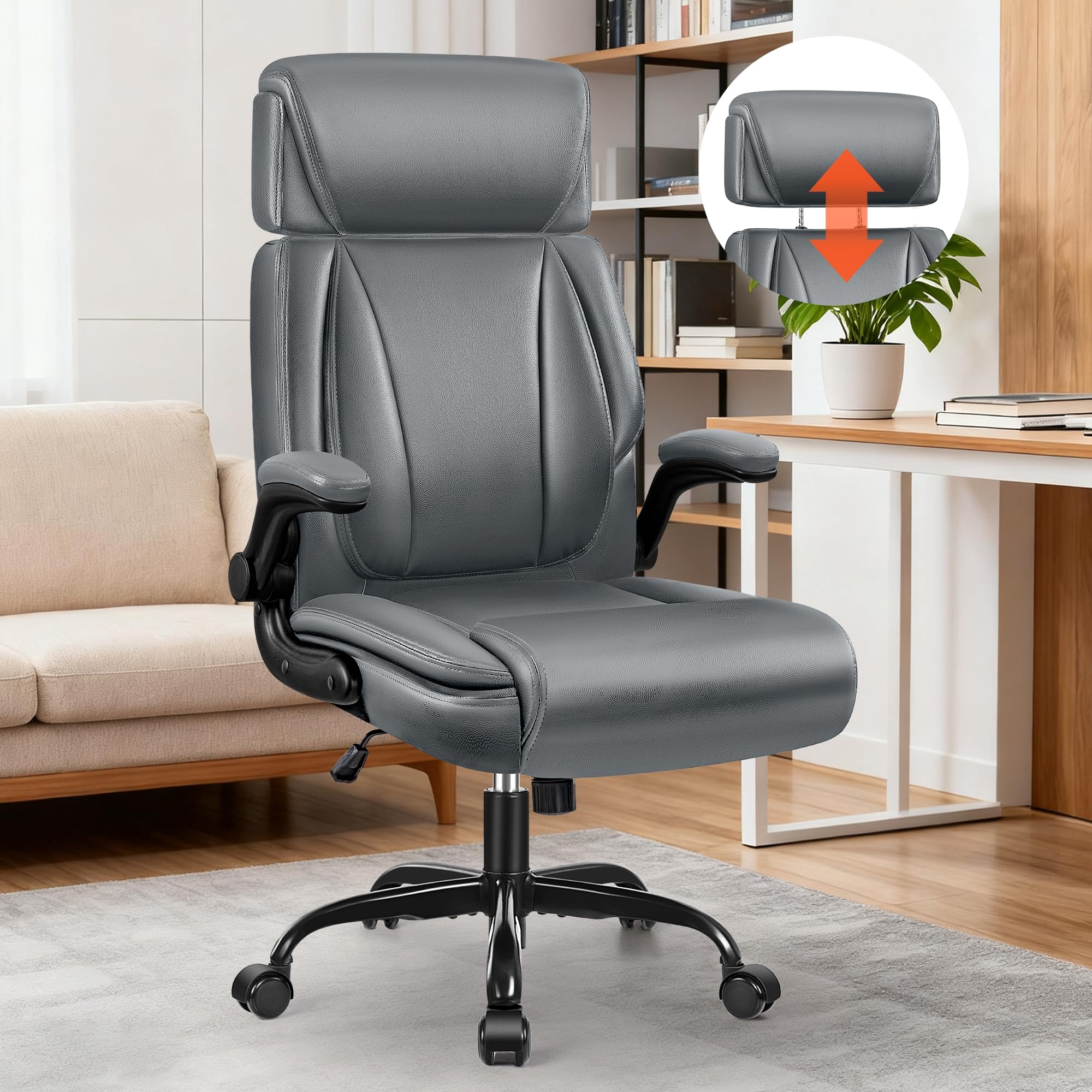
Image: BestGlory Executive Office Chair Model 289 in Grey, showcasing its overall design.
Important Safety Information
- Always ensure the chair is fully assembled before use.
- Do not exceed the maximum weight capacity of 350 lbs (159 kg).
- Exercise caution when adjusting the headrest and armrests to prevent injury.
- Keep the chair away from direct heat sources to avoid damage to the faux leather material.
Setup and Assembly
Assembly of the BestGlory Executive Office Chair Model 289 is designed to be straightforward and can typically be completed within 15 minutes by following the provided instructions or video guide.
Assembly Steps:
- Unpack Components: Carefully remove all parts from the packaging and verify against the parts list in your physical manual.
- Assemble Base: Attach the five split base tubes to the central base tube using the provided screws and wrench. Ensure all screws are tightened securely.
- Install Castors: Firmly push each of the five castors into the holes at the end of the base tubes until they click into place.
- Insert Gas Lift: Turn the assembled base over and insert the air rod (gas lift) into the central hole of the base.
- Attach Base Plate to Seat Cushion: Align the base plate with the "FRONT" indicator on the seat cushion. Secure the base plate to the underside of the seat cushion using the M6x20mm screws. Ensure the lever is facing the front.
- Connect Seat to Base: Align the hole underneath the seat cushion with the gas lift. Press the seat down firmly onto the gas lift to secure it to the base.
- Install Armrests: Attach the armrests to the sides of the seat cushion using the M6x25mm screws. Ensure they are oriented correctly.
- Install Backrest: Align the backrest with the armrests and secure it using the remaining screws.
- Cover Screws: Place the decoration caps over any exposed screws for a finished look.
Video: Detailed assembly guide for the BestGlory Executive Office Chair Model 289. This video demonstrates each step of the installation process, from assembling the base to attaching the backrest and armrests.

Image: Components for the chair base assembly, including the central base tube, split base tubes, screws, and wrench.

Image: Installation of the castors into the chair base and insertion of the gas lift.
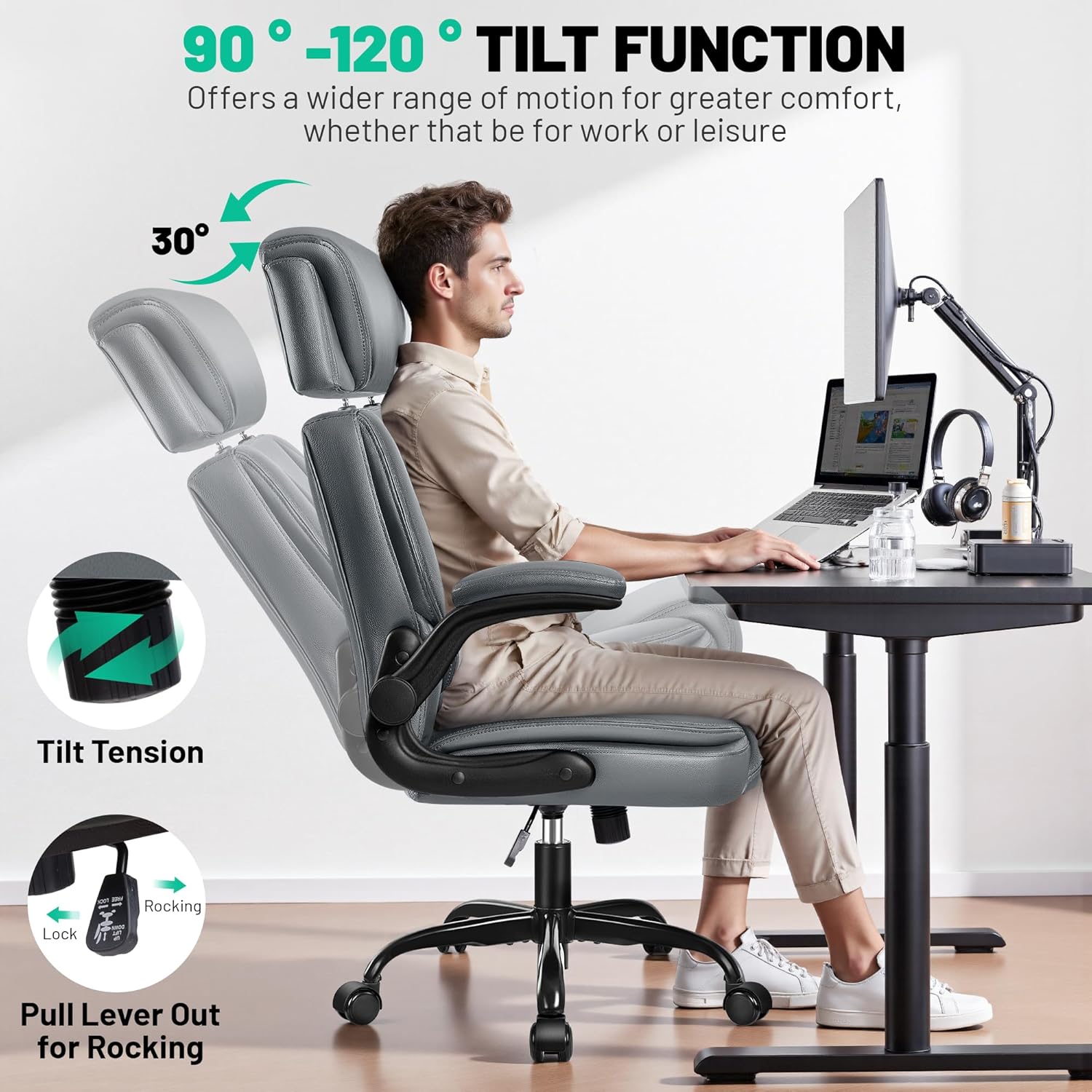
Image: Securing the base plate to the underside of the seat cushion with screws, noting the "FRONT" direction.

Image: The seat cushion being pressed onto the gas lift, connecting it to the assembled chair base.

Image: The process of attaching the armrests and then the backrest to the chair, followed by covering the screws with caps.
Operating Instructions
The BestGlory Executive Office Chair Model 289 offers several adjustable features to customize your seating experience for optimal comfort and support.
Adjustments:
- Seat Height Adjustment: Locate the lever on the right side beneath the seat. Pull the lever upwards to raise the seat. To lower the seat, remain seated and pull the lever upwards. Release the lever at the desired height. The chair offers a 3.7-inch height adjustment range.
- Headrest Adjustment: The headrest can be adjusted vertically by pulling it up or pushing it down to suit your neck and head support needs. It has a 3.7-inch adjustment range.
- Tilt and Rocking Function: The chair features a 90°–120° tilt rocking function. To activate rocking, pull the lever outwards. To lock the chair in an upright position, push the lever inwards.
- Tilt Tension Adjustment: A round knob located beneath the seat, usually at the front, controls the tilt tension. Turn clockwise to increase tension (making it harder to recline) or counter-clockwise to decrease tension (making it easier to recline).
- Flip-Up Armrests: The armrests can be flipped up by rotating them upwards, allowing the chair to be pushed closer to a desk or to provide more space when not in use.
Video: Demonstration of the adjustable features of the BestGlory Executive Office Chair Model 289, including headrest, seat height, and tilt functions.

Image: Visual representation of the ergonomic design and various adjustable features, such as headrest height, armrest position, and tilt function.

Image: A user demonstrating the 360-degree swivel and height adjustment of the chair.
Maintenance
Proper care and maintenance will extend the life and appearance of your BestGlory Executive Office Chair Model 289.
- Cleaning: For general cleaning, spot clean with a damp cloth. For more stubborn marks, wipe clean with a mild soap solution and then dry thoroughly. Avoid harsh chemicals or abrasive cleaners.
- Inspection: Periodically check all screws and connections to ensure they remain tight. Re-tighten if necessary to maintain stability and safety.
- Avoid Direct Sunlight: Prolonged exposure to direct sunlight can cause the faux leather to fade or crack. Position the chair away from direct sun exposure.
- Weight Capacity: Adhere to the maximum weight recommendation of 350 lbs (159 kg) to prevent damage to the chair's components.

Image: Close-up of the faux leather material, highlighting its texture and water-resistant properties, indicating ease of cleaning.
Specifications
| Feature | Detail |
|---|---|
| Brand | BestGlory |
| Model Name | 289 |
| Color | Grey |
| Product Dimensions | 22.4"D x 22"W x 47"H |
| Maximum Weight Recommendation | 350 lbs (159 kg) |
| Material | Faux Leather, Foam |
| Special Features | Adjustable Headrest, Adjustable Height, Flip-Up Armrests, Lumbar Support |
| Back Style | High Back |
| Reclining Position Count | 1 (90°-120° tilt) |
| Item Weight | 38.5 pounds |
| Recommended Uses | Computer, Gaming, Office |
Image: Detailed product dimensions and weight capacity information for the chair.

Image: Illustration of upgraded components including the certified gas lift, strong steel base, and silent casters.
Warranty and Support
For any questions, concerns, or support regarding your BestGlory Executive Office Chair Model 289, please contact our customer service team.
- Protection Plans: Optional 2-Year and 3-Year Protection Plans are available for purchase. Please refer to your purchase documentation for details.
- Return Policy: This product is eligible for a refund/replacement within 30 days of purchase.
- Manufacturer Support: For direct assistance, please contact BestGlory customer service.
You can typically find contact information for the seller through your Amazon order history by navigating to "Your Orders" and selecting "Contact Seller" for this product.


