
1. Important Safety Instructions
Before operating the FUNMILY Treadmill, please read and understand all instructions thoroughly. Retain this manual for future reference.
- Consult a Physician: Before starting any exercise program, consult your physician, especially if you have pre-existing health conditions.
- Placement: Place the treadmill on a solid, level surface with at least 2 feet (0.6 meters) of clear space on each side and 6 feet (1.8 meters) behind it. Do not place on thick carpet, which may interfere with ventilation.
- Power Connection: Connect the treadmill to a properly grounded outlet. Do not use extension cords or adapters.
- Safety Key: Always attach the safety key clip to your clothing before starting the treadmill. In case of an emergency, the safety key will disengage, stopping the treadmill.
- Children and Pets: Keep children and pets away from the treadmill at all times, especially when in operation. The Child Safety Mode can be activated for added protection.
- Weight Capacity: The maximum user weight capacity for this treadmill is 300 lbs (136.08 kg). Do not exceed this limit.
- Maintenance: Perform regular maintenance as described in this manual to ensure safe and optimal performance.
- Emergency Stop: Familiarize yourself with the emergency stop button on the console.
2. Setup and Assembly
2.1 Unpacking
Carefully remove the treadmill from its packaging. It is recommended to have two people for this process due to the weight of the unit. Inspect all components for any damage. If any parts are missing or damaged, contact customer support immediately.
2.2 Minimal Assembly
The FUNMILY Treadmill is largely pre-assembled. Only a few bolts need to be secured to complete the setup. Refer to the included tool kit and specific assembly instructions provided in the separate assembly guide for detailed steps.
2.3 Unfolding the Treadmill
To unfold the treadmill for use:
- Ensure the treadmill is on a stable, level surface.
- Gently lift the running deck until the hydraulic rod system engages, allowing it to slowly lower into the flat position.
- Ensure the deck is fully locked into place before use.

Figure 2.3: Treadmill folding and unfolding mechanism.
2.4 Power Connection
Plug the power cord into the treadmill's power input, then into a grounded electrical outlet. Ensure the power switch is in the 'ON' position.
3. Operating Instructions
3.1 Control Panel Overview
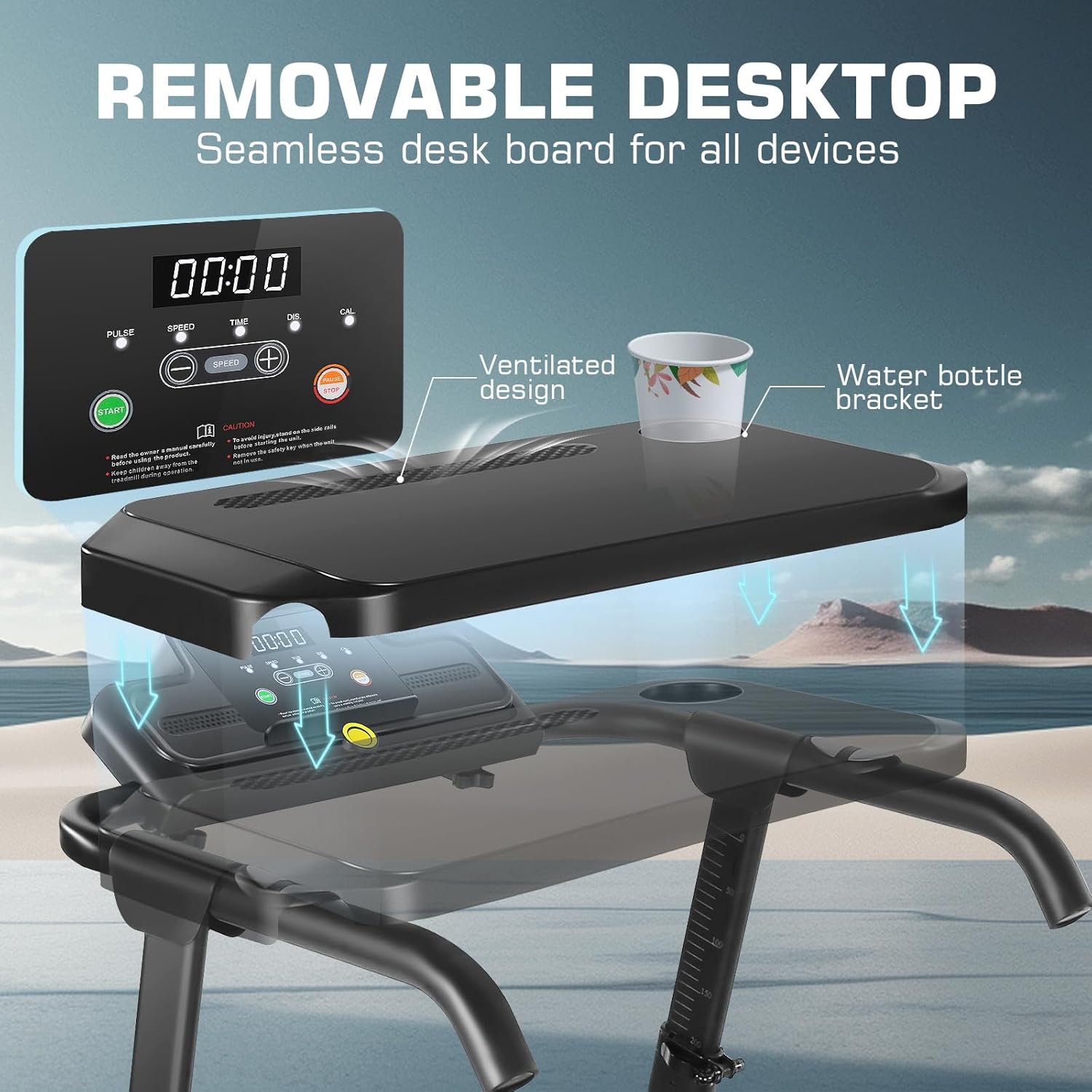
Figure 3.1: Control panel and removable desktop.
The control panel displays key workout metrics such as Speed, Time, Distance, and Calories Burned. It also features buttons for Start, Stop, Speed Adjustment, and Mode selection.
3.2 Starting and Stopping
- Attach the safety key clip to your clothing and insert the safety key into its designated slot on the console.
- Press the START button to begin your workout. The treadmill will typically start at a low speed.
- To stop, press the STOP button. For an emergency stop, pull the safety key from the console.
3.3 Speed Adjustment
Use the Speed +/- buttons on the console or handlebars to adjust the running belt speed. The speed range is 0.6 to 7.5 MPH.
3.4 Incline Adjustment
The treadmill features 3 levels of manual incline. To adjust the incline, you will need to manually rotate the adjustable slope base located at the rear of the treadmill. Ensure the treadmill is stopped and powered off before adjusting the incline.

Figure 3.4: Manual incline adjustment.
3.5 Desk Height Adjustment
The integrated desk workstation offers an adjustable height range from 33 to 50 inches. Use the adjustment buttons located on the armrests to raise or lower the desk to your preferred ergonomic height.

Figure 3.5: Adjustable desk height from 33 to 50 inches.
3.6 Child Safety Mode
To activate Child Safety Mode, refer to your specific assembly guide or contact customer support. In this mode, certain buttons (P, M, 2, 3, 5, 6) are disabled, allowing only the Start and Stop functions. The maximum running speed is limited to 3 MPH to ensure child safety.
3.7 Bluetooth Connectivity and App
The treadmill features Bluetooth connectivity for music playback and integration with a fitness tracking application. Refer to the app's instructions for pairing your device and utilizing its features to record exercise data and select different workout modes.
4. Maintenance
Regular maintenance ensures the longevity and safe operation of your FUNMILY Treadmill.
4.1 Lubrication
The running belt requires periodic lubrication to reduce friction and wear. A bottle of lubricant is included with your treadmill. Apply lubricant every 3-6 months, or after approximately 100 hours of use, depending on usage frequency.
- Turn off and unplug the treadmill.
- Loosen the rear roller bolts slightly to lift the belt.
- Apply a thin line of lubricant evenly under the center of the running belt.
- Tighten the rear roller bolts.
- Plug in the treadmill and run it at a slow speed (e.g., 1-2 MPH) for 5 minutes to distribute the lubricant.
4.2 Cleaning
Wipe down the treadmill surfaces, including the console and desk, with a damp cloth after each use. Avoid using abrasive cleaners or solvents. Regularly vacuum under the treadmill to prevent dust buildup.
4.3 Belt Tension and Alignment
Periodically check the running belt for proper tension and alignment. If the belt feels loose, slips, or drifts to one side, refer to the specific instructions in your assembly guide or contact customer support for adjustment procedures.
5. Troubleshooting
If you encounter issues with your FUNMILY Treadmill, refer to the following common troubleshooting steps:
- Treadmill Not Starting:
- Ensure the power cord is securely plugged into a grounded outlet and the treadmill.
- Check that the power switch is in the 'ON' position.
- Verify the safety key is correctly inserted into the console.
- Check the circuit breaker on the treadmill (if applicable) and your home's electrical panel.
- Running Belt Slipping or Hesitating:
- The running belt may require lubrication (refer to Section 4.1).
- The running belt may need tension adjustment. Refer to your assembly guide or contact support.
- Unusual Noises:
- Ensure all assembly bolts are tightened.
- Check for any foreign objects under the running belt.
- Lubricate the running belt if a squeaking noise is present.
- Display Not Working:
- Check all power connections.
- If the issue persists, contact customer support.
For issues not covered here, please contact FUNMILY customer support.
6. Product Specifications
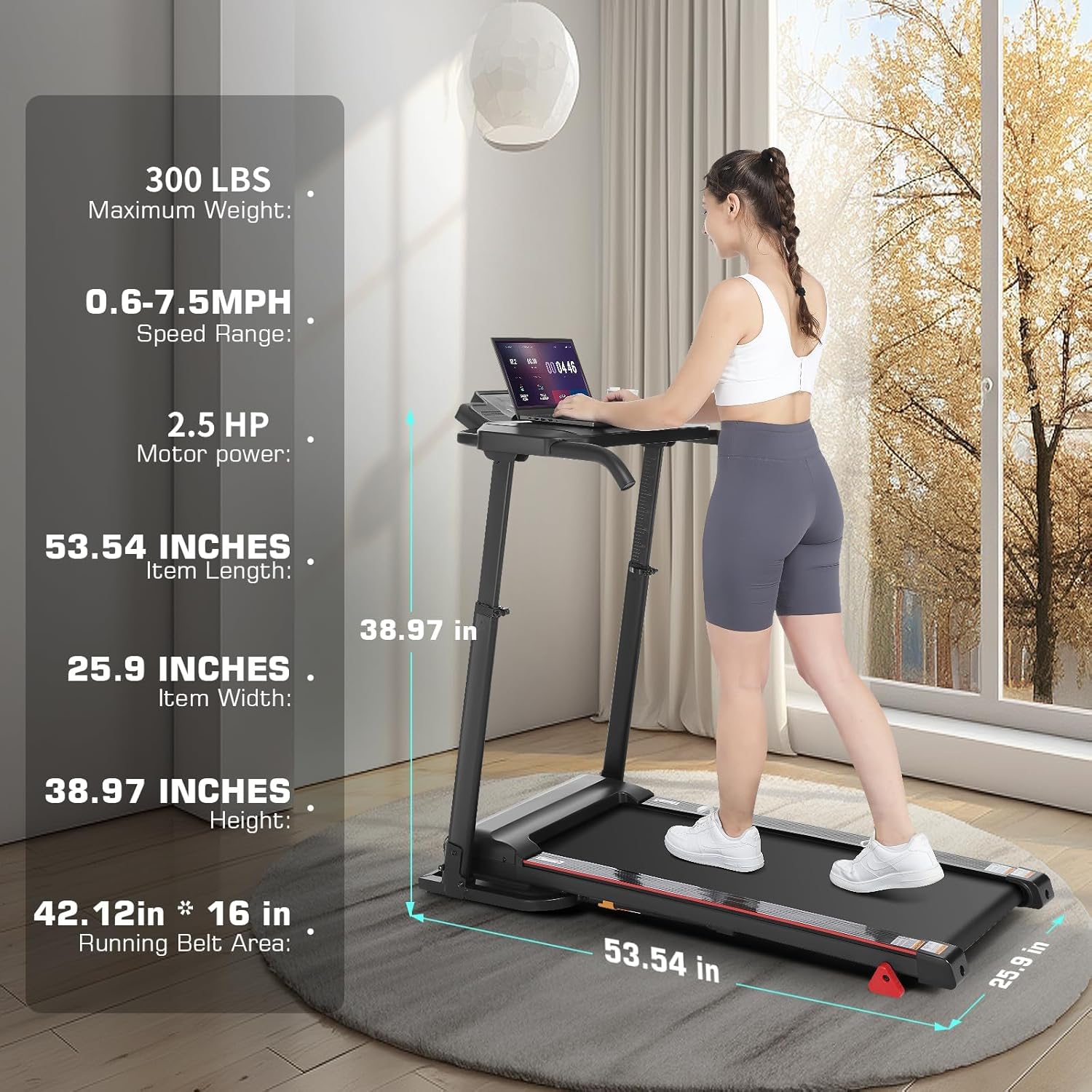
Figure 6.1: Treadmill dimensions and specifications.
| Feature | Specification |
|---|---|
| Brand | FUNMILY |
| Model | B0FJFDZK5G |
| Motor Horsepower | 2.5 HP |
| Speed Range | 0.6 - 7.5 MPH |
| Maximum Weight Capacity | 300 LBS (136.08 kg) |
| Incline Levels | 3 (Manual Adjustment) |
| Adjustable Desk Height | 33 - 50 inches |
| Running Belt Area | 42.12 x 16 inches |
| Product Dimensions (L x W x H) | 142.2D x 68.6W x 17.8H Centimeters |
| Material | Alloy Steel |
| Special Features | Folding Design, Bluetooth Speaker, Fitness App Tracking, Child Safety Mode |
| Included Components | Lubricant, Power Cord, Safety Key, Tool Kit, User Manual |
7. Warranty and Support
FUNMILY provides a one-year warranty covering the motor, frame, and all treadmill parts from the date of purchase. This warranty covers manufacturing defects and material flaws under normal use.
For warranty claims, technical assistance, or any questions regarding your FUNMILY Treadmill, please contact our customer support team. We are committed to providing satisfactory after-sales service and aim to respond to inquiries within 24-48 hours.
Please have your product model (B0FJFDZK5G) and proof of purchase ready when contacting support.
