
1. Introduction
The Uwell Typhos Pod System Kit is a compact and high-performance vaping device designed for both RDL (Restricted Direct Lung) and MTL (Mouth-to-Lung) vaping styles. It integrates a powerful 2000mAh battery with a maximum output of 45W, a 6ml side-fill pod, and a clear 1.05-inch OLED screen for real-time information. This manual provides essential instructions for safe and effective use of your Typhos device.

Image 1.1: The Uwell Typhos Pod System Kit in Polar Black.
2. Product Overview
2.1 Package Contents
- Typhos Main Unit x1
- 0.3Ω Dual Mesh Coil 6ml Pod x1
- 0.6Ω Single Mesh Coil 6ml Pod x1
- USB-C Charging Cable x1
- User Manual x1
- meihen Vape Band x1
2.2 Key Features
- Battery: Built-in 2000mAh for extended use.
- Output Power: Adjustable from 5W to 45W.
- Pod Capacity: Large 6ml capacity reduces refill frequency.
- Filling Method: Convenient side-fill design.
- Charging: Fast USB-C charging, approximately 40 minutes for a full charge.
- Display: 1.05-inch OLED screen for real-time information (battery, wattage, puff count).
- Leak Prevention: CoreShield leak-proof technology.
- Airflow: Stepless adjustable airflow for precise draw control.
- Output Modes: Two modes available: WAVE (energy-saving, stable output) and STORM (powerful burst).
- Coil Compatibility: Supports 0.3Ω Dual Mesh (25-45W), 0.6Ω Single Mesh (13-25W), and 0.8Ω Single Mesh (10-18W) coils.

Image 2.1: Illustration of the 6ml pod and 2000mAh battery capacity.

Image 2.2: Close-up of the Real Dual Mesh Coil, highlighting its structure and power output.

Image 2.3: Diagram illustrating the CoreShield leak prevention technology within the pod.
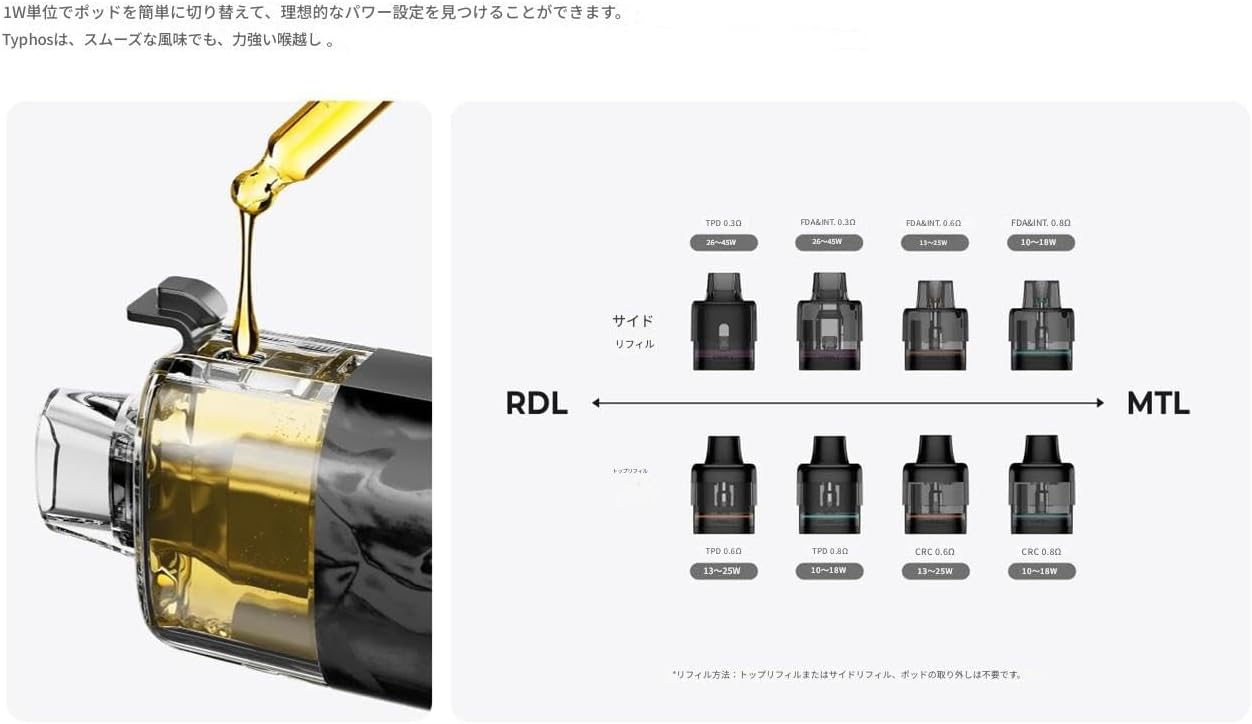
Image 2.4: The 1.05-inch OLED screen displaying device information.
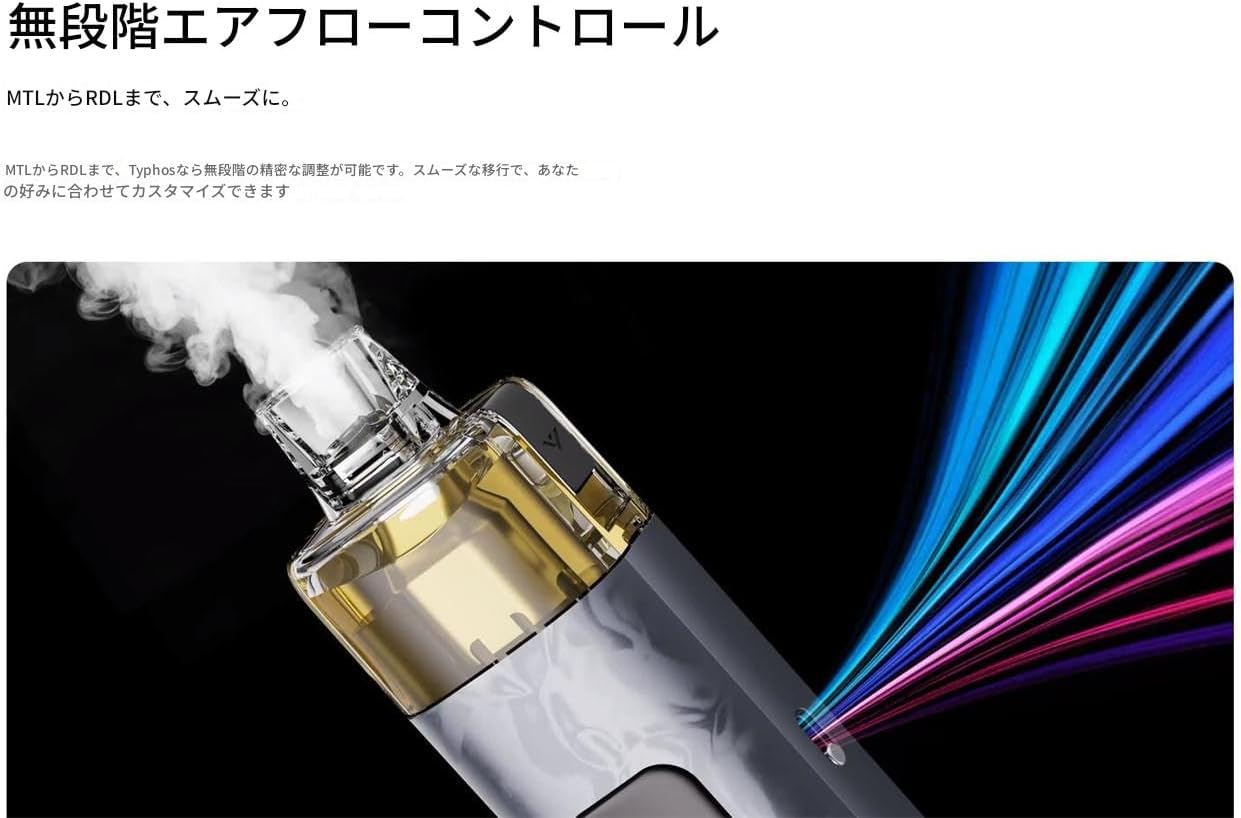
Image 2.5: The stepless airflow control mechanism on the Typhos device.
3. Setup
3.1 Charging the Device
Before first use, fully charge the Typhos device. Connect the provided USB-C charging cable to the charging port on the device and to a suitable power source. The OLED screen will indicate the charging status. A full charge takes approximately 40 minutes.
3.2 Installing the Pod
- Ensure the device is powered off.
- Insert the desired pod (0.3Ω or 0.6Ω) firmly into the device. It will magnetically snap into place.
3.3 Filling the Pod
- Remove the pod from the device.
- Locate the side-fill port on the pod.
- Open the silicone plug and carefully fill the pod with your e-liquid.
- Close the silicone plug securely to prevent leaks.
- After filling a new pod or coil, wait at least 5-10 minutes before vaping to allow the coil to saturate with e-liquid. This prevents dry hits and extends coil life.

Image 3.1: Illustration of the side-fill mechanism and various compatible coil options for RDL and MTL vaping.
4. Operating Instructions
4.1 Power On/Off
Press the fire button 5 times rapidly to power the device on or off.
4.2 Adjusting Wattage
Use the adjustment buttons (usually located below the screen) to increase or decrease the wattage. The current wattage setting will be displayed on the 1.05-inch OLED screen. The device supports a wattage range of 5W to 45W.
4.3 Mode Selection (WAVE/STORM)
The Typhos offers two distinct output modes:
- WAVE Mode: Provides an energy-saving and stable output for consistent flavor.
- STORM Mode: Delivers a powerful burst for a more intense vaping experience.
Refer to the on-screen menu or user interface to switch between these modes.
4.4 Airflow Adjustment
The device features stepless adjustable airflow. Locate the airflow control slider or ring on the device and adjust it to your preferred draw tightness, ranging from a tight MTL draw to a more open RDL draw.
4.5 Vaping
Inhale through the mouthpiece to activate the auto-draw feature, or press and hold the fire button while inhaling. Release the button when you finish inhaling.
Video 4.1: Official Uwell TYPHOS POD System overview, demonstrating key features and operation.
5. Maintenance
5.1 Cleaning
- Regularly clean the pod and the device's contact points with a dry cloth or cotton swab to prevent e-liquid buildup.
- Ensure no e-liquid enters the charging port or airflow channels.
5.2 Coil Replacement
Replace the coil when you notice a burnt taste, reduced vapor production, or diminished flavor. To replace:
- Remove the pod from the device.
- Pull out the old coil from the bottom of the pod.
- Insert a new coil firmly into the pod.
- Refill the pod with e-liquid and allow it to sit for 5-10 minutes before use.
5.3 Charging Best Practices
- Use only the provided USB-C cable.
- Avoid overcharging or completely draining the battery to prolong its lifespan.
5.4 Storage
Store the device in a cool, dry place away from direct sunlight and extreme temperatures. Keep out of reach of children and pets.
6. Troubleshooting
6.1 No Vapor / Weak Vapor
- Check Battery: Ensure the device is charged.
- Check Pod Connection: Re-seat the pod firmly.
- Check E-liquid Level: Refill if low.
- Check Coil: Replace the coil if it's old or burnt.
- Check Wattage: Adjust wattage to the recommended range for your coil.
6.2 Leaking
- Check Silicone Plug: Ensure the side-fill plug is securely closed.
- Check Coil Installation: Make sure the coil is properly seated.
- Avoid Overfilling: Do not overfill the pod.
- Proper Priming: Ensure the coil is adequately primed before first use.
6.3 Device Not Turning On / Charging
- Check Charging Cable: Use the original USB-C cable and ensure it's properly connected.
- Clean Charging Port: Remove any debris from the charging port.
- Power Cycle: Try turning the device off and on again (5 clicks).
7. Specifications
| Battery Capacity | 2000mAh (Built-in) |
| Output Power | 5W - 45W (Adjustable) |
| Pod Capacity | 6ml |
| Charging Port | Type-C |
| Display | 1.05-inch OLED Screen |
| Dimensions | 11.02 x 3.16 x 2.05 cm |
| Weight | 200g |
| Compatible Coils | 0.3Ω Dual Mesh (25-45W), 0.6Ω Single Mesh (13-25W), 0.8Ω Single Mesh (10-18W) |
8. Warranty and Support
This product includes a meihen vape band and a security code to verify its authenticity. For warranty claims or technical support, please refer to the contact information provided by your retailer or the official Uwell website. Keep your proof of purchase for any warranty-related inquiries.
Note: This product does not contain nicotine or e-liquid.


