
Introduction
Thank you for choosing the PUTORSEN Under Desk PC Mount. This product is designed to securely hold your computer tower under your desk, freeing up valuable floor and desk space. It features adjustable width and height to accommodate various PC sizes and is built with high-grade steel for durability and stability. This manual provides detailed instructions for installation, operation, and maintenance to ensure safe and optimal use of your PC mount.
Safety Information
- Read all instructions carefully before installation and use.
- Ensure the mounting surface (desk underside) is strong enough to support the combined weight of the PC mount and your computer tower. The mount supports up to 77 lbs (35 kg).
- Use appropriate tools and hardware for installation. If unsure, consult a qualified professional.
- Do not overtighten screws during installation, as this may damage the desk or the mount.
- Keep children and pets away from the installation area.
- Regularly check all connections and fasteners to ensure they remain secure.
- Do not exceed the maximum weight capacity of 77 lbs (35 kg).
- Ensure proper ventilation around your PC after mounting to prevent overheating. The open-frame design of this mount promotes 360° airflow.
Product Specifications
| Feature | Specification |
|---|---|
| Brand | PUTORSEN |
| Model | B0FJF269L |
| Color | Black |
| Width Range | 7.89" - 13.39" (200mm - 340mm) |
| Height Range | 11.42" - 23.23" (290mm - 590mm) |
| Weight Capacity | Up to 77 lbs (35 kg) |
| Material | High-grade Steel |
| Mounting Type | Under-desk (Tabletop) |
| Warranty | 2 Years |
Note: All dimensions are approximate and may vary slightly.
Package Contents
Please verify that all parts are present before beginning installation. Refer to the packaging for a complete list of included hardware and components. Typically, the package includes:
- PC Mount Frame (main components)
- Mounting Brackets
- Protective Mats
- Assembly Hardware (screws, washers, etc.)
- Instruction Manual
Setup and Installation
Follow these steps carefully to install your PUTORSEN Under Desk PC Mount.
Step 1: Measure Your PC Tower and Adjust Mount
Before assembly, measure the width and height of your PC tower to determine the required adjustments for the mount. The mount supports widths from 7.89" to 13.39" and heights from 11.42" to 23.23". Adjust the mount's width and height to match your PC tower's dimensions and secure the adjustable components using the provided screws.

Image 1: Measuring your PC tower and adjusting the mount's width and height before installation.
Step 2: Prepare the Mount and Desk
Ensure the protective mats are placed on the contact surfaces of the mount to prevent scratches and dampen vibrations. Position the assembled mount under your desk in the desired location. Use a pencil to mark the drilling points for the mounting brackets. Remove the mount and drill pilot holes into the desk surface. Ensure the pilot holes are of the correct size for the provided screws to prevent splitting the wood or damaging the desk.

Image 2: Detailed dimensions of the PUTORSEN Under Desk PC Mount, illustrating its adjustable ranges.
Video 1: Installation Guide for CPU Holder. This video demonstrates the process of marking and drilling pilot holes, and securing the mount to the desk.
Step 3: Secure the Mount to the Desk
Align the mounting brackets with the pilot holes and secure them firmly to the underside of the desk using the provided screws. Ensure the mount is stable and does not wobble. The design allows for minor adjustments (up to 0.35 inches) after initial drilling, preventing the need for redrilling if alignment is slightly off. Simply loosen the screws, shift the bracket, and retighten.

Image 3: The mount's adjustment feature for precise positioning without redrilling.
Step 4: Insert Your PC Tower
Carefully slide your PC tower into the mounted holder. Ensure it fits snugly and is centered. The protective mats will cushion the PC and prevent movement. The open-frame design ensures excellent 360° airflow, preventing overheating and extending your hardware's life.
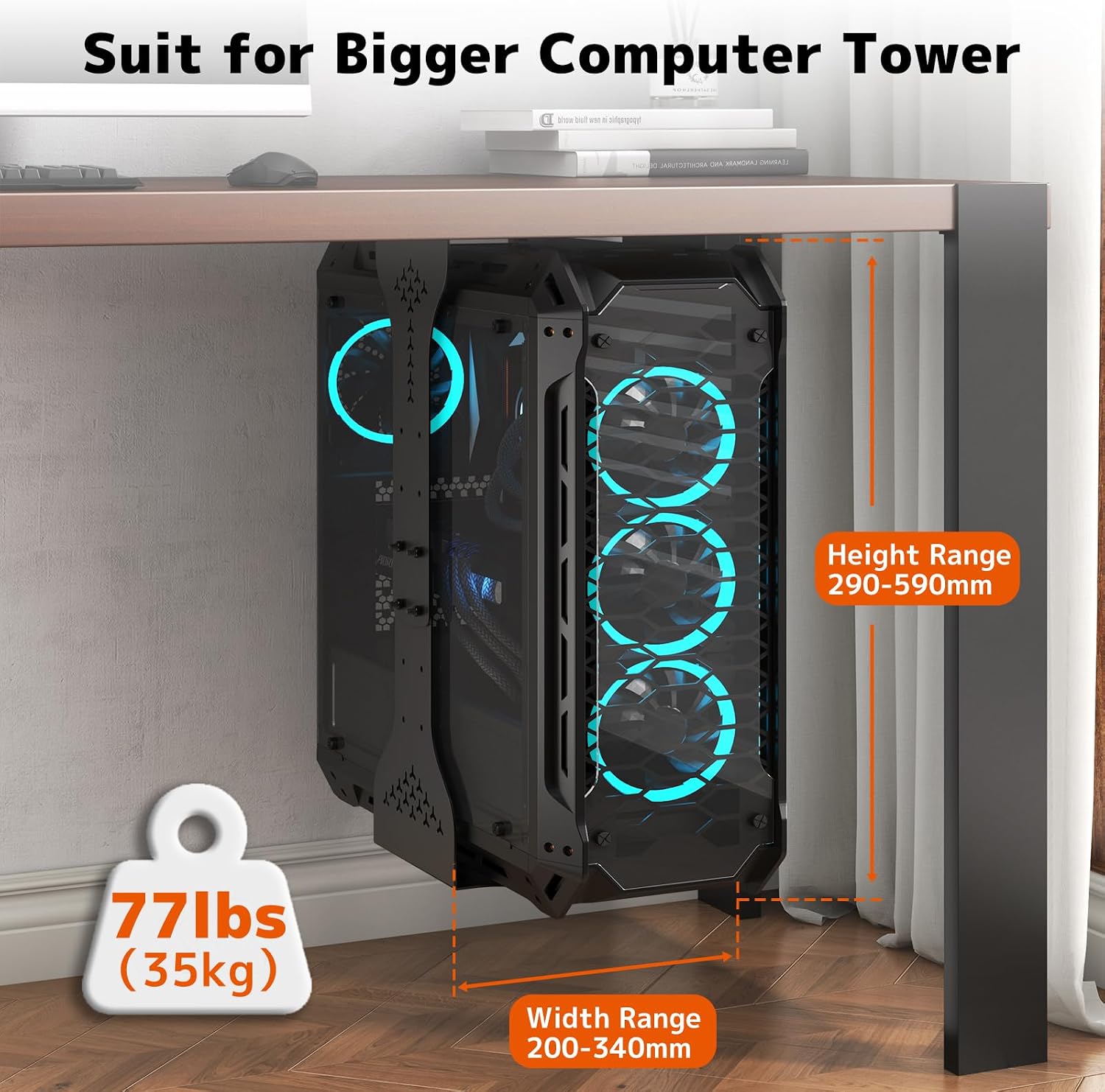
Image 4: A PC tower securely mounted under a desk, demonstrating the space-saving and aesthetic benefits.
Operating Instructions
Once installed, the PUTORSEN Under Desk PC Mount requires minimal operation. Its primary function is to securely hold your PC tower.
- Adjusting Width/Height: If you need to change the PC tower or adjust the fit, loosen the screws on the adjustable components, reposition them as needed, and then retighten firmly.
- Cable Management: Ensure all cables connected to your PC have sufficient slack, especially if using with a standing desk. This mount is designed to move in sync with standing desks, preventing cable strain and disconnections.
- Airflow: The open-frame design ensures 360° airflow around your PC. Do not obstruct the ventilation holes on the mount or your PC.

Image 5: The PC mount seamlessly integrates with sit-stand desks, moving with the desk to prevent cable strain.
Maintenance
To ensure the longevity and continued safe operation of your PC mount:
- Regular Inspection: Periodically check all screws and connections to ensure they are tight and secure.
- Cleaning: Wipe the mount with a soft, damp cloth to remove dust. Avoid abrasive cleaners or solvents.
- Protective Mats: Inspect the protective mats for wear and tear. Replace if necessary to maintain cushioning and prevent scratches on your PC case.
Troubleshooting
| Problem | Possible Cause | Solution |
|---|---|---|
| Mount feels unstable or wobbly. | Screws are loose; desk material is too thin/weak; PC tower is too heavy. | Ensure all mounting screws are securely tightened. Verify desk stability and weight capacity. Do not exceed 77 lbs (35 kg). |
| PC tower does not fit correctly. | Incorrect width or height adjustment. | Loosen adjustment screws, reposition the mount components to fit your PC tower (within 7.89"-13.39" width and 11.42"-23.23" height), then retighten. |
| Difficulty aligning mounting holes. | Minor misalignment during marking. | The mount allows for a 0.35" adjustment without redrilling. Loosen the screws, shift the bracket slightly, and retighten. |
| Cables are strained with standing desk. | Insufficient cable slack. | Ensure all cables have enough slack to accommodate the full range of motion of your standing desk. |
Warranty Information
The PUTORSEN Under Desk PC Mount comes with a 2-year warranty from the date of purchase. This warranty covers manufacturing defects and material flaws under normal use. It does not cover damage caused by improper installation, misuse, accidents, modifications, or exceeding the specified weight capacity.
Please retain your proof of purchase for warranty claims.
Customer Support
If you have any questions, require assistance with installation, or need to make a warranty claim, please contact PUTORSEN customer support through the retailer where you purchased the product or visit the official PUTORSEN website for contact information.
For more information and product updates, visit the PUTORSEN Store on Amazon.