
ARCCAPTAIN MIG205MP
ARCCAPTAIN MIG205MP Welder User Manual
Comprehensive Guide for Operation and Maintenance
1. Product Overview
The ARCCAPTAIN MIG205MP is a versatile multi-process welding machine designed for a wide range of applications, from home DIY to professional repairs. It offers 9 distinct welding modes, including Gas MIG, Gasless MIG, Cut, DC HF TIG, DC Lift TIG, MMA Stick, Clean, Spot Welding, and Spool Gun Aluminum Welding.
This welder is equipped with an exclusive large LED display for easy parameter adjustment and monitoring. It also features app control for convenient remote operation and data management. The included spool gun and ER4043 Aluminum Welding Wire ensure smooth and stable arc characteristics, providing excellent weld bead appearance, especially for aluminum applications.

Image 1.1: The ARCCAPTAIN MIG205MP multi-process welder, shown with the included spool gun and aluminum welding wire.
2. Setup and Connections
Before operating the ARCCAPTAIN MIG205MP welder, ensure all connections are secure and proper safety precautions are observed. Refer to the safety guidelines in the full manual.
2.1 Unpacking and Inspection
- Carefully remove all components from the packaging.
- Inspect the welder and accessories for any signs of damage during transit.
- Verify that all listed accessories are present.
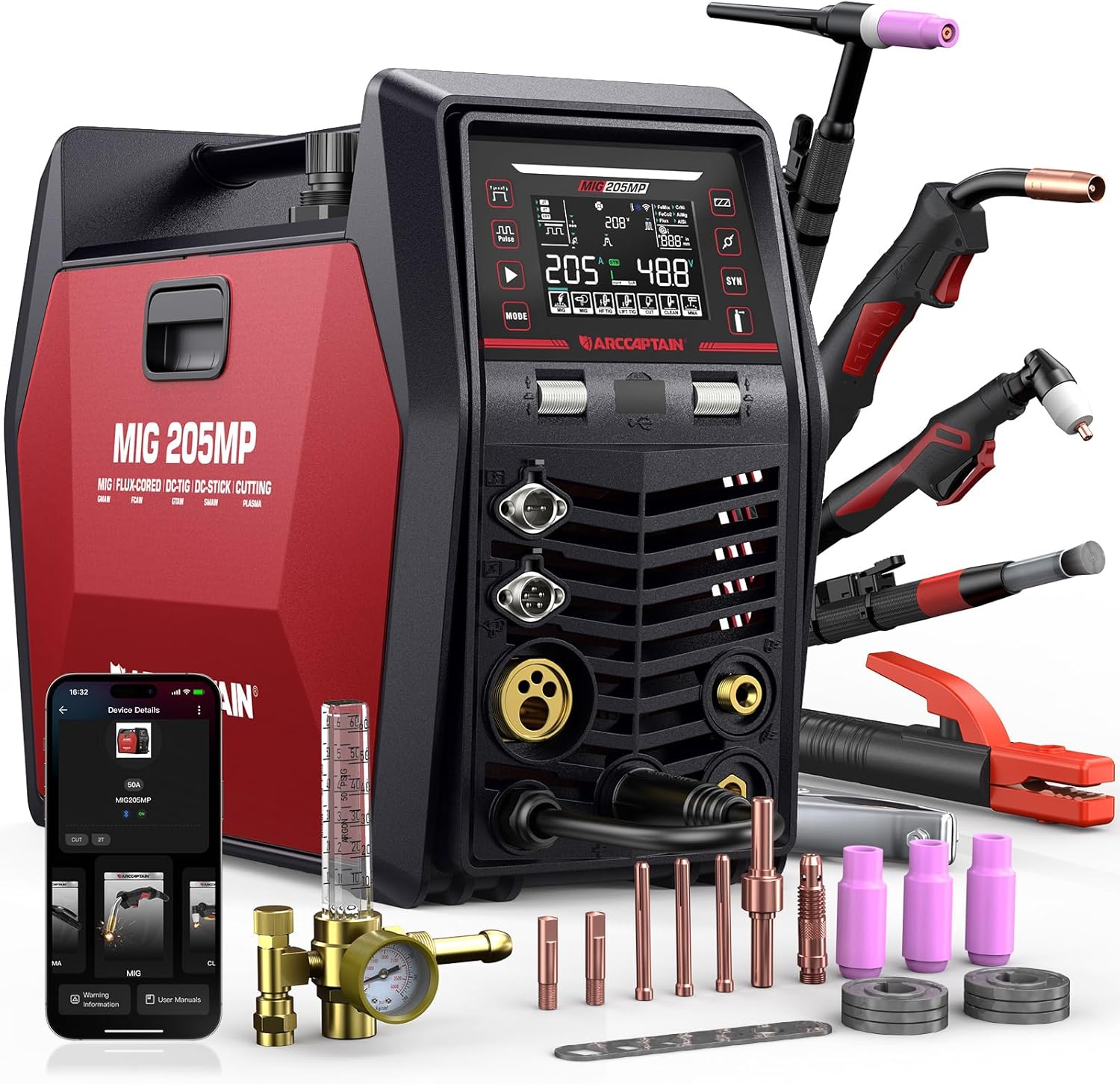
Image 2.1: The ARCCAPTAIN MIG205MP welder with its comprehensive set of accessories, including various torches and clamps.
2.2 Power Connection
- Connect the power cord to a suitable power supply as specified in the electrical requirements section of the main manual.
- Ensure the power source matches the welder's voltage and current requirements.
2.3 Gas Connection (for Gas MIG/TIG)
- Attach the gas hose from your shielding gas cylinder to the gas inlet on the rear of the welder.
- Secure all connections to prevent gas leaks.
2.4 Wire Installation (MIG/Spool Gun)
- For MIG welding, install the appropriate welding wire spool into the wire feeder compartment.
- For aluminum welding with the spool gun, ensure the ER4043 Aluminum MIG Wire is correctly loaded into the spool gun. The spool gun features a transparent cover for easy visibility and to keep the wire clean.

Image 2.2: Detailed view of the high-quality spool gun, highlighting its ergonomic comfort handle and break-resistant spring elbow for durability and ease of use.

Image 2.3: The ARCCAPTAIN ER4043 Aluminum MIG Welding Wire, designed for smooth welding with high strength and good ductility.
3. Operating Instructions
The ARCCAPTAIN MIG205MP offers a wide array of welding modes and intuitive controls for various welding tasks.
3.1 Welding Modes
This machine supports 9 welding modes:
- Gas MIG: For welding with shielding gas.
- Gasless MIG (Flux-Cored): For welding without external shielding gas.
- Cut: Plasma cutting function.
- DC HF TIG: DC High-Frequency TIG welding.
- DC Lift TIG: DC Lift-Arc TIG welding.
- MMA Stick: Manual Metal Arc (Stick) welding.
- Clean: Cleaning function.
- Spot Welding: For precise spot welds.
- Spool Gun Aluminum Welding: Optimized for aluminum welding with a spool gun.

Image 3.1: Visual representation of the 9 welding modes available on the ARCCAPTAIN MIG205MP.
3.2 Control Panel and Display
The large LED display provides comprehensive information and allows for easy adjustment of welding parameters. Navigate through modes and settings using the control knobs and buttons on the front panel.

Image 3.2: The exclusive large LED display, showing various functions and adjustable parameters for diverse welding needs.
3.3 App Control
The ARCCAPTAIN MIG205MP can be controlled via a dedicated mobile application, offering remote operation, multi-parameter adjustability, quick data saving, and instant access to settings within a 10-meter range.

Image 3.3: Illustration of the app control feature, allowing users to manage welding parameters remotely from a smartphone.
3.4 Spool Gun Operation
When using the spool gun, the wire feed speed can be conveniently adjusted directly through the spool gun itself, providing precise control during aluminum welding.

Image 3.4: The spool gun's remote adjustment capability, allowing for on-the-fly wire feed speed changes.

Image 3.5: A welder performing aluminum welding, demonstrating the machine's capability for this material.
4. Maintenance
Regular maintenance ensures the longevity and optimal performance of your ARCCAPTAIN MIG205MP welder.
4.1 General Cleaning
- Periodically clean the exterior of the machine with a dry, soft cloth.
- Use compressed air to clear dust and debris from ventilation openings. Ensure the machine is unplugged before cleaning.
4.2 Spool Gun and Wire Care
- Keep the welding wire clean and free from contaminants. The spool gun's transparent cover helps maintain wire cleanliness.
- Inspect the spool gun's contact tip and nozzle regularly and replace if worn.
4.3 Cable and Connection Inspection
- Check all cables and connections for signs of wear, damage, or loose fittings before each use.
- Ensure ground clamp and electrode holder connections are secure.
5. Troubleshooting
This section provides basic troubleshooting steps for common issues. For more complex problems, consult the full user manual or contact customer support.
5.1 No Power
- Check the power cord connection to the wall outlet and the machine.
- Verify the circuit breaker or fuse for the power supply.
- Ensure the machine's power switch is in the 'ON' position.
5.2 Poor Arc Start or Instability
- Ensure the workpiece is clean and free of rust, paint, or grease.
- Check the ground clamp connection to the workpiece and the machine.
- Verify correct welding parameters (voltage, wire feed speed, amperage) for the material and wire type.
- For Gas MIG/TIG, check gas flow and ensure no leaks.
5.3 Wire Feeding Issues
- Check for tangled or kinked wire in the spool or liner.
- Ensure the drive rollers are correctly tensioned and matched to the wire size.
- Inspect the contact tip for blockage or wear.
6. Specifications
| Attribute | Value |
|---|---|
| Model | ARCCAPTAIN MIG205MP |
| ASIN | B0FJF24RK9 |
| Style | ARCCAPTAIN MIG205MP Welder with Spool Gun & ER4043 Wire |
| Welding Modes | 9-in-1 (Gas MIG, Gasless MIG, Cut, DC HF TIG, DC Lift TIG, MMA Stick, Clean, Spot Welding, Spool Gun Aluminum Welding) |
| Display | Exclusive Large LED Display |
| Control | Manual and App Control |
7. Warranty and Support
7.1 Return Policy
This product is subject to a 30-day refund/replacement return policy from the date of purchase. Please refer to your purchase documentation for specific terms and conditions.
7.2 Customer Support
For technical assistance, troubleshooting beyond this guide, or warranty inquiries, please visit the official ARCCAPTAIN Store or contact their customer service department. You can find more information and contact details at the ARCCAPTAIN Store on Amazon.
Related documentsMIG205MP

Ask a question about this manual
Ask about setup, troubleshooting, compatibility, parts, safety, or missing instructions. Manuals+ will review the question and use this page’s manual context to help answer it.