
YOUKAIN YJ817
YOUKAIN 52-Inch Ceiling Fan with Lights (Model 52-YJ817-BK) - Instruction Manual
Comprehensive guide for installation, operation, and maintenance of your YOUKAIN ceiling fan.
1. Setup Instructions
Before beginning installation, ensure the power supply to the ceiling fan location is turned off at the circuit breaker. Always consult a qualified electrician if you are unsure about any electrical connections.
1.1. Unboxing and Parts Identification
Carefully remove all components from the packaging. Verify that all parts listed in your product manual are present and undamaged. The package includes the fan motor, three solid wood blades, a remote control, down rods (6" and 10"), and a light kit.

Image: All components of the YOUKAIN 52-inch ceiling fan laid out for inspection before assembly.
1.2. Mounting Bracket Installation
Attach the mounting bracket securely to the ceiling junction box. Ensure the bracket is firmly fastened to support the weight of the fan. If installing on a sloped ceiling (up to 15 degrees), ensure the bracket is correctly oriented.

Image: A person securing the mounting bracket to the ceiling's electrical junction box.
1.3. Downrod and Motor Assembly
Thread the electrical wires from the fan motor through the chosen downrod (6" or 10"). Secure the downrod to the fan motor assembly. Slide the decorative canopy over the downrod.

Image: Detailed view of the downrod being connected to the fan motor, with wires threaded through.
1.4. Wiring Connections
Carefully connect the fan's electrical wires to the household wiring according to the color codes (typically black to black, white to white, and green/bare copper to ground). Ensure all connections are secure using wire nuts. The remote receiver should be connected as per the detailed instructions in the manual.
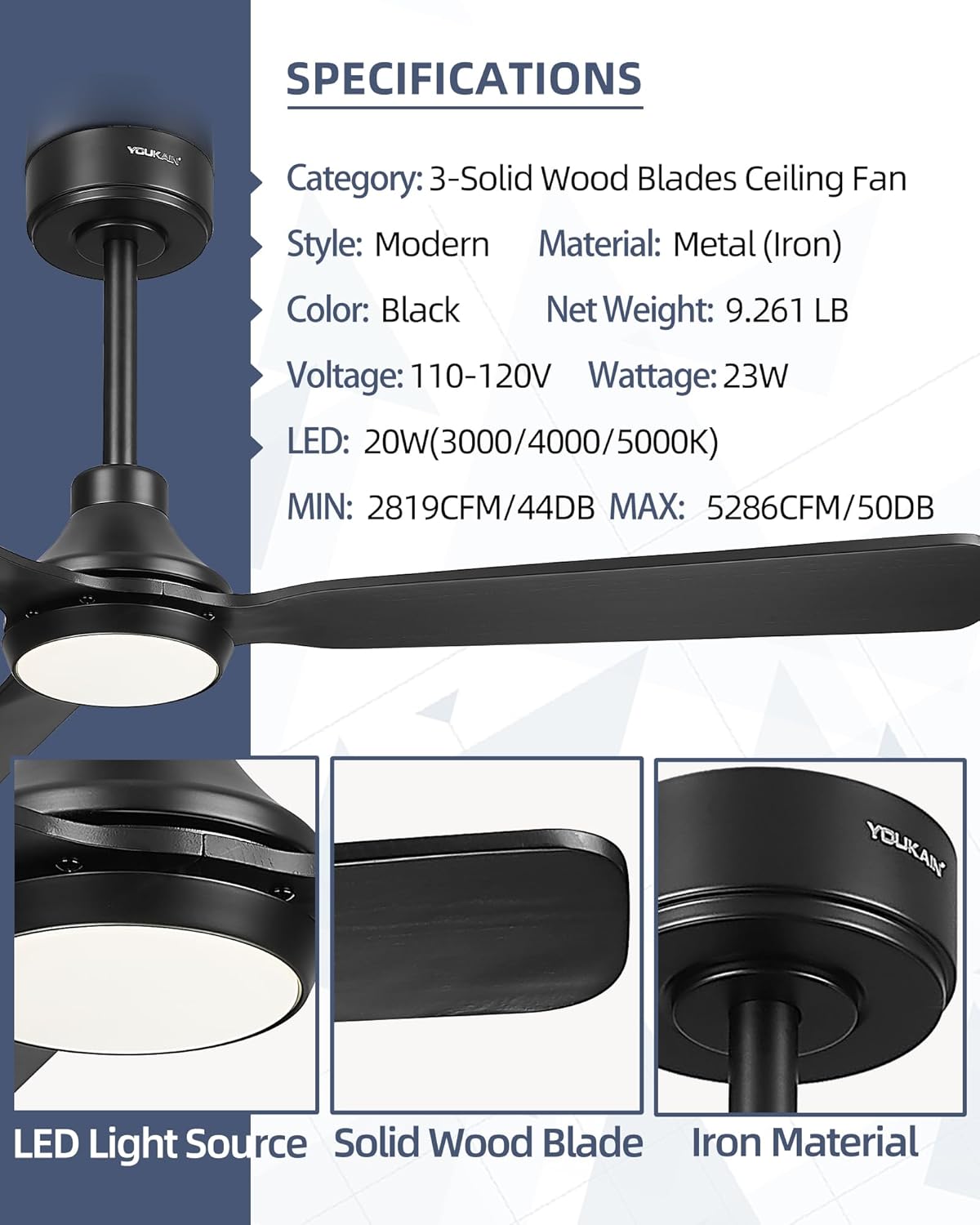
Image: Hands connecting the electrical wires of the fan to the ceiling's power supply.
1.5. Attaching Fan Blades
Attach each of the three solid wood blades to the fan motor using the provided screws. Ensure they are tightened firmly but do not overtighten. Proper blade attachment is crucial for balanced operation.

Image: A person securing a fan blade to the motor housing with a screwdriver.
1.6. Light Kit Installation
Connect the LED lamp to the fan's light kit wiring. The LED lamp is designed to magnetize to the LED board for easy installation. Secure the light cover by twisting it into place.
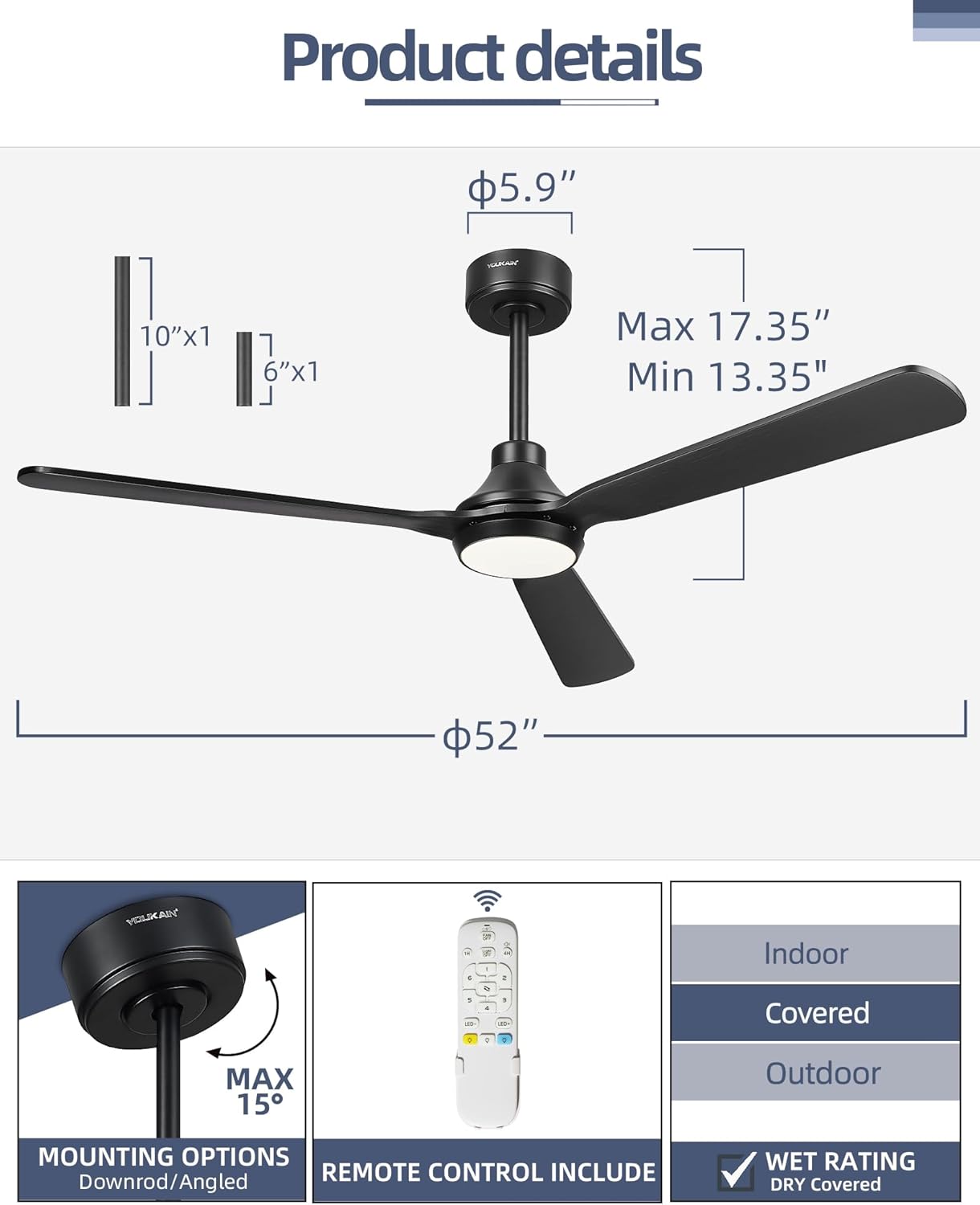
Image: A person installing the LED light module and attaching the light cover to the fan.
1.7. Installation Video Guide
For a visual step-by-step guide, please refer to the official installation video below:
Video: Official YOUKAIN guide on how to install the 52-inch YJ817 Ceiling Fan with Light.
2. Operating Instructions
Your YOUKAIN ceiling fan is operated via a convenient remote control, offering various settings for comfort and ambiance.
2.1. Remote Control Functions
The all-in-one remote control allows independent operation of the fan and light. It features buttons for power, fan speed, light on/off, light dimming, color temperature adjustment, reversible motor, and timer settings.

Image: The remote control for the YOUKAIN ceiling fan, highlighting its various function buttons.
2.2. Fan Speed Settings
The fan offers 6-speed settings to suit your preference:
- Speeds 1-2: Comfortable, gentle breeze.
- Speeds 3-4: Natural, medium wind.
- Speeds 5-6: Cooling, high wind for maximum airflow (up to 5286 CFM).
2.3. Light Settings
The integrated LED light is 1400 lumens, 20 watts, and offers three color temperature options (3000K/4000K/5000K). It is fully dimmable from 5% to 100% to satisfy different brightness requirements. Use the dedicated light buttons on the remote to adjust.
2.4. Reversible Motor Function
The DC motor features a reversible function, allowing year-round use:
- Summer Mode: Counter-clockwise rotation creates a downward airflow for a cooling effect.
- Winter Mode: Clockwise rotation creates an upward airflow to circulate warm air, helping to reduce heating costs.
2.5. Timer Function
Set the fan to automatically turn off after a specified period using the timer buttons (1H/4H) on the remote control. This feature is useful for energy saving, especially during sleep.
2.6. Mute Mode
The remote control includes a mute mode switch to turn off key sounds, providing a quieter user experience.
2.7. Operating Video Guide
Watch the video below for a demonstration of the fan's operating features:
Video: Demonstration of the YOUKAIN 52-YJ817-BK ceiling fan's features and remote control functionality.
3. Maintenance
Regular maintenance ensures the longevity and optimal performance of your ceiling fan.
3.1. Cleaning
To clean the fan blades and motor housing, use a soft, damp cloth. Avoid using abrasive cleaners or solvents that could damage the finish. Ensure the fan is turned off and completely stopped before cleaning.
3.2. Regular Checks
Periodically check all screws and connections for tightness. Over time, vibrations can cause screws to loosen. Tighten any loose screws to prevent wobbling or noise. No lubrication is required for the DC motor.
4. Troubleshooting
If you encounter any issues with your YOUKAIN ceiling fan, refer to the following common troubleshooting steps:
- Fan does not start: Check if the power is on at the circuit breaker and wall switch. Ensure all electrical connections are secure. Verify the remote control batteries are functional and the remote is paired correctly with the fan.
- Light does not work: Check the light switch and circuit breaker. Ensure the LED lamp is properly connected and the light cover is securely in place.
- Fan wobbles: Ensure all blade screws are tightened. Check that the mounting bracket is securely installed and all downrod connections are firm.
- Remote not responding: Replace the remote control batteries. Ensure there are no obstructions between the remote and the fan's receiver. Re-pair the remote if necessary (refer to the pairing instructions in your full manual).
- Noise: Ensure all screws are tight. Check for any loose parts or obstructions. The DC motor is designed for quiet operation (minimum 44dB).
5. Product Specifications
| Brand | YOUKAIN |
| Model Name | YJ817 |
| Size | 52 Inch |
| Color | Black |
| Number of Blades | 3 (Solid Wood) |
| Motor Type | DC Motor (23W) |
| Air Flow Capacity | 5286 CFM (Max) |
| Noise Level | 44 dB (Min) |
| Light Source | Integrated LED (1400 Lumens, 20W) |
| Color Temperature | 3000K/4000K/5000K (Adjustable) |
| Dimmable | 5%-100% |
| Control Method | Remote Control |
| Downrod Lengths | 6" and 10" |
| Indoor/Outdoor Usage | Indoor, Outdoor (Covered Installations) |
| Voltage | 110 Volts |
| Item Weight | 9.26 Pounds |
6. Warranty and Customer Support
YOUKAIN provides comprehensive support for your ceiling fan:
- Warranty: 2 years free replacement quality services.
- Technical Support: 24 hours a day technical support service.
If you have any questions about installation, use, or require support, please contact YOUKAIN customer service directly.
Related documentsYJ817


Ask a question about this manual
Ask about setup, troubleshooting, compatibility, parts, safety, or missing instructions. Manuals+ will review the question and use this page’s manual context to help answer it.