1. Introduction
Thank you for purchasing the Lumoday Wood Grain Digital Alarm Clock. This compact and stylish alarm clock features a clear LCD display, dual alarms, a snooze function, a convenient backlight, and unique encouragement messages to start and end your day positively. Its Scandinavian wood grain design seamlessly blends into any room environment.

Figure 1: Front view of the Lumoday Digital Alarm Clock.
2. Package Contents
- Lumoday Wood Grain Digital Alarm Clock (Model LMD-9W)
- User Manual
3. Setup
3.1 Battery Installation
The Lumoday Digital Alarm Clock is battery-operated, offering flexibility in placement without being tied to an outlet. It requires two AAA batteries (not included).
- Locate the battery compartment on the back of the clock.
- Slide open the battery cover.
- Insert two AAA batteries, ensuring correct polarity (+/-).
- Close the battery cover securely.
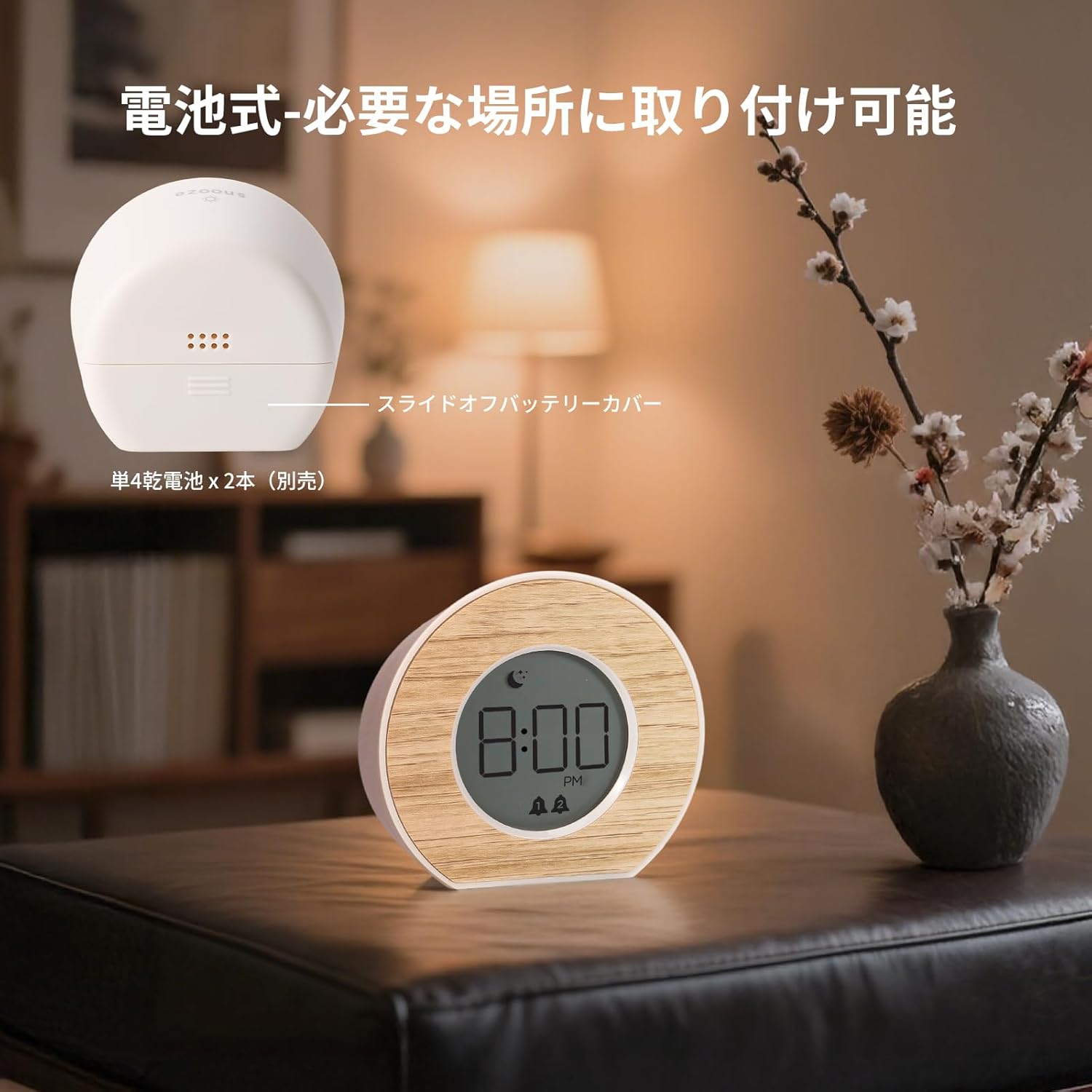
Figure 2: Rear view with battery compartment and control buttons.
3.2 Initial Time Setting
After installing batteries, the clock will power on. Use the buttons on the back to set the current time.
- Press the TIME SET button to enter time setting mode.
- Use the HR button to adjust the hour.
- Use the MIN button to adjust the minute.
- Press TIME SET again to confirm and exit.
4. Operating Instructions
4.1 Dual Alarm Setting
This clock features two independent alarms, allowing you to set different wake-up times for weekdays and weekends, or for two different users.
- To set Alarm 1: Press the ALARM 1 SET button. Use HR and MIN to adjust the time. Press ALARM 1 SET again to confirm.
- To set Alarm 2: Press the ALARM 2 SET button. Use HR and MIN to adjust the time. Press ALARM 2 SET again to confirm.
- To activate/deactivate an alarm: Press the corresponding ALARM 1 ON/OFF or ALARM 2 ON/OFF button. An alarm icon (bell 1 or bell 2) will appear on the display when active.

Figure 3: Setting the alarm time on the clock.
4.2 Snooze Function
When an alarm sounds, gently press the top of the clock to activate the snooze function. The alarm will pause and sound again after a set interval.
- Snooze intervals can be set to 5, 10, 15, or 30 minutes. Refer to the back panel diagram for the snooze setting button.
- To stop the alarm completely, press any other button on the back of the clock.
4.3 Backlight Activation
The clock features a gentle backlight for easy viewing in low-light conditions.
- To activate the backlight, gently press the top of the clock. The backlight will illuminate for approximately 5 seconds.
- This feature allows you to check the time without disturbing your sleep with bright light.

Figure 4: Backlight activated by pressing the top of the clock.
4.4 Encouragement Message Display
To reset your mood and receive a positive message, double-tap the top of the display.
- Double-tap the top of the clock. A random encouragement message will appear on the display.
- Messages like "Have a nice day!" are designed to provide a positive start to your day or a calming end to your night.

Figure 5: Encouragement messages displayed on the clock face.
5. Maintenance
- Clean the clock with a soft, dry cloth. Do not use abrasive cleaners or solvents.
- Avoid exposing the clock to extreme temperatures, direct sunlight, or high humidity.
- If the clock will not be used for an extended period, remove the batteries to prevent leakage.
6. Troubleshooting
| Problem | Possible Cause | Solution |
|---|---|---|
| Clock does not turn on. | Batteries are dead or incorrectly installed. | Replace batteries with new ones, ensuring correct polarity. |
| Alarm does not sound. | Alarm is not activated or volume is too low. | Ensure the alarm is turned ON (bell icon visible). Check battery level. |
| Backlight does not activate. | Batteries are low or the top press was not firm enough. | Replace batteries. Press the top of the clock more firmly. |
| Time is inaccurate. | Batteries are low. | Replace batteries and reset the time. |
7. Specifications
- Model Number: LMD-9W
- Brand: Lumoday
- Material: Acrylonitrile Butadiene Styrene (ABS)
- Color: Wood Grain Warm Gray
- Display Type: LCD
- Power Source: Battery operated (2 x AAA batteries, not included)
- Product Dimensions: 9.4 cm (width) x 8.7 cm (height)
- Product Weight: 101.5 grams
- Features: Dual Alarm, Snooze Function (5/10/15/30 min), 5-second Backlight, Encouragement Message Display
- Room Type: Indoor (Bedroom, Living Room, Office)
- Style: Scandinavian
8. Warranty and Support
For warranty information or technical support, please refer to the product packaging or contact your retailer. Keep your purchase receipt for warranty claims.


