
1. Introduction and Product Overview
This manual provides detailed instructions for the assembly, operation, and maintenance of your Yaheetech Queen Bed Frame. This bed frame features an upholstered headboard with integrated USB charging ports and AC outlets, a convenient storage shelf, and a sturdy wooden slat support system designed for use without a box spring.

Image 1.1: Overview of the Yaheetech Queen Bed Frame with integrated headboard features.
2. Safety Information
Please read all instructions carefully before assembly and use. Keep this manual for future reference.
- Ensure all parts are present and undamaged before beginning assembly. Do not use if any parts are missing or broken.
- Assemble the bed frame on a soft, clean surface to prevent scratches.
- Tighten all screws and bolts securely, but do not overtighten. Periodically check and re-tighten all fasteners.
- Do not allow children to climb on the bed frame during assembly or use.
- The bed frame has a maximum weight capacity of 800 lbs (363 kg). Do not exceed this limit.
- For external use only. (This refers to the product's intended use as furniture, not for internal consumption).
- Keep electrical components (charging station) away from water or excessive moisture.
3. Package Contents
Verify that all components listed below are included in your package. If any parts are missing or damaged, please contact customer support.
- Upholstered Headboard with Charging Station
- Side Rails (Left and Right)
- Footboard
- Center Support Beam(s)
- Wooden Slats with Fabric Strap Connection
- Support Legs (for frame and center beam)
- Hardware Pack (screws, bolts, washers, Allen wrench)
- Assembly Instructions Manual
4. Setup and Assembly
Assembly typically requires two adults and can be completed within an hour. A power drill is recommended for faster and easier assembly, though a regular screwdriver can be used.
Required Tools (Not Included):
- Phillips Head Screwdriver (or Power Drill with Phillips bit)
Assembly Steps:
- Unpack and Identify Parts: Carefully unpack all components and lay them out on a clean, soft surface. Refer to the parts list in your manual to identify each piece.
- Attach Headboard Legs: Secure the support legs to the upholstered headboard using the provided hardware.
- Connect Side Rails: Attach the side rails to the headboard and footboard using the appropriate bolts. Ensure all connections are firm.
- Install Center Support: Assemble and install the center support beam(s) and their respective support legs. Ensure the legs are positioned to provide adequate support.
- Place Wooden Slats: Lay the wooden slats across the bed frame. The slats are connected by a fabric strap for easy placement. Secure the slats to the side rails using the provided screws. This system supports your mattress directly, eliminating the need for a box spring.
- Final Tightening: Once all components are in place, go back and ensure all screws and bolts are securely tightened. Do not overtighten.

Image 4.1: Detail of the wooden slats and fabric strap connection for easy assembly and mattress support.

Image 4.2: Illustration of the solid foundation provided by the wooden slats.
5. Operating the Charging Station
The upholstered headboard includes a built-in power strip for convenient charging of your electronic devices.

Image 5.1: Close-up of the integrated charging station on the headboard.
- Power Connection: Locate the power cord extending from the headboard and plug it into a standard wall outlet.
- USB Ports: The charging station features one 5V/2.1A USB-A port and one 5V/2.1A USB-C port. Connect your compatible devices (e.g., smartphones, tablets, power banks) to these ports for charging.
- AC Outlets: Two 125V/12A AC outlets are provided for plugging in small appliances or chargers, such as lamps or laptop power adapters.
- Storage Shelf: The top surface of the headboard serves as a storage shelf, ideal for placing your phone, books, or small decorative items while charging.

Image 5.2: The headboard offers both charging capabilities and a convenient storage shelf.
6. Maintenance
Regular maintenance will help prolong the life and appearance of your bed frame.
- Cleaning the Upholstery: For general cleaning, gently vacuum the velvet fabric to remove dust and debris. For spills, blot immediately with a clean, dry cloth. For stubborn stains, use a mild fabric cleaner according to its instructions, testing on an inconspicuous area first.
- Frame Cleaning: Wipe down the frame components with a damp cloth and mild soap if necessary. Dry immediately.
- Under-Bed Cleaning: The bed frame features a 6-inch (15 cm) under-bed clearance, allowing most robot vacuums to pass underneath for effortless cleaning.
- Fastener Check: Periodically check all bolts and screws to ensure they remain tight. Re-tighten as needed to maintain stability and prevent squeaking.

Image 6.1: The 6-inch under-bed clearance facilitates easy cleaning with robot vacuums.
7. Troubleshooting
Refer to the following common issues and solutions:
| Problem | Possible Cause | Solution |
|---|---|---|
| Bed frame is wobbly or squeaks. | Loose fasteners. | Check and re-tighten all bolts and screws. Ensure all connections are secure. |
| Mattress sags between slats. | Slats are too far apart or not properly secured. | Ensure all slats are correctly positioned and screwed into the side rails. If gaps are still too wide, consider adding a bunkie board or additional support. |
| Center support legs do not touch the floor. | This is normal without weight. | The center support legs are designed to engage and provide support once weight is applied to the bed. They may not fully touch the floor when the bed is empty. If they remain significantly off the floor with a mattress and occupant, check assembly of the center beam and legs. |
| Charging station is not working. | Power cord unplugged; device incompatibility; faulty outlet. | Ensure the headboard's power cord is securely plugged into a functional wall outlet. Test the wall outlet with another device. Try a different device with the charging station to rule out device incompatibility. |
8. Specifications
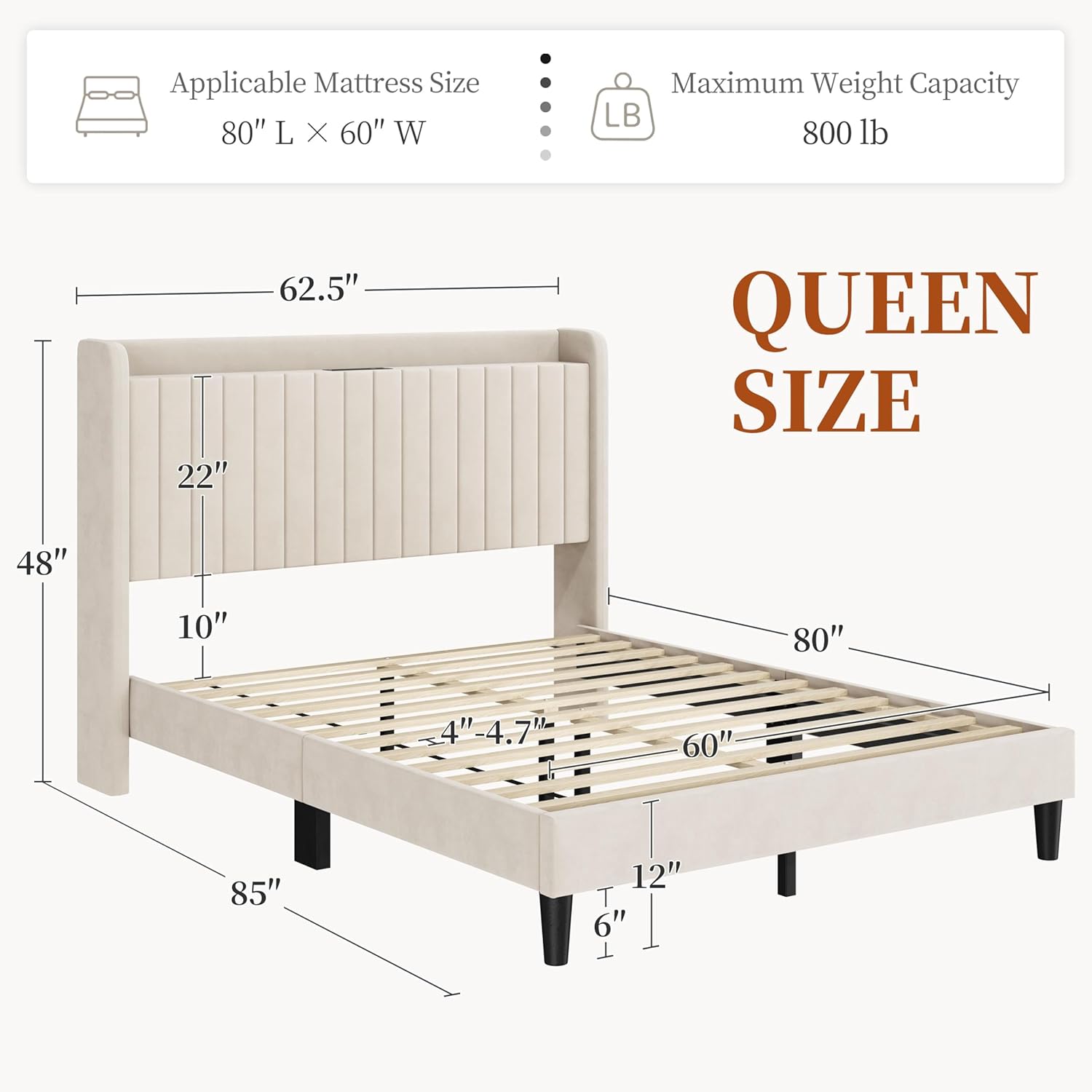
Image 8.1: Detailed dimensions of the Queen size bed frame.
| Feature | Detail |
|---|---|
| Standard Size | Queen |
| Materials | Plywood, High-density foam, MDF, Particle Board, Poplar Laminated Board, Velvet Fabric, Non-Woven Fabric, Rubber wood, Plastic |
| Assembled Dimensions (L x W x H) | 85" L x 62.5" W x 48" H (2.13L x 1.58W x 1.22H meters) |
| Applicable Mattress Size | 80" L x 60" W (Queen) |
| Distance between Headboard and Bedstead | 10 inches |
| Maximum Weight Capacity | 800 lbs (363 kg) |
| Item Weight | 92.4 lbs (42 kg) |
| Color | Beige |
| Headboard Features | Upholstered, Storage Shelf, 1x USB-A (5V/2.1A), 1x USB-C (5V/2.1A), 2x AC Outlets (125V/12A) |
| Under-Bed Clearance | 6 inches |
9. Warranty and Support
Your Yaheetech Queen Bed Frame is designed for durability and satisfaction.
- Return Policy: This product is eligible for return, refund, or replacement within 30 days of receipt, as per Amazon's return policy.
- Manufacturer: Yaheetech
- Manufacturer Contact Information: 100 Bentley St., Markham, ON, L3R3L2
- Online Support: For additional information or to explore other products, please visit the Yaheetech Store on Amazon.
- For any issues or inquiries, please contact the seller or Amazon customer support.