
Introduction
This manual provides essential instructions for the proper installation, use, and maintenance of your Radtel replacement belt clips. These belt clips are designed to securely attach your compatible Radtel two-way radio to your belt or clothing, ensuring convenient and hands-free operation.
Package Contents
- 10 x Radtel Walkie Talkie Belt Clips

Image: Front view of a single Radtel walkie talkie belt clip, showing its general shape and design.
Compatibility
These belt clips are specifically designed for use with the following Radtel and compatible two-way radio models:
- Radtel RT12
- WLN KD-C51
- WLN KD-C52
- Radtel RT15
Safety Information
Please read and understand the following safety guidelines before installing or using the belt clip:
- Ensure the belt clip is securely attached to the radio to prevent accidental detachment and potential damage to the device.
- Avoid applying excessive force when attaching or detaching the clip, as this may damage the clip or the radio.
- Keep the belt clips out of reach of small children to prevent choking hazards.
Setup and Installation
Attaching the Belt Clip to Your Radio
Follow these steps to properly install the belt clip onto your compatible Radtel two-way radio:
- Identify the designated mounting area on the back of your Radtel RT12, WLN KD-C51, KD-C52, or RT15 radio. This area typically includes screw holes or a slot for the clip.
- Align the belt clip with the mounting points on the radio. Ensure the clip is oriented correctly, with the clip mechanism facing outwards.
- If your radio model uses screws, insert the provided screw(s) into the designated holes and tighten them gently with a screwdriver until the clip is firm. Do not overtighten. If it's a snap-on design, press the clip firmly until it clicks into place.
- Verify that the belt clip is securely attached and does not wobble.
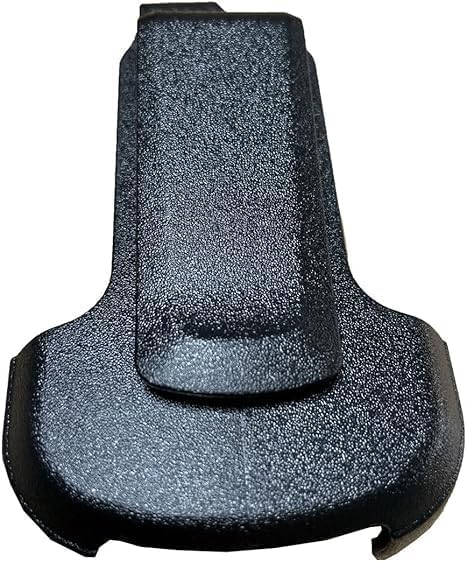
Image: Back view of a Radtel walkie talkie belt clip, illustrating the area where it connects to the radio.
Removing the Belt Clip from Your Radio
To remove the belt clip, reverse the installation process:
- If secured by screws, carefully unscrew them.
- If it's a snap-on design, gently pry the clip away from the radio until it detaches. Avoid using excessive force to prevent damage.
Operating the Belt Clip
Attaching the Radio to Your Belt or Clothing
Once the belt clip is attached to your radio, you can easily secure it to your person:
- Slide the belt clip over the edge of your belt, waistband, or pocket.
- Ensure the radio is positioned comfortably and securely, allowing for easy access and preventing it from falling.
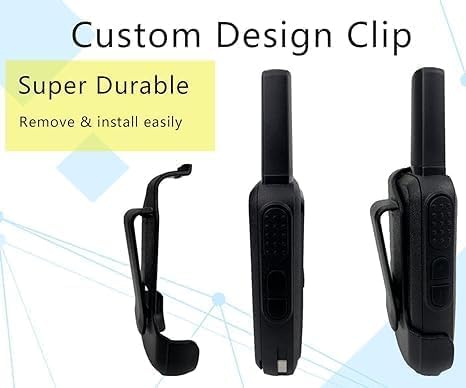
Image: A Radtel walkie talkie with the belt clip attached, demonstrating how it extends from the side of the radio for attachment to a belt.
Detaching the Radio from Your Belt or Clothing
To remove the radio from your belt or clothing:
- Grasp the radio firmly.
- Gently lift the radio upwards and away from your belt or clothing, allowing the clip to disengage.
Maintenance and Care
To ensure the longevity and proper function of your belt clips, follow these maintenance tips:
- Cleaning: Wipe the belt clips with a soft, damp cloth to remove dust or dirt. Avoid using harsh chemicals or abrasive cleaners.
- Inspection: Periodically inspect the clips for any signs of wear, cracks, or damage. Replace damaged clips immediately to prevent your radio from falling.
- Storage: Store unused belt clips in a cool, dry place away from direct sunlight and extreme temperatures.
Troubleshooting Common Issues
If you encounter any issues with your belt clips, refer to the table below for potential solutions:
| Problem | Possible Cause | Solution |
|---|---|---|
| Belt clip feels loose on the radio. | Screws are not tightened sufficiently, or clip is not fully snapped into place. | Ensure screws are tightened (do not overtighten) or press firmly until the clip clicks into position. |
| Difficulty attaching/detaching the radio from a belt. | Incorrect angle or obstruction. | Ensure the clip is aligned correctly with the belt/clothing. Avoid bulky clothing layers. |
| Belt clip is damaged or broken. | Physical stress or wear and tear. | Replace the damaged belt clip with a new one. |
Product Specifications
- Brand: Radtel
- Included Components: Belt Clip (10 pieces)
- Item Weight: Approximately 250 Grams (for the 10-pack)
- Compatible Models: Radtel RT12, WLN KD-C51, KD-C52, RT15
Warranty Information
This product comes with a 1-year warranty from the date of purchase. The warranty covers manufacturing defects. It does not cover damage resulting from misuse, accident, unauthorized modification, or normal wear and tear. Please retain your proof of purchase for warranty claims.
Customer Support
For further assistance, technical support, or warranty inquiries, please contact Radtel customer service through the retailer where the product was purchased or visit the official Radtel website for contact information.


