1. Introduction
This manual provides essential information for the safe and effective operation of your Huepar SW-T50 3-in-1 Laser Measuring Tool. This versatile device integrates a laser distance meter, a green cross line laser level, and a traditional tape measure into a single compact unit. It is designed for various measurement tasks in construction, home improvement, and DIY projects.
Please read this manual thoroughly before using the device and retain it for future reference.

Image 1.1: The Huepar SW-T50 showcasing its three primary functions: laser distance measurement up to 165ft, a 33ft green cross line laser for leveling, and a 6.5ft physical tape measure.
2. Safety Information
WARNING: LASER RADIATION
This product is a Class 2 laser product. Avoid direct eye exposure to the laser beam. Do not stare into the beam. Do not intentionally direct the laser beam at others. Laser radiation can cause eye injury.
- Do not attempt to modify or disassemble the device.
- Keep the device out of reach of children.
- Use only as specified in this manual.
- Do not operate the device in explosive atmospheres or near flammable materials.
- Protect the device from extreme temperatures, strong vibrations, and mechanical shock.
3. Product Overview
3.1 Package Contents
The Huepar SW-T50 package includes the following items:
- 1 x Huepar SW-T50 3-in-1 Laser Measuring Tool (165 Feet)
- 1 x Auxiliary Measuring Target Plate
- 1 x Portable Carrying Bag
- 1 x Hand Strap
- 1 x Type-C Charging Cord
- 1 x User Manual
- 1 x Paper Color Box
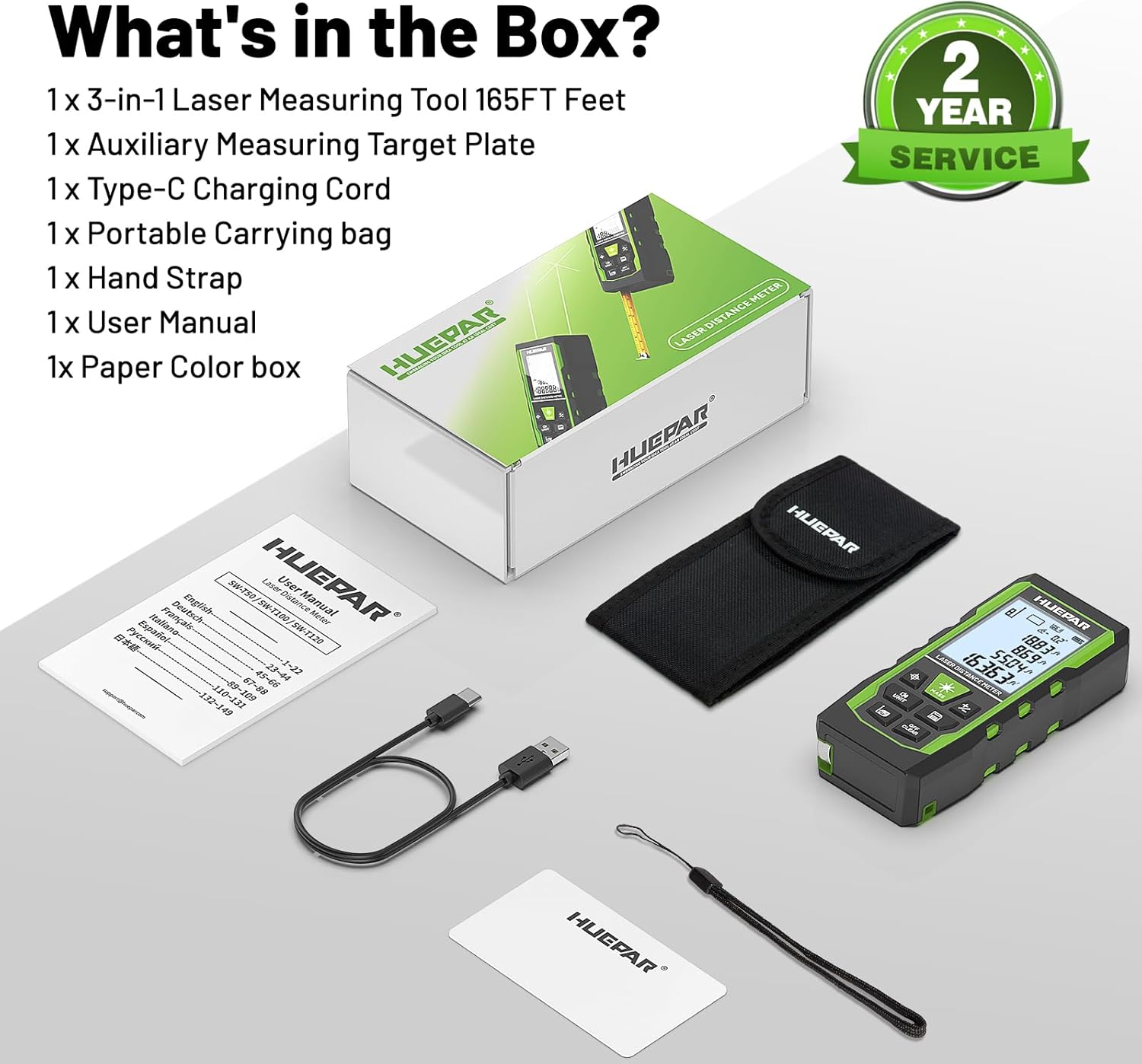
Image 3.1: All items included in the Huepar SW-T50 product package.
3.2 Device Components

Image 3.2: Detailed diagram of the Huepar SW-T50, highlighting its buttons, display, laser apertures, and ports.
- Power ON / Measure Button: Activates the device and initiates measurements.
- Laser Level Mode Button: Switches to and controls the green cross line laser.
- Unit Switch / Sound Button: Changes measurement units and controls voice broadcast.
- Addition / Subtraction Button: Performs calculations with measurements.
- Data Saving Button: Stores measurement data.
- Turn OFF / Clear Button: Powers off the device or clears current readings.
- Benchmark / Mode Switch: Selects measurement reference points and modes.
- Green Cross Line Laser: Emits horizontal and vertical laser lines.
- 1/4" Threaded Mount: For tripod attachment.
- Type-C Charging Port: For recharging the internal battery.
- Hand Strap Slot: For attaching the included hand strap.
- Tape Measure: Integrated physical tape measure.
3.3 Key Features
- 3-in-1 Functionality: Laser distance measurement (up to 165ft), green cross line laser level (33ft), and 6.5ft tape measure.
- High Accuracy: Laser measure accuracy of ±1/16 inch, laser level accuracy of ±1/9 inch, and angle accuracy of ±1°.
- Voice Broadcast: Real-time voice feedback for measurements, enhancing readability and efficiency.
- Multiple Measurement Modes: Includes distance, area, volume, Pythagorean (indirect height), wall area, and continuous measurement.
- Rechargeable Battery: Built-in 3.7V / 600mAh battery with Type-C charging.
- Data Storage: Stores up to 100 sets of measurement data.
- Rugged Design: Durable TPE housing for drop, dust, and light water spray resistance (IP54).
- Tripod Mount: 1/4"-20 threaded mount for stable positioning.
4. Setup
4.1 Charging the Device
Before initial use, fully charge the device using the provided Type-C charging cord. Connect the cord to the Type-C charging port on the device and a compatible USB power source.
4.2 Powering On/Off
- To Power On: Press the Power ON / Measure Button.
- To Power Off: Press and hold the Turn OFF / Clear Button for a few seconds. The device will also auto shut-off after 150 seconds of inactivity to conserve energy.
5. Operation
5.1 General Settings
- Changing Units: Press the Unit Switch / Sound Button to cycle through available measurement units (e.g., inches, feet, meters).
- Voice Broadcast: Long press the Unit Switch / Sound Button to switch between English voice, Chinese voice, or to turn off the sound. Note: Voice broadcast is not active while charging.

Image 5.1: The voice broadcast feature provides audible measurement readings.
5.2 Laser Distance Measurement
The laser distance meter provides fast and accurate measurements up to 165 feet.
- Taking a Measurement: Press the Power ON / Measure Button once to activate the laser, then press it again to take a measurement.
- Reference Points: The device supports measurements from the front, rear, or screw-hole reference points. Press the Benchmark / Mode Switch to select the desired reference point.

Image 5.2: Illustration of front-based, screw-hole based, and rear-based measurement reference points.
5.3 Measurement Modes
The SW-T50 offers various measurement modes for different applications:
- Distance Measurement: Standard point-to-point measurement.
- Area Measurement: Calculates the area of a surface (length x width).
- Volume Measurement: Calculates the volume of a space (length x width x height).
- Pythagorean Measurement (Indirect Height): Calculates height indirectly using two or three measurements.
- Wall Area Measurement: Calculates the total area of multiple walls.
- Continuous Measurement (Tracking): Provides real-time distance updates as the device is moved.
Press the Benchmark / Mode Switch repeatedly to cycle through these measurement modes. Follow the on-screen prompts for each mode.

Image 5.3: Visual representation of the nine different measurement modes.
5.4 Green Cross Line Laser Level
The integrated green cross line laser level is ideal for tasks requiring precise alignment, such as hanging pictures or installing shelves.
- Activating the Laser Level: Press the Laser Level Mode Button to activate the green cross line laser.
- Angle Display: The screen displays angles from -90° to +90° horizontally.
- Out-of-Level Indication: If the angle exceeds ±4°, the 'Out' icon will flash on the screen, and the laser line will flash rapidly, indicating the device is not level.

Image 5.4: Using the green cross line laser level mode for precise alignment.
5.5 Tape Measure
The physical tape measure extends up to 6.5 feet (2 meters) for quick, short-distance measurements.
- Simply pull out the tape measure from the side of the device for use.
- Ensure the tape retracts smoothly after use.
5.6 Data Storage
The device automatically saves valid measurements and can store up to 100 groups of data. The top of the screen indicates the number of stored groups.
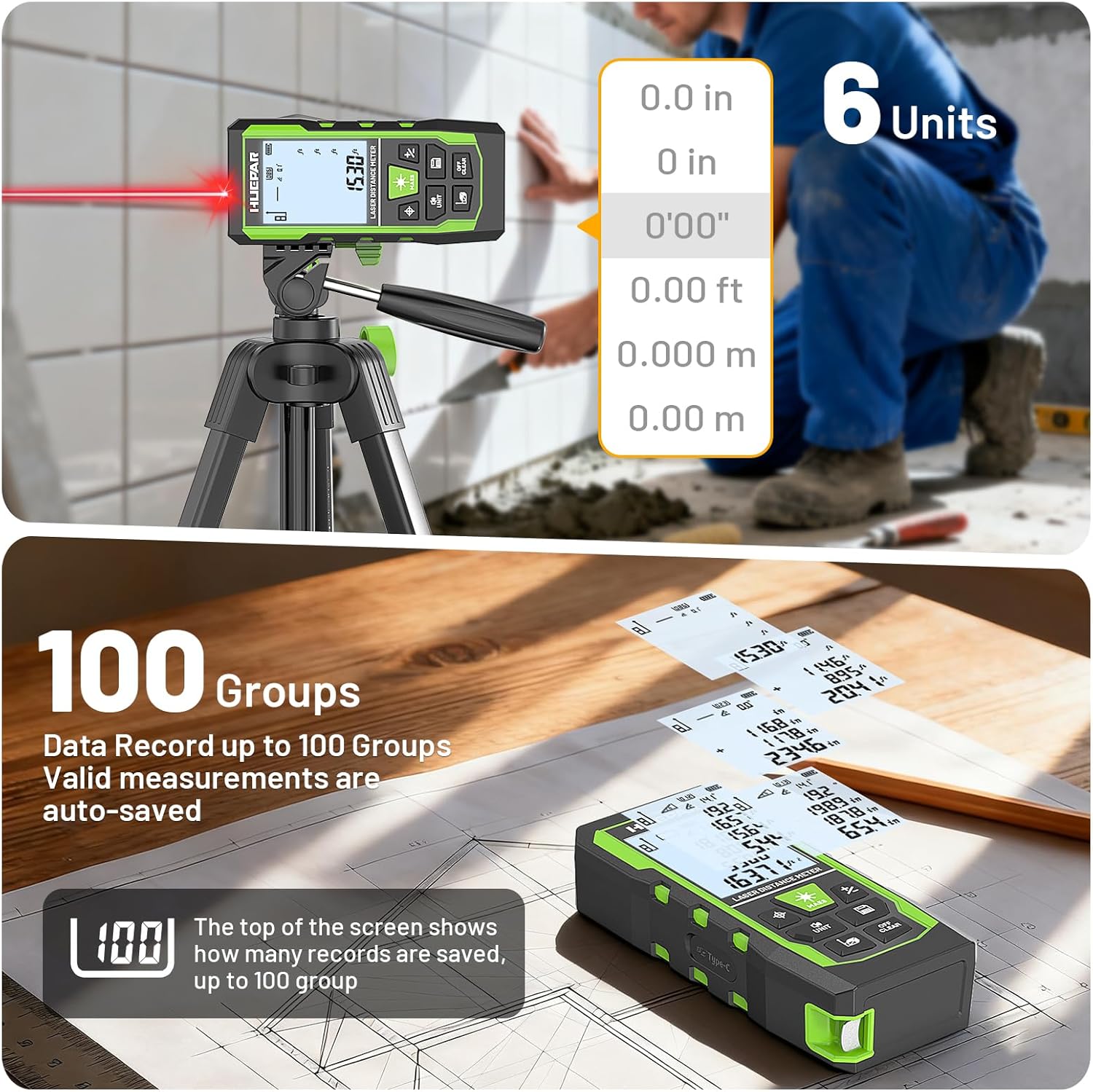
Image 5.5: The device supports multiple units and stores up to 100 measurement records.
5.7 Product Demonstration Video
Video 5.6: An official product video demonstrating the various functions and features of the Huepar 3-in-1 Laser Measuring Tape Tool, including laser distance measurement, laser leveling, and tape measure usage.
6. Maintenance
- Cleaning: Use a soft, damp cloth to clean the device. Do not use abrasive cleaners or solvents.
- Storage: Store the device in its portable carrying bag in a cool, dry place when not in use.
- Battery Care: Recharge the battery regularly, even if the device is not used frequently, to maintain battery health.
- Environmental Protection: The device features IP54 dust and splash resistance, but it is not fully waterproof. Avoid submerging it in water.

Image 6.1: The device is designed for durability with IP54 rating and comes with a portable pouch for protection.
7. Troubleshooting
If you encounter issues with your Huepar SW-T50, refer to the following common problems and solutions:
| Problem | Possible Cause | Solution |
|---|---|---|
| Device does not power on. | Low battery. | Charge the device using the Type-C charging cable. |
| Inaccurate laser measurements. | Incorrect reference point selected; Obstruction in laser path; Unstable surface. | Verify the selected reference point. Ensure a clear laser path. Place the device on a stable surface or use a tripod. |
| Laser beam is not visible. | Bright ambient light; Long distance measurement. | Use the auxiliary measuring target plate to enhance visibility. Reduce ambient light if possible. |
| Green cross line laser flashes rapidly. | Device is out of level (angle > ±4°). | Adjust the device position until it is within the self-leveling range. |
| Voice broadcast not working. | Voice broadcast is turned off; Device is charging. | Long press the Unit Switch / Sound Button to activate voice broadcast. Voice broadcast is disabled during charging. |
8. Specifications
| Feature | Specification |
|---|---|
| Model Number | SW-T50 |
| Laser Measure Range | 165 Feet |
| Laser Measure Accuracy | ±1/16 inch |
| Green Cross Line Laser Range | 33 Feet |
| Laser Level Accuracy | ±1/9 inch |
| Angle Accuracy | ±1° |
| Tape Measure Length | 6.5 Feet (2 Meters) |
| Laser Class | Class 2, <1mW |
| Laser Type | 490-560nm |
| Battery | Built-in 3.7V / 600mAh |
| Display | 2.2" Backlit LCD |
| Data Storage | Up to 100 groups |
| Auto Shut-off | 150 seconds (laser), 180 seconds (device) |
| IP Rating | IP54 (Dust and Splash Resistant) |
| Item Weight | 9.6 ounces |
| Package Dimensions | 6.34 x 3.43 x 2.36 inches |
| Material | Acrylonitrile Butadiene Styrene (TPE Housing) |
9. Warranty and Support
The Huepar SW-T50 Laser Measuring Tool comes with a 2-year quality assurance. In the event of a product fault, free repair or replacement will be provided.
Huepar is committed to providing excellent customer service. For technical support, warranty claims, or any inquiries, please contact the Huepar service team. They aim to respond within 24 hours and provide a solution within 48 hours. Lifetime technical support and access to worldwide maintenance centers are also available for faster service.
For further assistance, please visit the official Huepar website or contact their customer support directly.


