
1. Introduction
The Huepar 3-in-1 Laser Measuring Tool SW-T120 is a versatile device designed for various measurement tasks. It integrates a laser distance meter, a green cross line laser level, and a traditional tape measure into a single compact unit. This manual provides detailed instructions for safe and effective use of the tool.
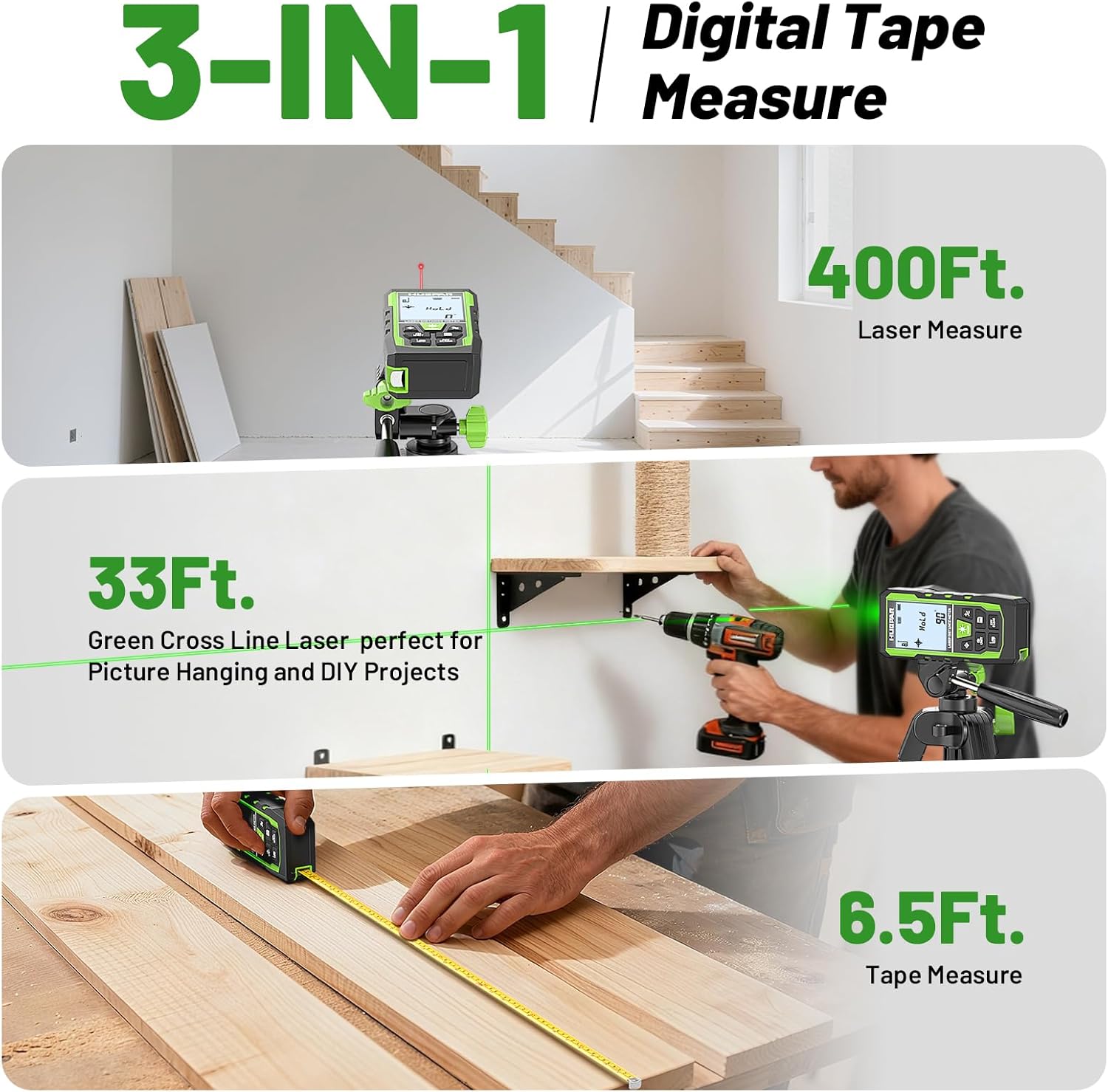
Image: The Huepar 3-in-1 Laser Measuring Tool demonstrating its three core functions: 400ft laser distance measurement, 33ft green cross line laser leveling, and 6.5ft tape measure.
2. What's in the Box
Verify that all items are present in the package:
- 1 x Huepar 3-in-1 Laser Measuring Tool (SW-T120)
- 1 x Auxiliary Measuring Target Plate
- 1 x Portable Carrying Bag
- 1 x Hand Strap
- 1 x Type-C Charging Cord
- 1 x User Manual
- 1 x Paper Color Box
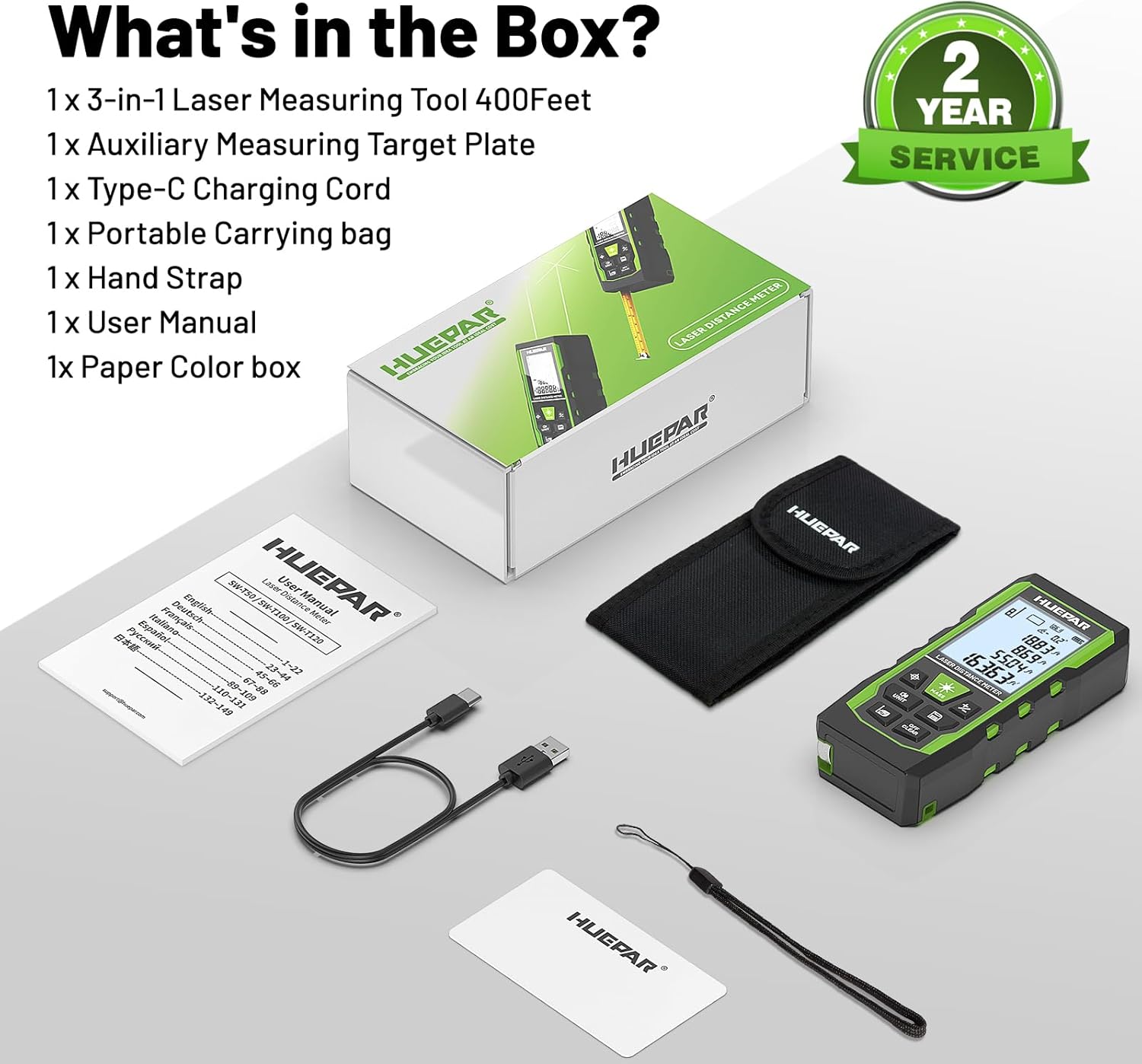
Image: All components included with the Huepar 3-in-1 Laser Measuring Tool, neatly arranged in their packaging.
3. Product Features
The SW-T120 combines multiple functionalities for comprehensive measurement tasks:
- Laser Distance Measurement: Measures distances up to 400 feet with an accuracy of ±1/16 inch.
- Green Cross Line Laser Level: Projects a bright green cross line for leveling and alignment tasks, effective up to 33 feet with ±1/9 inch accuracy.
- Digital Tape Measure: Features a 6.5-foot physical tape measure for short-distance measurements.
- Multiple Measurement Modes: Supports distance, area, volume, wall area, and various Pythagorean calculations.
- Voice Broadcast: Provides real-time audio feedback of measurements for enhanced readability.
- Data Storage: Stores up to 100 sets of measurement data.
- Rechargeable Battery: Integrated rechargeable battery for extended use.
- Rugged Design: IP54 rated for dust and splash resistance, with a durable TPE housing.
- Multiple Reference Points: Measurements can be taken from the front, rear, or screw-hole of the device.
4. Setup and Controls
4.1 Charging the Device
Connect the provided Type-C charging cord to the device's charging port and a suitable USB power source. The battery indicator on the display will show charging status. Ensure the device is fully charged before first use.
4.2 Control Panel Overview

Image: Front view of the Huepar tool, detailing the function of each button on the control panel.

Image: Side and back views of the Huepar tool, highlighting the green cross line laser, 1/4" threaded mount, Type-C charging port, hand strap slot, tape measure, and serial number.
- Power ON/Measure Button: Press to turn on the device or initiate a laser measurement.
- Laser Level Mode Button: Activates or deactivates the green cross line laser.
- Unit Switch/Sound Button: Short press to cycle through measurement units (in, ft, m). Long press to switch voice broadcast language (English/Chinese) or turn off sound.
- Benchmark/Mode Switch Button: Changes the measurement reference point (front, rear, screw-hole) or cycles through measurement modes (distance, area, volume, etc.).
- Addition/Subtraction Buttons: Used for adding or subtracting measurements in certain modes.
- Data Saving Button: Saves the current measurement to memory.
- Turn off/Clear Button: Short press to clear the last measurement. Long press to turn off the device.
5. Operating Instructions
5.1 Laser Distance Measurement
- Press the Power ON/Measure button to turn on the device.
- Select the desired reference point (front, rear, or screw-hole) using the Benchmark/Mode Switch button.
- Point the laser at the target.
- Press the Power ON/Measure button again to take a measurement. The result will be displayed on the screen and broadcasted if voice is enabled.

Image: The laser measuring tool displaying its high accuracy and illustrating the three available measurement reference points.
5.2 Green Cross Line Laser Level Mode
- Press the Power ON/Measure button to turn on the device.
- Press the Laser Level Mode button to activate the green cross line laser.
- Position the device on a stable surface or tripod. The laser will project horizontal and vertical lines.
- If the angle exceeds ±4°, the laser line will flash rapidly, indicating it is out of self-leveling range. Adjust the device until the lines are stable.

Image: A user utilizing the green cross line laser level function for precise alignment, with the display showing angle information.
5.3 Tape Measure Function
Pull out the physical tape measure from the side of the device for short-distance measurements. The tape measure extends up to 6.5 feet (2 meters).
5.4 Measurement Modes
Press the Benchmark/Mode Switch button repeatedly to cycle through the available measurement modes:
- Distance Measurement: Single linear measurement.
- Area Measurement: Calculates area from two measurements.
- Volume Measurement: Calculates volume from three measurements.
- Wall Area Measurement: Calculates total wall area.
- Pythagorean Modes (1-4): For indirect height or distance measurements.
- Continuous Measurement: Provides real-time distance updates as the device is moved.

Image: Visual representation of the nine distinct measurement modes available on the Huepar SW-T120 tool.
5.5 Unit Switching and Voice Broadcast
- Units: Short press the Unit Switch/Sound button to change measurement units (e.g., inches, feet, meters).
- Voice Broadcast: Long press the Unit Switch/Sound button to toggle voice broadcast on/off or switch between available languages. Note: Voice broadcast is not active while charging.
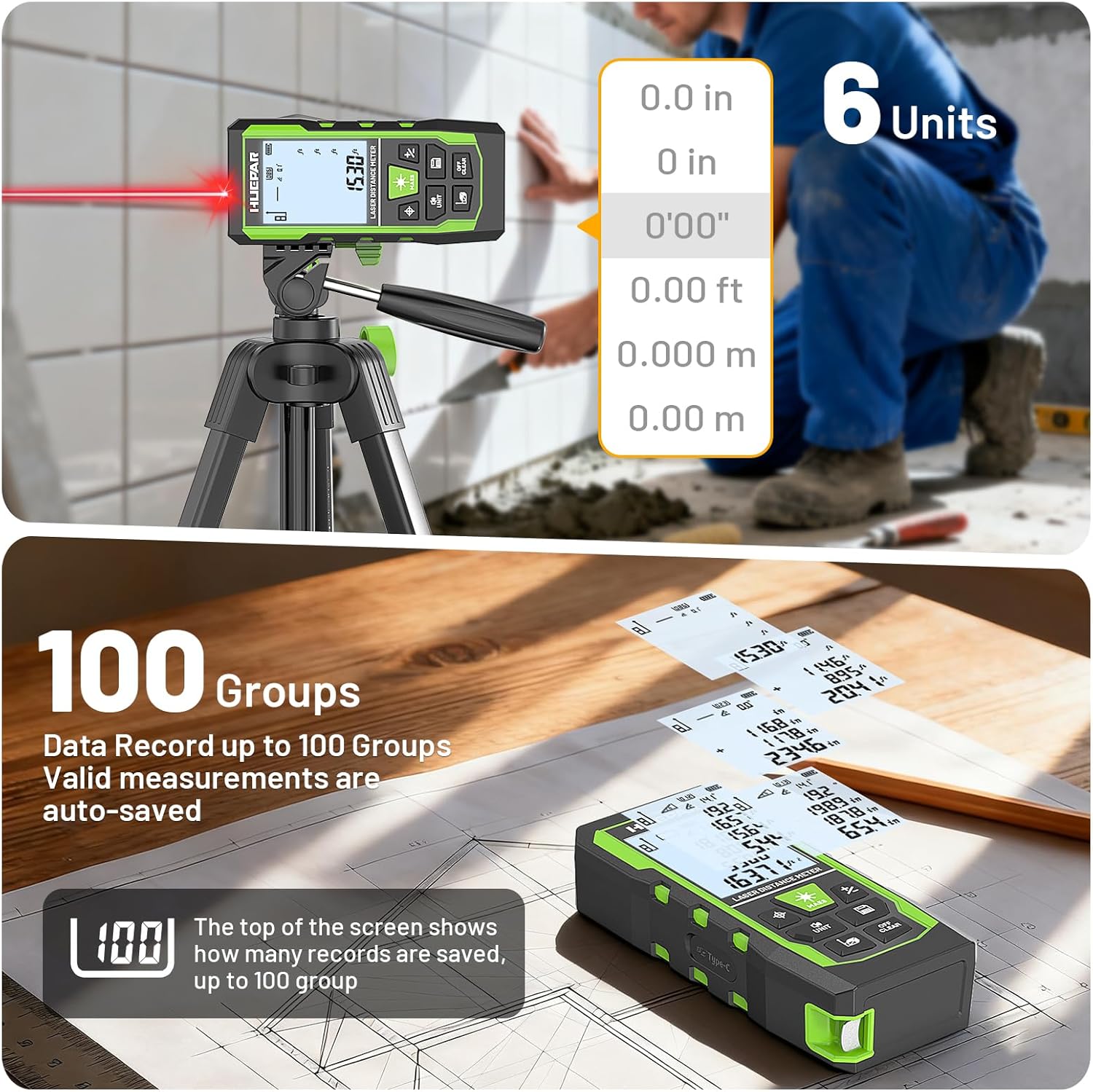
Image: The device's screen displaying multiple measurement units and indicating its capacity to store up to 100 measurement records.

Image: A user holding the device, illustrating the voice broadcast feature that provides audible measurement readings.
5.6 Using the Auxiliary Measuring Target Plate
The auxiliary measuring target plate can be used to enhance laser visibility in bright conditions or to provide a stable target when no suitable surface is available for measurement.

Image: The auxiliary measuring target plate in use, demonstrating how it improves laser visibility and provides a clear target for measurements.
6. Maintenance
- Keep the device clean and dry. Use a soft, damp cloth for cleaning. Do not use abrasive cleaners or solvents.
- Protect the laser lens from scratches and dirt.
- Store the device in its portable carrying bag when not in use to prevent damage.
- Avoid exposing the device to extreme temperatures or direct sunlight for prolonged periods.
- The device is IP54 rated for dust and splash resistance, but it is not fully waterproof. Avoid immersion in water.
7. Troubleshooting
| Problem | Possible Cause | Solution |
|---|---|---|
| Device does not turn on. | Low battery or device malfunction. | Charge the device fully. If problem persists, contact support. |
| Laser measurement is inaccurate. | Incorrect reference point, obstructed laser path, or unstable surface. | Ensure correct reference point is selected. Clear laser path. Use a stable surface or tripod. |
| Green cross line laser flashes rapidly. | Device is out of self-leveling range (angle > ±4°). | Adjust the device's position until it is within ±4° of level. |
| Voice broadcast not working. | Voice feature turned off or device is charging. | Long press the Unit Switch/Sound button to enable voice. Voice broadcast is disabled during charging. |
| Display is difficult to read. | Bright ambient light or screen glare. | Move to a shaded area or use the voice broadcast feature. |
8. Specifications
| Feature | Specification |
|---|---|
| Model Number | SW-T120 |
| Laser Distance Range | 400 ft |
| Laser Measure Accuracy | ±1/16 in |
| Green Cross Line Laser Range | 33 ft |
| Laser Level Accuracy | ±1/9 in |
| Angle Accuracy | ±1° |
| Tape Measure Length | 6.5 ft (2 m) |
| Laser Class | Class 2 |
| Laser Type | 490-560nm, <1mW |
| Data Storage | Up to 100 readings |
| Display | 2.2" Backlit LCD |
| Auto Shut-off | 150 seconds (to conserve energy) |
| Material | Acrylonitrile Butadiene Styrene (TPE housing) |
| Ingress Protection (IP) Rating | IP54 (Dust and splash resistant) |
| Power Source | Rechargeable battery (Type-C charging) |
| Tripod Mount Size | 1/4"-20 |

Image: Features such as the 1/4-inch tripod mount, portable carrying pouch, and IP54 dust/splash resistance are highlighted.
9. Safety Information
Please read and understand all safety warnings before using this product.
- Laser Radiation: This product emits Class 2 laser radiation. Do not stare directly into the laser beam. Avoid direct eye exposure.
- Do not attempt to modify or disassemble the device. Unauthorized modifications can result in hazardous laser radiation exposure.
- Keep the device out of reach of children.
- Use the device only for its intended purpose as described in this manual.
- Do not operate the device in explosive atmospheres or near flammable materials.
10. Warranty and Support
The Huepar 3-in-1 Laser Measuring Tool SW-T120 comes with a 2-year quality assurance. Free repair or replacement is provided if the product is faulty. Huepar is committed to providing best-in-class service to its customers.
10.1 Technical Support
For product questions, setup assistance, troubleshooting, or other information, please contact Huepar support:
- Email: support@huepar.com
- WhatsApp Support: https://wa.me/16262545609 (Lisa Support)
- Response Time: 12-hour response, solution within 48 hours.
- Support Duration: 2-5 years support, lifetime technical support.

Image: Detailed contact information for Huepar customer support, including email and WhatsApp.
11. Product Video
Watch this official product video for a visual demonstration of the Huepar 3-in-1 Laser Measuring Tool's features and operation.
Video: Demonstration of the Huepar 3-in-1 Laser Measuring Tool's various functions, including laser distance measurement, green cross line laser leveling, and tape measure use.


