
Introduction
This manual provides comprehensive instructions for the assembly, operation, and maintenance of your Rolanstar Twin Headboard. This headboard features a velvet upholstered design, integrated storage compartments, adjustable LED lighting, and convenient USB and Type-C charging ports. Please read all instructions carefully before beginning assembly or operation.
Safety Information
- Always follow the assembly instructions carefully.
- Keep hands and fingers away from pinch points during assembly.
- Do not exceed the maximum weight capacity of 33 lbs per storage shelf, or 66 lbs total for the headboard.
- For wall mounting, ensure the wall can support the weight and use appropriate hardware (not included).
- Ensure all connections are secure before use.
- Keep electrical components (LED lights, USB ports) away from liquids.
Package Contents
Verify that all components are present before beginning assembly. If any parts are missing or damaged, please contact customer support.
- Upholstered Headboard Panel
- Storage Shelf Components
- Headboard Legs
- Bed Frame Adapters (2)
- LED Light Strip with Controller
- USB/Type-C Charging Module
- Hardware Pack (screws, bolts, nuts, Allen wrench)
- Instruction Manual
Assembly Instructions
Follow these steps carefully for proper assembly. It is recommended to assemble the headboard on a soft, clean surface to prevent damage.
Step 1: Attach Headboard Legs
Secure the headboard legs to the main upholstered panel using the provided hardware. Ensure they are firmly attached.
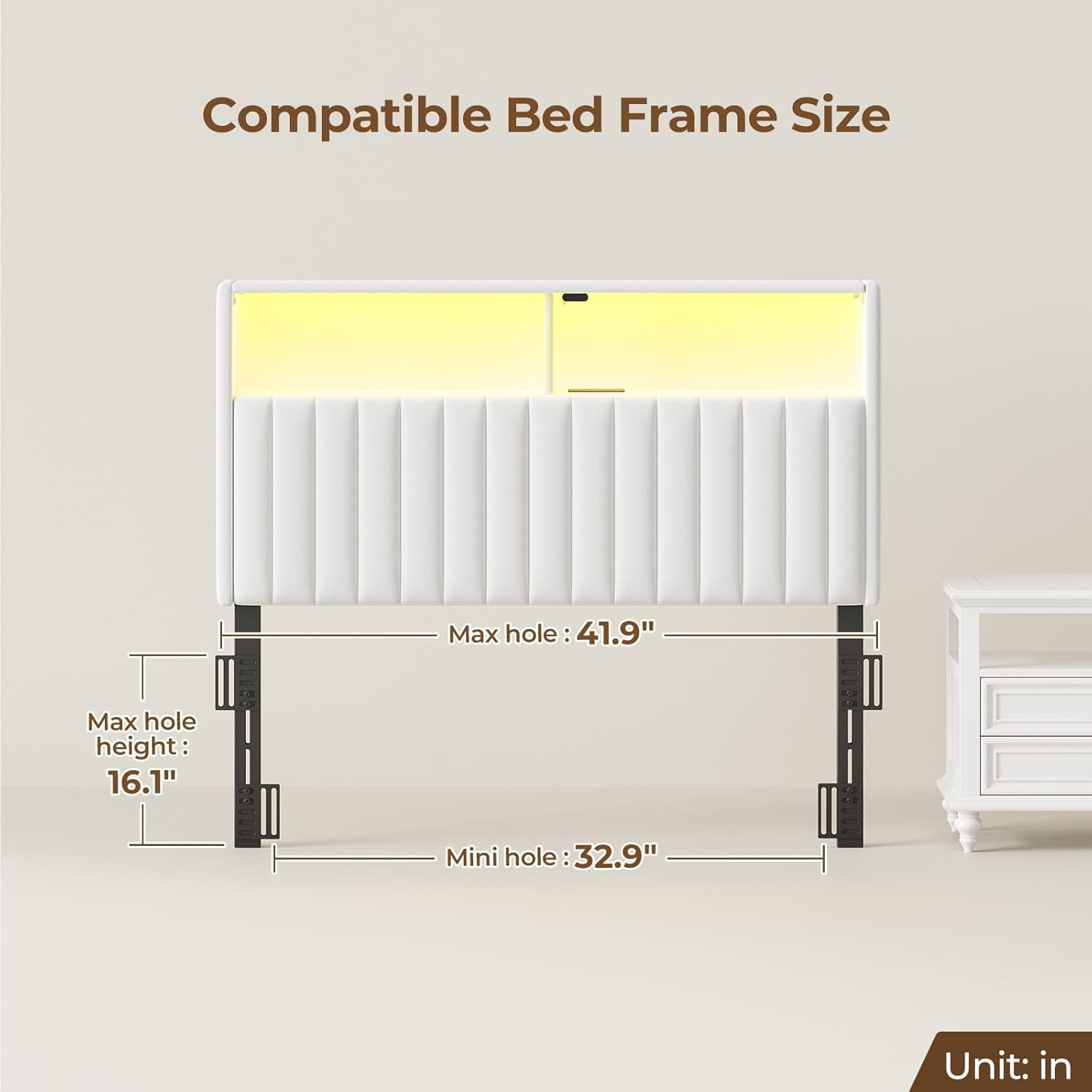
Image: The headboard with its legs attached, illustrating the adjustable height feature. The maximum height is 43.3 inches and minimum is 41.3 inches.
Step 2: Assemble Storage Shelves
Assemble the storage shelf components and attach them to the top of the headboard panel. These shelves provide 7.1 inches of height for storage.
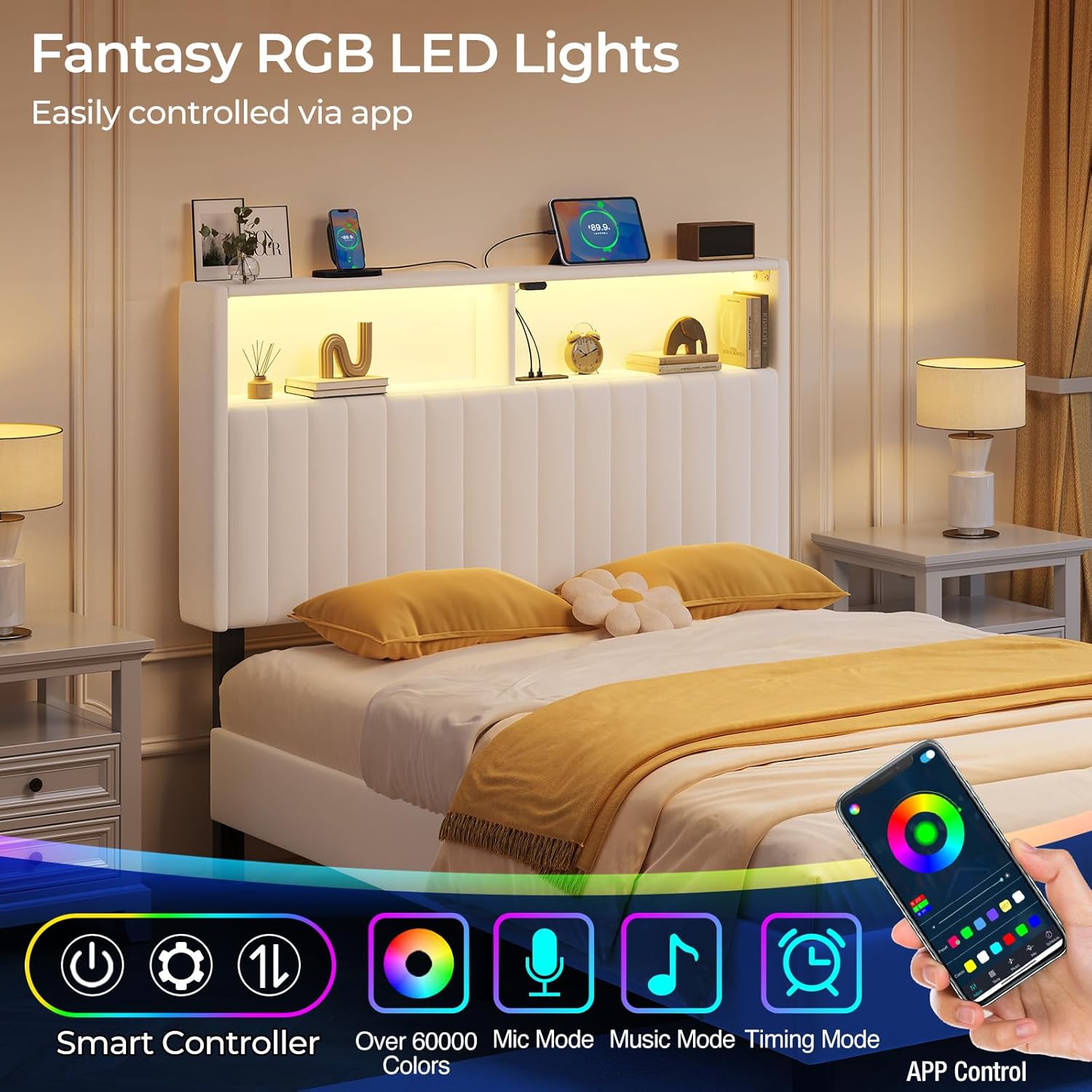
Image: A detailed diagram illustrating the storage space dimensions, indicating a height of 7.1 inches and a total headboard width of 40.9 inches.
Step 3: Install LED Light Strip
Carefully adhere the LED light strip to the designated area within the storage compartment. Connect the light strip to its controller.

Image: A close-up view of the LED light controller, showing the power button, settings button, and brightness adjustment buttons.
Step 4: Install USB/Type-C Charging Module
Insert the USB/Type-C charging module into its designated slot in the storage area and secure it. Connect the power cord.

Image: A detailed view of the charging module, featuring one Type-C port (5V/3A) and two USB ports (5V/2.4A), along with a 6.5-foot power cord.
Step 5: Attach to Bed Frame
Use the included bed frame adapters to attach the headboard to your existing bed frame. The adapters are designed to accommodate various bed frame types with leg holes (round, vertical slots, horizontal slots).
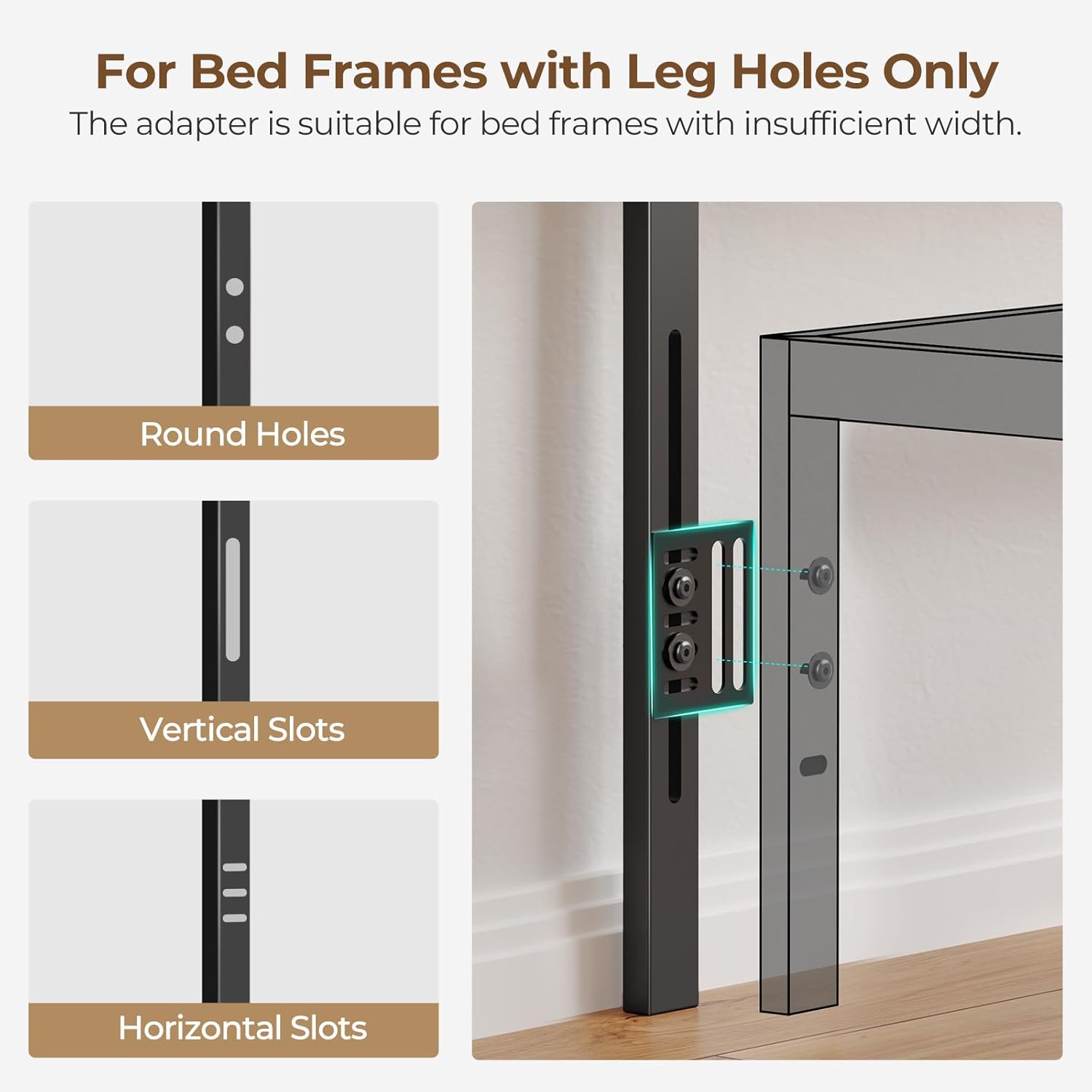
Image: An illustration demonstrating the attachment of the headboard to a bed frame using the provided adapter, highlighting compatibility with round holes, vertical slots, and horizontal slots on bed frame legs.
Operating Instructions
LED Lighting System
The integrated LED lighting system can be controlled via a mobile application or the physical controller. The app offers over 60,000 DIY color options, music sync, and voice recording sync modes.
- Power On/Off: Use the power button on the controller or within the mobile app.
- Color Selection: Use the mobile app for full color customization. The physical controller may offer preset colors.
- Brightness Adjustment: Use the up/down buttons on the controller or the slider in the app.
- Mode Selection: Access various modes (e.g., music sync, timing) through the mobile app.

Image: The headboard with its LED lights illuminated, demonstrating control via a mobile application with a color wheel interface. Icons for Smart Controller, 60,000+ Colors, Mic Mode, Music Mode, and Timing Mode are visible.
USB and Type-C Charging Ports
The headboard includes one Type-C port (5V/3A) and two USB ports (5V/2.4A) for convenient charging of electronic devices. Connect your device's charging cable to the appropriate port.

Image: The headboard's storage area displaying a tablet and smartphone actively charging using the built-in USB and Type-C ports.
Maintenance
- Cleaning the Velvet Upholstery: Gently vacuum the velvet surface with a soft brush attachment to remove dust. For spills, blot immediately with a clean, dry cloth. For stubborn stains, use a mild upholstery cleaner following the product's instructions, testing on an inconspicuous area first.
- Cleaning Storage Areas: Wipe down the storage shelves with a damp cloth and mild detergent as needed. Ensure the surface is dry before placing items back.
- Electrical Components: Keep USB/Type-C ports and LED lights free from dust and debris. Do not use liquid cleaners directly on electrical components.
- Hardware Check: Periodically check all screws and bolts to ensure they remain tight. Retighten as necessary to maintain stability.
Troubleshooting
| Problem | Possible Cause | Solution |
|---|---|---|
| LED lights not turning on. | Power cable disconnected; LED strip not properly connected to controller; controller malfunction. | Check power cable connection to outlet and headboard. Ensure LED strip is securely plugged into the controller. If issues persist, contact customer support. |
| USB/Type-C ports not charging devices. | Power cable disconnected; device cable faulty; module malfunction. | Verify headboard power connection. Try a different charging cable. Test with another device. If still not working, contact customer support. |
| Headboard feels unstable. | Loose hardware; improper attachment to bed frame. | Check and tighten all assembly screws and bolts. Ensure the headboard is correctly and securely attached to the bed frame using the adapters. |
Specifications
| Feature | Detail |
|---|---|
| Model Number | hq-chtb005-01 |
| Brand | Rolanstar |
| Size | Twin |
| Material | Velvet Upholstery, Iron Frame |
| Color | White |
| Dimensions (L x W x H) | 40.9"L x 5.3"W x 43.3"H (Max) |
| Adjustable Height | Yes (Min 41.3", Max 43.3") |
| Storage Space Height | 7.1 inches |
| Storage Shelf Capacity | 33 lbs per shelf |
| LED Lighting | 60,000+ DIY colors, App control, Music/Voice sync |
| USB Ports | 2 x 5V/2.4A |
| Type-C Port | 1 x 5V/3A |
| Power Cord Length | 6.5 feet |
| Item Weight | 21.4 Pounds |
| Assembly Required | Yes |
Warranty and Support
This product is sold without an explicit warranty. For any questions, missing parts, or assistance with assembly or operation, please contact Rolanstar customer support. Refer to the packaging or the official Rolanstar website for contact information.