
Introduction
This user manual provides comprehensive instructions for the sbujuetc SMK-25 25-Key USB Bluetooth MIDI Keyboard Controller. It covers product features, setup procedures, operational guidelines, maintenance tips, and troubleshooting information. Please read this manual thoroughly before using your device to ensure optimal performance and longevity.
Package Contents
Verify that all items listed below are included in your package:
- 1 x sbujuetc SMK-25 MIDI Keyboard Controller
- 1 x USB Cable
- 1 x User Manual (English)

Image: The sbujuetc SMK-25 MIDI Keyboard Controller, accompanied by its USB cable and the included user manual.
Product Overview
The sbujuetc SMK-25 is a portable 25-key MIDI keyboard controller designed for music production. It features a range of controls for versatile performance and studio integration.

Image: A top-down view of the SMK-25 MIDI keyboard controller, showcasing its keys, pads, and knobs.
Key Features:
- 25 Velocity-Sensitive Slim Keys: For expressive playing.
- 8 RGB Backlit Pads: Velocity-sensitive with aftertouch for dynamic drumming and sample triggering.
- 8 Assignable Rotary Encoders: 360-degree endless knobs for controlling various parameters in your software.
- Capacitive Touch-Stripes: For Pitch Bend and Modulation control.
- Sustain Pedal Port: For connecting an external sustain pedal.
- MIDI Out Port: For connecting to external MIDI hardware.
- Multiple Connectivity Options: USB, Bluetooth, and direct wireless.
- Smart Chord and Scale Features: Assist in music creation and performance.
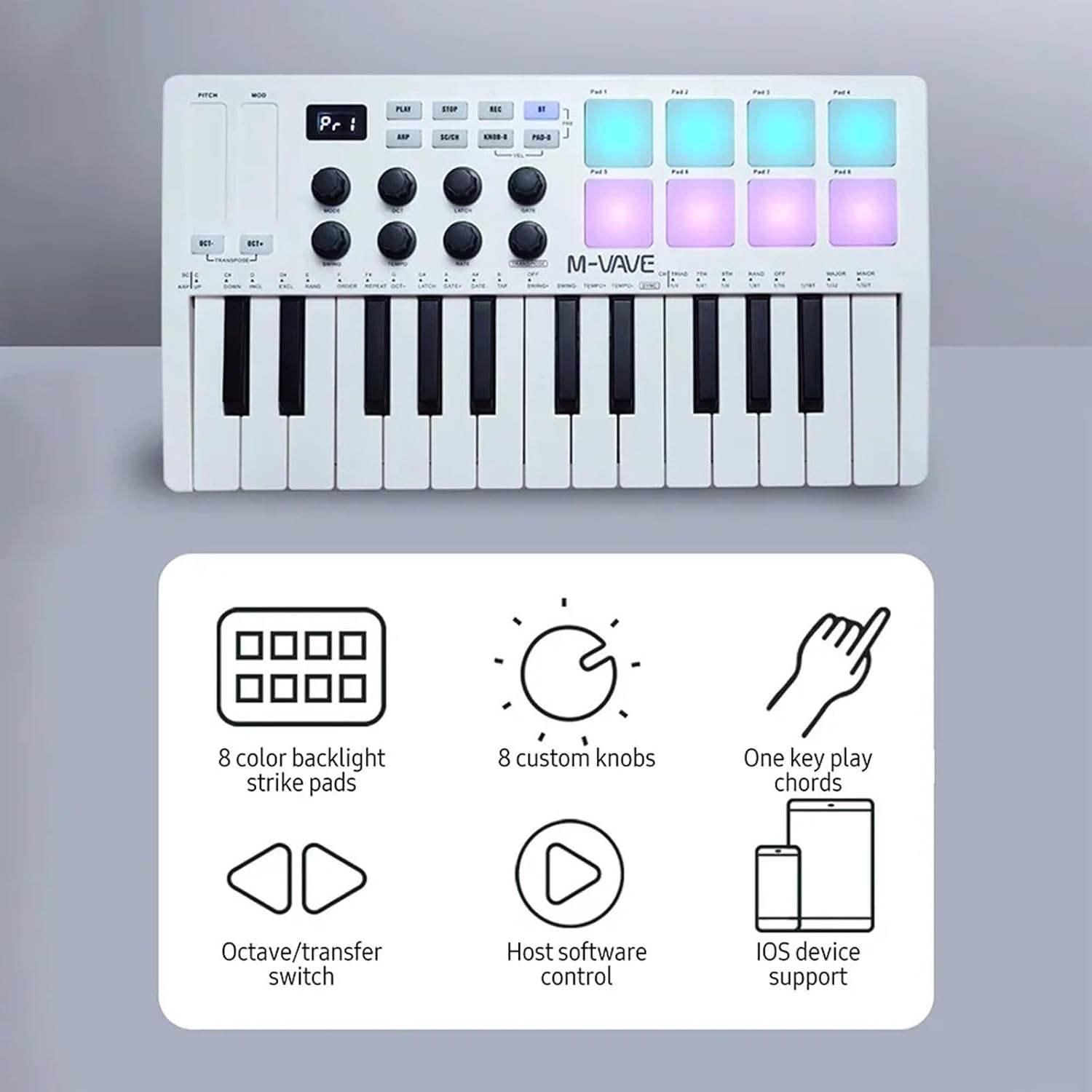
Image: A visual representation of the SMK-25's main features, including 8 color backlight strike pads, 8 custom knobs, one-key play chords, octave/transfer switch, host software control, and iOS device support.

Image: A close-up view of the eight assignable rotary encoders, which can be rotated freely to control various parameters.
Setup
Powering On
The SMK-25 can be powered via USB or its built-in 2000mAh battery. Ensure the battery is sufficiently charged for wireless operation.
Connecting to a Device
The controller supports multiple connection methods:
- USB Connection: Connect the included USB cable from the SMK-25 to your computer (Windows/Mac OS) or mobile device.
- Bluetooth Wireless Connection: Pair the SMK-25 with your device (Windows, Mac OS, Android, iOS) via Bluetooth. Refer to your device's Bluetooth settings for pairing instructions.
- Direct Wireless / Wireless MIDI OUT: Specific instructions for these advanced wireless modes may be found in the full manual or online support.
For Android devices, a Type-C to Type-C cable can be used for connection.

Image: The SMK-25 MIDI keyboard controller shown with various compatible devices, including desktop computers, laptops, tablets, and smartphones, illustrating its multi-platform support.
Operating Instructions
Keys and Pads
- 25 Velocity-Sensitive Keys: Play melodies, chords, and bass lines. The velocity sensitivity allows for dynamic expression based on how hard you press the keys.
- 8 RGB Backlit Pads: Use these pads to trigger drum samples, one-shots, or loops. The pads are velocity-sensitive and support aftertouch for additional expressive control.
Rotary Encoders
The 8 assignable rotary encoders can be mapped to control various parameters within your Digital Audio Workstation (DAW) or software instruments. Consult your DAW's manual for MIDI mapping instructions.
Pitch Bend and Modulation
The capacitive touch-stripes on the left side of the controller allow for real-time manipulation of pitch bend and modulation, adding expression to your performances.
Arpeggio Function
The SMK-25 includes an arpeggio function, which automatically plays a sequence of notes from a held chord. This can be used to generate rhythmic patterns and melodic ideas.

Image: Hands interacting with the SMK-25 MIDI keyboard controller, demonstrating its use with the arpeggio function for dynamic music creation.
Connectivity
The SMK-25 offers flexible connectivity options to integrate with your studio setup or mobile devices.
- USB: Standard USB connection for power and MIDI data transfer to computers and compatible mobile devices.
- Bluetooth: Wireless MIDI connectivity for untethered performance and production.
- MIDI Out: A dedicated MIDI output port allows you to control external hardware synthesizers or modules.
Smart Chord and Scale Functions
The SMK-25 integrates Smart Chord and Smart Scale functions to assist users in music creation and performance. These features allow you to easily play complex chords and stay within a chosen musical scale, simplifying the creative process.
- Smart Chord: Automatically generates full chords from single key presses.
- Smart Scale: Ensures that all played notes remain within a selected musical scale, preventing out-of-key notes.
Refer to the full user manual for detailed instructions on activating and customizing these functions.
Maintenance
- Cleaning: Use a soft, dry cloth to clean the surface of the controller. Avoid using abrasive cleaners or solvents.
- Storage: Store the device in a cool, dry place away from direct sunlight and extreme temperatures.
- Battery Care: For optimal battery life, avoid fully discharging the battery frequently. If storing for extended periods, charge the battery to approximately 50%.
- Handling: Handle the controller with care to prevent damage to keys, pads, and knobs.
Troubleshooting
If you encounter issues with your SMK-25, refer to the following common solutions:
- No Power: Ensure the USB cable is securely connected or that the internal battery is charged.
- No Sound/MIDI Output:
- Verify the controller is correctly connected via USB or Bluetooth to your computer/device.
- Check your DAW or software settings to ensure the SMK-25 is selected as a MIDI input device.
- Ensure the correct instrument track is armed for recording or monitoring in your DAW.
- Bluetooth Connection Issues:
- Ensure Bluetooth is enabled on both the controller and your receiving device.
- Try unpairing and re-pairing the device.
- Move the controller closer to the receiving device to reduce interference.
- Pads/Keys Not Responding: Check if the device is in the correct mode (e.g., not in a setup or configuration mode). Restart the controller and your software.
For further assistance, please contact sbujuetc customer support.
Specifications
| Feature | Detail |
|---|---|
| Model Name | SMK-25 |
| Keys | 25 velocity-sensitive slim keys |
| Pads | 8 RGB backlit pads with velocity-sensitive & aftertouch |
| Knobs | 8 assignable 360-degree rotary encoders |
| Touch Stripes | Capacitive touch-stripes for Pitch Bend & Modulation |
| Connectivity | USB, Bluetooth 2.0, MIDI Out |
| Compatible Devices | Laptop, PC, Tablet, Smartphone |
| Supported Software | Ableton Live, FL Studio, Cubase, Logic Pro X, Bitwig, Reason, Studio One, GarageBand (iOS) |
| Battery | 2000mAh (approx. 16 hours operation) |
| Material | ABS |
| Item Size | 321 x 178 x 46mm (12.64 x 7.01 x 1.81in) |
| Item Weight | 765g (26.98oz / 2.24 pounds) |
Warranty and Support
For warranty information, technical support, or service inquiries, please refer to the official sbujuetc website or contact their customer service department. Keep your purchase receipt as proof of purchase for warranty claims.
Online Resources: Visit the sbujuetc store on Amazon for product updates and additional information: sbujuetc Store