
JBL BAR 1000 MK2
JBL BAR 1000 MK2 7.1.4 Channel Soundbar System and AudioQuest Sky 3m HDMI Cable User Manual
Brand: JBL | Model: BAR 1000 MK2
Introduction
This manual provides detailed instructions for the setup, operation, and maintenance of your JBL BAR 1000 MK2 7.1.4 Channel Soundbar System, bundled with the AudioQuest Sky 3m HDMI Cable. Please read this manual thoroughly before using the product to ensure proper functionality and to maximize your audio experience.

Image: The JBL BAR 1000 MK2 soundbar system, including the main soundbar unit, detachable surround speakers, wireless subwoofer, and the bundled AudioQuest Sky HDMI cable.
What's in the Box
Verify that all components are present in the packaging:
- JBL BAR 1000 MK2 Soundbar (main unit with detachable surround speakers)
- Wireless Subwoofer
- AudioQuest Sky 48 Gbps 8K 10K Ultra High Speed HDMI Cable (3.0 Meters)
- Remote Control with Batteries
- Power Cords
- HDMI Cable (standard, in addition to AudioQuest Sky)
- Wall-mount Bracket Kit with Screws
- Quick Start Guide
- Safety Sheet
- Warranty Card
Setup
1. Connecting the Soundbar
The soundbar offers multiple connectivity options for your television and other devices.
- HDMI eARC Connection (Recommended): Connect the HDMI OUT (TV ARC/TV eARC) port on the soundbar to the HDMI ARC/eARC input on your television using the provided AudioQuest Sky HDMI cable. This connection supports high-resolution audio formats like Dolby Atmos.
- Other HDMI Inputs: The soundbar features three HDMI 2.1 pass-through ports (HDMI 1, HDMI 2, HDMI 3). Connect your gaming consoles, streaming devices, or other media players to these inputs. The soundbar will act as a hub, passing video to your TV and processing audio.
- Optical Connection: If your TV does not support HDMI ARC/eARC, use an optical cable to connect the OPTICAL input on the soundbar to the optical output on your television. Note that optical connections do not support advanced audio formats like Dolby Atmos.

Image: A close-up view of the AudioQuest Sky HDMI cable connected to an HDMI 2.1 port, indicating high-speed data transfer for optimal audio and video quality.

Image: A pair of AudioQuest Sky 48 Gbps 8K 10K Ultra High Speed HDMI cables, featuring blue and black design with gold-plated connectors.

Image: The rear panel of the JBL BAR 1000 MK2 soundbar, displaying power input, USB port, Ethernet port, three HDMI inputs, HDMI eARC output, and an optical audio input.
2. Connecting the Wireless Subwoofer
The wireless subwoofer automatically pairs with the soundbar upon power-up. Ensure the subwoofer is placed in a suitable location within your room, preferably near a power outlet.
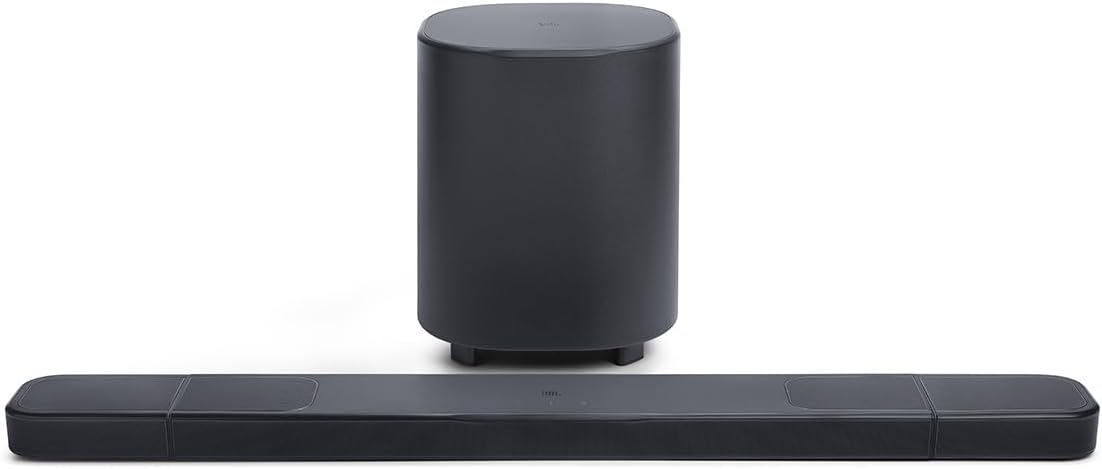
Image: The JBL BAR 1000 MK2 soundbar positioned in front of a television, with its wireless subwoofer placed on the floor beside a cabinet.
3. Detachable Surround Speakers
The JBL BAR 1000 MK2 features detachable, battery-powered surround speakers for flexible audio configurations.
- Attachment: For standard stereo or front-focused surround sound, magnetically attach the two smaller speakers to the ends of the main soundbar unit. They will charge automatically when attached.
- Detachment: For an immersive 7.1.4 channel surround sound experience, detach the speakers and place them behind your listening area. Ensure they are positioned appropriately for optimal sound dispersion.
- Charging: Each detachable speaker provides approximately 10 hours of battery life. They can be charged by reattaching them to the main soundbar or via their individual USB-C ports.
- Standalone Use: The detachable speakers can also function as standalone Bluetooth speakers, allowing you to use them independently in other rooms.

Image: A close-up of a detachable surround speaker being magnetically connected to the end of the main JBL soundbar unit.

Image: Two detached JBL surround speakers, showing their compact design and the charging/connectivity ports on one side.
4. Sound Calibration
The soundbar features an easy sound calibration function. This system analyzes your room's acoustics, including how sound reflects off walls and furniture, to optimize the audio output for your specific environment. Follow the instructions in the Quick Start Guide or the JBL One app to initiate the calibration process.
Operating Instructions
1. Basic Controls
The soundbar can be controlled using the included remote control or the touch-sensitive buttons on the top panel of the main soundbar unit.
- Power Button: Turns the system on or off.
- Volume Control: Adjusts the overall volume level.
- Source Selection: Cycles through input sources (HDMI 1, HDMI 2, HDMI 3, TV, Bluetooth).
- Bluetooth Pairing: Initiates Bluetooth pairing mode.

Image: A close-up of the top panel of the JBL BAR 1000 MK2 soundbar, showing the JBL logo and touch controls for volume and power.
The remote control provides dedicated buttons for power, volume, input selection (TV, Bluetooth, HDMI), play/pause, and sound modes for convenient operation.
2. Audio Modes and Settings
- Dolby Atmos & DTS:X: The system supports these immersive audio formats, providing a three-dimensional sound experience.
- Night Listening Mode: Reduces dynamic range to allow for lower volume listening without missing dialogue or important sound effects, ideal for not disturbing others.
- Bass Adjustment: The JBL One app allows you to adjust the subwoofer's bass level to suit your preference and room acoustics.
- PureVoice 2.0: Enhances dialogue clarity, ensuring voices are distinct even during intense action scenes.
3. Connectivity
- Bluetooth: Connect your mobile devices wirelessly for audio streaming.
- Wi-Fi: Enables AirPlay 2, Google Cast, and direct streaming from compatible services like Spotify and Tidal.
- USB Port: For service or firmware updates.
Maintenance
- Cleaning: Use a soft, dry cloth to clean the surfaces of the soundbar, subwoofer, and speakers. Avoid using liquid cleaners or abrasive materials.
- Speaker Charging: Regularly charge the detachable surround speakers by reattaching them to the main soundbar or using their USB-C ports to maintain battery health.
- Firmware Updates: Periodically check for firmware updates via the JBL One app or the JBL support website to ensure optimal performance and access to new features.
Troubleshooting
If you encounter issues with your JBL BAR 1000 MK2 system, refer to the following common solutions:
- No Sound: Ensure all cables are securely connected. Verify the correct input source is selected on the soundbar and your TV. Check TV audio output settings (e.g., set to PCM or Bitstream).
- Sound Cutting Out/Blips: This can sometimes be related to Wi-Fi interference or HDMI/CEC communication issues. Try restarting all connected devices (TV, soundbar, source devices). Ensure the soundbar's firmware is up to date. If using Wi-Fi, try moving the soundbar or router to reduce interference.
- Wi-Fi Connection Issues: Ensure your Wi-Fi network is active and the password is correct. Try restarting your router and the soundbar. If issues persist, try connecting the soundbar via Ethernet for initial setup or troubleshooting.
- HDMI/CEC/EDID Lockouts (No Video/Audio): This can occur with multiple devices connected. Try connecting problematic devices directly to the TV if possible. Adjust HDMI-CEC settings on your TV and source devices (sometimes disabling CEC on certain devices can resolve conflicts). Ensure all HDMI cables are high-speed and compatible with HDMI 2.1.
- Subwoofer Not Pairing: Ensure the subwoofer is powered on and within range of the soundbar. Refer to the Quick Start Guide for manual pairing instructions if automatic pairing fails.
- Overwhelming Bass: Use the JBL One app to adjust and reduce the subwoofer's bass level to your preferred setting.
Specifications
| Feature | Specification |
|---|---|
| Model Name | BAR 1000 MK2 |
| Surround Sound Channel Configuration | 7.1.4 |
| Speaker Maximum Output Power | 660 Watts |
| Subwoofer Diameter | 10 Inches (25.4 Centimeters) |
| Frequency Response | 20000 Hz |
| Connectivity Technology | Wireless (Bluetooth, Wi-Fi) |
| Wireless Communication Technology | Bluetooth |
| Audio Output Mode | Dolby Atmos |
| Special Features | USB Port, Network Ready, Detachable Wireless Surround Speakers |
| Product Dimensions | 5"D x 33.6"W x 2"H (Soundbar) |
| Item Weight | 43.4 pounds (Total System) |
| Power Source | Corded Electric |
| AudioQuest Sky HDMI Cable Bandwidth | 48 Gbps (8K/10K Ultra High Speed) |
Warranty and Support
The JBL BAR 1000 MK2 system comes with a limited warranty. For specific warranty terms, registration, and technical support, please visit the official JBL website or refer to the warranty card included in your package.
For additional assistance, you may also visit the JBL Store on Amazon.
Related documentsBAR 1000 MK2


Ask a question about this manual
Ask about setup, troubleshooting, compatibility, parts, safety, or missing instructions. Manuals+ will review the question and use this page’s manual context to help answer it.