
Important Safety Information
Please read this manual thoroughly before operating the 4DRC V32 RC Plane. Failure to follow instructions may result in injury or damage to the product.
- Age Recommendation: Suitable for users aged 8 years and up. Adult supervision is recommended for younger users.
- Flying Environment: Operate the aircraft in open, clear areas, away from people, animals, buildings, and power lines. Avoid flying in strong winds or adverse weather conditions.
- Battery Safety: Use only the provided batteries and charger. Do not overcharge or short-circuit batteries. Keep batteries away from heat and direct sunlight. Dispose of batteries responsibly.
- Propeller Safety: Keep hands, face, and loose clothing away from rotating propellers.
- Water Exposure: This product is not waterproof. Avoid contact with water or moisture.
Package Contents
Verify that all items listed below are included in your package:
- 4DRC V32 RC Plane
- Remote Control Transmitter
- 3 x 3.7V 350mAh Rechargeable Batteries
- USB Charging Cable
- 2 x C Batteries (for remote control)
- Spare Propellers (if included)
- User Manual
Product Overview
The 4DRC V32 is a foam RC plane designed for ease of use and stable flight. It features LED lights, multiple speed modes, and functions like 360° flips and altitude hold.
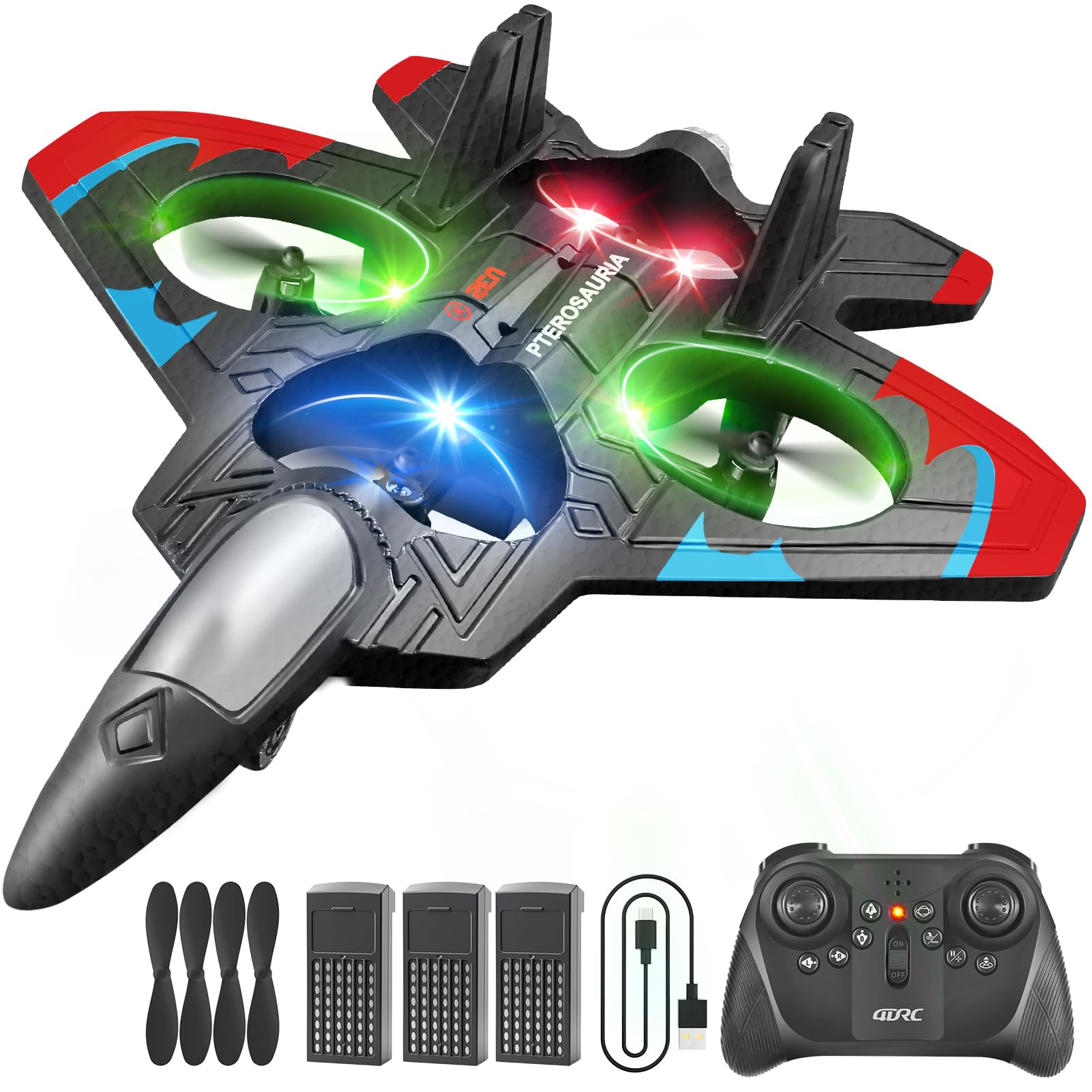
Image: The 4DRC V32 RC Plane, showcasing its design and integrated LED lights.

Image: The 4DRC V32 RC Plane in flight, highlighting its gyro stabilizer for stable operation, ideal for beginners.
Setup
1. Aircraft Battery Installation
- Locate the battery compartment on the underside of the aircraft.
- Carefully insert one of the 3.7V 350mAh rechargeable batteries into the compartment.
- Connect the battery connector to the aircraft's power port.
- Close the battery compartment securely.
2. Battery Charging
Each 3.7V 350mAh battery provides approximately 20 minutes of flight time. Charge all batteries fully before first use.
- Connect the USB charging cable to a USB power adapter (not included) or a computer USB port.
- Connect the other end of the charging cable to the battery.
- The indicator light on the USB charger will show the charging status (e.g., red for charging, off when fully charged).
- Charging typically takes 60-90 minutes per battery.
3. Remote Control Battery Installation
The remote control requires 2 C batteries (included).
- Open the battery compartment on the back of the remote control.
- Insert 2 C batteries, ensuring correct polarity (+/-).
- Close the battery compartment cover.

Image: The 2.4GHz remote control for the 4DRC V32 RC Plane, showing its layout and buttons.
4. Pairing the Remote Control
- Place the aircraft on a flat, level surface.
- Turn on the aircraft by pressing the power button. The LED lights on the aircraft will flash.
- Turn on the remote control.
- Push the left joystick (throttle) all the way up, then all the way down. The remote control will beep, and the aircraft's LED lights will become solid, indicating successful pairing.
Operating Instructions
1. Pre-Flight Checklist
- Ensure aircraft and remote control batteries are fully charged.
- Verify the aircraft and remote control are successfully paired.
- Check for any obstructions in the flying area.
- Inspect propellers for damage.
2. Take-off
After pairing, press the One-Key Take-off button on the remote control. The aircraft will automatically ascend to a stable hovering altitude.

Image: Illustration of the One-Key Take-off function, showing the plane ascending automatically.
3. Basic Controls
- Left Joystick (Throttle): Push up to increase altitude, pull down to decrease altitude.
- Right Joystick (Direction): Push forward to fly forward, pull back to fly backward. Push left to fly left, push right to fly right.
4. Advanced Features
- 360° Flip: Press the 360° Flip button and then move the right joystick in the desired direction to perform an acrobatic flip.

Image: Multiple 4DRC V32 RC Planes performing 3D flips in an open outdoor environment.
- Headless Mode: Press the Headless Mode button. In this mode, the aircraft's orientation is relative to the pilot, regardless of the aircraft's front direction.

Image: Visual representation of Headless Mode and Altitude Hold features for the 4DRC V32 RC Plane.
- Altitude Hold: The aircraft maintains a stable altitude automatically, allowing for easier control. This feature is active by default after take-off.
- Speed Modes: Press the Speed button to cycle through three different speed settings (30%, 60%, 100%) to match your flying skill level.

Image: Depiction of the three speed modes (30%, 60%, 100%) available for the 4DRC V32 RC Plane.
- LED Lights: The aircraft is equipped with bright LED lights for visibility, especially during low-light conditions.

Image: The 4DRC V32 RC Plane illuminated by its colorful LED lights, enhancing visibility and aesthetic appeal.
5. Landing
Press the One-Key Landing button. The aircraft will slowly descend and land automatically. Alternatively, gently pull down the left joystick (throttle) to manually land the aircraft.
Maintenance
- Cleaning: Use a soft, dry cloth to clean the aircraft after each use. Avoid using water or chemical cleaners.
- Propellers: Regularly check propellers for any damage (bends, cracks). Replace damaged propellers immediately using spare parts.
- Storage: Store the aircraft and remote control in a cool, dry place, away from direct sunlight and extreme temperatures. Remove batteries from the remote control during long periods of non-use.
Troubleshooting
| Problem | Possible Cause | Solution |
|---|---|---|
| Aircraft does not respond to remote control. | Not paired; low battery in remote or aircraft. | Re-pair the remote and aircraft; replace/charge batteries. |
| Aircraft flies erratically or drifts. | Not calibrated; damaged propeller; strong wind. | Calibrate the gyroscope (refer to remote control instructions); replace propellers; fly in calm conditions. |
| Short flight time. | Battery not fully charged; old battery. | Ensure batteries are fully charged; consider replacing old batteries. |
| LED lights not working. | Power issue; damaged LED. | Check aircraft power connection; contact support if issue persists. |
| Low battery alert. | Aircraft battery is low. | Land the aircraft immediately and charge the battery. Image: Illustration of the low battery alert system, showing the plane's battery status and recommended action. |
Specifications
| Feature | Detail |
|---|---|
| Model | V32 |
| Brand | 4DRC |
| Product Dimensions | 10 x 2 x 8 inches |
| Item Weight | 10.2 ounces |
| Recommended Age | 8 years and up |
| Aircraft Battery | 3 x 3.7V 350mAh (included) |
| Remote Control Battery | 2 C batteries (included) |
| Flight Time | Approx. 20 minutes per battery (60 minutes total with 3 batteries) |
| Control Frequency | 2.4GHz |
Warranty and Support
For warranty information or technical support, please refer to the contact details provided on the product packaging or the official 4DRC website. Keep your purchase receipt as proof of purchase.
If you encounter any issues not covered in this manual, please contact 4DRC customer service for assistance.
