
1. Introduction
Thank you for choosing the HARDELL 12V Cordless Rotary Tool. This manual provides essential information for the safe and effective operation, maintenance, and troubleshooting of your new tool. Please read this manual thoroughly before first use and retain it for future reference.
The HARDELL rotary tool is a versatile and powerful cordless device designed for a wide range of applications, including engraving, sanding, grinding, and polishing. Its compact and lightweight design, combined with a powerful 12-volt motor and variable speed control, makes it an indispensable tool for DIY enthusiasts and professionals alike.
2. Product Overview
The HARDELL 12V Cordless Rotary Tool comes with a comprehensive set of accessories to support various tasks. Familiarize yourself with the main components and included accessories.
2.1 Main Components
- Cordless Rotary Tool Body
- 12V Rechargeable Battery (integrated)
- Variable Speed Control Dial
- Collet Nut and Collets (2.3mm, 3.2mm)
2.2 Included Accessories
The kit includes 94 accessories and an additional 60pcs sanding sleeves, providing extensive versatility for different materials and applications.
- Grinding Stones
- Sanding Pads
- Felt Wheels
- Sanding Sleeves (60pcs) and Sanding Drums (3pcs)
- Mandrels and Wrenches
- Various Drill Bits, Brushes, and Cut-off Wheels
- Plastic Storage Case for accessories
- Polyester Fabric Tool Bag for the entire kit

Figure 2.1: Complete HARDELL Rotary Tool Kit with all accessories.

Figure 2.2: Another view of the rotary tool and its extensive accessory set.

Figure 2.3: Detailed view of the Sanding Drum Kit components.
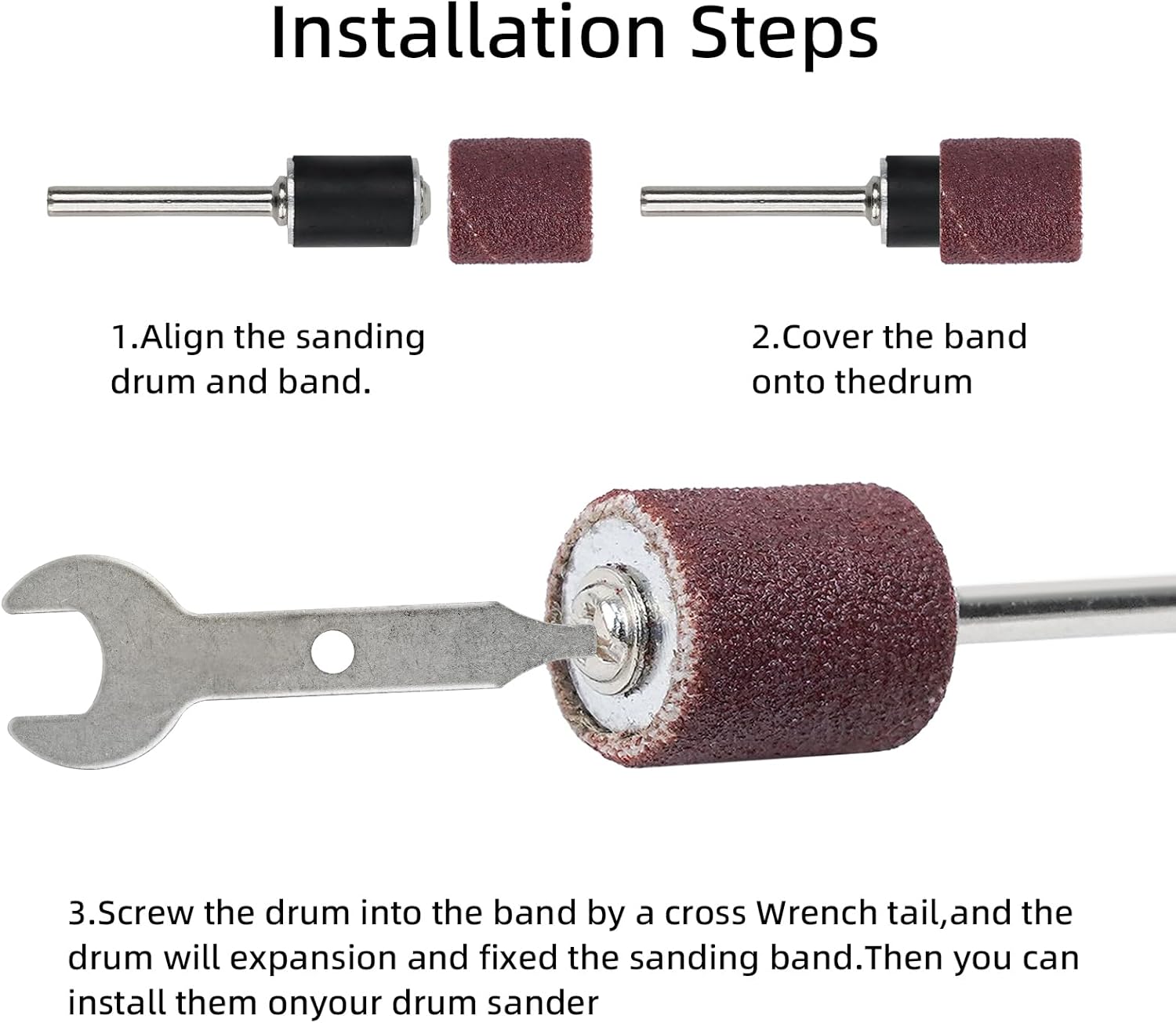
Figure 2.4: Dimensions of the sanding sleeves and drums for compatibility.
3. Setup
Before operating your rotary tool, ensure proper setup of the desired accessory.
3.1 Attaching Accessories
- Ensure the tool is turned off and disconnected from any charging source.
- Press and hold the spindle lock button (if applicable) to prevent the spindle from rotating.
- Unscrew the collet nut.
- Insert the shank of the desired accessory into the collet. Ensure the accessory shank matches the collet size (2.3mm or 3.2mm).
- Tighten the collet nut securely using the provided wrench. Do not overtighten.
- Release the spindle lock button.
3.2 Sanding Drum Installation
For sanding drums, follow these specific steps to ensure a firm grip:
- Align the sanding drum and the sanding band.
- Carefully cover the sanding band onto the rubber sanding drum.
- Using the provided wrench, screw the drum into the band. The unique expanding rubber pad will expand and fix the sanding band securely in place, preventing movement during use.

Figure 3.1: Step-by-step installation of a sanding drum and band.
4. Operating Instructions
Understand how to control your HARDELL rotary tool for optimal performance and safety.
4.1 Powering On/Off and Speed Adjustment
The tool features a variable speed control dial with 6 settings, allowing you to adjust the RPM from 5,000 to 30,000 RPM to match the specific requirements of your task and material.
- To turn on the tool, rotate the speed control dial from 'OFF' to the desired speed setting (1-6).
- Start with a lower speed for delicate work or when first learning to use an accessory. Gradually increase the speed as needed.
- To turn off the tool, rotate the speed control dial back to the 'OFF' position.
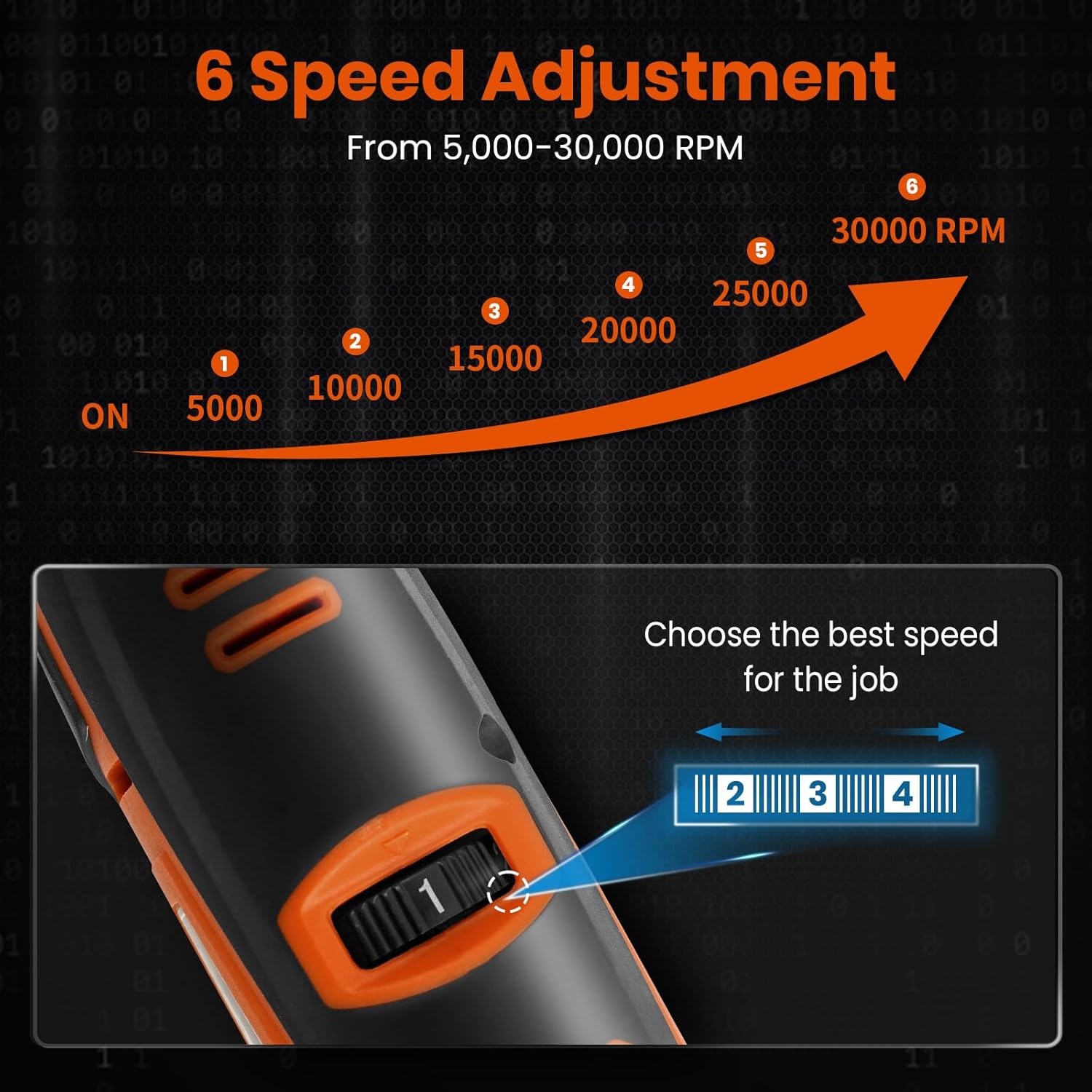
Figure 4.1: The 6-speed adjustment dial and corresponding RPM ranges.
4.2 Accessory Compatibility and Changing
The HARDELL rotary tool is designed for quick disassembly and installation of various accessories, ensuring broad compatibility for different tasks.

Figure 4.2: Overview of accessory compatibility and quick change mechanism.
4.3 Applications and Usage Tips
This tool is suitable for refining both soft and hard surfaces, including woodcrafts, metal products, plastics, and stone. Always wear appropriate safety gear, including eye protection.
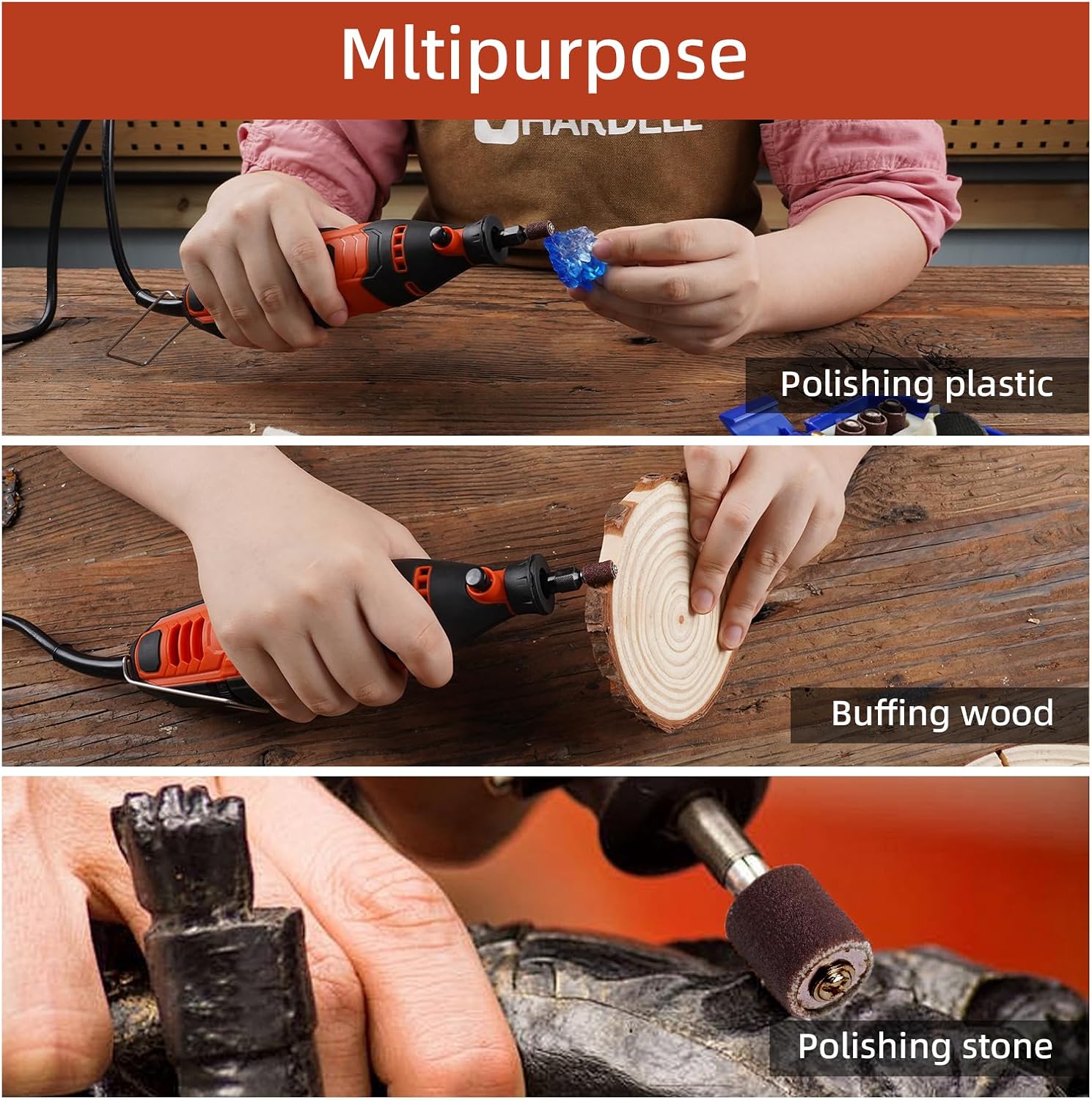
Figure 4.3: Examples of the tool's multipurpose capabilities.

Figure 4.4: The tool's versatility for various DIY projects.
5. Maintenance
Regular maintenance ensures the longevity and optimal performance of your HARDELL rotary tool.
- Cleaning: After each use, wipe down the tool with a clean, dry cloth to remove dust and debris. Use a soft brush to clean ventilation slots. Do not use harsh chemicals or abrasive cleaners.
- Accessory Care: Clean accessories after use. Store them in the provided plastic case to prevent damage and loss.
- Battery Care: Store the tool in a cool, dry place. For long-term storage, ensure the battery is partially charged (around 50%) to maintain battery health. Avoid fully discharging the battery before recharging.
- Storage: Store the tool and all accessories in the provided tool bag or plastic case in a dry, secure location, out of reach of children.
6. Troubleshooting
If you encounter issues with your HARDELL rotary tool, refer to the following common problems and solutions.
| Problem | Possible Cause | Solution |
|---|---|---|
| Tool does not turn on. | Battery is depleted. | Charge the tool's battery. |
| Tool loses power during operation. | Battery is low. | Recharge the battery. |
| Accessory wobbles or is loose. | Collet nut not tightened properly; incorrect collet size. | Ensure collet nut is securely tightened; use the correct collet size for the accessory shank. |
| Excessive vibration or noise. | Damaged or unbalanced accessory; loose collet. | Inspect accessory for damage and replace if necessary; ensure collet is tightened. |
If the problem persists after attempting these solutions, please contact HARDELL customer support for further assistance.
7. Specifications
| Feature | Specification |
|---|---|
| Model | 12V Cordless Rotary Tool & 60pcs Sanding Sleeves Set (ASIN: B0FJ2KDQN3) |
| Brand | HARDELL |
| Voltage | 12V |
| Speed Range | 5,000 - 30,000 RPM (6 adjustable speeds) |
| Weight | 1.1 pounds |
| Dimensions | Approx. 12 inches (length) |
| Collet Sizes | 2.3mm, 3.2mm |
| Accessories Included | 94 accessories + 60pcs sanding sleeves |
| First Available Date | April 25, 2025 |
8. Warranty and Support
For warranty information or technical support, please refer to the product packaging or contact HARDELL customer service directly through their official website or the retailer where the product was purchased. Keep your purchase receipt as proof of purchase.