
1. Introduction
This manual provides essential information for the safe and efficient use of your DOOGEE Note 58 Smartphone. Please read this guide thoroughly before operating your device to ensure optimal performance and longevity.
2. Safety Information
- Battery Safety: Do not disassemble, impact, squeeze, or put the battery into fire. If severe swelling occurs, discontinue use. Avoid high temperatures.
- Charging: Use only approved chargers and cables. Unapproved chargers may cause fire, explosion, or other hazards.
- Water and Dust Resistance: This device is not waterproof. Avoid exposure to liquids.
- Driving Safety: Always prioritize driving safety. Do not use your phone while driving unless absolutely necessary and in a hands-free manner.
- Medical Devices: Maintain a safe distance between your phone and implanted medical devices like pacemakers. Consult your physician for specific guidelines.
3. Package Contents
Verify that your package contains the following items:
- DOOGEE Note 58 Smartphone
- Type-C Cable
- Power Adapter
- SIM Ejector Tool
- User Manual
- Protective Case
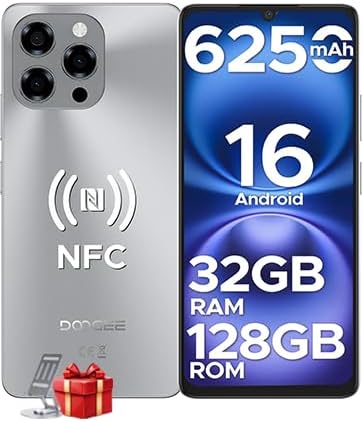
Image: The DOOGEE Note 58 Smartphone, showcasing its front and rear design, highlighting key specifications such as 6250mAh battery, Android 16, 32GB RAM, 128GB ROM, and NFC capabilities.

Image: An illustration of the DOOGEE Note 58 retail box and its contents, including the smartphone, Type-C cable, power adapter, SIM ejector tool, user manual, and protective case.
4. Device Layout
Familiarize yourself with the physical components of your DOOGEE Note 58.

Image: A side view of the DOOGEE Note 58, emphasizing its ultra-thin 8.6mm design. This image helps users locate side buttons and ports.
4.1 Physical Buttons and Ports
- Power Button: Located on the right side. Press and hold to power on/off or restart. Press briefly to lock/unlock the screen.
- Volume Buttons: Located above the power button. Press to adjust media volume, call volume, or alarm volume.
- USB Type-C Port: Located at the bottom. Used for charging and data transfer.
- Speaker: Located at the bottom.
- Microphone: Located at the bottom.
- SIM/SD Card Tray: Located on the left side. Use the provided ejector tool to open.
4.2 Cameras
- Rear Camera Module: Located on the upper left of the back panel, featuring a 16MP main camera.
- Front Camera: Located at the top center of the display (waterdrop notch), featuring an 8MP camera.
5. Setup
5.1 Inserting SIM and SD Cards
- Locate the SIM/SD card tray on the left side of the device.
- Insert the SIM ejector tool into the small hole next to the tray and press gently until the tray pops out.
- Place your Nano-SIM card(s) and/or microSD card (up to 2TB) into the designated slots on the tray. Ensure the gold contacts face downwards.
- Carefully push the tray back into the device until it clicks into place.
5.2 Initial Power On and Basic Setup
- Press and hold the Power button until the DOOGEE logo appears.
- Follow the on-screen prompts to select your language, connect to a Wi-Fi network, and set up your Google account.
- You will be guided through setting up security features like Face ID during this process.
6. Operating Your Device
6.1 Basic Navigation
- Tap: Select an item or open an app.
- Swipe: Scroll through screens or lists.
- Pinch: Zoom in or out on photos and web pages.
- Long Press: Access contextual menus or move icons.
6.2 Calls and Messaging
- Making Calls: Open the Phone app, enter the number, and tap the call icon.
- Sending Messages: Open the Messages app, tap 'Start chat', enter recipient and message, then send.
6.3 Camera Usage
Your DOOGEE Note 58 features a 16MP main camera and an 8MP front camera for capturing photos and videos.

Image: A close-up of the DOOGEE Note 58's rear camera module, highlighting the 16MP main camera with OV16880 sensor and AF support.

Image: A person taking a selfie with the DOOGEE Note 58, illustrating the use of the 8MP front camera with IMX134 sensor and 78° FOV.
- Open the Camera app.
- Select desired mode (Photo, Video, Portrait, Night, Pro, Time-lapse).
- Tap the shutter button to capture.
6.4 Connectivity
- Wi-Fi: Go to Settings > Network & internet > Wi-Fi to connect to available networks. Supports Wi-Fi 5 (2.4GHz/5GHz).
- Bluetooth: Go to Settings > Connected devices > Bluetooth to pair with other devices.
- NFC: For contactless payments and quick pairing. Enable in Settings > Connected devices > Connection preferences > NFC.
- OTG: Connect external USB devices (e.g., flash drives) or use for reverse charging.

Image: A hand holding the DOOGEE Note 58 near a payment terminal, demonstrating the multifunctional NFC feature for contactless payments.

Image: Two smartphones connected via an OTG cable, illustrating the reverse charging capability of the DOOGEE Note 58.
6.5 Battery Management
The DOOGEE Note 58 is equipped with a 6250mAh battery.

Image: An illustration of the DOOGEE Note 58's 6250mAh battery, detailing its long-lasting performance with examples like 1266 hours standby, 36.3 hours call time, 9 hours video playback, 11 hours web browsing, and 27 hours music playback.
- To check battery usage, go to Settings > Battery.
- Enable Battery Saver mode to extend battery life when needed.
6.6 Storage Management
The device comes with 128GB of internal storage, expandable up to 2TB via microSD card.

Image: Visual representation of the DOOGEE Note 58's 128GB ROM and the option for 2TB expandable storage, emphasizing ample space for user data.
- To view storage usage, go to Settings > Storage.
- Manage files using the pre-installed File Manager app.
6.7 Security Features
- Face ID: Set up facial recognition for quick and secure unlocking. Go to Settings > Security > Face unlock.

Image: A user unlocking the DOOGEE Note 58 using Face ID, demonstrating instant and secure access.
6.8 GPS Navigation
The device supports GPS, Glonass, Galileo, and Beidou for accurate positioning.

Image: A smartphone displaying a navigation map in a car, illustrating the accurate GPS navigation system of the DOOGEE Note 58.
- Use pre-installed map applications or download your preferred navigation app from the Google Play Store.
6.9 Android 16 Features
Your DOOGEE Note 58 runs on the latest Android 16 operating system, offering enhanced performance and features.

Image: Screenshots demonstrating Android 16's multi-functional system, including 'Super Notes', 'Split Screen Mode', and 'Dual System Mode' for enhanced productivity and privacy.
- Split Screen Mode: Use two apps simultaneously by long-pressing the recent apps button and selecting the split-screen option.
- Super Notes: Access advanced note-taking features for improved organization.
- Dual System Mode: Create separate user profiles for work and personal use, enhancing privacy and organization.
7. Maintenance
7.1 Cleaning Your Device
- Use a soft, lint-free cloth to wipe the screen and body.
- Avoid using harsh chemicals or abrasive materials.
7.2 Software Updates
- Regularly check for software updates to ensure optimal performance and security. Go to Settings > System > System update.
7.3 Battery Care
- Avoid extreme temperatures, as they can degrade battery life.
- Do not leave the device charging for extended periods after it reaches 100%.
8. Troubleshooting
8.1 Common Issues
- Device not turning on: Ensure the battery is charged. Connect to a charger for at least 10 minutes, then try powering on.
- Apps crashing: Clear the app's cache (Settings > Apps > [App Name] > Storage & cache > Clear cache). If the issue persists, reinstall the app.
- Network issues: Check if airplane mode is off. Restart the device. Verify SIM card insertion.
- Slow performance: Close unused apps, clear cache, or free up storage space.
8.2 Factory Reset
A factory reset will erase all data from your device and restore it to its original factory settings. Backup important data before proceeding.
- Go to Settings > System > Reset options.
- Tap 'Erase all data (factory reset)'.
- Confirm your decision and enter your PIN/password if prompted.
9. Specifications
Detailed technical specifications for the DOOGEE Note 58 Smartphone.
| Feature | Specification |
|---|---|
| Model | NOTE58 |
| Operating System | Android 16 |
| Processor | UNISOC T7520 Octa-core (1.8GHz) |
| RAM | 32GB (8GB physical + 24GB virtual) |
| Internal Storage | 128GB |
| Expandable Storage | Up to 2TB (microSD) |
| Display | 6.75-inch HD+ IPS (720x1600 pixels) |
| Refresh Rate | 90Hz |
| Main Camera | 16MP |
| Front Camera | 8MP |
| Battery Capacity | 6250mAh |
| Dimensions | 16.8 x 7.75 x 0.86 cm |
| Weight | 199 grams |
| Connectivity | 4G, Wi-Fi 5 (2.4G/5G), Bluetooth, NFC, OTG |
| Navigation | GPS, Glonass, Galileo, Beidou |
| Security | Face ID |
10. Warranty and Support
10.1 Warranty Information
- Your DOOGEE Note 58 Smartphone comes with a 2-year limited warranty from the date of purchase. This warranty covers manufacturing defects.
- A 30-day refund and free return policy is available for eligible purchases. Please refer to your retailer's return policy for details.
10.2 Customer Support
- For technical assistance or support inquiries, DOOGEE offers 24/7 online assistance. Please visit the official DOOGEE website or contact their customer service channels for further help.


