
1. Introduction
The Thermal Master Thor002 is a high-performance thermal camera designed for detailed inspections across various applications, including electrical, industrial, and building diagnostics. It features advanced X³ IR technology for enhanced image resolution, a wide temperature measurement range, and multiple imaging modes to suit diverse inspection needs.


Key Features:
- 512×384 X³ IR Resolution: Upscales native 256×192 resolution for clearer thermal images.
- 3.5-inch IPS Screen: Provides a wide and clear display for inspections.
- Wide Temperature Range: Measures from -4°F to 1022°F (-20°C to 550°C) with ±3.6°F accuracy.
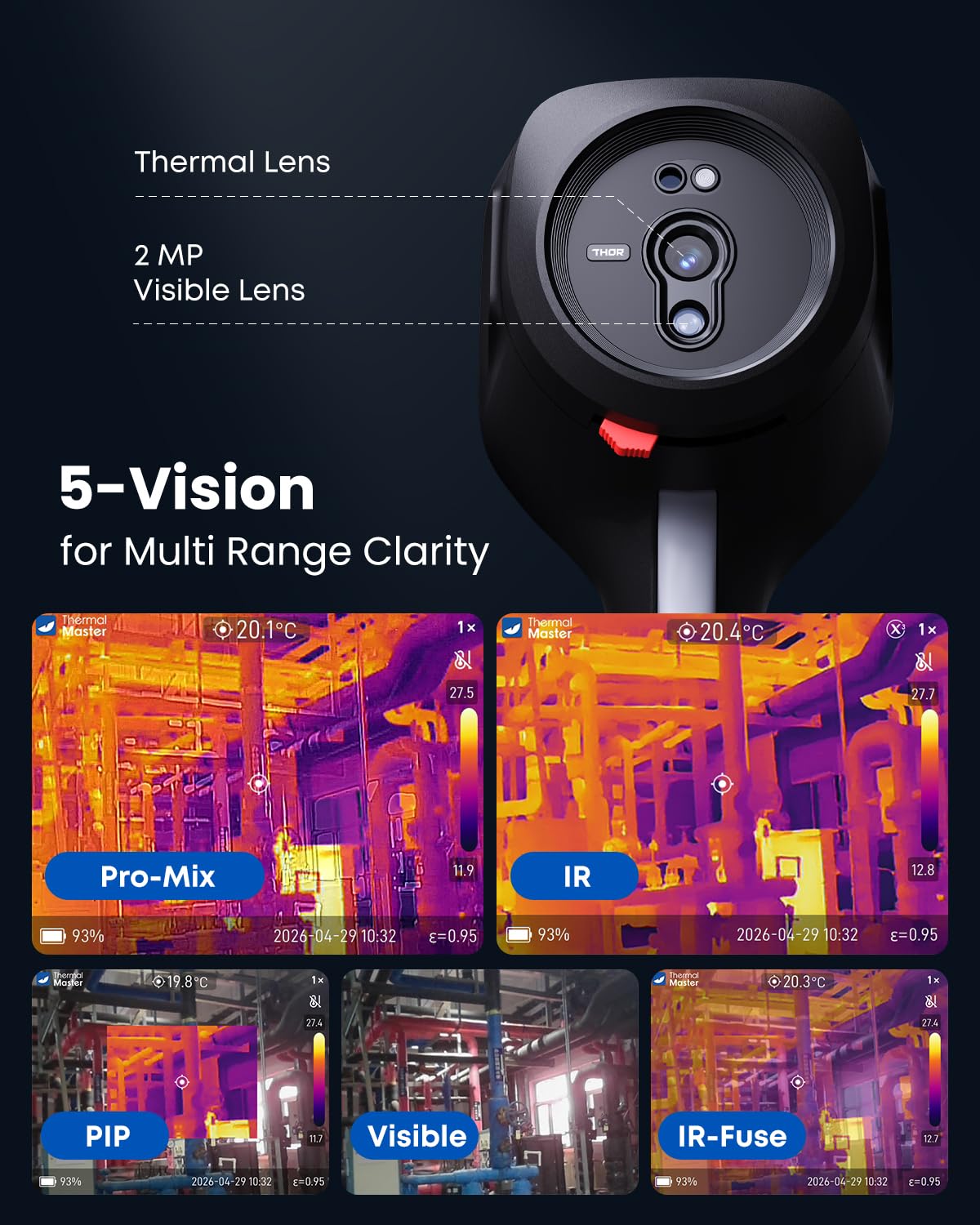
- 5 Imaging Modes: Includes IR, Pro-Mix, IR-Fuse, PIP (Picture-in-Picture), and Visible light.
- 8x Digital Zoom: Allows for detailed analysis of specific areas.
- 6-Point Temperature Measurement: Features center, max, min, and three customizable points.
- 32GB Storage & Wireless Connectivity: Supports stable thermal video recording, image capture, and data transfer to the Thermal Smart app or PC.
- 10.5h Runtime: Powered by a 5000mAh battery with 18W fast charging.
- Durable Design: IP54 protection and 2m drop resistance.
2. Setup
What's in the Box:
- Thermal Master Thor002 Thermal Camera
- 32GB Memory Card
- Rugged Hard Case
- USB Data Cable (100cm)
- User Manual

Initial Charging:
Before first use, fully charge the Thor002 thermal camera using the provided USB data cable and an 18W fast charger (not included). The 5000mAh battery provides up to 10.5 hours of continuous use on a full charge.
3. Operating Instructions
Power On/Off:
Press and hold the power button located on the device to turn the camera on or off. The device will boot up and display the thermal imaging interface.
Imaging Modes:
The Thor002 offers five distinct imaging modes to optimize your inspection view. Use the navigation buttons to cycle through these modes:
- IR (Infrared): Displays a pure thermal image.
- Pro-Mix: Enhances edge details within the infrared image for clearer object recognition.
- IR-Fuse: Blends thermal and visible light images with an adjustable blending ratio.
- PIP (Picture-in-Picture): Overlays a smaller thermal image onto a visible light image.
- Visible: Displays a standard visible light image from the 2MP camera.
Temperature Measurement:
The camera measures temperatures from -4°F to 1022°F (-20°C to 550°C) with a TruePix accuracy of ±3.6°F. It supports 6-point temperature measurement:
- Center Spot: Displays the temperature at the center of the screen.
- Max/Min Spots: Automatically identifies and displays the highest and lowest temperatures within the field of view.
- 3 Custom Points: Allows users to manually select three additional points for specific temperature readings.
Visual temperature alerts can be configured to notify you when temperatures exceed or fall below set thresholds.


Digital Zoom:
Utilize the 8x digital zoom to enlarge specific areas of interest for closer analysis during inspections. This feature is particularly useful for examining distant objects or small components.

Color Palettes:
The Thor002 offers 7 professional color palettes to visualize thermal data. Different palettes can highlight temperature variations more effectively depending on the application. Switch between palettes to find the most suitable display for your inspection.

Emissivity Adjustment:
For accurate temperature measurements, adjust the emissivity setting based on the material being inspected. The camera allows you to set correct emissivity, distance, and ambient temperature parameters. Refer to standard emissivity tables for common materials.

Connectivity & Data Management:
The Thor002 supports wireless transmission to the Thermal Smart app (available for iOS & Android) and wired connection to Windows PCs via the provided USB data cable. The included 32GB memory card enables storage of over 220,000 images and stable thermal video recording. This allows for efficient data storage, professional analysis, and report generation.


LED Flashlight & Laser Indicator:
The integrated LED flashlight provides illumination in low-light and dark environments, enhancing visibility for inspections. The laser indicator is for target indication only, helping to pinpoint the area of interest. Note that minor parallax between the laser and the measurement spot may occur depending on the distance to the target.

Applications:
The Thor002 is suitable for a wide range of inspection tasks:
- Electrical Safety: Identify overheating components in electrical panels to prevent fires.
- Industrial Inspection: Spot overheating components in machinery and industrial systems.
- Building Energy Loss: Track heat loss in buildings to identify insulation deficiencies.
- Water Leak Detection: Locate hidden water leaks by detecting temperature differences.


Official Product Videos:
Video: Thermal Master Thor Series Introduction & Users Guide. This video provides a comprehensive introduction and user guide for the Thermal Master Thor series, including the Thor002.
Video: Great Tool: Thermal Master Thor001 for Car Repair. This video demonstrates the use of a Thermal Master Thor series camera for automotive repair, showcasing its practical applications.
4. Maintenance
Durability and Protection:
The Thor002 features an alloy base and ergonomic ABS body, designed for stability in demanding environments. It boasts IP54 protection, making it resistant to dust and splashing water, and is rated for 2-meter drop resistance.

Battery Care:
The device is equipped with a 5000mAh battery, providing approximately 10.5 hours of continuous operation. Use an 18W fast charger to ensure efficient recharging. To prolong battery life, avoid extreme temperatures and store the device with a partial charge if not used for extended periods.

5. Troubleshooting
Temperature Measurement Inaccuracy:
If temperature readings appear inconsistent with other measurement tools, ensure that the emissivity setting is correctly adjusted for the target material. Also, verify that the distance and ambient temperature parameters are accurately set in the device's settings. Environmental factors can influence readings.
Narrow Field of View:
The Thor002 has a specific field of view. If you need to capture a larger area, it may be necessary to increase your distance from the target. The 8x digital zoom can be used for closer examination of smaller areas within the current field of view.
Laser Parallax:
Be aware that a minor parallax may exist between the laser indicator and the actual measurement spot, especially at varying distances. The laser is intended for target indication, while temperature measurement is based on the on-screen spot (center/custom spot).
6. Specifications
| Feature | Specification |
|---|---|
| Model Number | Thor002-ver2 |
| IR Resolution | 512x384 (upscaled from 256x192 with X³ IR technology) |
| Temperature Range | -4°F to 1022°F (-20°C to 550°C) |
| Temperature Accuracy | ±3.6°F |
| Screen Size | 3.5 inches IPS |
| Visible Light Camera | 2 MP Effective Still Resolution |
| Digital Zoom | 8x |
| Shooting Modes | IR, Pro-Mix, IR-Fuse, PIP, Visible |
| Continuous Shooting Speed | 25 frames per second |
| Battery Capacity | 5000mAh |
| Battery Runtime | Up to 10.5 hours |
| Charging | 18W Fast Charging |
| Storage | 32GB Memory Card (included) |
| Connectivity | Wireless (Thermal Smart app), Wired (USB to PC) |
| Water Resistance Level | IP54 |
| Drop Resistance | 2 meters |
| Focus Type | Fixed Focus |
| Color | Black |
7. Warranty and Support
Warranty Information:
The Thermal Master Thor002 Thermal Camera comes with a 2-year warranty. Replacements are provided only under warranty conditions. Please retain your proof of purchase for warranty claims.
Customer Support:
For any questions, technical assistance, or support needs, please contact Thermal Master customer service. Responses are typically provided within 24 hours. You can also use the "Ask a Question" button on the product's store page for inquiries before purchase.


