Read all instructions carefully before assembly and use. Keep this manual for future reference.
Anti-Tip Kit: This cabinet includes an anti-tip kit for stability. It is crucial to install this kit to prevent accidental tipping, especially in households with children or pets.
Weight Capacity: Do not exceed the maximum weight capacity of 110 lbs (50 kg) on the tabletop. Overloading can compromise stability and cause damage.
Assembly: Follow all assembly instructions precisely. Incorrect assembly can lead to instability and potential injury.
Placement: Place the cabinet on a flat, stable, and level surface.
Maintenance: Regularly check all fasteners and connections to ensure they remain tight.
WARNING: Failure to follow these safety instructions may result in injury or product damage.
2. Package Contents
Before beginning assembly, verify that all parts and hardware are present and undamaged. Refer to the parts list in your included paper manual for specific component identification.
Image: The HOMCOM 4-Drawer Lateral File Cabinet, fully assembled, in a home office environment.
Components:
Cabinet panels (various sizes, typically labeled with numbers)
Drawer fronts and sides
Drawer slides (metal rails)
Handles
Anti-tip kit
Hardware:
All screws, dowels, and other small parts are individually bagged and labeled with letters for easy identification during assembly.
3. Assembly Instructions
Assembly typically requires two people and a Phillips head screwdriver. Follow the step-by-step diagrams provided in your physical instruction manual. Ensure all connections are secure before proceeding to the next step.
Key Assembly Steps:
Unpack and Organize: Lay out all numbered panels and lettered hardware bags.
Attach Drawer Slides: Secure the metal drawer slides to the cabinet side panels and drawer components using the provided screws.
Assemble Cabinet Frame: Connect the main cabinet panels according to the diagrams.
Assemble Drawers: Construct the four drawers, ensuring the drawer slides are correctly aligned.
Install Handles: Attach the black matte handles to each drawer front.
Install Anti-Tip Kit: Securely attach the anti-tip kit to the back of the cabinet and to a wall stud to prevent tipping.
Image: Detailed view of the cabinet's features, including the chic handles, decorative metal accents, the anti-tip kit attachment point, and the thickness of the top panel.
Video: A brief overview demonstrating the features and assembly process of the HOMCOM 4-Drawer File Cabinet. This video highlights the functionality and design elements of the cabinet.
4. Operating Instructions
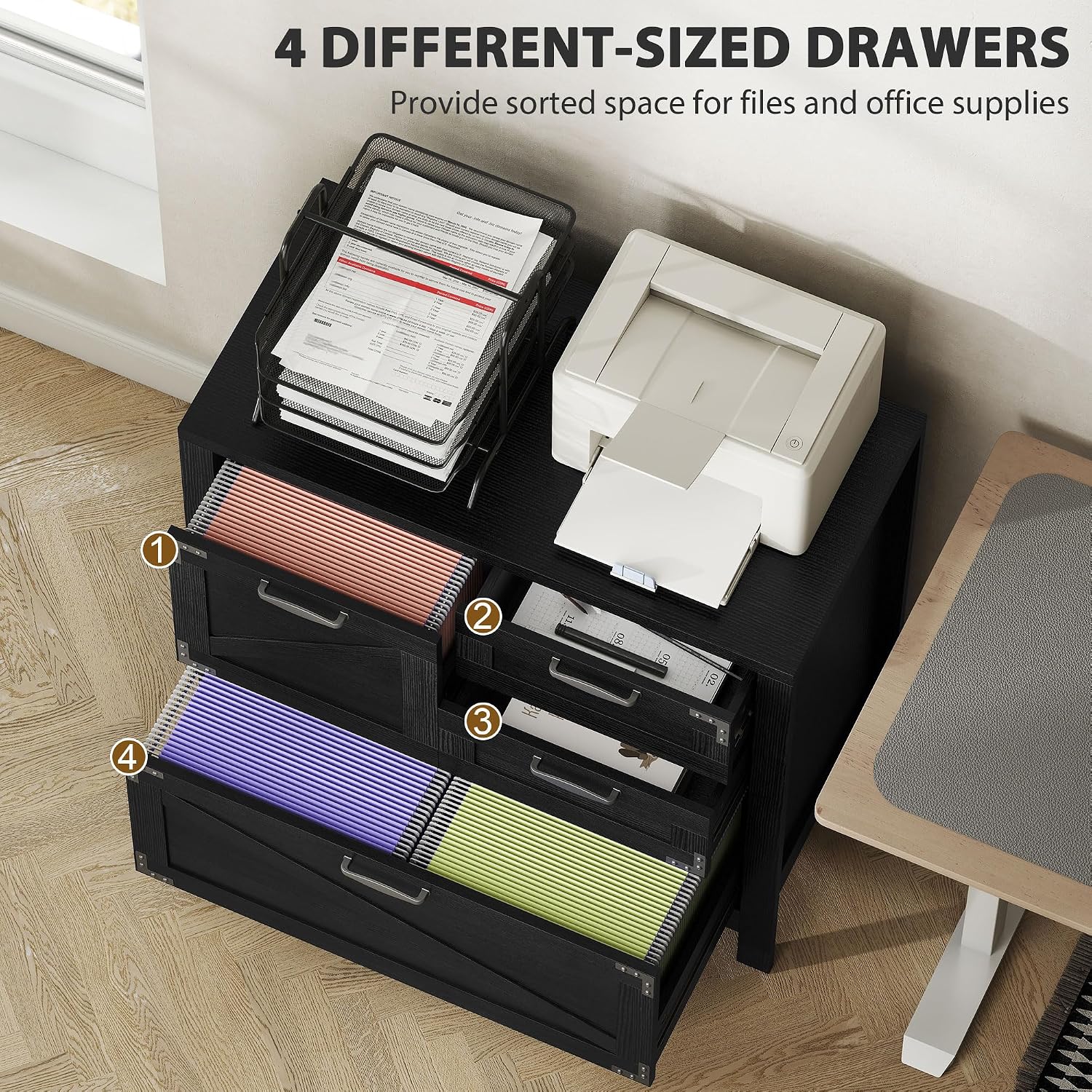
This lateral file cabinet is designed for efficient organization of documents and office supplies.
Drawer Usage:
Top Small Drawers: Ideal for storing small office supplies such as pens, staplers, and sticky notes.
Middle Drawer: Suitable for Letter/A4 size files.
Bottom Large Drawer: Designed for Letter/A4/Legal size files. It features adjustable hanging rails to accommodate different file sizes.
Image: An overhead view illustrating the four different-sized drawers of the file cabinet, showcasing their capacity for files and office supplies.
Adjustable Hanging Rails:
The bottom drawer includes adjustable hanging rails. To change the file size configuration (Letter, A4, Legal), simply reposition the rails as needed. Ensure the rails are securely seated in their designated slots.
Image: A close-up view demonstrating the adjustable hanging bars within the file cabinet drawers, illustrating how they can be configured for A4, Letter, and Legal size files.
Smooth Drawer Slides:
The drawers are equipped with silent alloy runners for smooth and quiet operation. Avoid forcing drawers open or closed if they encounter resistance.
Image: A detailed shot highlighting the silent drawer glides, emphasizing their smooth and quiet operation.
Top Surface:
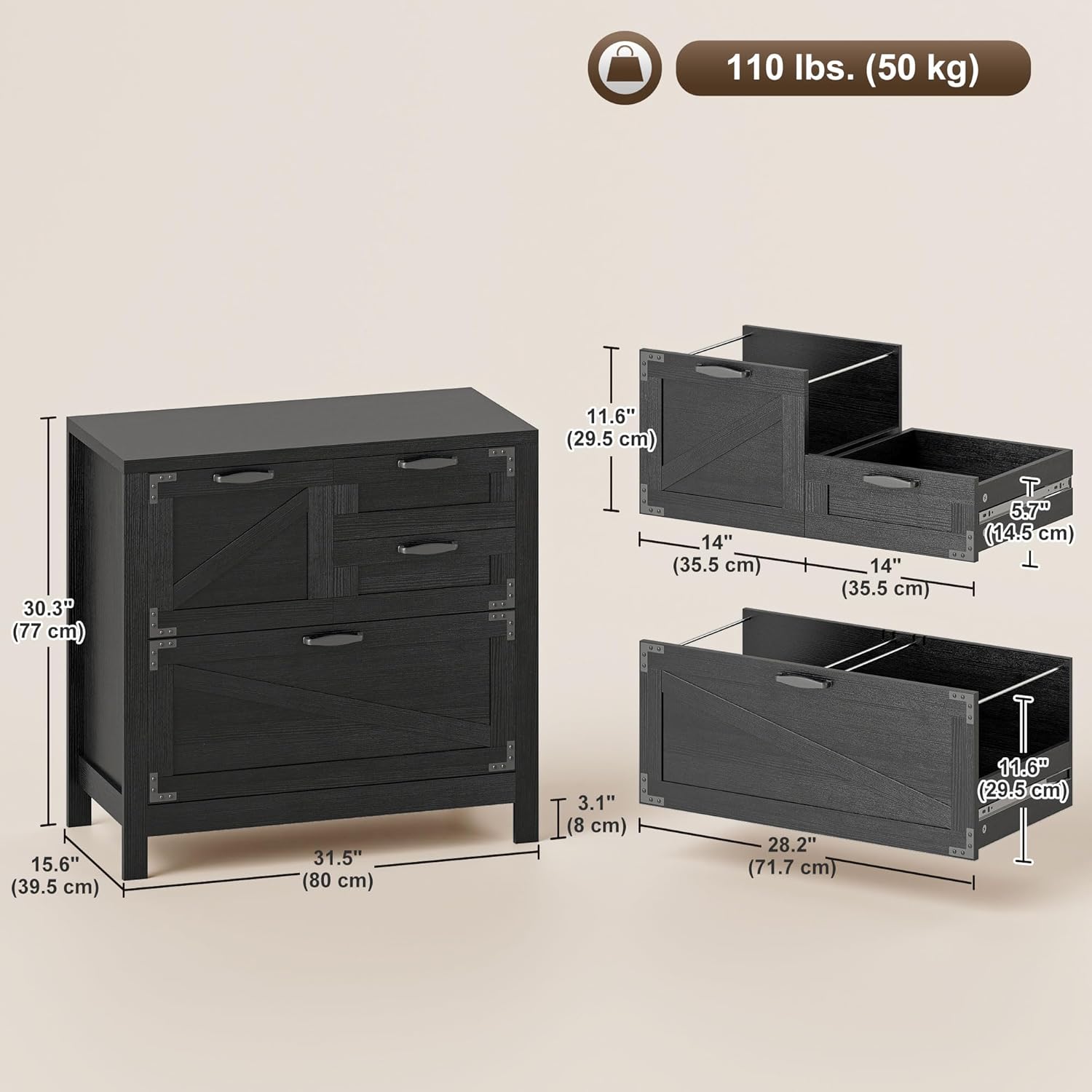
The spacious 31.5" x 15.6" tabletop, made with a 0.98" thick board, provides a stable surface for a printer, scanner, or other office essentials, up to 110 lbs.
5. Maintenance
Cleaning: Wipe surfaces with a soft, damp cloth. Avoid harsh chemicals or abrasive cleaners that may damage the finish.
Hardware Check: Periodically inspect all screws and fasteners to ensure they are tight. Tighten any loose connections to maintain stability.
Drawer Slides: If drawer operation becomes less smooth, clean the drawer slides and apply a silicone-based lubricant if necessary.
6. Troubleshooting
Drawers not closing smoothly: Check that the drawer slides are correctly installed and aligned. Ensure no objects are obstructing the slides. Verify that all screws on the slides are tight.
Cabinet feels unstable: Confirm that the anti-tip kit is properly installed and secured to a wall stud. Ensure the cabinet is placed on a level surface.
Missing or damaged parts: Refer to the contact information in the Warranty and Support section for assistance with replacement parts.
Image: A diagram illustrating the precise dimensions (depth, width, height) and the maximum weight capacity (110 lbs / 50 kg) of the file cabinet.
8. Warranty and Support
For warranty information, specific product support, or to order replacement parts, please contact HOMCOM customer service directly. Refer to your purchase documentation for contact details.
Protection Plans:
Optional 2-Year and 3-Year Protection Plans may be available for purchase. Please refer to your retailer for details on these plans.
2-Year Protection Plan: Available
3-Year Protection Plan: Available
Ask a question about this manual
Ask about setup, troubleshooting, compatibility, parts, safety, or missing instructions. Manuals+ will review the question and use this page’s manual context to help answer it.