
GEEKOM GEEKOM A9 Max
Contents
GEEKOM A9 Max AI Mini PC User Manual
Model: GEEKOM A9 Max
Introduction
The GEEKOM A9 Max AI Mini PC is a compact yet powerful computing device engineered for a wide range of applications, from intensive AI workloads and high-fidelity gaming to professional creative tasks and everyday productivity. It integrates cutting-edge AMD Ryzen AI technology and robust cooling solutions to deliver exceptional performance in a small form factor.

Image: The GEEKOM A9 Max AI Mini PC, showcasing its compact design and sleek silver finish.
What's in the Box
- 1 x GEEKOM A9 Max Mini PC
- 1 x HDMI Cable
- 1 x VESA Mount
- 1 x Power Adapter
- 1 x User Guide
Setup Guide
- Connect the Power Adapter: Plug the power adapter into the DC-in port on the rear of the GEEKOM A9 Max and then into a wall outlet.
- Connect to a Display: Use the provided HDMI cable or a USB4 cable to connect your mini PC to a monitor or TV. The GEEKOM A9 Max supports up to 8K resolution and quad displays.
- Connect Peripherals: Plug in your USB keyboard, mouse, and any other desired peripherals into the available USB ports.
- Power On: Press the power button located on the front of the mini PC. The power indicator light will illuminate.
- Initial Setup: Follow the on-screen instructions to complete the Windows 11 Pro setup, including network configuration and user account creation.
Operating Your GEEKOM A9 Max
The GEEKOM A9 Max comes pre-installed with Windows 11 Pro, offering a familiar and intuitive user experience. It is also compatible with other operating systems like Ubuntu, Manjaro, and Android x86, providing flexibility for various user needs.
For optimal performance, ensure your operating system and drivers are kept up to date. The mini PC is designed for seamless multitasking, allowing you to run multiple applications simultaneously without significant performance degradation.
Video: An overview of the GEEKOM A9 Max Mini PC, highlighting its features and capabilities for gaming and AI tasks.
Key Features
Unmatched AI Performance
The A9 Max Mini PC features the AMD Ryzen AI 9 HX 370 processor, built on the "Strix Point" architecture, delivering an industry-leading 80 TOPS of total AI acceleration. Its next-gen XDNA 2 AI engine provides 50 TOPS of dedicated NPU performance, enabling seamless Copilot+ experiences, local large model deployment, and advanced content generation. It handles intensive AI workloads effortlessly while maintaining optimal thermal efficiency.

Image: Visual representation of the GEEKOM A9 Max's AI capabilities, highlighting the AMD Ryzen AI 9 HX 370 processor and Radeon 890M graphics.
Built-in Gaming Powerhouse
Equipped with AMD's Radeon 890M integrated graphics (16 RDNA 3.5 compute units), the GEEKOM A9 Max delivers performance comparable to entry-level discrete GPUs. It supports popular games like Valorant, Fortnite, League of Legends, and CS2 at 1080p high settings with excellent frame rates. AMD's FidelityFX Super Resolution (FSR) technology further boosts frame rates and enhances visual quality. Beyond gaming, it handles crisp 4K video playback and light 3D rendering tasks.

Image: Demonstrates the gaming performance of the GEEKOM A9 Max with various game titles and their respective frame rates.
Pro-Grade IceBlast 2.0 Cooling
The A9 Max features the IceBlast 2.0 thermal system, which includes an oversized copper heatsink, dual heat pipes, and a high-performance, whisper-quiet fan. Precision-engineered airflow with side intake and rear exhaust vents, along with premium thermal compounds, ensures optimal heat transfer. This intelligent cooling solution prevents overheating and thermal throttling, delivering sustained peak performance during intensive workloads.
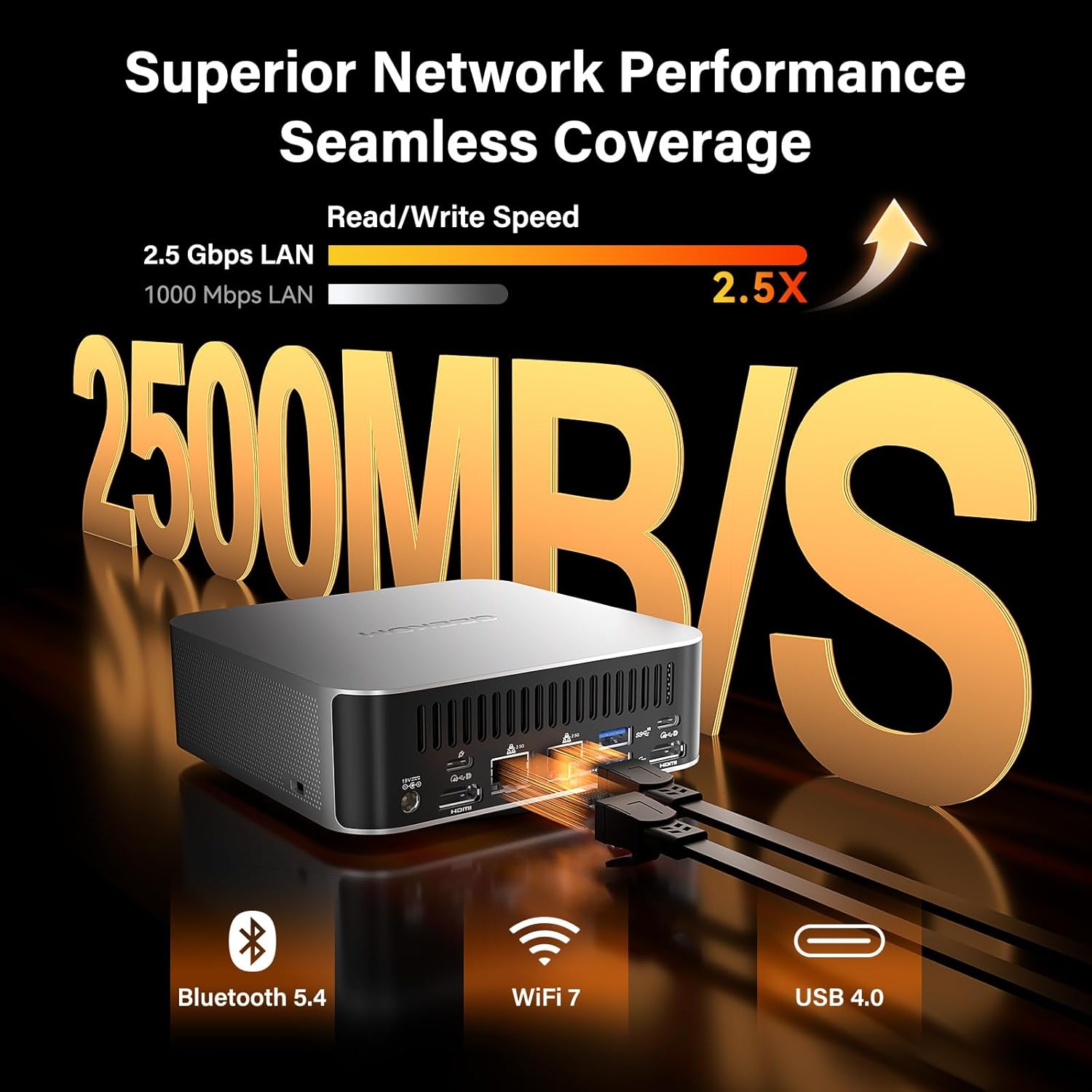
Image: A diagram illustrating the IceBlast 2.0 cooling system with its copper heatsink, dual heat pipes, and fan for efficient heat dissipation.
Desktop-Class Memory & Storage
The GEEKOM A9 Max supports up to 128GB of blazing-fast DDR5-5600MHz RAM in dual-channel mode. It also includes dual PCIe Gen4 NVMe SSD slots (1x M.2 2280 + 1x M.2 2230), each expandable to 4TB. This powerful combination provides exceptional speed and flexibility for demanding multitasking, rapid AI model processing, and intensive creative workflows, accommodating both high-capacity system drives and ultra-fast scratch disks.

Image: An internal view highlighting the dual-channel DDR5 SODIMM slots and M.2 NVMe SSD slots for expandable memory and storage.
Advanced I/O and Expandability
This mini PC offers pro-level expandability with dual USB4 ports (40Gbps with PD charging and display support) for connecting external GPUs, superfast storage, or up to 4K/8K displays. It also features five USB-A 3.2 Gen2 ports, dual HDMI 2.1 outputs, dual 2.5GbE Ethernet ports, and a full-speed SD 4.0 card reader. With Wi-Fi 7 and Bluetooth 5.4, it serves as an ultimate hub for multi-screen setups, streamers, and IT professionals.

Image: A detailed diagram showing all the input/output ports available on the GEEKOM A9 Max, including USB, HDMI, LAN, and audio jacks.

Image: Illustrates the GEEKOM A9 Max's capability to support multiple 8K displays for enhanced productivity and immersive experiences.
Compact Yet Powerful
Measuring just 135mm x 132mm x 45.6mm, the GEEKOM A9 Max fits effortlessly into any setup. Despite its size, it houses a 54W TDP flagship CPU with up to 12 high-performance cores and cutting-edge I/O, delivering desktop-grade power for intensive workloads. Its premium all-metal construction ensures durability and enhances heat dissipation, and it includes VESA mount compatibility for clean, space-saving setups.
Secure, Stable, and Durable
The GEEKOM A9 Max Mini PC is built for demanding workloads with Windows 11 24H2 pre-installed and full compatibility with Ubuntu, Manjaro, and Android x86. Security features include TPM 2.0 encryption and Kensington Lock support. Dual 2.5G LAN ports provide secure wired connections. Each component undergoes rigorous testing for thermal performance and long-term reliability.
Technical Specifications
| Feature | Specification |
|---|---|
| Brand | GEEKOM |
| Series | GEEKOM A9 Max |
| Model Number | GEEKOM A9 Max |
| Operating System | Windows 11 Pro |
| Processor | AMD Ryzen AI 9 HX 370 (5.1 GHz) |
| Graphics Coprocessor | AMD Radeon 890M (Integrated) |
| RAM | 32GB DDR5-5600MHz (Expandable to 128GB) |
| Hard Drive | 2 TB NVMe SSD (Dual PCIe Gen4 M.2 slots, up to 4TB each) |
| Screen Resolution | 7680 x 4320 (8K) |
| Wireless Type | Wi-Fi 7, Bluetooth 5.4 |
| USB Ports | 2 x USB4 (40Gbps), 5 x USB-A 3.2 Gen2, 1 x USB 2.0 |
| Video Outputs | 2 x HDMI 2.1, 2 x USB4 (DisplayPort Alt Mode) |
| LAN Ports | 2 x 2.5G RJ45 Ethernet |
| Other Ports | 3.5mm Headphone Jack, SD 4.0 Card Reader, DC-in |
| Item Weight | 3.58 pounds |
| Product Dimensions | 5.32 x 5.2 x 1.8 inches |
Maintenance
- Keep it Clean: Regularly wipe the exterior with a soft, dry cloth. Use compressed air to clear dust from vents to maintain optimal airflow.
- Software Updates: Ensure your operating system, drivers, and applications are kept up-to-date to benefit from performance improvements and security patches.
- Avoid Obstructions: Do not block the ventilation openings on the mini PC to prevent overheating.
- Safe Shutdown: Always shut down the mini PC properly through the operating system to prevent data corruption.
Troubleshooting
- No Power: Ensure the power adapter is securely connected to both the mini PC and a working power outlet. Try a different outlet if necessary.
- No Display: Verify that the HDMI or USB4 cable is securely connected to both the mini PC and the monitor. Check the monitor's input source settings.
- Peripheral Not Detected: Try connecting the peripheral to a different USB port. Ensure drivers for the peripheral are installed if required.
- System Slowdown: Close unnecessary applications. Check for background processes consuming high resources. Ensure sufficient free storage space.
- Network Connectivity Issues: For wired connections, check the Ethernet cable and router status. For Wi-Fi, ensure the correct network is selected and the password is entered correctly. Restart your router if needed.
Warranty & Support
GEEKOM offers a 3-year limited warranty on every Mini PC from the date of purchase, covering all defects in design and workmanship. This includes 1 year of free replacement and 2 years of free maintenance, totaling 3 years of quality support.
For any inquiries or support needs, please refer to the following options:
- Find the Seller on Amazon: Log in to your Amazon buyer's account, find your order, and click 'Get help' to ask for assistance with this product.
- Email After-sales Team: You can send an email to shirley.li@geekom.tw. The team aims to respond within 24 hours.

Image: Visual representation of GEEKOM's 3-year warranty policy, detailing free replacement and maintenance periods.
Ask a question about this manual
Ask about setup, troubleshooting, compatibility, parts, safety, or missing instructions. Manuals+ will review the question and use this page’s manual context to help answer it.