
1. Introduction
The Xiaomi Truclean W20 is a versatile cordless wet dry vacuum cleaner designed for efficient cleaning of various floor types. It integrates vacuuming, mopping, and self-cleaning functions to handle both wet and dry messes. This manual provides essential information for safe operation, maintenance, and troubleshooting to ensure optimal performance of your device.

Image: The Xiaomi Truclean W20 Wet Dry Vacuum Cleaner, showcasing its sleek design and powerful cleaning capabilities.
2. Safety Instructions
Please read all safety warnings and instructions before using this appliance to prevent electric shock, fire, or serious injury. Keep this manual for future reference.
- This appliance is for household use only. Do not use it for commercial or industrial purposes.
- Do not immerse the appliance, battery, or charging dock in water or other liquids.
- Keep hair, loose clothing, fingers, and all parts of the body away from openings and moving parts.
- Use only the charging adapter provided by the manufacturer.
- Do not vacuum flammable or combustible liquids, such as gasoline, or use in areas where they may be present.
- Do not pick up anything that is burning or smoking, such as cigarettes, matches, or hot ashes.
- Ensure the dirty water tank and clean water tank are properly installed before operation.
- Always disconnect the appliance from the charger before cleaning or performing maintenance.
- Store the appliance indoors in a dry place.
3. Package Contents
Verify that all components are present in the package:
- Xiaomi Truclean W20 Vacuum Unit
- Handle
- Charging Dock
- Cleaning Brush
- Crevice Tool
- Mini Motorized Brush
- User Manual
4. Product Diagram
Familiarize yourself with the main parts of your Xiaomi Truclean W20 vacuum cleaner.
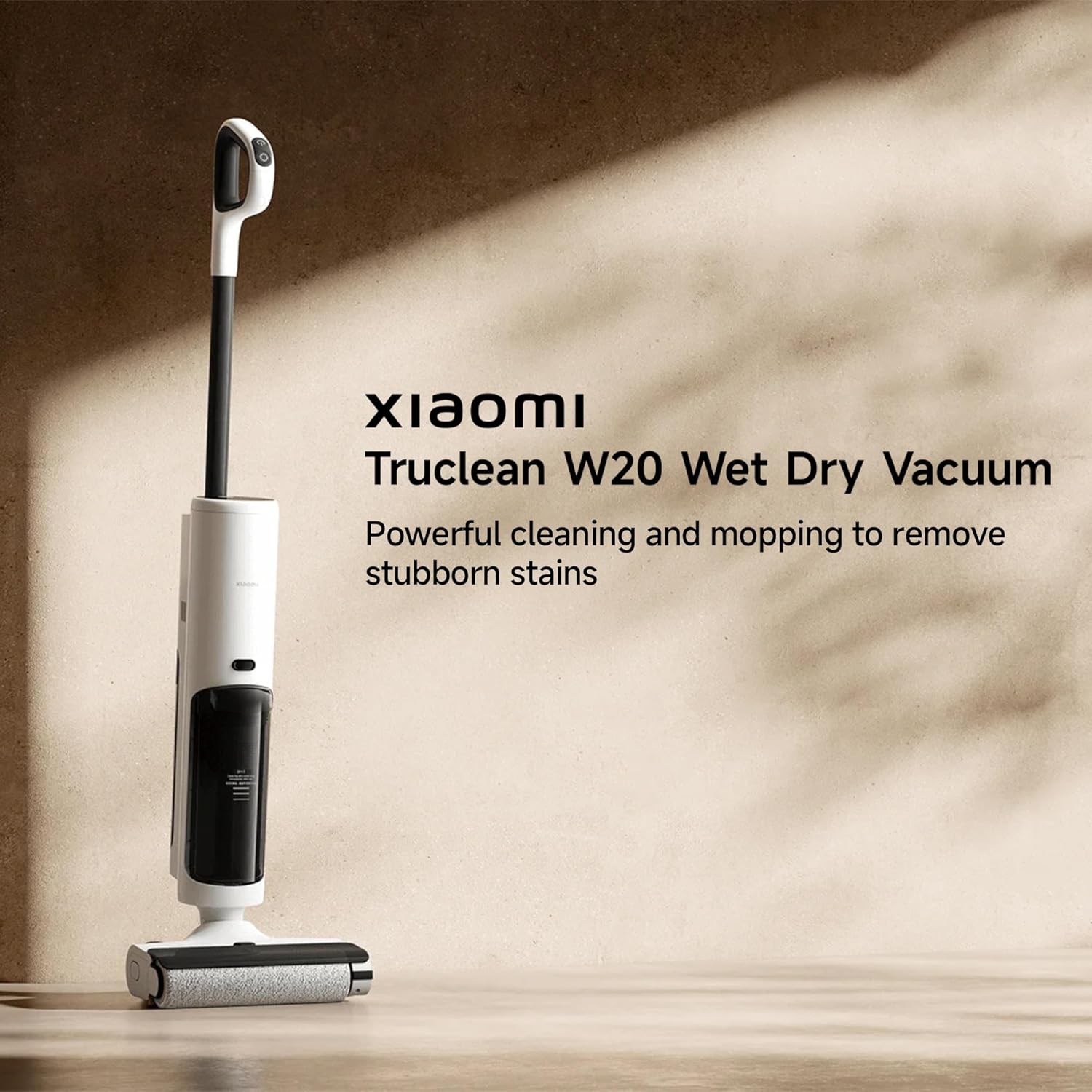
Image: An overview of the Xiaomi Truclean W20, showing its main body, handle, and cleaning head.
Key components include the handle, main body with motor and tanks, roller brushbar, and charging dock.
5. Setup
5.1 Assembly
- Insert the handle into the main body until it clicks securely into place.
- Place the assembled vacuum cleaner onto the charging dock.
5.2 Initial Charging
Before first use, fully charge the vacuum cleaner. Connect the charging dock to a power outlet. The LED display will indicate charging status. A full charge takes approximately 4-5 hours.
5.3 Filling the Clean Water Tank
- Press the release button to detach the clean water tank from the main body.
- Open the tank cap and fill with clean tap water up to the MAX line. You may add a small amount of non-foaming cleaning solution suitable for wet vacuums.
- Close the cap securely and reattach the clean water tank to the main body until it clicks.

Image: Illustration showing the 780ml clean water tank and 550ml dirty water tank, highlighting their capacities.
6. Operating Instructions
6.1 Powering On/Off
Press the power button on the handle to turn the vacuum cleaner on or off.
6.2 Mode Selection
The vacuum cleaner offers multiple cleaning modes. Tap and hold the Mode button to switch between:
- Standard Mode: For general cleaning of light dirt and spills.
- Water Absorption Mode: For picking up larger liquid spills.
- Powerful Suction Mode (MAX): For stubborn dirt and deep cleaning.

Image: Diagram illustrating the different operating modes: Standard, Water Absorption, and Powerful Suction.
6.3 Smart Dirt Detection
The intelligent sensors automatically adjust suction power based on the detected level of dirt, optimizing cleaning efficiency and battery life.
6.4 Wet/Dry Cleaning
The Truclean W20 simultaneously vacuums and mops, effectively tackling both dry debris and wet spills in a single pass. The roller brushbar is continuously supplied with clean water for effective mopping.
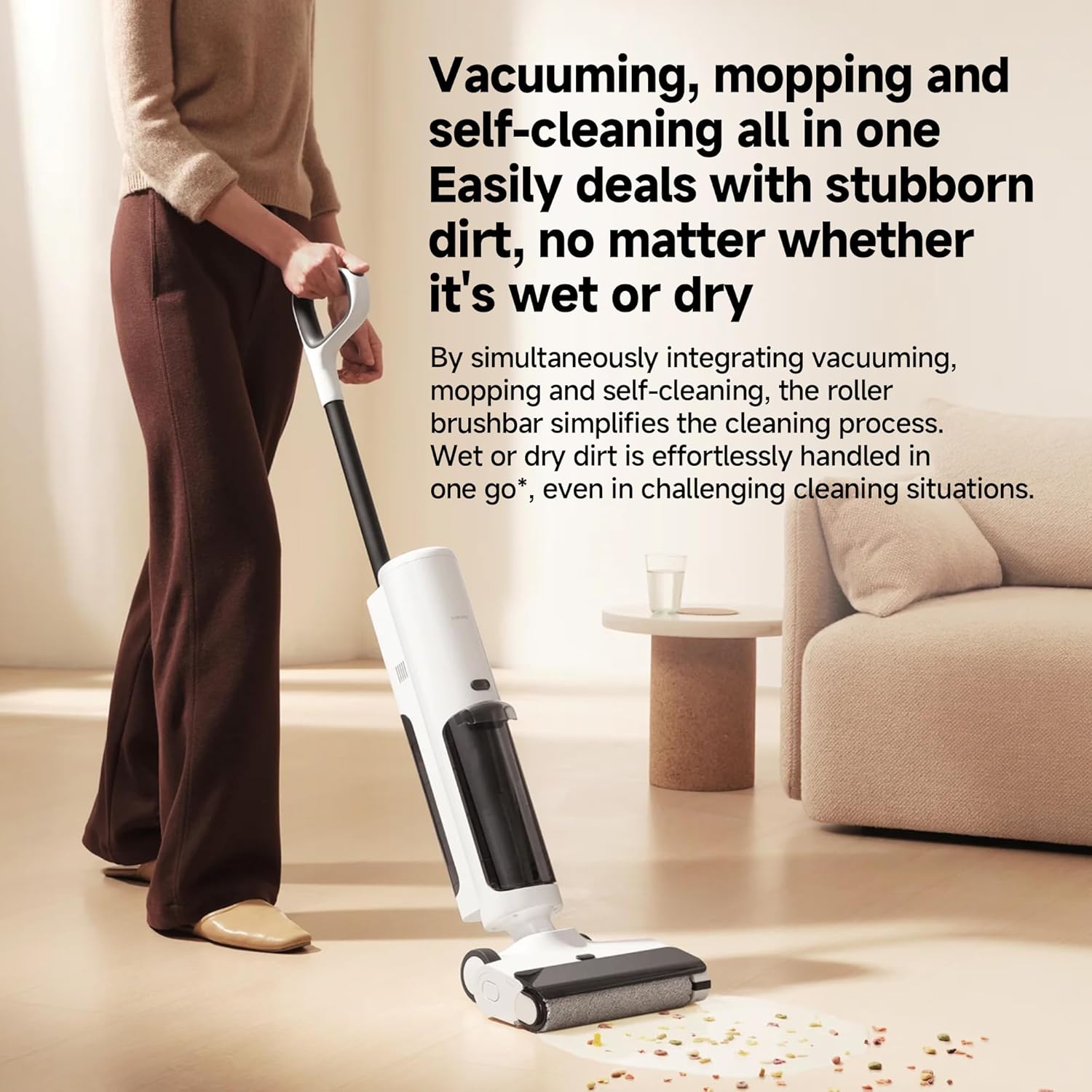
Image: A user operating the vacuum cleaner, demonstrating its ability to handle both wet and dry messes simultaneously.
6.5 Edge and Corner Cleaning
The flexible brush head is designed to reach wall edges and under furniture, ensuring thorough cleaning in hard-to-reach areas.

Image: The vacuum cleaner demonstrating its capability to clean close to walls and into corners.
6.6 Handheld Use
The detachable handheld unit can be used with the crevice tool or mini motorized brush for cleaning tight spaces, car interiors, or upholstery.
7. Maintenance
Regular maintenance ensures the longevity and optimal performance of your Xiaomi Truclean W20.
7.1 Self-Cleaning Function
After each use, place the vacuum cleaner on the charging dock and initiate the one-tap self-cleaning function. The roller brushbar will be washed with flowing water and then spun dry, eliminating the need for manual washing.

Image: The vacuum cleaner positioned on its charging dock, ready for the self-cleaning cycle.
7.2 Emptying the Dirty Water Tank
- Press the release button to detach the dirty water tank.
- Carefully open the tank and dispose of the dirty water.
- Rinse the dirty water tank and its filter thoroughly with clean water.
- Allow all parts to air dry completely before reassembling and reattaching to the vacuum cleaner.
7.3 Cleaning the Roller Brushbar
Even with self-cleaning, periodic manual inspection and cleaning of the roller brushbar is recommended to remove any tangled hair or debris. The scraper with densely-packed teeth helps to reduce hair entanglement during operation.

Image: Close-up view of the roller brushbar and the integrated scraper designed to prevent hair tangles.
7.4 Cleaning the HEPA Filter
The sealed HEPA system traps 99.97% of micro-dust and allergens. Regularly clean the HEPA filter by rinsing it under running water. Ensure it is completely dry before reinstalling to maintain optimal suction and filtration.
8. Troubleshooting
If you encounter issues with your Xiaomi Truclean W20, refer to the following common problems and solutions:
| Problem | Possible Cause | Solution |
|---|---|---|
| Vacuum does not turn on | Low battery; Power button not pressed correctly | Charge the vacuum; Ensure power button is fully pressed |
| Weak suction power | Dirty water tank full; Clogged filter; Blocked roller brushbar | Empty dirty water tank; Clean HEPA filter; Clear any blockages from brushbar |
| Water not dispensing | Clean water tank empty; Water nozzle clogged | Refill clean water tank; Clean water nozzle |
| Roller brushbar not rotating | Hair or debris tangled; Brushbar motor issue | Remove tangles from brushbar; Contact customer support if issue persists |
| Abnormal noise | Foreign object in brushbar; Motor issue | Inspect and remove foreign objects; Contact customer support |
If the problem persists after attempting these solutions, please contact customer support.
9. Specifications
Technical specifications for the Xiaomi Truclean W20 Cordless Wet Dry Vacuum Cleaner:
- Brand: XIAOMI
- Model: Truclean W20
- Colour: White
- Product Dimensions: 27 x 23.01 x 109.3 cm
- Item Weight: 4.75 kg
- Clean Water Tank Capacity: 780 Milliliters
- Dirty Water Tank Capacity: 550 Milliliters
- Power/Wattage: 200 watts
- Voltage: 26 Volts
- Runtime: Up to 45 minutes (depending on mode)
- Special Features: Wet/Dry, Smart Dirt Detection, Edge Cleaning, Self-cleaning Roller Brushbar
- Filter Type: HEPA Filter
- Surface Recommendation: Hard Floor
- Power Source: Battery Powered (Cordless)
- Battery Capacity: 2500mAh
10. Warranty and Support
For warranty information and customer support, please refer to the warranty card included in your product packaging or visit the official Xiaomi website. Keep your purchase receipt as proof of purchase for warranty claims.


