
Introduction
This manual provides detailed instructions for the assembly, operation, maintenance, and troubleshooting of your Korfile GD-006-63 63-inch Gaming Desk. Designed for an optimal gaming and home office experience, this desk features a durable carbon fiber texture, integrated Bluetooth LED lighting, and convenient power outlets. Please read this manual thoroughly before assembly and use to ensure proper function and longevity of your product.

Image: The Korfile 63-inch Gaming Desk in a gaming setup, showcasing its LED lighting and spacious design.
The desk is equipped with a carbon fiber textured desktop, a robust MDF core, and a sturdy metal frame. Key features include a built-in charging station with AC outlets and USB ports, ample storage with fabric drawers, side hooks, and a reversible PC tower shelf. The design also allows for flexible placement and the option to connect two desks for an extended setup.
Setup and Assembly
Your Korfile gaming desk is designed for straightforward assembly. All necessary tools and clearly labeled parts are included. Follow the step-by-step instructions provided in the separate assembly guide to ensure correct and secure construction.
Assembly Steps Overview:
- Unpack Components: Carefully remove all parts from the packaging and verify against the parts list in the assembly guide.
- Identify Parts: Match each part to its corresponding label in the guide.
- Follow Instructions: Assemble the desk frame, desktop, monitor stand, and storage units according to the numbered steps.
- Reversible Design: Note that the storage shelf and drawers can be installed on either the left or right side of the desk to suit your space and preference.
- Secure Connections: Ensure all screws and fasteners are tightened securely for stability. Do not overtighten.
- Adjust Leveling Feet: Once assembled, adjust the anti-slip feet to ensure the desk is level on uneven surfaces.

Image: A diagram illustrating the product dimensions and the reversible shelf feature of the Korfile gaming desk.
Important: Always follow the assembly instructions carefully. Do not exceed the maximum weight recommendation of 220 pounds (100 kg) for the desktop.
Operating Instructions
Bluetooth LED Lighting
The integrated LED lighting system can be controlled via a dedicated smartphone application. This allows for customization of your desk's ambiance.
- Download App: Scan the QR code provided in the assembly guide or search for the specified app in your device's app store.
- Connect via Bluetooth: Enable Bluetooth on your smartphone and open the app. Follow the in-app instructions to pair with your desk's LED lighting system.
- Customize Lighting: The app provides options for:
- Static Colors: Choose from 10 preset colors.
- Dynamic Modes: Select from 10 dynamic lighting effects.
- Brightness Levels: Adjust the intensity with 6 brightness settings.
- Save Presets: Save your favorite lighting configurations for quick access.

Image: The Korfile Gaming Desk highlighting its RGB LED lighting features, including app control, color changes, dynamic modes, brightness levels, and flicker frequencies.
Built-in Charging Station
The desk includes a power strip with multiple outlets to conveniently power your devices.
- AC Outlets: 3 standard AC power outlets (125V/12A) are available for monitors, computers, and other electronics.
- USB Ports: 1 USB-A port (5V/3A) and 1 USB-C port (5V/3A) are provided for charging smartphones, tablets, and other USB-powered devices.
- Power Connection: Connect the desk's main power cord to a standard wall outlet.
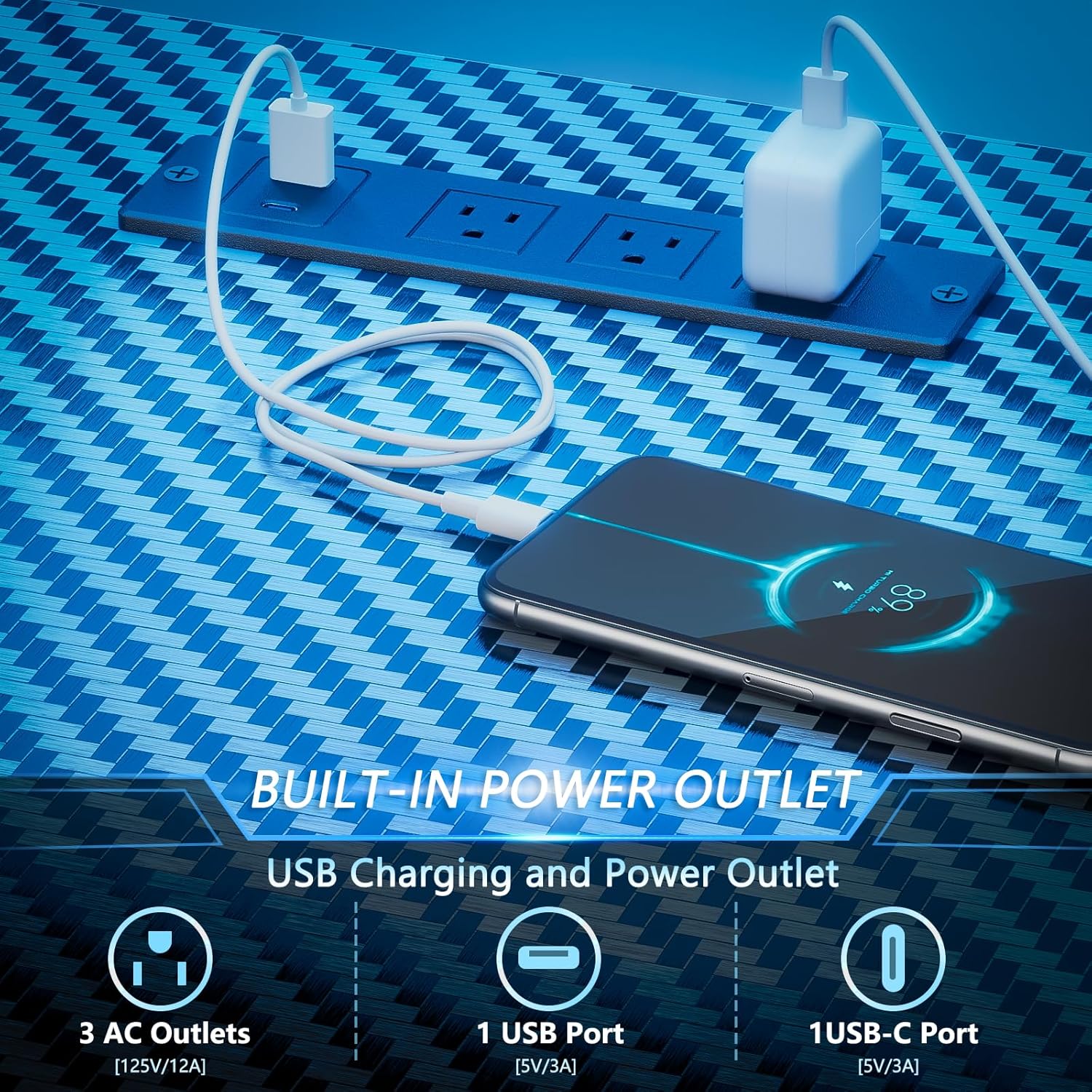
Image: A close-up view of the built-in power outlet on the Korfile desk, showing 3 AC outlets, 1 USB port, and 1 USB-C port in use.
Maintenance
Regular maintenance will help preserve the appearance and functionality of your Korfile gaming desk.
- Cleaning the Desktop: The carbon fiber textured surface is scratch-resistant and easy to clean. Use a soft, damp cloth with a mild, non-abrasive cleaner. Avoid harsh chemicals that may damage the finish.
- Frame and Legs: Wipe metal parts with a dry or slightly damp cloth to remove dust.
- Fabric Drawers: Fabric drawers can be spot cleaned with a mild detergent and water. Allow to air dry completely.
- Check Connections: Periodically check all screws and fasteners to ensure they remain tight. Retighten if necessary.
- Avoid Excessive Moisture: Do not expose the desk to excessive moisture or direct sunlight for prolonged periods.
Troubleshooting
If you encounter issues with your Korfile gaming desk, refer to the following common solutions:
- LED Lights Not Working:
- Ensure the desk's power cord is securely plugged into a functional wall outlet.
- Check if the LED light strip is properly connected to its power source.
- Verify that Bluetooth is enabled on your device and the app is correctly paired with the desk. Try restarting the app or your device. - Power Outlets Not Functioning:
- Confirm the desk's main power cord is plugged in and the wall outlet is active.
- Check if any circuit breakers on the power strip (if present) have tripped. Reset if needed.
- Ensure devices are properly plugged into the AC or USB ports. - Desk Instability/Wobbling:
- Verify that all assembly screws are securely tightened. Refer to the assembly guide for specific locations.
- Adjust the leveling feet at the bottom of the desk legs to compensate for uneven flooring. - Missing Parts or Damaged Components:
- If you received the product with missing parts or damaged components, do not proceed with assembly. Contact customer support immediately for assistance.
Specifications
| Feature | Detail |
|---|---|
| Brand | Korfile |
| Model Number | GD-006-63 |
| Desk Design | Computer Desk / Gaming Desk |
| Product Dimensions (D x W x H) | 18.9" x 62.7" x 47.2" (48cm x 159.2cm x 119.9cm) |
| Item Weight | 47 Pounds (21.3 kg) |
| Material Type | Engineered Wood (Desktop), Metal (Base) |
| Finish Type | Lacquered (Carbon Fiber Texture) |
| Color | Carbon Fiber Black |
| Special Features | Bluetooth LED Lights, Built-In Power Outlets (3 AC, 1 USB-A, 1 USB-C), Reversible Design, Fabric Drawers, Side Hooks, PC Tower Shelf |
| Maximum Weight Recommendation | 220 Pounds (100 kg) |
| Assembly Required | Yes (Tools Included) |
| Number of Drawers | 3 (Fabric) |
| Number of Shelves | 1 (Reversible) |
Warranty Information
The Korfile GD-006-63 Gaming Desk comes with a Limited Warranty. Please refer to the warranty card included in your product packaging for specific terms, conditions, and duration of coverage. This warranty typically covers manufacturing defects and material flaws under normal use.
Customer Support
For any questions, concerns, or assistance with your Korfile GD-006-63 Gaming Desk, please do not hesitate to contact our customer support team. Our professional team is ready to assist you within 24 hours.
Please have your model number (GD-006-63) and purchase information ready when contacting support to facilitate a quicker resolution.
Contact information can typically be found on the Korfile official website or through your purchase platform.