
1. Introduction
This manual provides detailed instructions for the assembly, operation, and maintenance of your LUXOAK Queen Size Platform Bed Frame, Model BMB003. This bed frame features a 2-tier storage headboard with an integrated charging station, a rustic industrial design, and 12 inches of under-bed storage clearance. Constructed with reinforced metal slats and sturdy support legs, it offers a 900 lb capacity and does not require a box spring.
Please read this manual thoroughly before assembly and use to ensure proper setup and safe operation. Keep this manual for future reference.
2. Safety Information
- Read all instructions carefully before beginning assembly. Failure to follow instructions may result in injury or damage to the product.
- Ensure all parts are present and undamaged before assembly. Do not use if any parts are missing or broken.
- Assemble the bed frame on a soft, clean surface (e.g., carpet) to prevent scratching.
- Do not overtighten screws during assembly. Hand-tighten until snug, then use the provided tool for final tightening.
- Do not exceed the maximum weight capacity of 900 lbs.
- Keep children and pets away from the assembly area.
- For the integrated charging station, ensure the power cord is not pinched or damaged. Do not overload the outlets or USB ports. Use only in dry indoor environments.
- Periodically check all bolts and connections to ensure they remain tight.
3. Specifications
| Feature | Detail |
|---|---|
| Model Number | BMB003 |
| Size | Queen |
| Product Dimensions (L x W x H) | 88" x 61.5" x 43.5" |
| Weight Capacity | 900 lbs |
| Under-bed Clearance | 12 inches |
| Color | Rustic Grey |
| Finish Type | Painted |
| Special Feature | Squeak Resistant, No Box Spring Required |
| Charging Station | 2 Standard Outlets, 2 USB Ports (1 USB-A, 1 USB-C), 6.2-foot Power Cord |
| Assembly Required | Yes (Approx. 40 minutes) |

Figure 1: Product dimensions and weight capacity. The Queen size frame measures 88"L x 61.5"W x 43.5"H and supports up to 900 lbs.
4. Package Contents
Before beginning assembly, verify that all components listed below are present and undamaged. Refer to the included assembly diagram for visual identification of parts.
- Headboard components (panels, frame pieces)
- Side rails
- Footboard components
- Metal support slats
- Support legs
- Charging station unit with power cord
- Hardware pack (bolts, washers, nuts, Allen wrench)
- Assembly instructions guide
5. Setup and Assembly Instructions
Assembly is designed to be straightforward and typically takes less than 40 minutes with the provided tools and instructions. It is recommended to have two people for easier assembly.
- Unpack and Identify Parts: Carefully unpack all components and lay them out on a soft, clean surface. Compare each part to the parts list in your separate assembly diagram to ensure everything is present.
- Assemble the Headboard: Follow the specific steps in your assembly diagram to connect the headboard panels and frame pieces. Ensure the 2-tier storage shelves are correctly oriented.
- Install the Charging Station: Secure the charging station unit into the designated slot on the headboard using the provided screws. Ensure it is flush and stable.
- Attach Side Rails: Connect the side rails to the assembled headboard and footboard using the specified bolts and washers. Do not fully tighten until the entire frame is assembled.
- Install Support Legs: Attach the central support legs to the frame as indicated in the diagram. These provide additional stability and weight distribution.
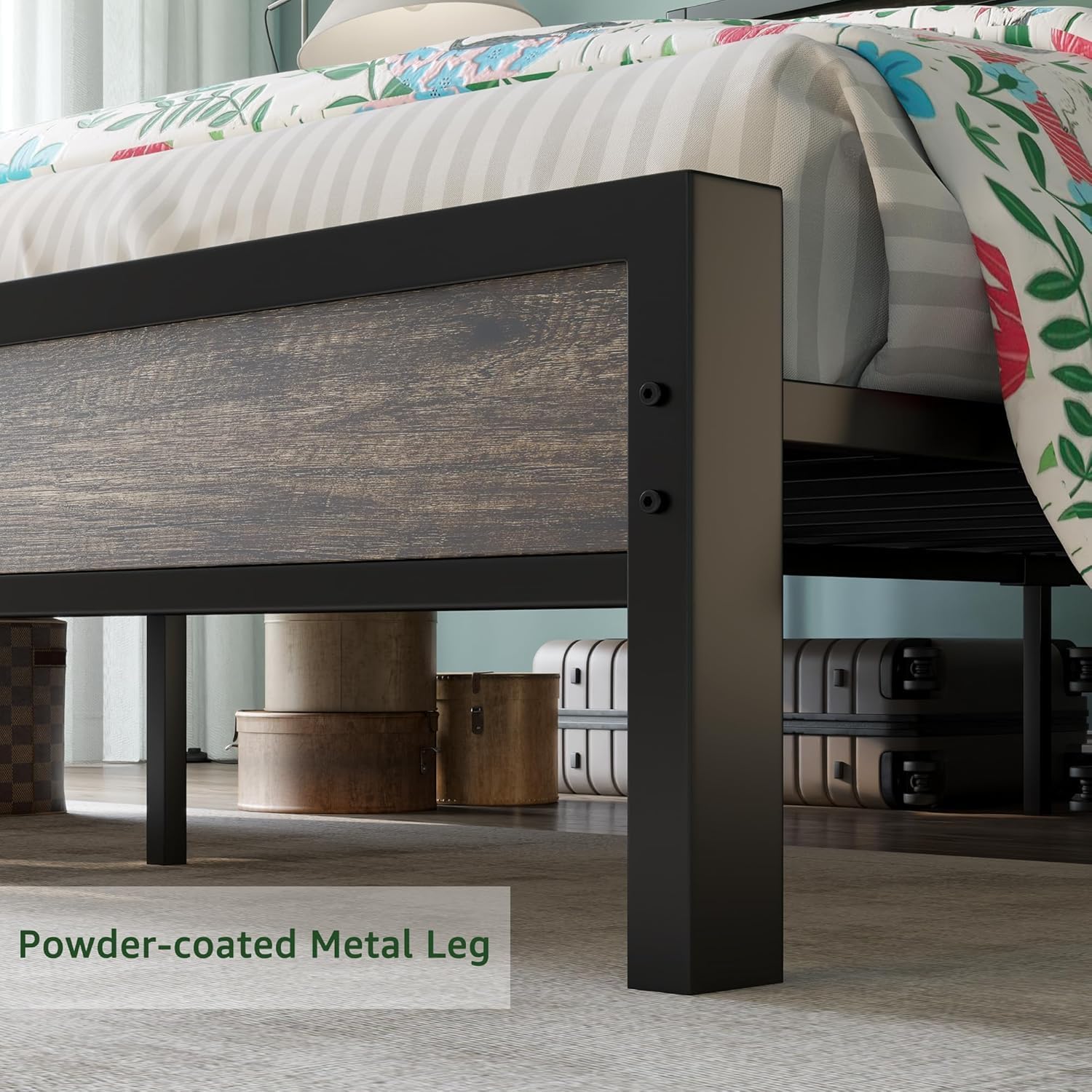
Figure 2: Detail of a powder-coated metal leg, designed for durability and stability.
- Place Metal Slats: Lay the reinforced metal slats across the frame, ensuring they are evenly spaced and securely fastened to the side rails. The non-slip strips on the slats help prevent mattress movement and reduce noise.
- Final Tightening: Once all components are in place and aligned, go back and securely tighten all bolts using the provided Allen wrench. Do not overtighten.
- Position the Bed: Carefully move the assembled bed frame to its desired location.

Figure 3: The LUXOAK Queen Size Bed Frame with its integrated storage headboard and charging station.

Figure 4: The bed frame provides 12.5 inches of clearance for convenient under-bed storage.
6. Operating Instructions (Charging Station)
The integrated charging station provides convenient power access for your electronic devices.
- Connect Power: Plug the 6.2-foot power cord from the charging station into a standard wall outlet.
- Use USB Ports: The headboard includes one USB-A port and one USB-C port (5V/2A total output). Connect your USB charging cables to these ports to charge compatible devices like smartphones and tablets.
- Use Power Outlets: Two standard 110V/12A outlets are available for powering or charging devices that require a wall plug, such as lamps or laptops.
Caution:
- Do not exceed the maximum electrical load for the charging station.
- Avoid spilling liquids on the charging station.
- Do not use if the power cord or charging station is damaged.
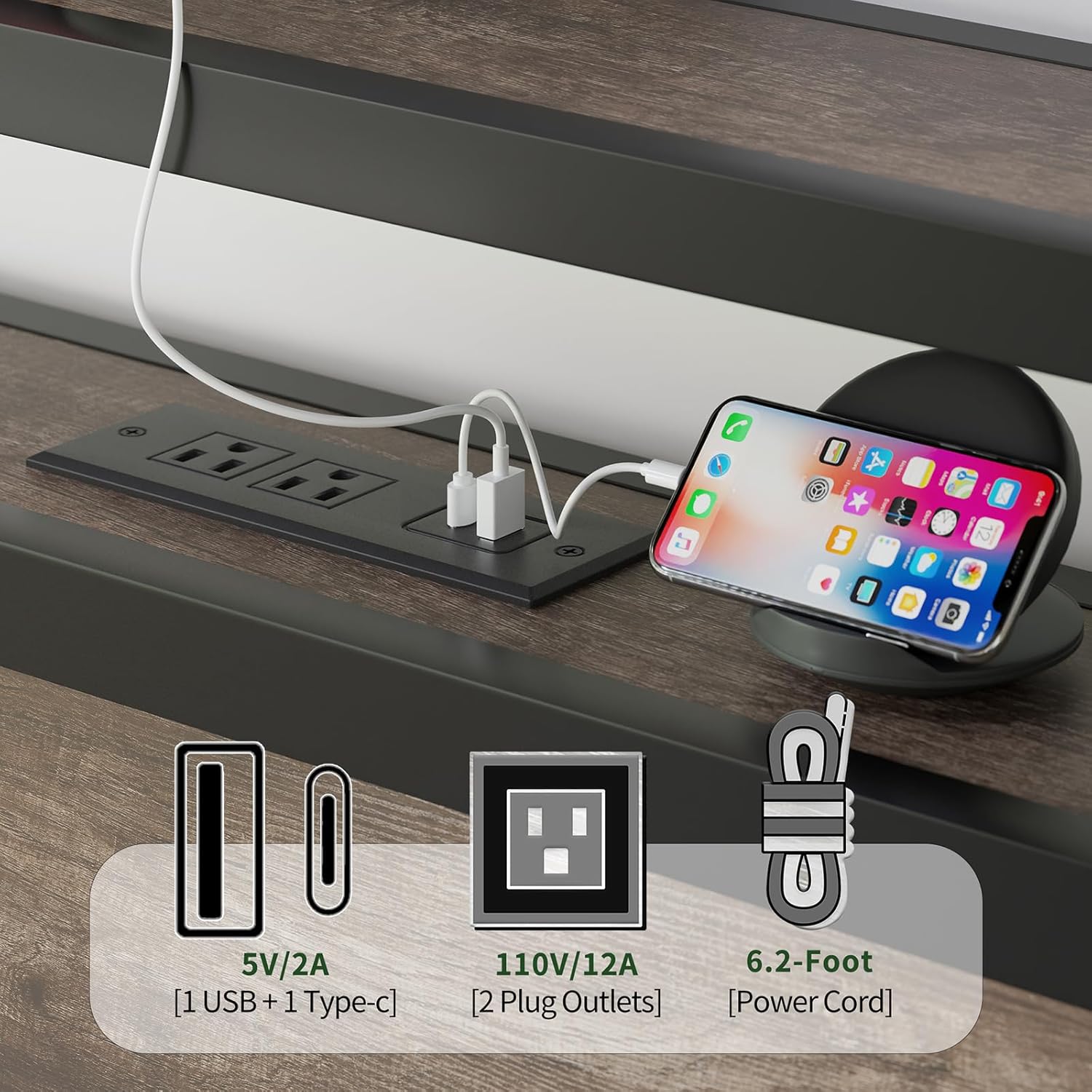
Figure 5: The integrated charging station features two USB ports and two standard power outlets.
7. Maintenance
- Cleaning: Wipe the metal frame and rustic wood panels with a soft, damp cloth. Avoid harsh chemicals or abrasive cleaners.
- Hardware Check: Periodically (e.g., every 3-6 months) inspect all bolts and screws to ensure they are tight. Retighten if necessary to maintain stability and prevent squeaking.
- Charging Station: Keep the charging station free of dust and debris. Do not attempt to disassemble or repair the electrical components yourself.
8. Troubleshooting
- Squeaking Noise: This is often caused by loose connections. Check and tighten all bolts and screws on the frame and slats. Ensure the non-slip strips on the slats are intact.
- Bed Frame Feels Unstable: Verify that all support legs are firmly on the ground and all bolts are securely tightened. Ensure the frame is on a level surface.
- Charging Station Not Working: Check if the power cord is securely plugged into both the charging station and the wall outlet. Test the wall outlet with another device to ensure it is functional. If issues persist, discontinue use and contact customer support.
- Missing or Damaged Parts: If you discover any missing or damaged parts during unpacking or assembly, do not proceed with assembly. Contact customer support immediately for assistance.
9. Warranty and Customer Support
LUXOAK stands behind the quality of its products. For any questions, concerns, or assistance with assembly, parts, or product functionality, please contact LUXOAK customer service. Please have your model number (BMB003) and purchase information ready when contacting support.
For customer support, please visit the LUXOAK store on Amazon or refer to your purchase documentation for contact details.

