
HTC N15
HTC N15 Wireless Clip On Earbuds User Manual
Model: N15
Introduction
This manual provides detailed instructions for the setup, operation, and maintenance of your HTC N15 Wireless Clip On Earbuds. Please read this manual thoroughly before using the product to ensure proper function and longevity.
Package Contents
Verify that all items are present in your product package:
- 1 Pair HTC N15 Clip On Earbuds
- 1 Charging Case
- 1 USB-C Charging Cable
- 1 Quick Start Guide (Basic Operations)
Product Overview
The HTC N15 Wireless Clip On Earbuds feature an open-ear design for situational awareness and a lightweight, secure fit. They come with a compact charging case for extended use.
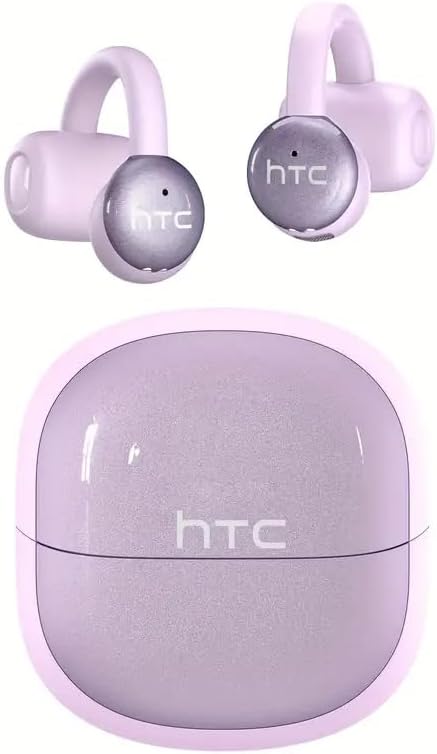
Image: HTC N15 Wireless Clip On Earbuds and Charging Case.

Image: The HTC N15 earbuds and charging case, highlighting battery life features such as 1.5 hours fast charging, 24 hours with the charge case, 8 hours on a single charge, and a Type-C charge port.
Charging the Earbuds and Case
Before first use, fully charge the earbuds and charging case. The charging case provides additional power for on-the-go charging.
- Charging the Case: Connect the provided USB-C cable to the charging port on the case and a power source. The indicator lights on the case will show the charging status.
- Charging the Earbuds: Place the earbuds into the charging case. Ensure they are correctly seated. The earbuds will begin charging automatically.
A single charge provides approximately 8 hours of playback. The charging case extends total playtime to about 22 hours. Fast charging allows for quick power replenishment.

Image: Visual representation of the HTC N15 earbuds' battery life: 8 hours on a single charge, 24 hours with the charging case, and 1.5 hours for fast charging.
Setup and Pairing
The HTC N15 earbuds utilize Bluetooth 6.0 technology for a stable and low-latency connection. They are compatible with iOS and Android devices.
- Power On: Open the charging case. The earbuds will automatically power on and enter pairing mode.
- Activate Bluetooth: On your device (smartphone, tablet, laptop), enable Bluetooth.
- Select Device: In your device's Bluetooth settings, search for 'HTC NE15' and select it to pair.
- Confirmation: Once paired, a voice prompt will confirm the connection.

Image: A diagram illustrating the 'Upgraded Bluetooth 6.0 Technology' with a comparison to Bluetooth 5.3 and 5.4, emphasizing low latency and fast connection.

Image: The HTC N15 earbuds and charging case shown with various compatible devices including notebooks, TVs, desktops, watches, phones, and iPads, demonstrating flexible connectivity. A phone screen displays 'HTC NE15 Connected'.
Operating Instructions (Touch Control)
The HTC N15 earbuds feature smart touch controls on both earbuds for easy management of calls and music playback.
- Answer/End Call: Click either earbud once.
- Reject Call: Press and hold either earbud for 2 seconds.
- Play/Pause Music: Double-click either earbud.
- Previous Song: Triple-click the left earbud.
- Next Song: Triple-click the right earbud.
- Volume Up: Click the right earbud once.
- Volume Down: Click the left earbud once.
- Voice Assistant: Hold the left earbud for 2 seconds.
- Game Mode: Hold the right earbud for 2 seconds.

Image: A diagram illustrating the touch control functions for the HTC N15 earbuds, showing actions for answering/ending calls, rejecting calls, playing/pausing music, skipping tracks, adjusting volume, activating voice assistant, and enabling game mode.
Wearing Instructions
The HTC N15 earbuds feature an ergonomic open-ear clip design for a secure and comfortable fit, allowing you to remain aware of your surroundings.
- Identify L/R: Confirm the left (L) and right (R) earbuds.
- Positioning: Confirm the direction of the earbud.
- Clip On: Gently clip the earbud onto the thinnest part of your ear by sliding it down.
- Adjust: Adjust the earbud tip to align with your ear canal for optimal sound and comfort.
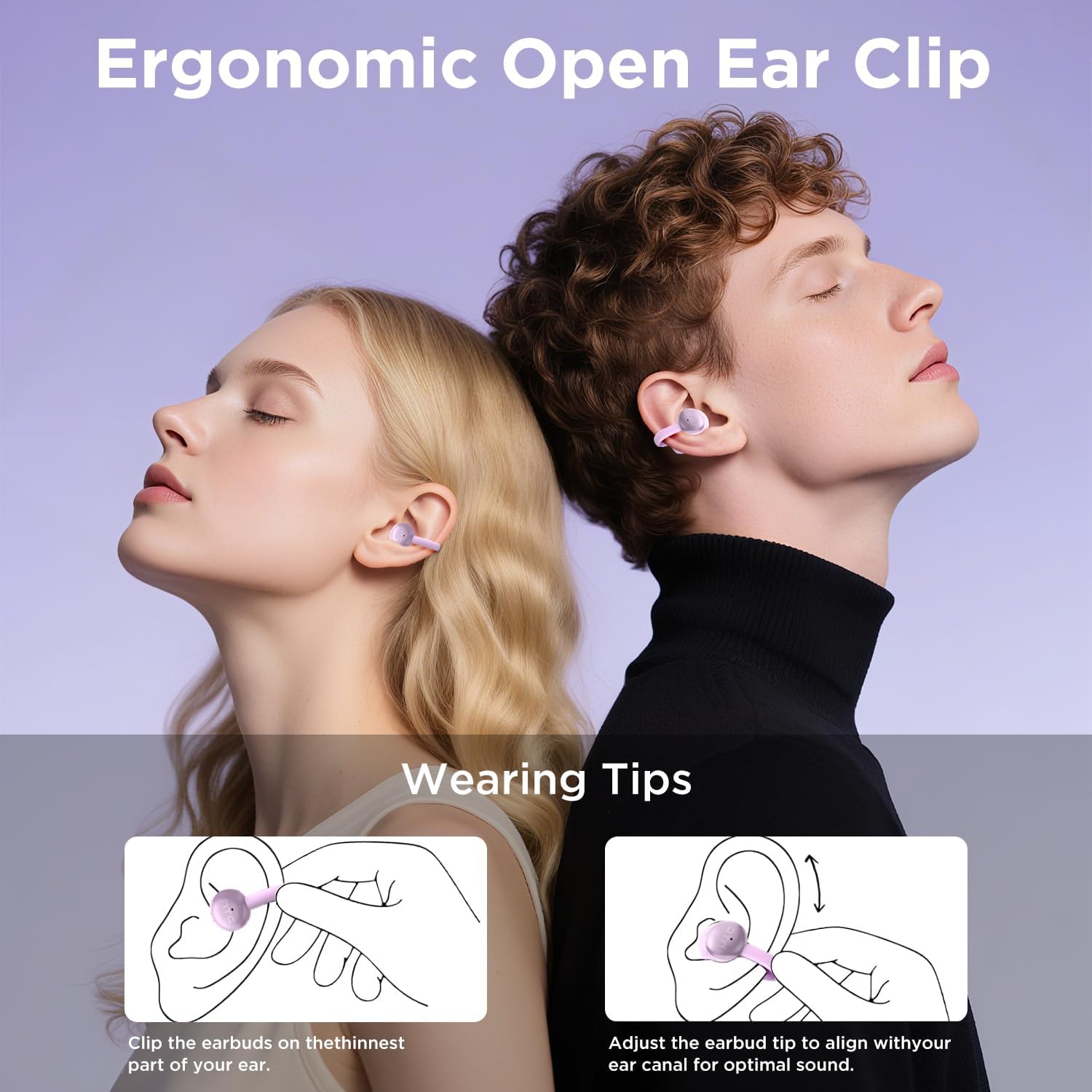
Image: A visual guide demonstrating the ergonomic open-ear clip design and wearing tips for the HTC N15 earbuds, showing how to clip them onto the ear and adjust for optimal sound.

Image: The HTC N15 earbuds emphasizing 'All-Day Comfort' with features like '4.7g Super Light' and a 'Flexible C-Bridge Design' for a secure fit.

Image: A four-step visual guide titled 'HOW TO WEAR?' showing how to correctly position and adjust the HTC N15 earbuds on the ear.
Maintenance
To ensure the longevity and optimal performance of your HTC N15 earbuds, follow these maintenance guidelines:
- Cleaning: Regularly wipe the earbuds and charging case with a soft, dry cloth. Avoid using harsh chemicals or abrasive materials.
- Water Resistance: The earbuds are IPX4 sweatproof, meaning they are resistant to splashes and sweat. Do not submerge them in water or expose them to heavy rain.
- Storage: When not in use, store the earbuds in their charging case to protect them from dust and damage.
- Temperature: Avoid exposing the earbuds to extreme temperatures (hot or cold) or direct sunlight for extended periods.
Troubleshooting
If you encounter issues with your HTC N15 earbuds, refer to the following common solutions:
- Earbuds not pairing: Ensure both earbuds are charged and in pairing mode. Turn off and on your device's Bluetooth, then try pairing again.
- No sound or low volume: Check the volume levels on both your device and the earbuds. Ensure the earbuds are correctly positioned in your ears. Due to the open-ear design, you may need to increase the volume slightly in noisy environments.
- Earbuds falling out: Ensure you are wearing the earbuds correctly as per the wearing instructions. Adjust the clip and earbud tip for a snug fit.
- Touch controls unresponsive: Ensure your fingers are clean and dry. Try restarting the earbuds by placing them back in the case and taking them out again.
- Charging issues: Verify the USB-C cable and power source are working. Ensure the earbuds are properly seated in the charging case.
Specifications
| Feature | Detail |
|---|---|
| Model Name | HTC NE15 |
| Connectivity Technology | Wireless (Bluetooth 6.0) |
| Earpiece Shape | Open-Ear |
| Control Method | Touch |
| Battery Life (Earbuds) | 8 Hours (single charge) |
| Total Playtime (with Case) | 22 Hours |
| Water Resistance Level | IPX4 (Sweat Resistant) |
| Material | Plastic, Silicone |
| Item Weight | 4.6 ounces |
| Compatible Devices | Cellphones, Tablets |
| UPC | 768649989703 |
Product Video
Video: An unboxing and overview of the HTC Wireless Clip On Earbuds N15 Bluetooth 6.0. This video demonstrates the product packaging, contents, and the physical appearance of the earbuds and charging case.
Warranty and Support
HTC provides customer support for its products. For any questions or assistance, please refer to the contact information provided with your purchase or visit the official HTC support website.
Customer Support: 7*24 Live Chat Support is available for assistance with your HTC N15 earbuds.
Please retain your proof of purchase for warranty claims.
Related documentsN15


Ask a question about this manual
Ask about setup, troubleshooting, compatibility, parts, safety, or missing instructions. Manuals+ will review the question and use this page’s manual context to help answer it.