1. Introduction
The 70mai Dash Cam Battery Pack BL96NNX is a high-capacity LiFePO4 backup power solution designed to provide extended parking surveillance for your dash cam without draining your vehicle's main battery. Featuring advanced protection mechanisms and versatile charging options, it ensures reliable and safe operation for continuous monitoring.
2. What's in the Box
Verify that all items are present in the package:
- Battery pack x1
- Fuse box charging cable x1
- Parking surveillance cable adapter x1
- Type C to Type-C output cable x1
- Fuse holders and fuses x4
- Cable tie x1
- Velcro tape x2
- User manual
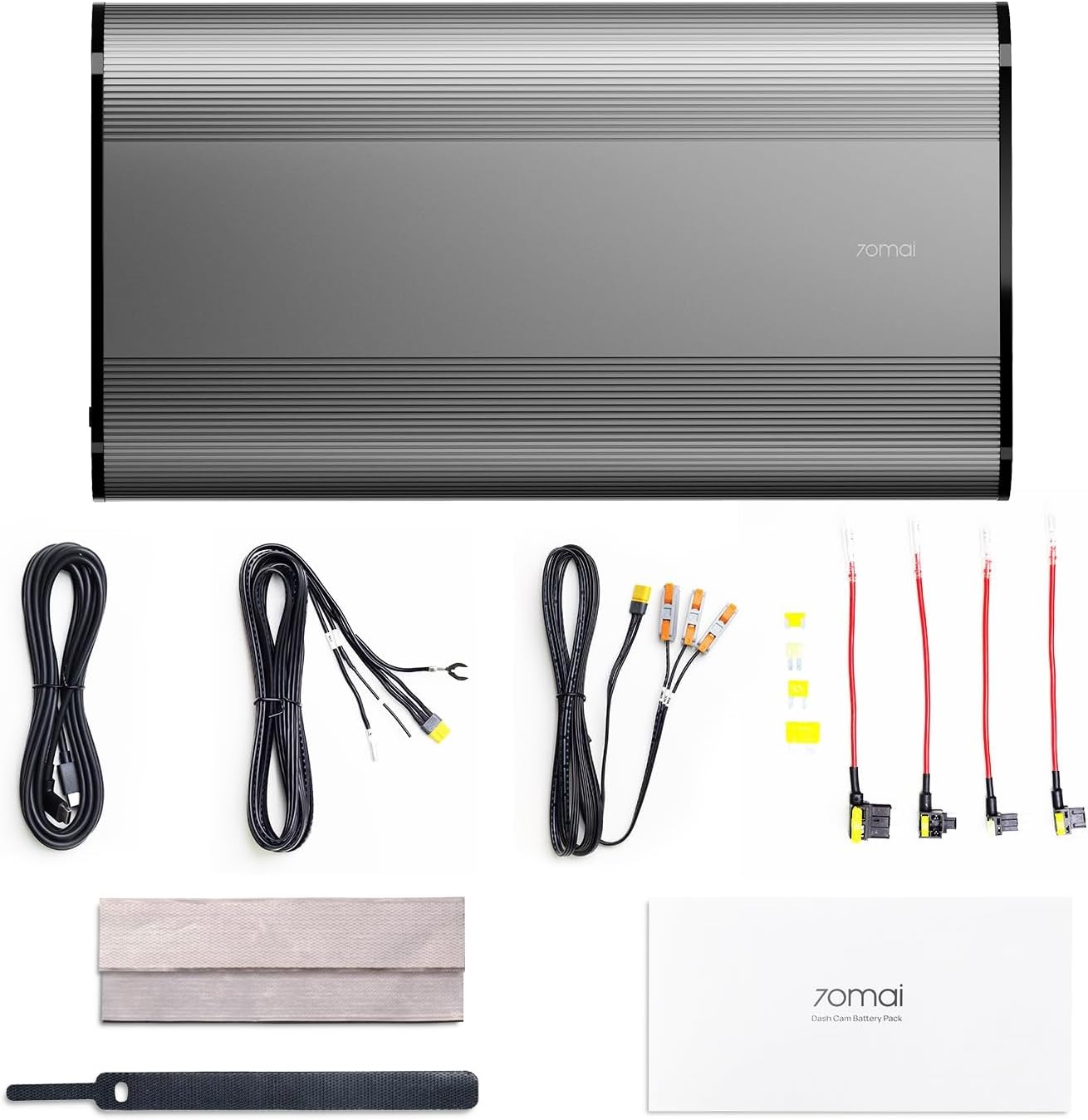
Figure 2.1: Package Contents. The image displays the 70mai Dash Cam Battery Pack along with its accessories: fuse box charging cable, parking surveillance cable adapter, Type-C output cable, fuse holders, fuses, cable tie, Velcro tape, and user manual.
3. Setup and Installation
3.1 Charging Setup
The battery pack offers two primary charging methods:
- Cigarette Lighter Charging: Connect the battery pack to your vehicle's cigarette lighter socket using the provided cable. This method powers the dash cam and enables parking surveillance without draining the car's battery. Note: This method is unsuitable if your vehicle's cigarette lighter is constantly powered.
- Hardwire Connection: For faster charging (up to 50% quicker), utilize the hardwiring option by connecting the battery pack to your vehicle's fuse box. This method is recommended for prioritizing rapid charging.

Figure 3.1: Two Charging Setups. The image illustrates connecting the battery pack either through the car's cigarette lighter or directly to the fuse box for charging.

Figure 3.2: Fast Charging. This image highlights the charging times: 60 minutes via hardwire and 90 minutes via cigarette lighter adapter.
3.2 Discharging Setup
Connect your dash cam to the battery pack using one of the following methods:
- Direct Type-C Connection: Use the included Type-C 5V output cable to directly connect to most dash cams. For 70mai dash cam users, this enables parking surveillance even if the 4G module is unused.
- Via Parking Surveillance Cable: The battery pack features a 12V output interface compatible with all 70mai dash cam models equipped with standard Hardwire Kits or 4G Hard-wire Kits, and most other dash cams with parking surveillance cables.

Figure 3.3: Discharging Setup. This image shows how to connect the battery pack to a dash cam using either the Type-C cable or a parking surveillance cable.

Figure 3.4: Extensive Compatibility. The battery pack is shown connected to different dash cam models, demonstrating its broad compatibility.
3.3 Securely Mount Your Battery Pack
To prevent movement and ensure stability during driving, securely mount the battery pack. It is recommended to place the battery pack with its wide surface facing downwards on the vehicle's floor. Use the provided adhesive Velcro for fixation. After securing the battery pack, use cable ties to fasten the wires and prevent any loose connections.

Figure 3.5: Mounting Options. The image displays two suggested locations for mounting the battery pack: inside the glove box or underneath a car seat.
4. Operating Instructions
4.1 Parking Surveillance
When your engine turns off, the 70mai Dash Cam Battery Pack automatically switches to its internal battery power. This allows for continuous dash cam recording without drawing power from or draining your car's battery, providing seamless 24/7 parking surveillance.

Figure 4.1: Extended Parking Surveillance. This image visually represents the battery pack providing continuous power for parking surveillance.
4.2 Charging Technology
The battery pack utilizes advanced charging technology:
- Rapid Charging: Through a hardwired connection, the battery can achieve a full charge in approximately 60 minutes.
- Delayed Charging: Charging begins 20 seconds after vehicle startup. This intelligent delay prevents excessive load on the vehicle's electrical system during ignition, safeguarding your car's battery.
- Automatic Current Limiting: The system dynamically adjusts the charging current based on the charging method, preventing depletion of your vehicle's battery.

Figure 4.2: Delayed Charging. This image illustrates the 20-second delay before charging begins, protecting the vehicle's electrical system.
5. Maintenance
To ensure the longevity and optimal performance of your 70mai Dash Cam Battery Pack, observe the following maintenance guidelines:
- Battery Longevity: The battery pack uses premium 26650 LiFePO4 cells, designed to maintain 70% capacity after more than 2,000 charging cycles. This ensures long-term reliability.
- Temperature Management: The battery pack is safeguarded against temperature extremes. The recommended charging temperature is 0°C ~ 45°C (32°F ~ 113°F). If the temperature is 0°C or below, turn on vehicle heating to resume charging. The discharge temperature range is -10°C ~ 60°C (14°F ~ 140°F).
- Protection System: The integrated 7-Protection BMS (Battery Management System) protects against overcharge, short-circuit, and other conditions to ensure safe, long-lasting operation.
- Physical Care: Avoid disassembling, crushing, puncturing, or shorting the external interface. Do not place it in fire or put it into water. Discontinue use if bulging is found and charge according to regulations.

Figure 5.1: Enhanced Battery Protection. This image visually represents the robust protection mechanisms built into the battery pack.
6. Troubleshooting
If you encounter issues with your 70mai Dash Cam Battery Pack, consider the following:
- Dash Cam Not Entering Parking Mode: Ensure the correct cable is used for your dash cam model and that it is properly connected to the battery pack's output. For hardwired setups, verify all fuse box connections are secure and correct. Some dash cams require a specific parking surveillance cable to trigger parking mode.
- Battery Pack Not Charging: Check the connection to your vehicle's power source (cigarette lighter or fuse box). Ensure the vehicle is running for charging to occur, especially for cigarette lighter connections that may not be constantly powered. Verify the charging temperature is within the recommended range (0°C ~ 45°C).
- Shortened Parking Mode Duration: The actual duration of parking mode depends on your dash cam's power consumption. Higher power draw will result in shorter operating times. Ensure the battery pack is fully charged before extended parking.
- General Malfunction: If the battery pack exhibits unusual behavior (e.g., excessive heat, strange odors, visible damage), immediately disconnect it from all power sources and contact customer support.
7. Specifications
| Feature | Detail |
|---|---|
| Model | BL96NNX |
| Nominal Voltage | 12.8V |
| Rated Capacity | 7500mAh |
| Rated Energy | 96Wh |
| Nominal Capacity | 7600mAh |
| Limited Charging Voltage | 14.6V |
| DC Output (XT30) | 11.2V-14.2V == 2A Max |
| Type-C Output | 5V == 2.4A Max |
| DC Input | 11.2-30V == 11A Max |
| Charging Temperature | 0°C ~ 45°C (32°F ~ 113°F) |
| Discharge Temperature | -10°C ~ 60°C (14°F ~ 140°F) |
| Package Dimensions | 10.94 x 6.5 x 2.72 inches |
| Item Weight | 4.24 pounds |
| Battery Cell Composition | Lithium Ion (LiFePO4) |
| Recommended Uses For Product | Camera |
8. Warranty and Support
70mai is committed to providing quality products and customer satisfaction.
- Warranty: This product comes with an 18-month warranty.
- Return Policy: A 30-day return policy is available.
- Customer Support: For any inquiries or assistance, please contact 70mai customer support:
- Email: help@70mai.com
- Phone: 1-877-746-6088 (Mon-Fri 9am-6pm PST)
70mai has an in-house R&D department and award-winning industrial designers, ensuring competitive software and hardware capabilities. The company has a proven track record of creating innovative products and serving diverse driver needs globally.


