1. Safety Information
Please read all safety instructions carefully before using this product. Keep this manual for future reference.
- Do not expose the speaker to extreme temperatures or direct sunlight for extended periods.
- Avoid dropping or subjecting the speaker to strong impacts.
- Do not attempt to disassemble, repair, or modify the speaker. This will void the warranty.
- Ensure the charging port cover is securely closed when using the speaker near water to maintain its IPX7 waterproof rating.
- Keep the speaker away from medical devices, as it contains magnets.
- Dispose of the speaker and its battery responsibly according to local regulations.
2. Package Contents
Verify that all items are present in your package:
- CASCHO M7 Portable Bluetooth Speaker
- USB Charging Cable
- User Manual
- Earbuds
3. Product Overview
The CASCHO M7 is a portable, waterproof Bluetooth speaker designed for robust audio performance. Its IPX7 rating ensures protection against water immersion, making it suitable for various environments.
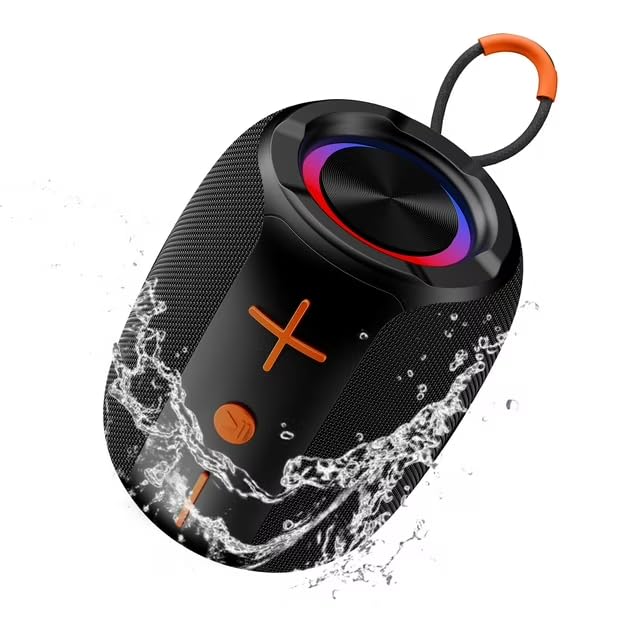
This image displays the CASCHO M7 Portable Bluetooth Speaker, a cylindrical device with a black mesh exterior and orange accents. Water splashes around the speaker, emphasizing its IPX7 waterproof feature. The top features a circular light ring and a metallic speaker grille. An orange carrying loop is attached to one end. Control buttons, including a plus and minus sign, are visible on the side.
Speaker Features:
- IPX7 Waterproof: Protected against temporary immersion in water.
- Bluetooth Connectivity: Seamless wireless audio streaming.
- High Output Power: Delivers clear and powerful sound.
- Portable Design: Compact and easy to carry with an integrated loop.
4. Setup
4.1 Charging the Speaker
- Locate the charging port on the speaker, usually protected by a rubber flap.
- Open the flap and connect the small end of the USB charging cable to the speaker's charging port.
- Connect the larger end of the USB cable to a USB power adapter (not included) or a computer's USB port.
- The charging indicator light will illuminate, typically red, during charging.
- Once fully charged, the indicator light will change color (e.g., turn off or turn blue/green). Disconnect the cable and securely close the charging port flap to maintain waterproofing.
4.2 Powering On/Off
- To Power On: Press and hold the power button (often marked with a power symbol) for a few seconds until you hear an audible prompt or see an indicator light.
- To Power Off: Press and hold the power button again for a few seconds until you hear an audible prompt or the indicator light turns off.
4.3 Bluetooth Pairing
- Ensure the speaker is powered on and in pairing mode. The Bluetooth indicator light will typically flash rapidly.
- On your mobile device (smartphone, tablet, computer), go to the Bluetooth settings.
- Enable Bluetooth and search for available devices.
- Select "CASCHO M7" from the list of found devices.
- Once paired, the speaker will emit an audible confirmation, and the Bluetooth indicator light will stop flashing and remain solid.
- If prompted for a password, enter "0000" (four zeros).
5. Operating Instructions
5.1 Playing Audio
- After successful Bluetooth pairing, open your preferred music or audio application on your connected device.
- Start playback, and the audio will stream wirelessly to the CASCHO M7 speaker.
5.2 Volume Control
- Increase Volume: Press the '+' button on the speaker.
- Decrease Volume: Press the '-' button on the speaker.
- Volume can also be adjusted directly from your connected device.
5.3 Call Handling (if applicable)
- Answer Call: Press the multi-function button (often the play/pause button) once.
- End Call: Press the multi-function button once during a call.
- Reject Call: Press and hold the multi-function button for 2 seconds.
5.4 Waterproof Usage Guidelines
- The speaker has an IPX7 rating, meaning it can be immersed in water up to 1 meter (3.3 feet) for up to 30 minutes.
- Ensure the charging port cover is completely sealed before exposing the speaker to water.
- After exposure to water, wipe the speaker dry with a soft cloth before charging or opening the port cover.
- Do not expose the speaker to saltwater or chlorinated water, as this may damage the device over time.
6. Maintenance
6.1 Cleaning
- Wipe the speaker with a soft, damp cloth.
- Do not use abrasive cleaners, alcohol, or chemical solvents.
- Ensure the speaker is completely dry before charging.
6.2 Storage
- Store the speaker in a cool, dry place away from direct sunlight and extreme temperatures.
- If storing for an extended period, charge the battery to approximately 50% every few months to prolong battery life.
7. Troubleshooting
- Speaker won't turn on: Ensure the battery is charged. Connect to a power source and try again.
- Cannot pair with Bluetooth: Make sure the speaker is in pairing mode. Turn off and on Bluetooth on your device. Ensure no other devices are connected to the speaker.
- No sound: Check the volume levels on both the speaker and your connected device. Ensure the speaker is successfully paired.
- Poor sound quality: Move the speaker closer to your device to reduce interference. Ensure the speaker is fully charged.
- Water damage (despite IPX7): Ensure the charging port cover was securely closed before water exposure. If damage occurs, discontinue use and contact support.
8. Specifications
| Brand | CASCHO |
| Model Name | M7 |
| Speaker Type | 3D |
| Connectivity Technology | Bluetooth |
| Speaker Maximum Output Power | 180 Watts |
| Product Dimensions | 3"D x 3"W x 5"H |
| Waterproof Rating | IPX7 |
| Included Components | Earbuds |
9. Warranty and Support
The CASCHO M7 Portable Bluetooth Speaker comes with a limited manufacturer's warranty. Please refer to the warranty card included in your package for specific terms and conditions.
For technical support, warranty claims, or further assistance, please contact CASCHO customer service through the retailer where the product was purchased or visit the official CASCHO website.


