
1. Product Overview
This bundle includes the DOINOW K1 6-in-1 Cordless Hot Wire Foam Cutter Kit and the DOINOW B1 Pro Precision Screwdriver with OLED display. The K1 foam cutter heats rapidly to 550℃/1022℉, offering cordless operation for various materials like foam board, pearl cotton, and sponge, suitable for crafting and modeling. It features a durable 0.38mm heating wire and interchangeable blades (bow-shaped, needle-shaped, U-shaped). The B1 Pro screwdriver provides precise control with an OLED display, LED light, and 5 adjustable torque levels (0.05 Nm - 0.2 Nm electric, up to 3 Nm manual). It comes with 48 magnetic precision bits and a pop-up magnetic storage box for organization.

Image 1: The DOINOW K1 Cordless Hot Wire Foam Cutter and B1 Pro Mini Electric Screwdriver bundle, showcasing both tools together.
2. Product Components
The package contains the following items:
- DOINOW K1 Cordless Hot Wire Foam Cutter Pen
- U-shaped hot wire blade
- Bow-shaped hot wire blade
- Needle-shaped hot wire blade
- Replacement heater wire (32.8ft)
- Power Adapter for K1 Foam Cutter
- DOINOW B1 Pro Mini Electric Screwdriver
- 48 Precision Bits (S2 material, 12 types)
- Pop-up Magnetic Storage Box for bits
- USB-C Charging Cable for B1 Pro Screwdriver
3. Setup Instructions
3.1 DOINOW K1 Cordless Hot Wire Foam Cutter
- Charging: Connect the power adapter to the foam cutter's charging port. Ensure the device is fully charged before first use for optimal performance. The device is cordless and rechargeable, providing freedom of movement.
- Attaching Blades: Carefully insert the desired hot wire blade (U-shaped, bow-shaped, or needle-shaped) into the designated slot at the tip of the foam cutter. Ensure it is securely fastened.

Image 2: The DOINOW K1 Foam Cutter highlighting its cordless and rechargeable features with a 2000mAh lithium battery and USB-C charging port.
3.2 DOINOW B1 Pro Mini Electric Screwdriver
- Charging: Connect the USB-C charging cable to the screwdriver and a power source. The OLED display will indicate charging status.
- Inserting Bits: Select the appropriate precision bit from the magnetic storage box. Insert the bit firmly into the magnetic chuck of the screwdriver. The magnetic design ensures bits remain secure.

Image 3: The DOINOW B1 Pro Screwdriver's magnetic case and holder, designed to prevent lost parts and reduce clutter.
4. Operating Instructions
4.1 DOINOW K1 Cordless Hot Wire Foam Cutter
- Power On: Flip the red ON/OFF switch to the 'ON' position. The cutter will begin to heat up rapidly.
- Heating Time: The hot wire foam cutter can reach up to 550℃/1022℉ in seconds, minimizing preheating time.
- Cutting: Gently guide the heated blade through the foam material. Apply steady, even pressure for clean cuts. The tool is suitable for pearl cotton, foam board, plastic extrusion board, KT board, EVA, and sponge.
- Blade Types:
- U-shape: Ideal for cutting and carving foam contours.
- Bows: Suitable for detailed cutting and carving.
- Needle: Used for punching and digging holes.
- Power Off: After use, flip the ON/OFF switch to the 'OFF' position and allow the blade to cool completely before storing.

Image 4: The DOINOW K1 Foam Cutter demonstrating its fast heating capability, reaching 550°C / 1022°F in seconds.

Image 5: Illustration of the three interchangeable blade types for the DOINOW K1 Foam Cutter: U-shape for contours, Bows for details, and Needle for punching holes.
4.2 DOINOW B1 Pro Mini Electric Screwdriver
- Power On/Off: The screwdriver activates when a button is pressed. It typically has an automatic shut-off feature to conserve battery.
- Adjusting Torque: The screwdriver offers 5 adjustable torque levels (0.05 Nm - 0.2 Nm in electric mode). Use the setting button to cycle through torque settings. A long press may adjust torque, while a single press may control the LED light. The OLED display shows the current torque setting.
- Rotation Direction: Use the directional buttons (usually left/right arrows) to select forward or reverse rotation for tightening or loosening screws. The OLED display indicates the current direction.
- Using LED Light: Press the designated button (often a light bulb icon) to activate the built-in ultra-bright, shadowless LED light for enhanced visibility in low-light conditions.
- Manual Mode: For higher torque requirements, the screwdriver can be used in manual mode, providing up to 3 Nm of torque.
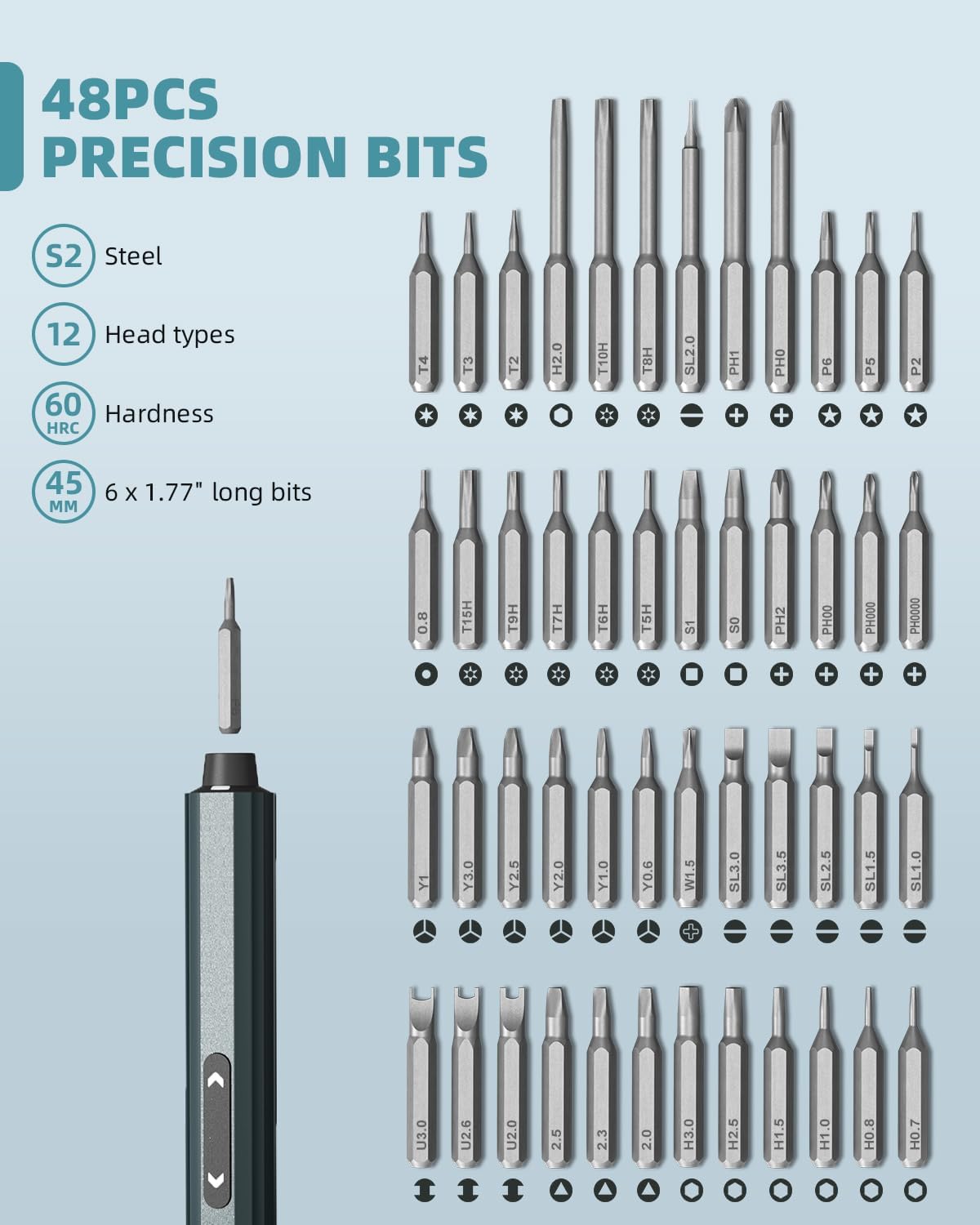
Image 6: The DOINOW B1 Pro Screwdriver's control panel, showing the setting button for 5 torque settings and the LED light control.

Image 7: A comprehensive display of the 48 precision bits included with the DOINOW B1 Pro Screwdriver, made from S2 steel with various head types.
5. Maintenance
5.1 General Care
- Keep both tools clean and dry. Wipe with a soft, dry cloth after each use.
- Avoid exposing the tools to extreme temperatures or humidity.
5.2 K1 Foam Cutter Maintenance
- Blade Cleaning: Ensure the blade is cool before cleaning. Gently remove any melted foam residue.
- Blade Replacement: If the heating wire becomes damaged or worn, replace it with the provided 32.8ft replacement wire. Follow the instructions for attaching blades carefully.
- Battery Care: Recharge the foam cutter regularly, even if not in frequent use, to maintain battery health.
5.3 B1 Pro Screwdriver Maintenance
- Bit Storage: Always store precision bits in the magnetic storage box to prevent loss and keep them organized.
- Battery Care: The built-in 350 mA lithium battery should be charged using the provided USB-C cable. Avoid overcharging or completely draining the battery for extended periods.
- Magnetic Zones: Utilize the magnetized and demagnetization zones in the toolbox for drill bits to maintain their precision and performance.
6. Troubleshooting
6.1 K1 Foam Cutter Issues
- Cutter not heating:
- Ensure the ON/OFF switch is in the 'ON' position.
- Check if the battery is charged. Recharge if necessary.
- Verify the blade is correctly installed and not damaged. Replace if broken.
- Poor cutting performance:
- The blade may be dirty; clean off any residue.
- The blade may be worn; replace the heating wire.
- Ensure the material being cut is compatible with the hot wire cutter.
6.2 B1 Pro Screwdriver Issues
- Screwdriver not turning:
- Check the battery level on the OLED display. Recharge if low.
- Ensure the correct rotation direction is selected.
- Verify the bit is properly inserted.
- Bit slipping or stripping screws:
- Ensure the correct bit size and type are used for the screw.
- Adjust the torque setting to an appropriate level for the task.
- Apply firm, steady pressure while operating.
- OLED display not working:
- Ensure the screwdriver is charged and powered on.
- If the issue persists, contact customer support.
7. Specifications
7.1 DOINOW K1 Cordless Hot Wire Foam Cutter
- Max Temperature: 550℃ / 1022℉
- Heating Wire Diameter: 0.38mm
- Battery: 2000mAh Lithium Battery
- Charging: USB-C
- Compatible Materials: Pearl cotton, foam board, plastic extrusion board, KT board, EVA, sponge, EPS, styrofoam.
7.2 DOINOW B1 Pro Mini Electric Screwdriver
- Electric Torque: 5 levels (0.05 Nm - 0.2 Nm)
- Manual Torque: Up to 3 Nm
- Battery: Built-in 350 mA Lithium Battery
- Continuous Work Time: 2-3 hours
- Screws per Charge: Up to 500 screws
- Bits: 48 precision bits, S2 material, 12 types
- Display: OLED Display
- Features: LED Light, Magnetic Bit Holder, Pop-up Magnetic Storage Box
8. Warranty and Support
For warranty information and customer support, please refer to the product packaging or contact DOINOW customer service directly. Keep your purchase receipt for any warranty claims.