
1. Introduction
This manual provides detailed instructions for the installation, operation, and maintenance of your ASURE 12.3-inch Car Stereo Radio GPS Navigation Unit. Please read this manual thoroughly before using the product to ensure proper function and safety. This unit is designed for Honda Accord X models from 2018 to 2021, offering advanced features such as an 8-Core Android 15 system, Wireless CarPlay, Android Auto, DSP audio processing, and a high-definition touchscreen.
2. Safety Information
Always prioritize safety. Do not attempt to operate the unit or adjust settings while driving. Ensure all connections are secure and properly insulated to prevent electrical hazards. Professional installation is recommended for optimal performance and safety. Keep the unit away from water and extreme temperatures. Refer to your vehicle's owner's manual for additional safety guidelines regarding aftermarket installations.
3. Package Contents
Verify that all items are present in the package:
- 1x 8-Core 12.3-inch Car Radio Unit
- 1x Installation Bezel
- 1x Wiring Harness
- 1x Microphone
- 1x 4G LTE Antenna
- 1x USB Adapter
- 1x Audio Video Ports Cable
- 1x WiFi/Bluetooth Antenna
- 1x GPS Cable
- 2x USB Cables
- Screw Hole Extension Post
- Screwdriver and User Manual
- 1x Radio Module Converter
- 1x HD Camera (if included in your specific package)
- Radio Aerial Adaptor

Image: Overview of the ASURE 12.3-inch Car Stereo Radio components, including the main unit, wiring harness, and various accessories.
4. Setup and Installation
This section guides you through the physical installation of the ASURE car stereo unit. Ensure the vehicle's battery is disconnected before starting any electrical work.
4.1 Screen Installation
The screen can be adjusted for optimal viewing. The distance between the top and bottom installation positions is 25mm, allowing for flexible placement. After determining the desired position, install the dedicated vehicle adapter frame onto the screen base and secure it with four screws.
Video: ASURE 12.3-inch/13.1-inch Car Stereo Radio Installation Guide.
4.2 Wiring Connections
Carefully connect the wiring harness to your vehicle's existing wiring. Refer to the provided wiring diagram for specific connections. If your vehicle's original car radio has different versions, the wiring may vary. Contact support if the provided wire harness does not match your vehicle's connectors.

Image: The ASURE 12.3-inch Car Stereo Radio seamlessly integrated into the dashboard of a Honda Accord X (2018-2021).

Image: Detailed wiring diagram showing connections for the ASURE car stereo radio, including power, audio, and control signals.
Rear View Camera Wiring:
- Black power plug to the red socket.
- To the Negative (-) of your car's Reversing Lamp Power.
- The two Red wires, to the Positive (+) of your car's Reversing Lamp Power.
- The RCA female to the RCA male.
- The RCA male to the RCA female.
- To your head unit's "REVERSE" wire of reversing camera input trigger. NOTE: No need to connect this wire if your radio comes with CAN-BUS box/decoder.
- To your radio's rear 10-Pin socket.

Image: Wiring instructions for connecting an HD backup camera to the ASURE car stereo unit.
5. Operating Instructions
5.1 Touchscreen Interface
The 12.3-inch HD touchscreen provides a responsive and clear interface for all functions. Navigate through menus, select applications, and control media playback with intuitive touch gestures. The 1980x720 resolution ensures vibrant visuals.

Image: The ASURE 12.3-inch capacitive touchscreen, highlighting its Super IPS Technology for wide viewing angles and clear display.
5.2 Wireless CarPlay & Android Auto
Connect your smartphone wirelessly via CarPlay or Android Auto for seamless integration of navigation, music, calls, and messages. This feature allows for hands-free operation and access to your phone's essential functions directly from the car stereo display.

Image: Demonstration of Wireless CarPlay and Android Auto interfaces on the ASURE unit, showing navigation and media playback.
5.3 DSP Audio Processing
The built-in Digital Sound Processor (DSP) and 4x45W amplifier provide enhanced audio quality with deep bass and clear vocals. Adjust equalizer settings to customize your listening experience.
5.4 Connectivity (Bluetooth, Wi-Fi, 4G LTE)
The unit supports Bluetooth 5.0 for stable phone calls and audio streaming. Dual-band Wi-Fi (2.4GHz & 5.0GHz) ensures fast internet access for streaming and app downloads. A 4G LTE antenna provides reliable cellular connectivity.

Image: The ASURE unit showcasing Bluetooth 5.0 features for phone calls and music streaming, with a phone connected.

Image: Illustration of the dual Wi-Fi band (2.4GHz & 5.0GHz) connectivity for seamless streaming and browsing.
5.5 Applications and Navigation
The Android 15 operating system with an 8-core processor, 4GB RAM, and 64GB ROM allows for smooth operation of various applications like YouTube, Spotify, and navigation apps. The unit supports GLONASS and GPS for worldwide navigation.

Image: The ASURE unit's home screen showing various pre-installed and downloadable Android applications.
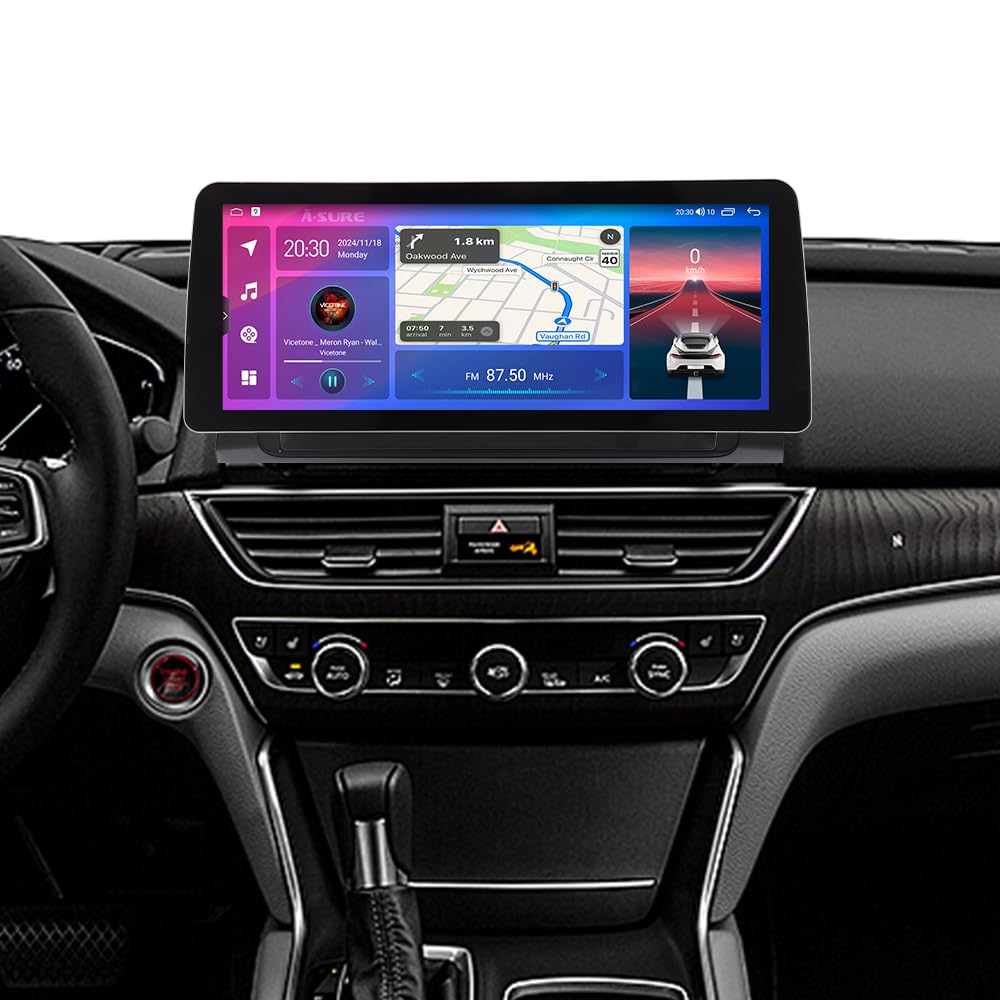
Image: The ASURE 12.3-inch car stereo displaying a GPS navigation map with real-time traffic information.
5.6 Video Output
The unit supports video output, allowing connection to external displays such as headrest monitors for passenger entertainment. An optional video output adapter may be required.

Image: Example of the video output feature, showing content displayed on rear headrest monitors for passengers.
6. Specifications
| Feature | Description |
|---|---|
| Brand | ASURE |
| Screen Size | 12.3 Inches |
| Resolution | 1980x720 HD |
| Operating System | Android 15 |
| Processor | 8-Core |
| RAM | 4GB |
| ROM | 64GB |
| Connectivity | Bluetooth 5.0, USB, Dual-band Wi-Fi (2.4GHz & 5.0GHz), 4G LTE |
| Navigation | GPS, GLONASS (Worldwide Map Type) |
| Special Features | Wireless CarPlay, Android Auto, Built-in DSP Audio, Steering Wheel Control (SWC) support |
| Audio Output Mode | Stereo (4x45W Amplifier) |
| Mounting Type | Dashboard Mount |
| Compatible Vehicle | Honda Accord X 2018-2021 |
| Item Dimensions (L x W x H) | 13.2"L x 5.3"W x 1.4"H |
7. Troubleshooting
This section addresses common issues you might encounter with your ASURE car stereo unit.
7.1 Unit Does Not Power On
- Check Power Connections: Ensure the wiring harness is securely connected to the vehicle's power source and the unit. Verify that the vehicle's battery is charged.
- Check Fuses: Inspect the fuses in both the vehicle and the stereo unit's wiring harness. Replace any blown fuses.
- Verify Compatibility: Confirm that the unit is compatible with your specific Honda Accord X model year (2018-2021) and that the wiring harness matches your car's original radio version. If the wiring does not match, contact customer support.
7.2 No Audio Output
- Volume Level: Ensure the volume is not muted or set to minimum.
- Speaker Connections: Check all speaker wire connections for proper polarity and secure fit.
- Audio Source: Verify that the correct audio source (e.g., Radio, Bluetooth, CarPlay) is selected.
7.3 Wireless CarPlay/Android Auto Not Connecting
- Enable Bluetooth/Wi-Fi: Ensure Bluetooth and Wi-Fi are enabled on both your smartphone and the car stereo.
- Forget Device: On your phone, forget the car stereo from your Bluetooth settings and attempt to pair again.
- Software Update: Check for any available software updates for the car stereo unit.
7.4 GPS Signal Issues
- Antenna Placement: Ensure the GPS antenna is installed in a location with a clear view of the sky, free from obstructions.
- Software: Verify that your navigation application is up to date.
8. Maintenance
To ensure the longevity and optimal performance of your ASURE car stereo, follow these maintenance guidelines:
- Screen Cleaning: Use a soft, lint-free cloth to gently wipe the touchscreen. For stubborn smudges, slightly dampen the cloth with water or a screen-safe cleaner. Avoid harsh chemicals or abrasive materials.
- Software Updates: Regularly check for and install software updates to ensure the system runs efficiently and has the latest features and security patches.
- Ventilation: Ensure the unit's ventilation openings are not blocked to prevent overheating.
- Cable Inspection: Periodically inspect all cables and connections for wear, damage, or loose fittings.
9. Warranty and Support
Your ASURE car stereo unit comes with a comprehensive warranty:
- 30 Days: Free return.
- 60 Days: Free replacement.
- 1 Year: Free repair for the first instance.
For technical support, warranty claims, or any questions regarding your product, please contact ASURE customer service. Refer to the contact information provided with your purchase or visit the official ASURE website.
Note: If you find that the wiring harness does not match your vehicle's original car radio, please contact us in time for assistance.

