
1. Introduction
Thank you for choosing the MangoKit SR40 Internet Radio. This manual provides essential information for setting up, operating, and maintaining your device. Please read these instructions carefully before use and retain them for future reference.
2. Safety Information
- Power Source: Use only the specified power adapter. Ensure the voltage matches the requirements of your region.
- Water and Moisture: Do not expose the device to rain, moisture, or liquids. Avoid placing objects filled with liquids, such as vases, on or near the device.
- Ventilation: Ensure adequate ventilation. Do not block ventilation openings. Place the device on a stable, flat surface.
- Heat: Keep the device away from heat sources such as radiators, heat registers, stoves, or other heat-producing appliances.
- Cleaning: Disconnect the power before cleaning. Use a soft, dry cloth. Do not use liquid cleaners or aerosol cleaners.
- Servicing: Do not attempt to service this product yourself. Refer all servicing to qualified service personnel.
3. Package Contents
Please check that all items are present in the package:
- MangoKit SR40 Internet Radio
- Power Adapter
- Quick Start Guide
- 2 x AAA Batteries (for remote control, if included)
4. Product Overview
The MangoKit SR40 is a versatile internet radio offering multiple listening options including Internet Radio, DAB/DAB+, FM, and Bluetooth connectivity. It features a clear display and intuitive controls for easy navigation.
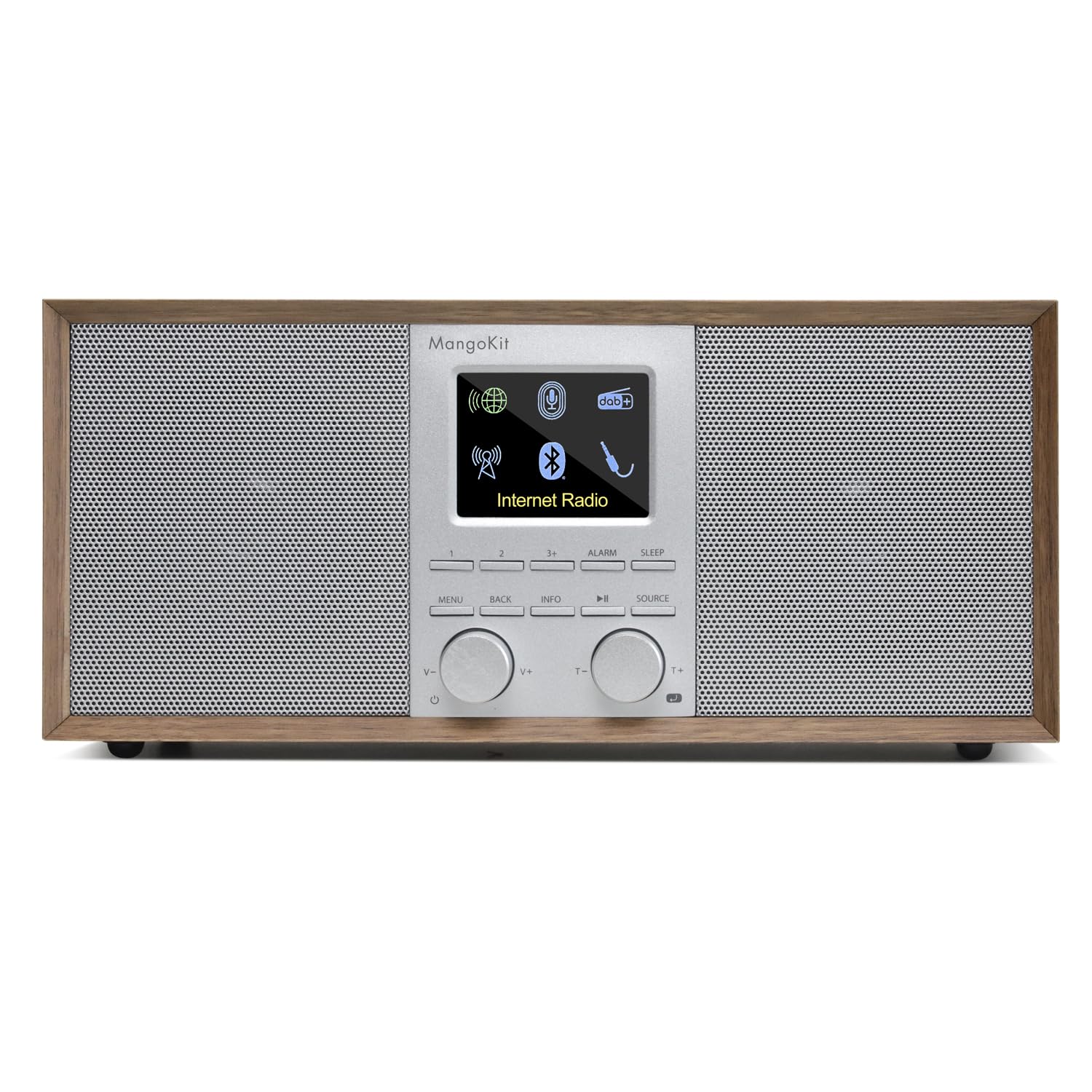
Front view of the MangoKit SR40 Internet Radio in Walnut finish.

Close-up of the MangoKit SR40 display and control panel.
4.1. Controls and Display
The front panel typically includes:
- LCD Display: Shows station information, menu options, and time.
- Navigation Dial/Buttons: For scrolling through menus and selecting options.
- Volume Control: Adjusts audio output level.
- Mode Button: Switches between Internet Radio, DAB, FM, and Bluetooth modes.
- Preset Buttons: For saving and recalling favorite stations.
4.2. Rear Panel Connections
The rear panel typically includes:
- Power Input: For connecting the power adapter.
- Antenna: For DAB/DAB+ and FM reception. Extend fully for best signal.
- Aux-in Port: For connecting external audio devices.
- Headphone Jack: For private listening.
5. Setup
5.1. Powering On
- Connect the supplied power adapter to the DC IN port on the rear of the SR40.
- Plug the power adapter into a wall outlet.
- Press the Power button on the unit or remote control to turn on the radio.
5.2. Initial Configuration
Upon first power-on, the radio will guide you through an initial setup wizard:
- Language Selection: Use the navigation dial to select your preferred language and press the dial to confirm.
- Time/Date Format: Set the time format (12/24 hour) and date.
- Network Connection: The radio will prompt you to connect to a Wi-Fi network.
5.3. Wi-Fi Network Connection
To access Internet Radio features, a stable Wi-Fi connection is required.
- From the main menu, navigate to Settings > Network > Wi-Fi Wizard.
- The radio will scan for available Wi-Fi networks.
- Select your network from the list using the navigation dial.
- Enter your Wi-Fi password using the navigation dial to select characters and confirm each character. Press the dial to confirm the entire password.
- Once connected, the radio will display a confirmation message.

The SR40 displaying network connection options on its screen.
6. Operating the Radio
6.1. Internet Radio Mode
Access thousands of radio stations from around the world.
- Press the Mode button until 'Internet Radio' is selected.
- Navigate through categories such as 'Location', 'Genre', or 'Popular Stations' using the navigation dial.
- Select a station to begin playback.
- To save a station as a preset, press and hold a Preset button until 'Preset Saved' appears.
6.2. DAB/DAB+ Radio Mode
Enjoy high-quality digital radio broadcasts.
- Extend the telescopic antenna fully.
- Press the Mode button until 'DAB Radio' is selected.
- The radio will automatically scan for available DAB/DAB+ stations.
- Use the navigation dial to browse the list of found stations and select one to listen.
6.3. FM Radio Mode
Tune into traditional analog FM broadcasts.
- Extend the telescopic antenna fully.
- Press the Mode button until 'FM Radio' is selected.
- Use the navigation dial to manually tune to a frequency, or press and hold the dial for auto-scan to find the next available station.
6.4. Bluetooth Mode
Stream audio wirelessly from your Bluetooth-enabled devices.
- Press the Mode button until 'Bluetooth' is selected. The radio will enter pairing mode.
- On your external device (smartphone, tablet, etc.), enable Bluetooth and search for 'MangoKit SR40'.
- Select 'MangoKit SR40' to pair. Once connected, you can play audio from your device through the radio.
7. Maintenance
- Cleaning: Use a soft, dry, lint-free cloth to clean the exterior of the radio. Do not use abrasive cleaners, waxes, or solvents.
- Storage: If storing the radio for an extended period, disconnect it from the power supply and store it in a cool, dry place.
- Antenna: Handle the telescopic antenna carefully to avoid damage.
8. Troubleshooting
| Problem | Possible Cause | Solution |
|---|---|---|
| No power | Power adapter not connected or faulty outlet. | Check power connections. Try a different outlet. |
| No sound | Volume too low; Mute activated; Incorrect source. | Increase volume. Check if mute is on. Ensure correct mode (Internet Radio, DAB, FM, Bluetooth) is selected. |
| Cannot connect to Wi-Fi | Incorrect password; Router too far; Network issue. | Re-enter password carefully. Move radio closer to router. Restart router. |
| Poor DAB/FM reception | Antenna not extended; Weak signal area. | Fully extend the telescopic antenna. Reposition the radio for better signal. |
| Bluetooth pairing fails | Device not in pairing mode; Radio not discoverable. | Ensure both devices are in pairing mode. Check that 'MangoKit SR40' is selected on your external device. |
9. Specifications
- Brand: MangoKit
- Model: SR40
- Connectivity Technology: Bluetooth, Wi-Fi
- Product Dimensions (L x W x H): 10.31" x 3.54" x 4.76"
- Tuner Technology: Internet Radio
- Power Source: Battery Powered (Rechargeable), AC Adapter
- Radio Bands Supported: FM/DAB/DAB+
- Included Components: Quick Start Guide
- Batteries: 2 AAA batteries required (included for remote control)
10. Warranty and Support
The warranty description for this product is currently unknown. For technical support or further assistance, please refer to the contact information provided in your Quick Start Guide or visit the official MangoKit website.


